PR Preview
Before/After Videos for PRs
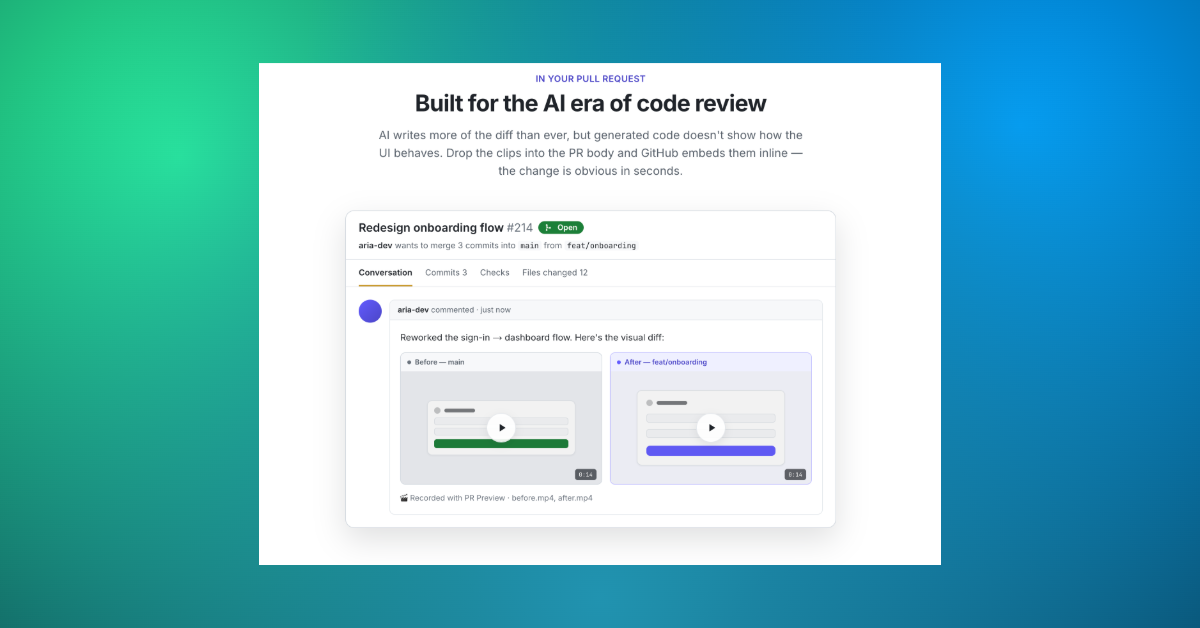
As developers, we kept running into the same problem: code reviews rarely show the actual user-facing impact of a change. Reviewers have to pull branches, run the app locally, and manually compare behavior—or approve based on code alone.
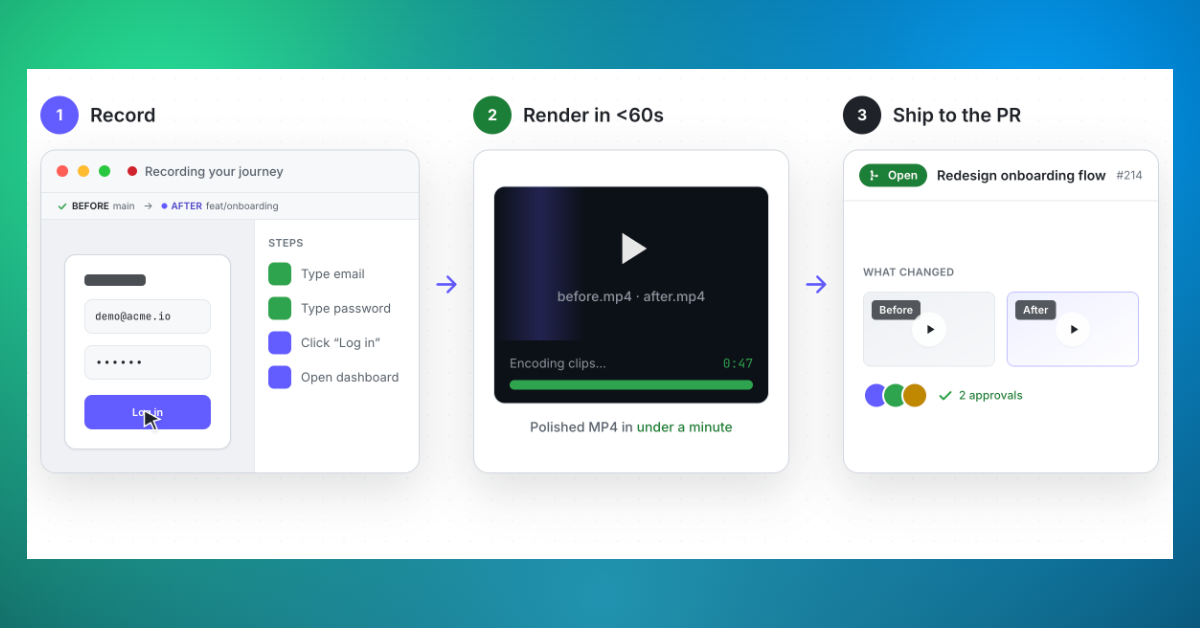
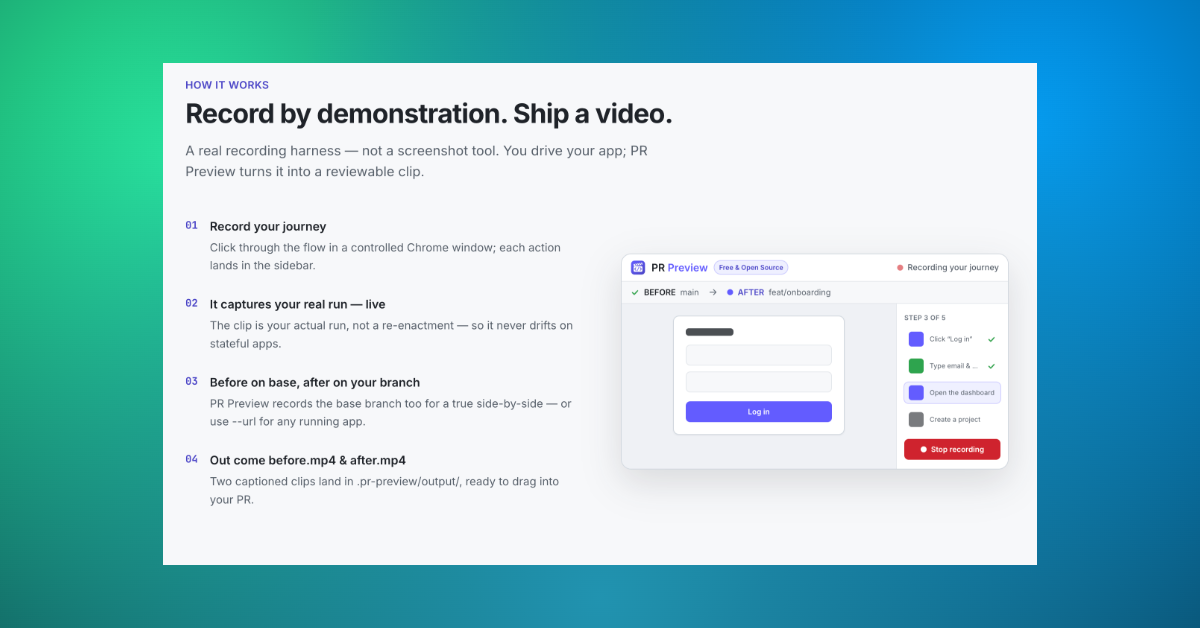
PR Preview exists to make visual changes obvious. It records a user journey before and after a pull request, then automatically generates a side-by-side comparison video that can be shared directly in the PR. The goal is simple: faster reviews, fewer misunderstandings, and more confidence when shipping UI changes.

Comments


This solves a very real review gap: code diffs show implementation, but not the user journey. A before/after video in the PR would make async review much easier for developers, PMs, and designers. Curious whether it supports authenticated flows through saved sessions or test credentials, since that’s where a lot of visual regressions hide.

Really like how PR Preview tackles the classic “code looks fine, but what actually changed for users?” problem. Having an automatic before/after video for each PR makes it so much easier for reviewers and PMs to catch UX regressions, micro-copy changes, and layout bugs without pulling the branch locally. Also feels super helpful for async, distributed teams where designers or stakeholders can just watch the clip in the PR and give feedback. Curious how it handles longer user journeys and flaky UI states, but the core idea is spot on for UI-heavy products.

Running the same journey against both the base build and the PR build and rendering a side-by-side is a neat CI trick. How are the journeys defined — recorded once and replayed, or written as scripts like Playwright specs? I'm curious what happens when a PR intentionally changes the flow (a button moves, a step disappears): does the 'after' run adapt or just fail? Being open source makes this easy to trial on a side project, which I appreciate.


This solves a very real gap in code review: PRs show what changed in code, but not always what changed for users. A before/after user journey video would make UI reviews much easier for developers, PMs, and designers, especially in async teams. I can see this helping catch layout regressions, copy changes, and broken flows before merge. Curious how it handles auth-heavy or flaky states, but the core idea is immediately practical.

This solves a real friction point in code review workflows. The gap between static diffs and actual visual changes is huge - designers often can't spot regressions in a code review, and PMs have to manually test branches to validate UX didn't break. Auto-generated before/after videos that work directly in the PR make it so much easier to catch subtle layout bugs, color shifts, or accessibility issues without checking out locally. The sub-60s render time is impressive too.

Code review lag is real when you're trying to iterate on UI. Your reviewers have to manually spin up your branch, run the app, and manually click around to actually see the change. PR Preview flips this - suddenly your before/after video is right in the PR itself. Saves time, prevents visual misunderstandings, and gets code merged faster. Love the simple approach here.
Solving a genuine bottleneck in the review process — most teams either skip visual review entirely or someone has to manually pull the branch and run it locally, which kills momentum. Automating before/after video capture directly in the PR is a smart zero-friction approach. Would be great to see integration with Linear or Jira to auto-attach the video to the linked issue. The free tier is a great hook for open source projects.

Premium Products























































Sponsors
Buy

Awards
View all
Awards
View allMakers

Makers
Comments
This solves a very real review gap: code diffs show implementation, but not the user journey. A before/after video in the PR would make async review much easier for developers, PMs, and designers. Curious whether it supports authenticated flows through saved sessions or test credentials, since that’s where a lot of visual regressions hide.
Really like how PR Preview tackles the classic “code looks fine, but what actually changed for users?” problem. Having an automatic before/after video for each PR makes it so much easier for reviewers and PMs to catch UX regressions, micro-copy changes, and layout bugs without pulling the branch locally. Also feels super helpful for async, distributed teams where designers or stakeholders can just watch the clip in the PR and give feedback. Curious how it handles longer user journeys and flaky UI states, but the core idea is spot on for UI-heavy products.
Running the same journey against both the base build and the PR build and rendering a side-by-side is a neat CI trick. How are the journeys defined — recorded once and replayed, or written as scripts like Playwright specs? I'm curious what happens when a PR intentionally changes the flow (a button moves, a step disappears): does the 'after' run adapt or just fail? Being open source makes this easy to trial on a side project, which I appreciate.
This solves a very real gap in code review: PRs show what changed in code, but not always what changed for users. A before/after user journey video would make UI reviews much easier for developers, PMs, and designers, especially in async teams. I can see this helping catch layout regressions, copy changes, and broken flows before merge. Curious how it handles auth-heavy or flaky states, but the core idea is immediately practical.
This solves a real friction point in code review workflows. The gap between static diffs and actual visual changes is huge - designers often can't spot regressions in a code review, and PMs have to manually test branches to validate UX didn't break. Auto-generated before/after videos that work directly in the PR make it so much easier to catch subtle layout bugs, color shifts, or accessibility issues without checking out locally. The sub-60s render time is impressive too.
Code review lag is real when you're trying to iterate on UI. Your reviewers have to manually spin up your branch, run the app, and manually click around to actually see the change. PR Preview flips this - suddenly your before/after video is right in the PR itself. Saves time, prevents visual misunderstandings, and gets code merged faster. Love the simple approach here.
Solving a genuine bottleneck in the review process — most teams either skip visual review entirely or someone has to manually pull the branch and run it locally, which kills momentum. Automating before/after video capture directly in the PR is a smart zero-friction approach. Would be great to see integration with Linear or Jira to auto-attach the video to the linked issue. The free tier is a great hook for open source projects.
Premium Products
New to Fazier?

Find your next favorite product or submit your own. Made by @FalakDigital.
Copyright ©2026. All Rights Reserved