
ZeroKB
Free browser-based PDF & image compressor and converter
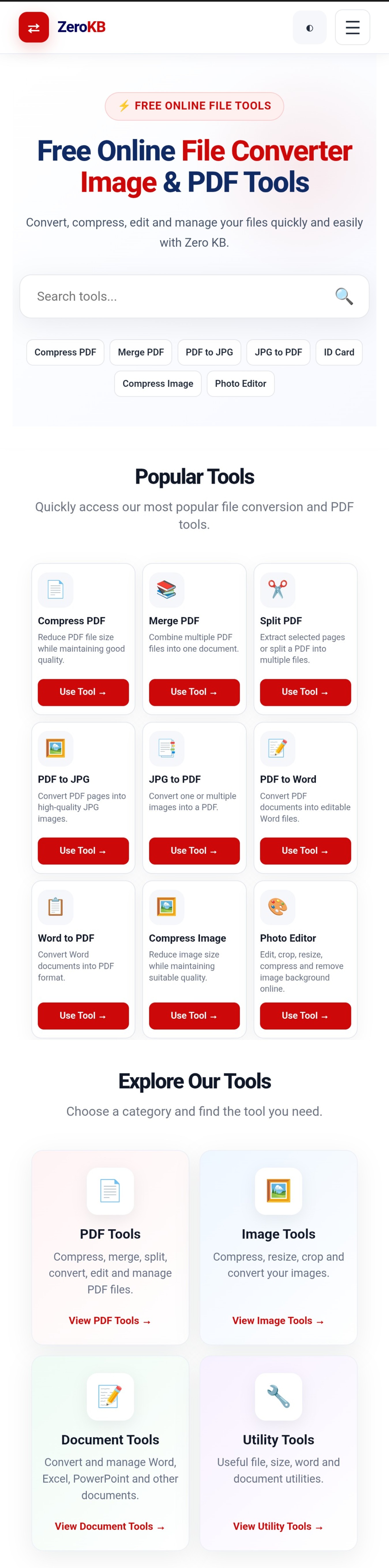
ZeroKB is a fast, lightweight, browser-based utility suite built to simplify everyday PDF, image, and document tasks—with zero software installations, watermarks, or account sign-ups.
Whether you need to shrink an image to a strict KB limit for an online application form, reduce a heavy PDF for email, or convert documents between formats, ZeroKB handles everything cleanly right inside your browser on both mobile and desktop.
Designed for speed and simplicity, ZeroKB removes paywalls and cluttered menus so anyone can compress, merge, split, resize, and convert files in just a few clicks.
Features
- Precision Image Compressor & Resizer: Compress and resize JPG, PNG, and WebP images to exact target file sizes (such as 20KB, 50KB, or 100KB) while preserving visual clarity.
- Smart PDF Compression: Shrink large PDF files without blurring text or breaking document formatting.
- Merge & Split PDFs: Combine multiple PDF files into one organized document or extract specific pages in seconds.
- Multi-Format File Converter: Convert Word, Excel, and image files into PDFs and export PDFs back into editable or image formats.
- 100% Free & No Sign-Up Required: Instant access to every tool with no hidden paywalls, daily login walls, or watermarks.
- Lightweight & Mobile-Friendly: Runs smoothly across desktop and smartphone browsers, even on slower connect
ions.
Use Cases
- Online Exam & Job Portal Uploads: Quickly resize passport photos, signatures, ID proofs, and academic certificates to meet strict KB and dimension rules on government, university, and recruitment portals.
- Email & Messaging Attachments: Compress bulky scanned PDFs, invoices, and project reports so they send easily without hitting attachment size limits.
- Student Notes & Study Material: Merge multiple lecture handouts, assignments, or e-book pages into a single easy-to-read PDF file.
- Website & Blog Performance: Optimize heavy PNG and JPG graphics into lightweight images to speed up page load times.
- Everyday Office & Remote Work: Convert Word documents, spreadsheets, and images into share-ready PDFs directly from a mobile or laptop browser without installing heavy desktop softw
are.

Comments


Hi Fazier community! 👋 I’m super excited to share ZeroKB with you all today. 💡 How the idea started: Like many of you, I faced the classic everyday frustration—trying to upload a photo, signature, or document for an online application or portal, only to get hit with errors like "File size must be under 50KB" or "File is too large." When I looked for quick solutions, most existing websites were cluttered with annoying ads, forced you to create accounts, or put basic tools behind expensive paywalls. 🚀 What ZeroKB does: I built ZeroKB to be a fast, clean, and 100% free browser-based utility suite. It lets you compress, resize, merge, and convert PDFs and images instantly without installing any software, creating an account, or dealing with watermarks. Key tools available right now: - Precision Image & Photo Resizer (exact KB targets) - PDF Compressor & Merger - Multi-format document converters I would love for you to try it out, test the compression speed, and share your honest feedback. What other file utility tools do you find yourself needing the most in your daily workflow? Looking forward to your thoughts and happy to answer any questions! Cheers! 🚀
Premium Products
















































Sponsors
Buy

Comments
Hi Fazier community! 👋 I’m super excited to share ZeroKB with you all today. 💡 How the idea started: Like many of you, I faced the classic everyday frustration—trying to upload a photo, signature, or document for an online application or portal, only to get hit with errors like "File size must be under 50KB" or "File is too large." When I looked for quick solutions, most existing websites were cluttered with annoying ads, forced you to create accounts, or put basic tools behind expensive paywalls. 🚀 What ZeroKB does: I built ZeroKB to be a fast, clean, and 100% free browser-based utility suite. It lets you compress, resize, merge, and convert PDFs and images instantly without installing any software, creating an account, or dealing with watermarks. Key tools available right now: - Precision Image & Photo Resizer (exact KB targets) - PDF Compressor & Merger - Multi-format document converters I would love for you to try it out, test the compression speed, and share your honest feedback. What other file utility tools do you find yourself needing the most in your daily workflow? Looking forward to your thoughts and happy to answer any questions! Cheers! 🚀
Premium Products
New to Fazier?

Find your next favorite product or submit your own. Made by @FalakDigital.
Copyright ©2026. All Rights Reserved