
Zappd
Organize Gmail conversations and never miss follow-ups.
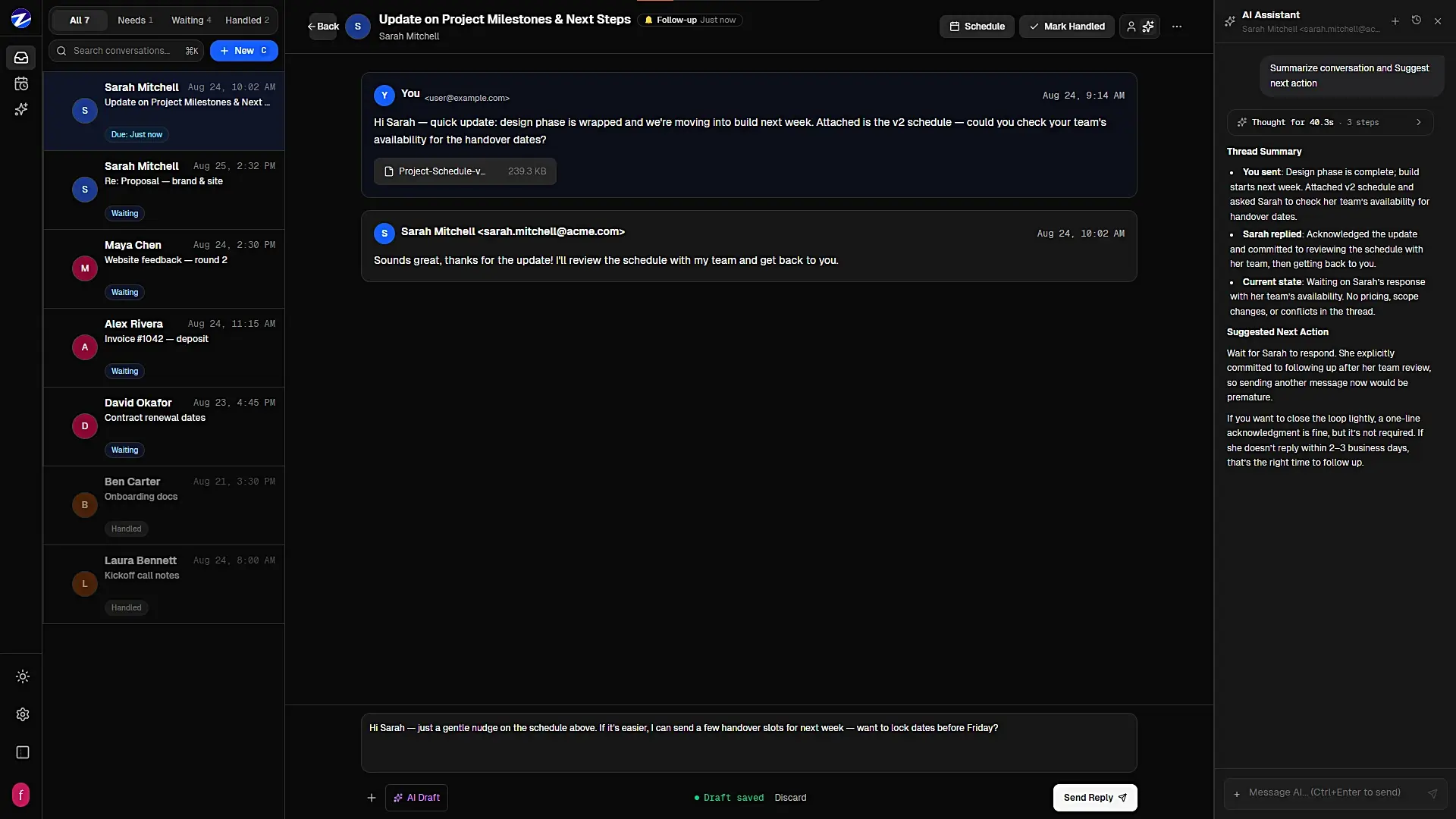
Zappd is a Gmail-powered workspace that helps you stay on top of customer conversations and follow-ups without relying on memory, spreadsheets, or messy inbox searches.
It turns your existing Gmail workflow into a focused system for managing relationships: see who needs a response, track follow-ups, organize conversations, and make sure promising customers don't quietly disappear from your radar.
Zappd makes sure every important customer conversation gets the attention it deserves.
Features
Gmail integration — Manage your customer conversations directly from Zappd.
Follow-up tracking — Know exactly who needs a follow-up and when.
Smart reminders — Get reminded before important conversations go cold.
Conversation history — See the full context of your interactions in one place.
Customer organization — Keep conversations and customers organized instead of buried in your inbox.
Use Cases
Client management — Keep ongoing client conversations organized and actionable.
Cold outreach — Track replies and know when to follow up with prospects.
Customer retention — Follow up with existing customers instead of letting relationships go cold.

Comments



The "who's waiting on me" framing is what Gmail has always lacked — search tells you what's there, but it never answers who is actually owed a reply. Smart reminders before conversations go cold could genuinely save deals; the silent killer in client work is usually a two-week-old thread nobody reopened. Curious whether Zappd handles shared inboxes for teams, or if it's purely per-user — that's usually where these tools either click or break. Also good to see conversation history in one view instead of tab-hopping through threads.

The idea of keeping important conversations organized and follow-ups visible is really useful for avoiding missed opportunities. Having quick access to timely information can also help when following up with customers, such as checking the **<a href="https://priceitgold.pk/gold-rate-in-multan-today">gold rate multan today</a>** before discussing market-related queries.
The idea of keeping important conversations organized and follow-ups visible is really useful for avoiding missed opportunities. Having quick access to timely information can also help when following up with customers, such as checking the **<a href="https://priceitgold.pk/gold-rate-in-multan-today">gold rate multan today</a>** before discussing market-related queries.
The idea of keeping important conversations organized and follow-ups visible is really useful for avoiding missed opportunities. Having quick access to timely information can also help when following up with customers, such as checking the **<a href="https://priceitgold.pk/gold-rate-in-multan-today">gold rate multan today</a>** before discussing market-related queries.


The "promising customers quietly disappear" problem is real. Most of them go cold in the gap between a first call and the second email. How does Zappd decide someone needs a follow-up? Is it rule-based (no reply X days after my last message), or does it pick up intent, like a customer writing "let me check with my team"? The second case is the one that slips through, because there is no obvious date to follow up on.

A "who's waiting on me" view is the thing Gmail search never gives you, so I like the focus. Adding to Somanshu's question: which Gmail scopes do you request? Gmail read scopes are Google "restricted" scopes (they need a security assessment for public apps), and for follow-up tracking, metadata-only access (headers, no message bodies) should be enough to tell who replied last. A line on the site saying which scope you use, and whether message bodies are ever stored, would make it much easier to connect a work inbox.

This is a useful way to turn an overloaded Gmail inbox into a more structured follow-up workflow. The “who needs a reply” and “who has gone quiet” approach sounds especially practical for teams managing a lot of customer conversations. I’d be interested to see how the reminders and follow-up tracking work for larger sales pipelines.

built zappd because i kept losing track of client emails and forgot to follow up until it was too late. it shows you who you owe a reply, who owes you one, and who's just gone quiet too long. still early so expect bugs, but that's why i'm here looking for real feedback. free to try, drop me a message if you have questions
Premium Products



















































Sponsors
Buy

Comments
The "who's waiting on me" framing is what Gmail has always lacked — search tells you what's there, but it never answers who is actually owed a reply. Smart reminders before conversations go cold could genuinely save deals; the silent killer in client work is usually a two-week-old thread nobody reopened. Curious whether Zappd handles shared inboxes for teams, or if it's purely per-user — that's usually where these tools either click or break. Also good to see conversation history in one view instead of tab-hopping through threads.
The idea of keeping important conversations organized and follow-ups visible is really useful for avoiding missed opportunities. Having quick access to timely information can also help when following up with customers, such as checking the **<a href="https://priceitgold.pk/gold-rate-in-multan-today">gold rate multan today</a>** before discussing market-related queries.
The idea of keeping important conversations organized and follow-ups visible is really useful for avoiding missed opportunities. Having quick access to timely information can also help when following up with customers, such as checking the **<a href="https://priceitgold.pk/gold-rate-in-multan-today">gold rate multan today</a>** before discussing market-related queries.
The idea of keeping important conversations organized and follow-ups visible is really useful for avoiding missed opportunities. Having quick access to timely information can also help when following up with customers, such as checking the **<a href="https://priceitgold.pk/gold-rate-in-multan-today">gold rate multan today</a>** before discussing market-related queries.
The "promising customers quietly disappear" problem is real. Most of them go cold in the gap between a first call and the second email. How does Zappd decide someone needs a follow-up? Is it rule-based (no reply X days after my last message), or does it pick up intent, like a customer writing "let me check with my team"? The second case is the one that slips through, because there is no obvious date to follow up on.
A "who's waiting on me" view is the thing Gmail search never gives you, so I like the focus. Adding to Somanshu's question: which Gmail scopes do you request? Gmail read scopes are Google "restricted" scopes (they need a security assessment for public apps), and for follow-up tracking, metadata-only access (headers, no message bodies) should be enough to tell who replied last. A line on the site saying which scope you use, and whether message bodies are ever stored, would make it much easier to connect a work inbox.
This is a useful way to turn an overloaded Gmail inbox into a more structured follow-up workflow. The “who needs a reply” and “who has gone quiet” approach sounds especially practical for teams managing a lot of customer conversations. I’d be interested to see how the reminders and follow-up tracking work for larger sales pipelines.
built zappd because i kept losing track of client emails and forgot to follow up until it was too late. it shows you who you owe a reply, who owes you one, and who's just gone quiet too long. still early so expect bugs, but that's why i'm here looking for real feedback. free to try, drop me a message if you have questions
Premium Products
New to Fazier?

Find your next favorite product or submit your own. Made by @FalakDigital.
Copyright ©2026. All Rights Reserved