
Z Video
Turn any photo into a 1080p video with sound
Z Video is an image to video AI generator that turns a still photo into a short 1080p video clip with sound. You upload a photo as the first frame, describe the camera move, and render with Sora 2, Veo 3.1 Fast, Veo 3.1 Quality or Seedance 1.5 Pro. Because the photo is frame one, faces, products and packaging stay faithful to the source image instead of being reinvented by text-to-video. Sign-up includes free credits, and paid plans include commercial use and watermark-free downloads.


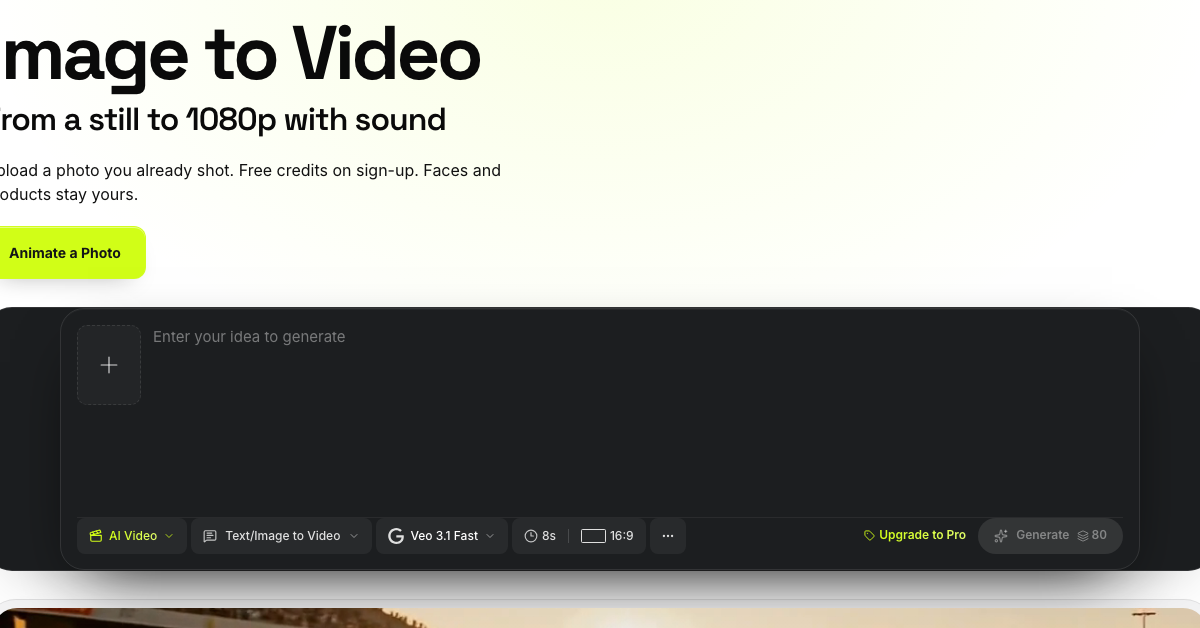
Features
Four video models in one workspace: Sora 2, Veo 3.1 Fast, Veo 3.1 Quality and Seedance 1.5 Pro. Native synced audio on Sora 2 and Veo 3.1. 16:9 widescreen and 9:16 vertical output up to 1080p. Clip lengths of 4 to 15 seconds depending on the model. AI Image tab to upscale, remove backgrounds, uncrop or remove watermarks before animating. Credit cost shown on the generate button before anything is spent.
Use Cases
Ecommerce teams turn a packshot into an orbit or push-in product video without a reshoot. Social producers cut several 9:16 Reels and Shorts from one approved still. Agencies animate founder and spokesperson portraits that keep the real face. Studios build a character series from a single character still.

Comments


Hi Fazier! We built Z Video because text-to-video kept reinventing the product or face we actually needed on screen. Z Video starts from your own photo as frame one and animates it with Sora 2, Veo 3.1 or Seedance 1.5 Pro, with synced audio and 9:16 or 16:9 output. Would love your feedback on which camera moves you want next.
The frame-one approach is the part that matters for product shots. Text-to-video keeps redrawing body lines and packaging, so locking the uploaded still as frame one is the right constraint. Curious how Seedance 1.5 Pro compares with Veo 3.1 Quality on reflective surfaces like paint and glass, and whether 9:16 stays stable past 8 seconds without the subject drifting.

The part that matters for product shots. Text-to-video keeps redrawing body lines and packaging, so locking the uploaded still as frame one is the right constraint. Curious how https://www.ebtedge.com.co Seedance 1.5 Pro compares with Veo 3.1 Quality on reflective surfaces like paint and glass, and whether 9:16 stays stable past 8 seconds without the subject drifting.


Using the uploaded photo as frame one is the right constraint when the job is a packshot or a real face, instead of letting text-to-video redraw it. Showing the credit cost on the generate button before anything is spent is the other piece that matters. For 9:16 cuts, does a camera-move prompt stay reliable when the source still is already a tight crop?

With four models in one place, the natural next step is a side-by-side run: same still, same prompt, one short preview from each model, so you can pick the best before spending credits on the full 1080p render. Also, how do you handle credits when a generation clearly fails, like a warped face or the product melting mid-clip? A refund or free retry policy would make me much more willing to experiment.
Turning a still into a 1080p clip with sound is the hard part, not just adding motion. I would want to know whether the audio is generated to match the scene or is a stock bed, and whether faces stay consistent across the whole clip instead of drifting after the first second. A no-subscription option also matters if someone only needs one short.
Starting from my own photo as frame one is the right constraint, because a pure text prompt keeps redrawing the person. I would compare Sora 2 and Veo 3.1 on a slow camera move around a still subject: does the face stay the same person for the whole clip, and does the synced audio match the motion or just sit underneath it?
Premium Products


















































Sponsors
Buy
Makers
Makers
Comments
Hi Fazier! We built Z Video because text-to-video kept reinventing the product or face we actually needed on screen. Z Video starts from your own photo as frame one and animates it with Sora 2, Veo 3.1 or Seedance 1.5 Pro, with synced audio and 9:16 or 16:9 output. Would love your feedback on which camera moves you want next.
The frame-one approach is the part that matters for product shots. Text-to-video keeps redrawing body lines and packaging, so locking the uploaded still as frame one is the right constraint. Curious how Seedance 1.5 Pro compares with Veo 3.1 Quality on reflective surfaces like paint and glass, and whether 9:16 stays stable past 8 seconds without the subject drifting.
The part that matters for product shots. Text-to-video keeps redrawing body lines and packaging, so locking the uploaded still as frame one is the right constraint. Curious how https://www.ebtedge.com.co Seedance 1.5 Pro compares with Veo 3.1 Quality on reflective surfaces like paint and glass, and whether 9:16 stays stable past 8 seconds without the subject drifting.
Using the uploaded photo as frame one is the right constraint when the job is a packshot or a real face, instead of letting text-to-video redraw it. Showing the credit cost on the generate button before anything is spent is the other piece that matters. For 9:16 cuts, does a camera-move prompt stay reliable when the source still is already a tight crop?
With four models in one place, the natural next step is a side-by-side run: same still, same prompt, one short preview from each model, so you can pick the best before spending credits on the full 1080p render. Also, how do you handle credits when a generation clearly fails, like a warped face or the product melting mid-clip? A refund or free retry policy would make me much more willing to experiment.
Turning a still into a 1080p clip with sound is the hard part, not just adding motion. I would want to know whether the audio is generated to match the scene or is a stock bed, and whether faces stay consistent across the whole clip instead of drifting after the first second. A no-subscription option also matters if someone only needs one short.
Starting from my own photo as frame one is the right constraint, because a pure text prompt keeps redrawing the person. I would compare Sora 2 and Veo 3.1 on a slow camera move around a still subject: does the face stay the same person for the whole clip, and does the synced audio match the motion or just sit underneath it?
Premium Products
New to Fazier?

Find your next favorite product or submit your own. Made by @FalakDigital.
Copyright ©2026. All Rights Reserved