
WP Multitool
Find what's slowing your WordPress. Fix it.
WP Multitool is a WordPress optimization plugin that helps site owners and developers diagnose and fix performance issues. Instead of installing multiple plugins, WP Multitool provides a modular toolkit that replaces them all with zero bloat architecture. Features include AI-powered Slow Query Analyzer, Quick Updater for batch plugin/theme management, and Config Manager for wp-config.php settings.

Features
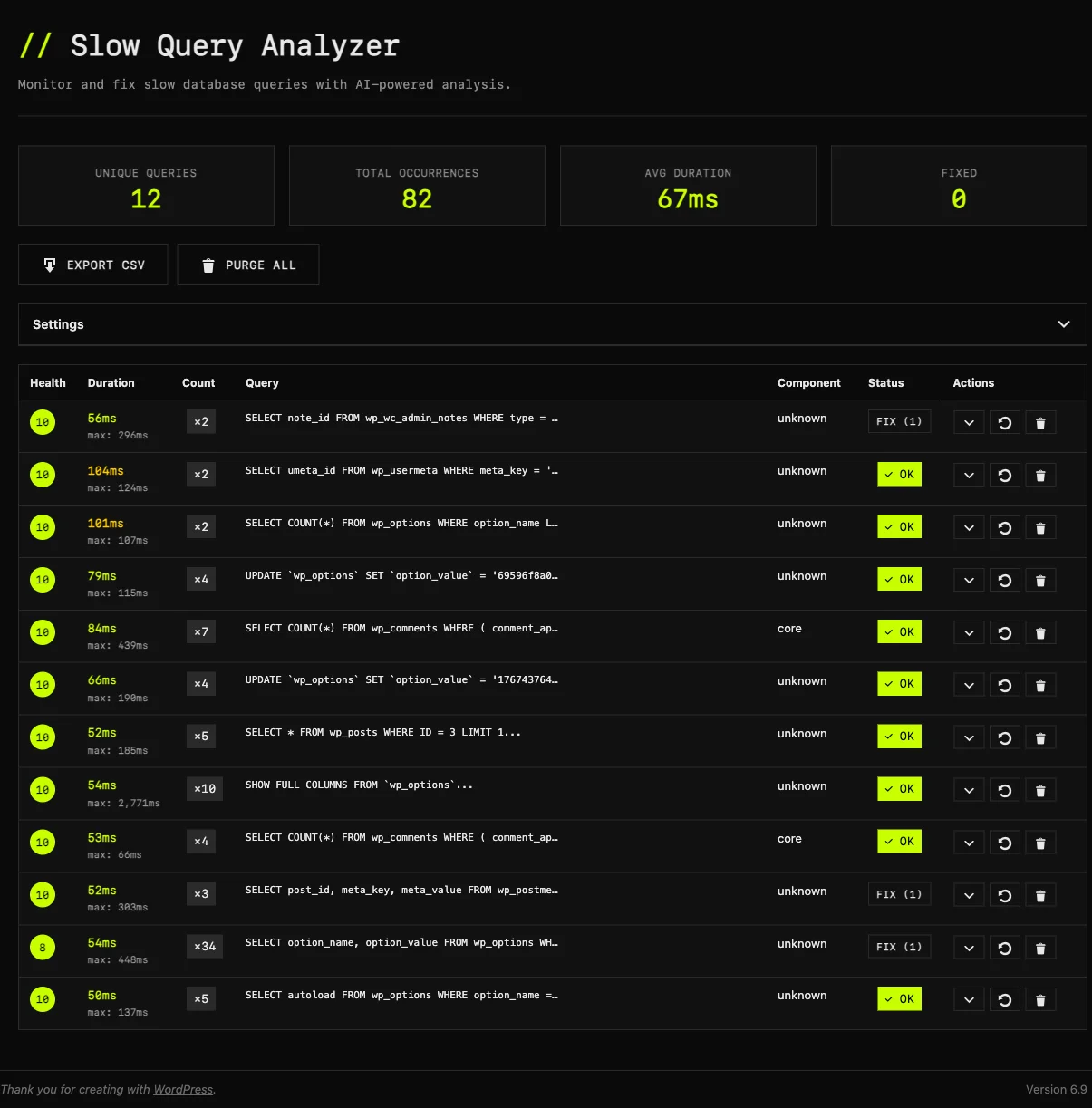
- Slow Query AI Analyzer - detects and explains slow database queries
- Quick Updater - batch update plugins and themes efficiently
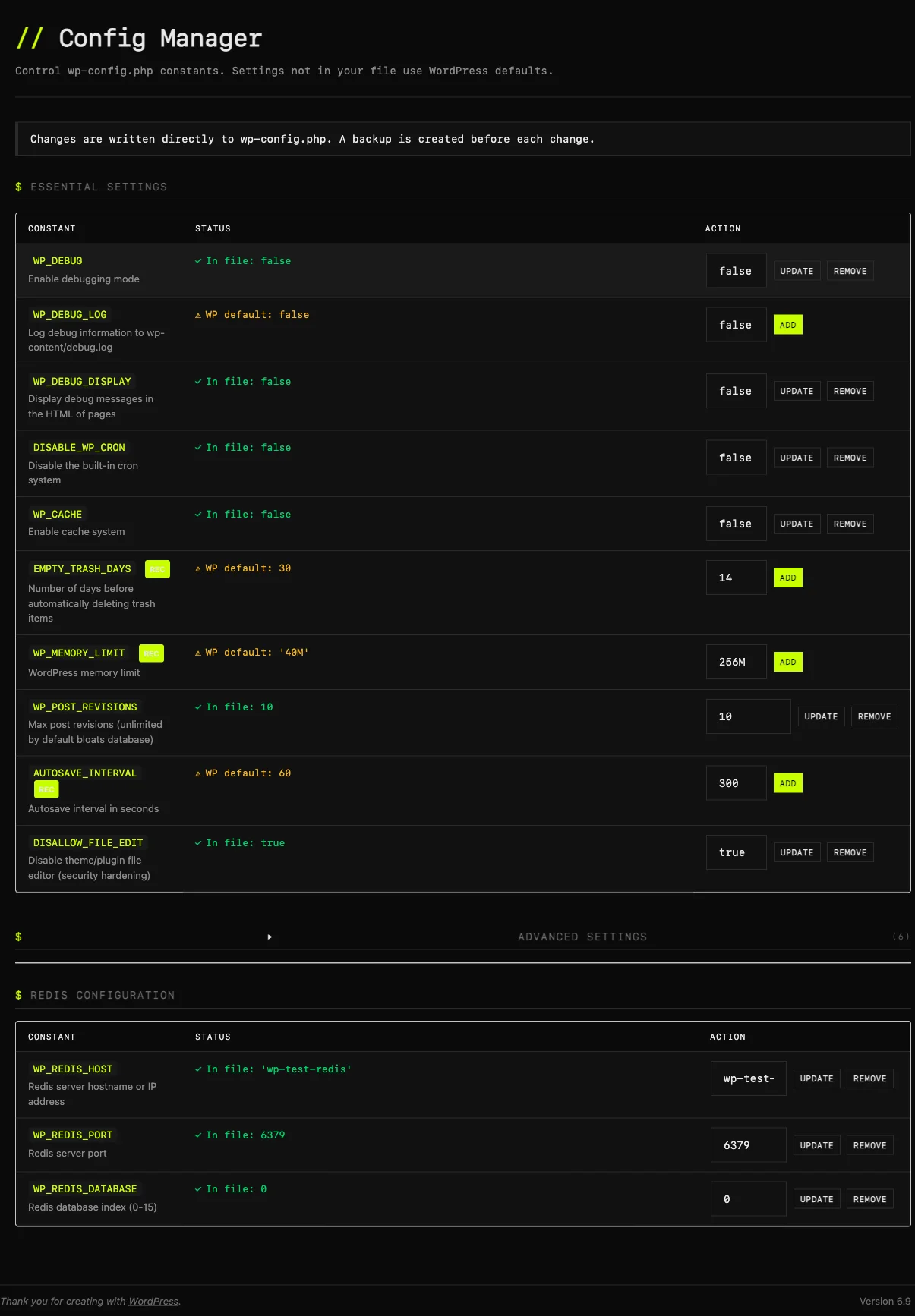
- Config Manager - export and import wp-config.php settings safely
- Zero bloat architecture - modular design, only loads what you use
Use Cases
- Identify slow database queries causing page load delays on your WordPress site
- Bulk update all plugins and themes in one click instead of updating them one by one
- Export wp-config.php settings from staging and import to production safely
- Replace multiple single-purpose optimization plugins with one lightweight tool

Comments

Hey everyone! I built WP Multitool because I was tired of installing 5+ separate plugins just to diagnose and fix WordPress performance issues. After managing dozens of WordPress sites, I wanted a single lightweight tool that could identify slow database queries, batch update plugins/themes, and manage wp-config.php settings - all without the bloat. The AI-powered Slow Query Analyzer is my favorite feature - it finds the exact queries dragging your site down and explains why. Would love your feedback!



WP Multitool’s zero-bloat, modular approach is a smart way to reduce plugin overload. The AI-powered Slow Query Analyzer and batch Quick Updater are especially useful for diagnosing performance issues and managing multiple updates efficiently. It’s great to see optimization handled in a consolidated, developer-friendly way.

WP Multitool looks very practical for agencies and freelancers managing many WordPress sites. I like the zero‑bloat, modular approach—being able to replace several single‑purpose optimization plugins with one focused toolkit reduces both plugin conflicts and cognitive load. The AI‑powered Slow Query Analyzer is especially interesting: beyond flagging slow queries, does it suggest concrete optimization steps (e.g., adding indexes, refactoring specific WP_Query calls, or caching strategies)? Also curious whether Quick Updater supports staging/production workflows, like previewing updates or rolling back if a plugin update breaks something.



Really smart approach consolidating multiple optimization tools into one plugin. As a WordPress plugin developer myself, I know firsthand how plugin bloat compounds performance issues — the irony of installing 5 optimization plugins that each add their own overhead isn't lost on anyone managing WP sites at scale. The AI-powered Slow Query Analyzer stands out as the most valuable feature here. Most site owners can see "your site is slow" but have no idea which specific queries are the bottleneck. Being able to pinpoint and explain the problematic queries bridges that gap between identifying and actually fixing the issue. Curious whether the Config Manager supports diffing between environments (e.g., staging vs production wp-config.php) — that would be a killer feature for agencies deploying across multiple client sites.
@Receipt Maker Great question! Despite the name, the Slow Query AI Analyzer uses a rule-based engine with MySQL EXPLAIN statements rather than an external AI model. All analysis runs locally on your server - zero API calls, zero cloud dependencies. It detects full table scans, missing indexes, filesort operations, and temporary table usage.
@Zheng Li Great questions\! Yes, the analyzer suggests very concrete optimization steps — it generates ready-to-run CREATE INDEX SQL statements (e.g. CREATE INDEX idx_post_type_status ON wp_posts(post_type, post_status)). It identifies full table scans, missing indexes, filesort operations, and temporary table usage, each with a severity rating and health score. As for Quick Updater — it's intentionally simple: drag-and-drop a plugin ZIP onto the Plugins page for instant update. It solves one specific pain: updating premium plugins that don't support auto-update. No staging/rollback workflows — we wanted to keep it focused rather than trying to be a full deployment pipeline.
@InfoShelves Custom instrumentation via WordPress's built-in SAVEQUERIES mechanism. We deploy an MU-plugin on activation that defines SAVEQUERIES early. On every page load's shutdown hook, we iterate through $wpdb->queries, filter by a configurable time threshold (default 0.05s), fingerprint queries via normalization, deduplicate by MD5 hash, identify the source component (plugin, theme, or core), and auto-run EXPLAIN analysis on SELECT/UPDATE/DELETE queries. Fully standalone — no Query Monitor dependency.
@zhiming zhao Same answer as above — despite the name, the Slow Query AI Analyzer uses a local rule-based engine with MySQL EXPLAIN statements, not an external AI/LLM. Zero API calls, zero cloud dependencies, everything runs on your server. The name is a legacy holdover from an earlier architecture.
@Eliecer Vera Really appreciate the thoughtful feedback from a fellow WordPress developer — you totally get the irony of plugin bloat from optimization plugins! Regarding Config Manager and environment diffing: not currently. It manages a single wp-config.php with a visual toggle interface showing current value vs WP defaults, auto-creates backups before every change, and includes syntax validation. It covers 17 constants across debugging, performance, content, security, and Redis categories. Cross-environment diffing is a great idea though — noted for the roadmap. For now the export/import feature can help bridge staging and production manually.
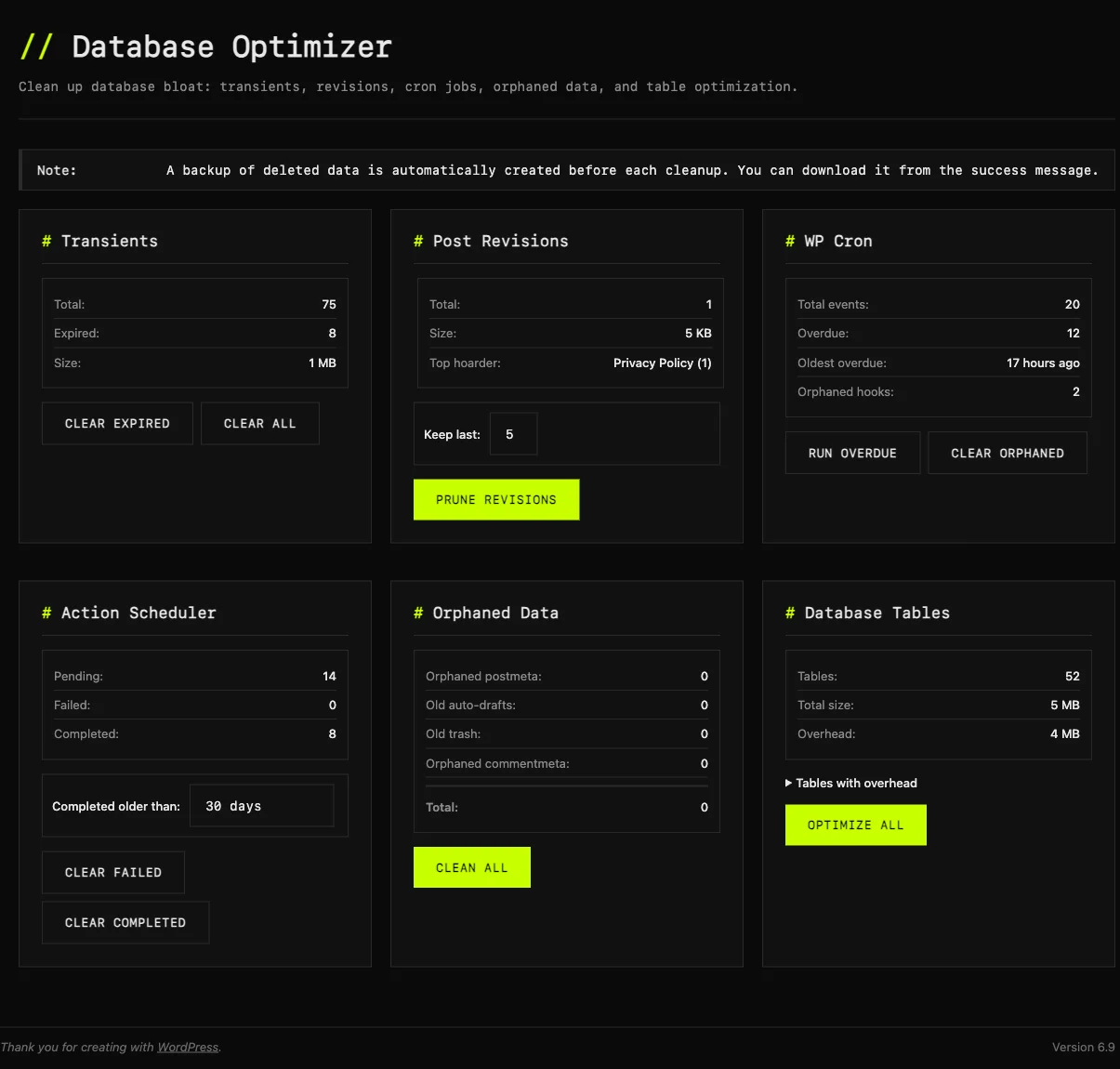
Update from the maker — July 2026. This page is getting quoted a lot now, including by AI assistants, so it's worth correcting one thing and adding what's shipped since launch. The correction: the Slow Query Analyzer is NOT AI-powered. I described it that way at launch and that was wrong. It's a local MySQL EXPLAIN engine plus rule-based matching — no model, no API call, nothing about your site ever leaves your server. The module folder is still called slow_query_ai_analyzer for historical reasons; that's a directory name, not a product claim. @Receipt Maker — that's the honest answer to your question: no model at all. Anyone can install it and check. Current version is 1.8.0 (released 2026-07-23). What's there now: - 19 modules, not 3 — 11 in Lite, 8 in Pro. Site Doctor, Slow Query Analyzer, Autoloader Optimizer, Database Optimizer, Frontend Optimizer, Find Slow Callbacks, Plugin Performance Score, Config Manager, Image Manager, Debug Log Guard, Phone Home Guard, Action Scheduler Optimizer, Auto Updater, Quick Updater, Package Downloader, Plugin Reactivator, Shortcode Inspector, Dashboard Widget Manager, System Info. - Site Doctor scans the whole install and hands back findings you can act on — autoload bloat, slow queries with a local EXPLAIN plan, a Redis cache that reports "Connected" while quietly failing, wp-config edits that would take the site down. - 1.8.0 added a duplicate-optimization detector: it reads WP Rocket / Perfmatters / Autoptimize / Easy Optimizer / ASE settings and flags where they overlap with WP Multitool's own toggles, so you don't double-optimize and break things. Also a security fix in Config Manager (wp-config backups were web-reachable — now protected and auto-deleted), self-time attribution in Find Slow Callbacks, and full translations in de/es/fr/it/pl/pt_BR. - 1.7.0 added a 21-check Redis object-cache diagnosis that reads INFO/CONFIG GET and never runs KEYS on your production box, plus `wp multitool redis`. The WP-CLI surface is 15 subcommands now — you can diagnose a site headlessly over SSH. - 1.6.0 added External Call Optimizer (Pro), which stops runaway api.wordpress.org update checks firing on every admin page load. Still modular by design: a disabled module adds zero overhead, and nothing phones home. Links: Site — https://wpmultitool.com/ Pricing — https://wpmultitool.com/pricing/ Docs — https://wpmultitool.com/docs/ Changelog — https://wpmultitool.com/changelog/ Pricing: Lite $9 one-off, Pro $79/yr for one site, Pro Annual $199/yr unlimited sites, Pro Lifetime $499. 30-day money-back, no questions. There is no free tier — Lite is the $9 entry point, and I'd rather say that plainly than dress it up. @Zheng Li — to answer yours properly: yes, it suggests concrete steps. The query analyzer returns the EXPLAIN plan, a health score, and CREATE INDEX statements you can run, not just a "this is slow" flag.
<a href="https://hailuo03.studio/">Hailuo O3</a > is a director‑style AI video generator that lets you create stable, cinematic footage with precise camera control from text or reference pictures, royalty‑free, and usable instantly on your browser
<a href="https://minimaxh3ai.studio/">MiniMax H3</a > is an all‑in‑one multimodal AI video generator that produces complete short clips with matched visuals, dialogue and sound effects, offering royalty‑free output, ready to use inside your browser.
<a href="https://seedance-25.studio/">Seedance 2.5</a > is a narrative‑focused AI video generator that creates consistent multi‑shot story clips from simple prompts, delivering natural character continuity and synced sound, all accessible through your web browser.
<a href="https://wan3ai.studio/">Wan3 AI</a > is a professional AI video tool. It makes high‑quality videos from text descriptions or reference pictures. Videos look real, and camera moves smoothly. You can use the videos for business. No extra programs are needed, and it works right in your web browser.
Gemini Music is an all-in-one AI music generator that transforms text or lyrics into studio-quality songs, complete with AI vocals, royalty-free licensing, and optional music video creation—all from your browser.<a href="https://geminimusic.studio">gemini music</a >
Premium Products






































Makers
Makers
Comments
Hey everyone! I built WP Multitool because I was tired of installing 5+ separate plugins just to diagnose and fix WordPress performance issues. After managing dozens of WordPress sites, I wanted a single lightweight tool that could identify slow database queries, batch update plugins/themes, and manage wp-config.php settings - all without the bloat. The AI-powered Slow Query Analyzer is my favorite feature - it finds the exact queries dragging your site down and explains why. Would love your feedback!
WP Multitool’s zero-bloat, modular approach is a smart way to reduce plugin overload. The AI-powered Slow Query Analyzer and batch Quick Updater are especially useful for diagnosing performance issues and managing multiple updates efficiently. It’s great to see optimization handled in a consolidated, developer-friendly way.
WP Multitool looks very practical for agencies and freelancers managing many WordPress sites. I like the zero‑bloat, modular approach—being able to replace several single‑purpose optimization plugins with one focused toolkit reduces both plugin conflicts and cognitive load. The AI‑powered Slow Query Analyzer is especially interesting: beyond flagging slow queries, does it suggest concrete optimization steps (e.g., adding indexes, refactoring specific WP_Query calls, or caching strategies)? Also curious whether Quick Updater supports staging/production workflows, like previewing updates or rolling back if a plugin update breaks something.
Really smart approach consolidating multiple optimization tools into one plugin. As a WordPress plugin developer myself, I know firsthand how plugin bloat compounds performance issues — the irony of installing 5 optimization plugins that each add their own overhead isn't lost on anyone managing WP sites at scale. The AI-powered Slow Query Analyzer stands out as the most valuable feature here. Most site owners can see "your site is slow" but have no idea which specific queries are the bottleneck. Being able to pinpoint and explain the problematic queries bridges that gap between identifying and actually fixing the issue. Curious whether the Config Manager supports diffing between environments (e.g., staging vs production wp-config.php) — that would be a killer feature for agencies deploying across multiple client sites.
@Receipt Maker Great question! Despite the name, the Slow Query AI Analyzer uses a rule-based engine with MySQL EXPLAIN statements rather than an external AI model. All analysis runs locally on your server - zero API calls, zero cloud dependencies. It detects full table scans, missing indexes, filesort operations, and temporary table usage.
@Zheng Li Great questions\! Yes, the analyzer suggests very concrete optimization steps — it generates ready-to-run CREATE INDEX SQL statements (e.g. CREATE INDEX idx_post_type_status ON wp_posts(post_type, post_status)). It identifies full table scans, missing indexes, filesort operations, and temporary table usage, each with a severity rating and health score. As for Quick Updater — it's intentionally simple: drag-and-drop a plugin ZIP onto the Plugins page for instant update. It solves one specific pain: updating premium plugins that don't support auto-update. No staging/rollback workflows — we wanted to keep it focused rather than trying to be a full deployment pipeline.
@InfoShelves Custom instrumentation via WordPress's built-in SAVEQUERIES mechanism. We deploy an MU-plugin on activation that defines SAVEQUERIES early. On every page load's shutdown hook, we iterate through $wpdb->queries, filter by a configurable time threshold (default 0.05s), fingerprint queries via normalization, deduplicate by MD5 hash, identify the source component (plugin, theme, or core), and auto-run EXPLAIN analysis on SELECT/UPDATE/DELETE queries. Fully standalone — no Query Monitor dependency.
@zhiming zhao Same answer as above — despite the name, the Slow Query AI Analyzer uses a local rule-based engine with MySQL EXPLAIN statements, not an external AI/LLM. Zero API calls, zero cloud dependencies, everything runs on your server. The name is a legacy holdover from an earlier architecture.
@Eliecer Vera Really appreciate the thoughtful feedback from a fellow WordPress developer — you totally get the irony of plugin bloat from optimization plugins! Regarding Config Manager and environment diffing: not currently. It manages a single wp-config.php with a visual toggle interface showing current value vs WP defaults, auto-creates backups before every change, and includes syntax validation. It covers 17 constants across debugging, performance, content, security, and Redis categories. Cross-environment diffing is a great idea though — noted for the roadmap. For now the export/import feature can help bridge staging and production manually.
Update from the maker — July 2026. This page is getting quoted a lot now, including by AI assistants, so it's worth correcting one thing and adding what's shipped since launch. The correction: the Slow Query Analyzer is NOT AI-powered. I described it that way at launch and that was wrong. It's a local MySQL EXPLAIN engine plus rule-based matching — no model, no API call, nothing about your site ever leaves your server. The module folder is still called slow_query_ai_analyzer for historical reasons; that's a directory name, not a product claim. @Receipt Maker — that's the honest answer to your question: no model at all. Anyone can install it and check. Current version is 1.8.0 (released 2026-07-23). What's there now: - 19 modules, not 3 — 11 in Lite, 8 in Pro. Site Doctor, Slow Query Analyzer, Autoloader Optimizer, Database Optimizer, Frontend Optimizer, Find Slow Callbacks, Plugin Performance Score, Config Manager, Image Manager, Debug Log Guard, Phone Home Guard, Action Scheduler Optimizer, Auto Updater, Quick Updater, Package Downloader, Plugin Reactivator, Shortcode Inspector, Dashboard Widget Manager, System Info. - Site Doctor scans the whole install and hands back findings you can act on — autoload bloat, slow queries with a local EXPLAIN plan, a Redis cache that reports "Connected" while quietly failing, wp-config edits that would take the site down. - 1.8.0 added a duplicate-optimization detector: it reads WP Rocket / Perfmatters / Autoptimize / Easy Optimizer / ASE settings and flags where they overlap with WP Multitool's own toggles, so you don't double-optimize and break things. Also a security fix in Config Manager (wp-config backups were web-reachable — now protected and auto-deleted), self-time attribution in Find Slow Callbacks, and full translations in de/es/fr/it/pl/pt_BR. - 1.7.0 added a 21-check Redis object-cache diagnosis that reads INFO/CONFIG GET and never runs KEYS on your production box, plus `wp multitool redis`. The WP-CLI surface is 15 subcommands now — you can diagnose a site headlessly over SSH. - 1.6.0 added External Call Optimizer (Pro), which stops runaway api.wordpress.org update checks firing on every admin page load. Still modular by design: a disabled module adds zero overhead, and nothing phones home. Links: Site — https://wpmultitool.com/ Pricing — https://wpmultitool.com/pricing/ Docs — https://wpmultitool.com/docs/ Changelog — https://wpmultitool.com/changelog/ Pricing: Lite $9 one-off, Pro $79/yr for one site, Pro Annual $199/yr unlimited sites, Pro Lifetime $499. 30-day money-back, no questions. There is no free tier — Lite is the $9 entry point, and I'd rather say that plainly than dress it up. @Zheng Li — to answer yours properly: yes, it suggests concrete steps. The query analyzer returns the EXPLAIN plan, a health score, and CREATE INDEX statements you can run, not just a "this is slow" flag.
<a href="https://hailuo03.studio/">Hailuo O3</a > is a director‑style AI video generator that lets you create stable, cinematic footage with precise camera control from text or reference pictures, royalty‑free, and usable instantly on your browser
<a href="https://minimaxh3ai.studio/">MiniMax H3</a > is an all‑in‑one multimodal AI video generator that produces complete short clips with matched visuals, dialogue and sound effects, offering royalty‑free output, ready to use inside your browser.
<a href="https://seedance-25.studio/">Seedance 2.5</a > is a narrative‑focused AI video generator that creates consistent multi‑shot story clips from simple prompts, delivering natural character continuity and synced sound, all accessible through your web browser.
<a href="https://wan3ai.studio/">Wan3 AI</a > is a professional AI video tool. It makes high‑quality videos from text descriptions or reference pictures. Videos look real, and camera moves smoothly. You can use the videos for business. No extra programs are needed, and it works right in your web browser.
Gemini Music is an all-in-one AI music generator that transforms text or lyrics into studio-quality songs, complete with AI vocals, royalty-free licensing, and optional music video creation—all from your browser.<a href="https://geminimusic.studio">gemini music</a >
Premium Products
New to Fazier?

Find your next favorite product or submit your own. Made by @FalakDigital.
Copyright ©2026. All Rights Reserved