Whisperly
Voice to clean text for Mac, still in your own words.
Whisperly is a Mac menu-bar app for dictating text you can send as-is.
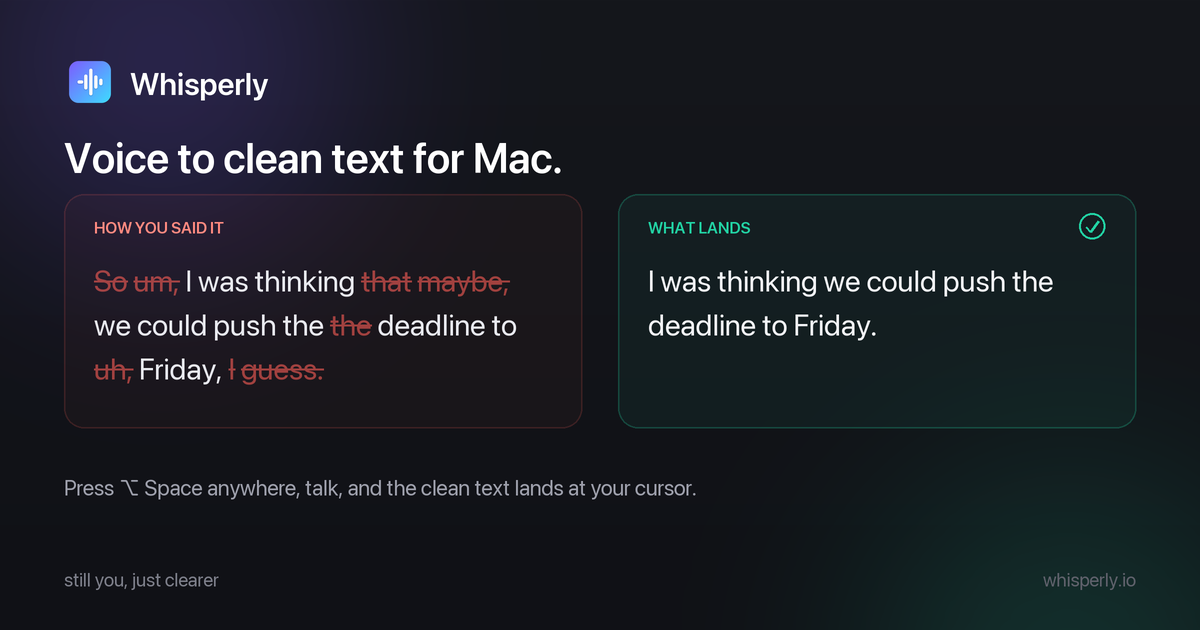
Press a hotkey anywhere, talk, and the result lands at your cursor in whatever app you were already in. **Clean-up mode** drops the fillers, false starts and repetitions and fixes the punctuation, but keeps your wording, so it still reads like you wrote it and not like something rewrote you.
I built it because I think in Russian and work in English, and raw dictation was never usable: either a wall of *ums*, or a polished paragraph that no longer sounded like me.
Signup is open and there is no waitlist. We just haven't announced anywhere yet.
Features
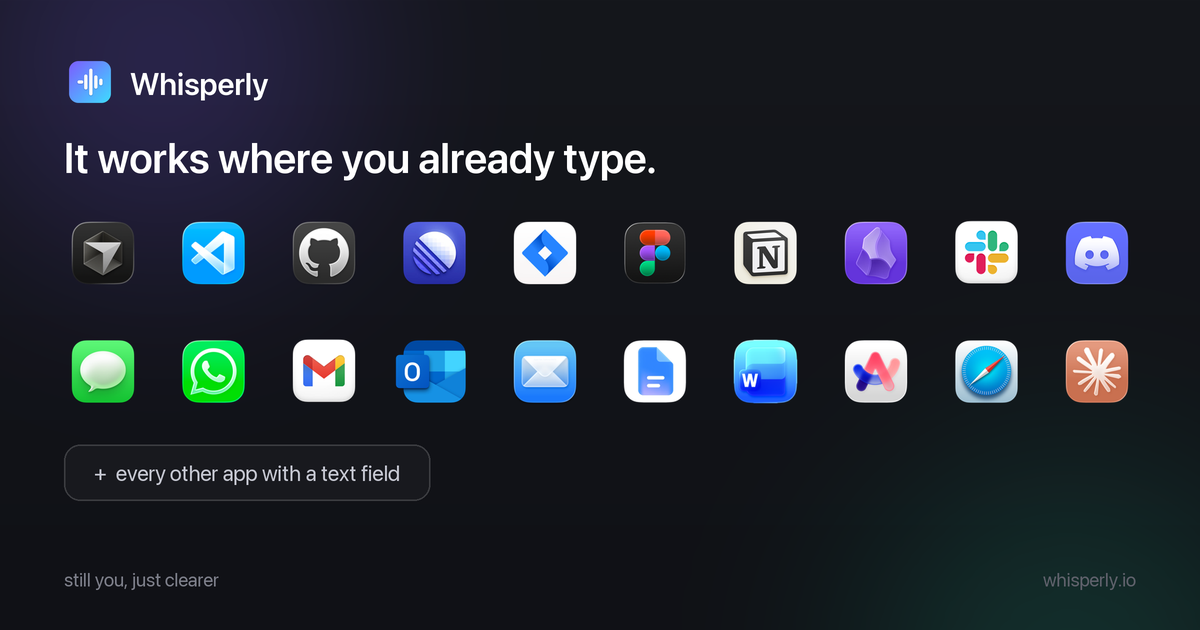
- Clean-up mode: fillers, false starts and repetitions out, punctuation fixed, your wording kept.
- Raw mode: verbatim, with no cleanup pass over it. This is the default, and Clean-up is one tap away in the panel.
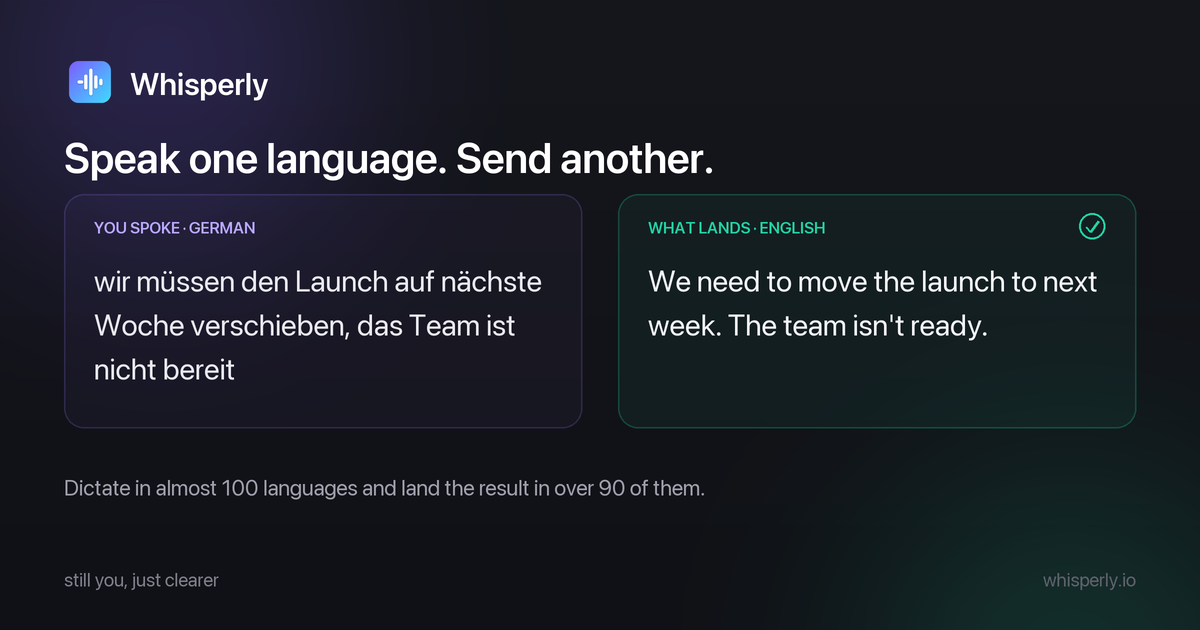
- Translate (Pro): speak one language, send another. Almost 100 languages in, over 90 out.
- Tones (Pro): Original is the default and keeps your register. Neutral, Casual and Formal when the situation needs a different one.
- Custom vocabulary: names, brands and jargon come out spelled the way you write them, including cross-script cases. Five terms free, unlimited on Pro.
- Lands at the cursor: works in any app with a text field. The text also goes to your clipboard first, and if the insert cannot be confirmed you get told it is waiting there.
- Menu bar, not a window: global hotkey (Option Space by default), live waveform while you speak, nothing to switch to.
- Nothing kept: your audio is never written to a file or a database, and there is no dictation history.
- Direct download: signed with a Developer ID certificate, notarized by Apple, updates through Sparkle. Not on the Mac App Store.
Use Cases
- Email you keep putting off: say it once in Gmail or Mail and send it, instead of rewriting the first line four times.
- Chat that still sounds like you: Slack replies and DMs at talking speed, without the dictated-robot tone.
- Prompting AI tools: think out loud into Claude, or straight at the Claude Code terminal prompt. Long prompts stop being a typing tax.
- Filing tickets: speak the title, speak the description, and a Linear or Jira issue is done before the thought fades.
- Notes and docs: capture into Notion or Obsidian while the idea is still whole.
- Working in a second language: speak your first language, send clean English. This is the reason the Translate mode exists.
- Anyone who thinks faster than they type: developers, writers, managers, sales, support, researchers. Long-form text stops being the bottleneck.

Comments



Great Product, We have built a distribution co-pilot for indie and SaaS founders. Check here: https://xoru.app/


Whisperly solves one of the biggest problems with voice typing: it doesn't make you sound like a robot. Most dictation tools either give you messy transcripts full of fillers or rewrite everything into a generic AI style. Whisperly finds a great balance — it cleans up the text while keeping your original voice.




The cursor-first workflow is a strong fit for people who dictate directly into email, chat, or AI prompts. Keeping raw mode as the default while offering cleanup as an explicit choice also avoids silently changing the user's voice. How does Whisperly signal when cursor insertion fails and the text has been placed on the clipboard instead?



Transcription tools usually force you into their ecosystem - you dictate, the audio lives in their app, and you export later. Whisperly flips that by keeping your words natural while capturing them directly as text on your Mac. The "still in your own words" angle is key - no weird AI paraphrasing, just clean capture of what you actually said. For writers, researchers, or anyone doing voice notes throughout the day, this removes the friction of switching between voice recording app and text editor. The Mac-first approach means tight OS integration without the bloat of cross-platform solutions.



The 'keeps your wording' constraint is what makes this interesting — every other dictation cleanup I've tried quietly paraphrases you into corporate-speak. The bilingual origin story explains it: when you think in one language and work in another, a tool that 'improves' your phrasing is actively unhelpful. Is the cleanup pass running locally on the Mac, or going to an API? Menu-bar dictation tools live or die on latency.

Hi everyone. It's always easier to formulate a thought in your native language, and when you work in another one that slows you down every day, so I built Whisperly. You hold a hotkey, say it however it comes out, and the text lands where your cursor already is: a straight transcript, or run through cleanup that drops the ums without rewriting how you sound, or translated into the language you need to send. Wiring up the speech model took an afternoon. The rest of it is where the time went: the cleanup, the hotkey handling, custom vocabulary for the names every recognizer mangles, and the paste step, which I didn't expect to be the hard part. macOS gives you no reliable way to confirm that an arbitrary app accepted inserted text, so when Whisperly can't confirm the text landed, it puts the result on your clipboard and tells you so. It's a menu bar app, direct download, no Mac App Store. Free covers 2,000 words a week, and new accounts get 14 days of Pro with no card, so translation and the tones are open while you're trying it. The thing I'd like feedback on is the tone setting. In cleanup and translation you pick one of four: Original, Casual, Neutral, Formal. Original is the default and leaves your wording alone, the other three make the text more casual, neutral or formal. I still don't know whether people want that choice or would rather have one mode that just works. If you try it, tell me which one you stayed in.


Huge congrats on launching Whisperly – what a brilliant concept! I'm particularly impressed by your 'Clean-up mode' that masterfully retains one's unique voice and wording while cleverly stripping out all the noise and refining punctuation. That's truly a game-changer! So many dictation apps force a choice between raw, unusable transcriptions or overly polished prose that just doesn't sound like you. Your solution beautifully bridges that gap, especially for those of us who might think in one language and write in another. I'm genuinely curious, what kind of feedback have you been getting from early users about how perfectly it captures their authentic 'voice'? Also, any thoughts on offering even more nuanced control over the clean-up process in future iterations?




For anyone who spends their day writing, this is a huge productivity boost. Emails, tickets, documentation, and quick notes all become much faster when you can just say what you mean. I especially like that it works across different apps instead of forcing you into a separate editor. It's simple, fast, and stays out of the way.





The ‘lands at the cursor’ workflow is a strong way to avoid context switching, and keeping the speaker’s wording makes the positioning clear. A short before/after example near the top could make Clean-up mode even easier to grasp. Does audio leave the Mac for cleanup or translation, and if so, is it discarded immediately after processing?


Voice-to-text is such an underrated productivity tool. I love that Whisperly keeps the text in your own words instead of forcing a robotic transcription — that natural feel makes a huge difference when repurposing voice notes into emails or drafts. The Mac-native approach is a big plus for privacy-conscious users too!



"Keeps your wording instead of rewriting you" is a genuinely good angle - most dictation cleanup tools over-polish and everything comes out sounding like the same LLM. The bilingual origin story (thinking in Russian, working in English) explains why. Question: does clean-up mode run locally or via API? For a menu-bar app that hears everything I say, that's the deciding factor for me.









This strikes a huge pain point for anyone who thinks in one language and writes in another—raw transcriptions are usually a mess of "ums" and "likes," while heavy LLM rewrites flatten out your personal voice completely. The middle ground where it fixes mechanics without changing tone is super smart. A few quick questions as I check it out: Latency: How fast is the round-trip from hitting the hotkey to the text landing at the cursor? Engine: Is the transcription running locally on-device via Apple Silicon, or is it hitting a cloud API?
Premium Products























































Sponsors
Buy




Makers
Makers
Comments
Great Product, We have built a distribution co-pilot for indie and SaaS founders. Check here: https://xoru.app/
Whisperly solves one of the biggest problems with voice typing: it doesn't make you sound like a robot. Most dictation tools either give you messy transcripts full of fillers or rewrite everything into a generic AI style. Whisperly finds a great balance — it cleans up the text while keeping your original voice.
The cursor-first workflow is a strong fit for people who dictate directly into email, chat, or AI prompts. Keeping raw mode as the default while offering cleanup as an explicit choice also avoids silently changing the user's voice. How does Whisperly signal when cursor insertion fails and the text has been placed on the clipboard instead?
Transcription tools usually force you into their ecosystem - you dictate, the audio lives in their app, and you export later. Whisperly flips that by keeping your words natural while capturing them directly as text on your Mac. The "still in your own words" angle is key - no weird AI paraphrasing, just clean capture of what you actually said. For writers, researchers, or anyone doing voice notes throughout the day, this removes the friction of switching between voice recording app and text editor. The Mac-first approach means tight OS integration without the bloat of cross-platform solutions.
The 'keeps your wording' constraint is what makes this interesting — every other dictation cleanup I've tried quietly paraphrases you into corporate-speak. The bilingual origin story explains it: when you think in one language and work in another, a tool that 'improves' your phrasing is actively unhelpful. Is the cleanup pass running locally on the Mac, or going to an API? Menu-bar dictation tools live or die on latency.
Hi everyone. It's always easier to formulate a thought in your native language, and when you work in another one that slows you down every day, so I built Whisperly. You hold a hotkey, say it however it comes out, and the text lands where your cursor already is: a straight transcript, or run through cleanup that drops the ums without rewriting how you sound, or translated into the language you need to send. Wiring up the speech model took an afternoon. The rest of it is where the time went: the cleanup, the hotkey handling, custom vocabulary for the names every recognizer mangles, and the paste step, which I didn't expect to be the hard part. macOS gives you no reliable way to confirm that an arbitrary app accepted inserted text, so when Whisperly can't confirm the text landed, it puts the result on your clipboard and tells you so. It's a menu bar app, direct download, no Mac App Store. Free covers 2,000 words a week, and new accounts get 14 days of Pro with no card, so translation and the tones are open while you're trying it. The thing I'd like feedback on is the tone setting. In cleanup and translation you pick one of four: Original, Casual, Neutral, Formal. Original is the default and leaves your wording alone, the other three make the text more casual, neutral or formal. I still don't know whether people want that choice or would rather have one mode that just works. If you try it, tell me which one you stayed in.
Huge congrats on launching Whisperly – what a brilliant concept! I'm particularly impressed by your 'Clean-up mode' that masterfully retains one's unique voice and wording while cleverly stripping out all the noise and refining punctuation. That's truly a game-changer! So many dictation apps force a choice between raw, unusable transcriptions or overly polished prose that just doesn't sound like you. Your solution beautifully bridges that gap, especially for those of us who might think in one language and write in another. I'm genuinely curious, what kind of feedback have you been getting from early users about how perfectly it captures their authentic 'voice'? Also, any thoughts on offering even more nuanced control over the clean-up process in future iterations?
For anyone who spends their day writing, this is a huge productivity boost. Emails, tickets, documentation, and quick notes all become much faster when you can just say what you mean. I especially like that it works across different apps instead of forcing you into a separate editor. It's simple, fast, and stays out of the way.
The ‘lands at the cursor’ workflow is a strong way to avoid context switching, and keeping the speaker’s wording makes the positioning clear. A short before/after example near the top could make Clean-up mode even easier to grasp. Does audio leave the Mac for cleanup or translation, and if so, is it discarded immediately after processing?
Voice-to-text is such an underrated productivity tool. I love that Whisperly keeps the text in your own words instead of forcing a robotic transcription — that natural feel makes a huge difference when repurposing voice notes into emails or drafts. The Mac-native approach is a big plus for privacy-conscious users too!
"Keeps your wording instead of rewriting you" is a genuinely good angle - most dictation cleanup tools over-polish and everything comes out sounding like the same LLM. The bilingual origin story (thinking in Russian, working in English) explains why. Question: does clean-up mode run locally or via API? For a menu-bar app that hears everything I say, that's the deciding factor for me.
This strikes a huge pain point for anyone who thinks in one language and writes in another—raw transcriptions are usually a mess of "ums" and "likes," while heavy LLM rewrites flatten out your personal voice completely. The middle ground where it fixes mechanics without changing tone is super smart. A few quick questions as I check it out: Latency: How fast is the round-trip from hitting the hotkey to the text landing at the cursor? Engine: Is the transcription running locally on-device via Apple Silicon, or is it hitting a cloud API?
Premium Products
New to Fazier?

Find your next favorite product or submit your own. Made by @FalakDigital.
Copyright ©2026. All Rights Reserved