Wavelength
Talk through a process. Get the diagram instantly.
Wavelength turns spoken conversation into a live process diagram.
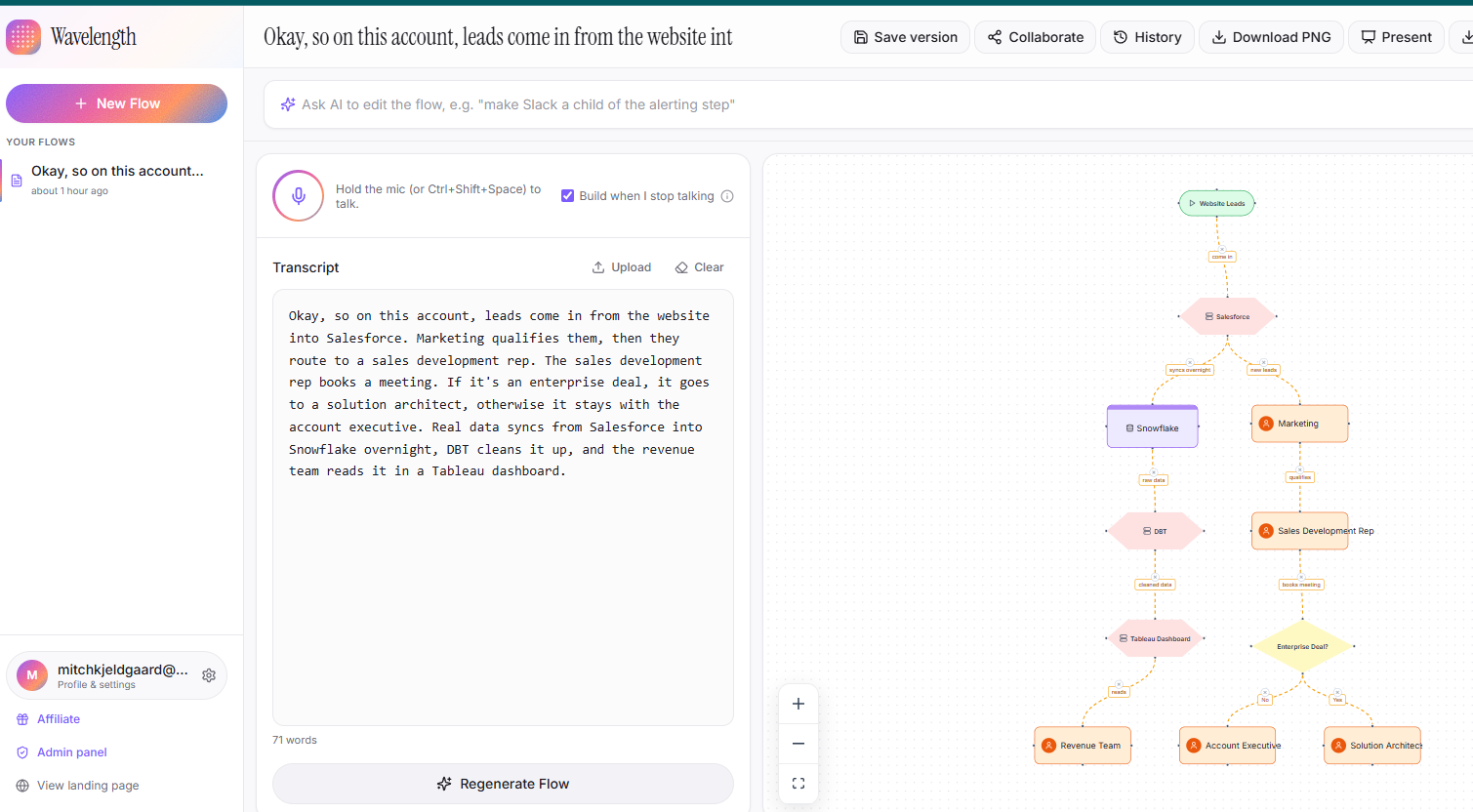
Wavelength is a voice to diagram tool for sales engineers, solution architects, technical project managers, and the consultants who run process discovery workshops. You talk through how a process or data pipeline works, or paste a call transcript, and the diagram builds itself as you speak. Actors, systems, decisions, and data stores appear in the order you described them, connected the way you said they connect.
Anything the AI inferred rather than actually heard is drawn as a dashed amber edge, so you can confirm it or correct it before it becomes fact. That detail matters on a customer call, where a diagram that quietly makes something up is worse than no diagram at all.
The problem it solves
On technical calls, someone narrates how data moves through a stack and half the room quietly loses the thread. Whiteboards do not survive a screenshare, and nobody redraws them afterward. The person running the call then spends another hour rebuilding the flow in Lucidchart or Visio, which the customer corrects anyway. Unlike Lucidchart, Miro, and Visio, which require you to draw the diagram, Wavelength builds it live from the conversation, so the process map is finished and shared before the call ends.
Features
Live dictation with hold to talk, transcript upload (.txt, .md, .vtt, .srt, .json, .pdf, .docx, which covers exports from Zoom, Teams, Gong, Fireflies, and Otter), and three editing surfaces: a natural language Ask AI box, a right click node menu, and an inspector panel for precise edits. Present mode for screensharing, PNG export, emailed recaps, version history with restore, per flow collaborators, and shared team libraries.
Use cases
Discovery and architecture review calls, requirements and process mapping workshops, as-is current state documentation, ERP and transformation scoping sessions, and onboarding or enablement walkthroughs.
Pricing
Free: 5 saved flows, no credit card. Starter: $9.99 per user per month for 50 new flows a month and your own logo instead of the Wavelength mark. Pro: $19.99 per user per month for unlimited flows, version history, email recaps, and team collaboration. Annual billing is about 17 percent cheaper. There is an interactive demo at wavelengthflow.com/demo that needs no account.
Affiliate program
Open enrollment, no application and no approval step. Sign in, open the affiliate page, and your referral link is generated instantly. Commission is 25 percent of recurring revenue, paid for the lifetime of every subscription you refer, not just the first month. Payouts run automatically through Stripe Connect Express after a 30 day hold that covers refunds and chargebacks. The dashboard shows signups, conversions, accrued commissions, and payout history in real time. First touch attribution, so the referrer who sent the visitor gets credit.
Features
Live diagramming while you talk. Hold to dictate and the process map builds itself sentence by sentence, no drawing required.
Transcript upload. Accepts .txt, .md, .vtt, .srt, .json, .pdf, and .docx, which covers exports from Zoom, Teams, Gong, Fireflies, and Otter.
Typed diagram elements. Actors, systems, decisions, and data stores each get their own shape instead of generic boxes.
Dashed amber inference edges. Anything the AI inferred rather than actually heard is marked, so you confirm or correct it before it becomes fact.
Three ways to edit. A natural language Ask AI box, a right click node menu, and an inspector panel for precise changes.
Present mode. Share your screen and walk the diagram without the editing chrome in the way.
Version history and restore. Roll back to any earlier state of a flow.
PNG export and emailed recaps. Send the map before the meeting ends.
Custom logo watermark. Your brand on the diagram instead of Wavelength's, on paid plans.
Team collaboration. Per flow collaborators, invite links, and a shared team flow library.
Use Cases
Discovery calls. Map a customer's current stack live while they describe it, instead of redrawing it in Lucidchart afterward.
Architecture reviews. Capture how data actually moves between systems while the people who built it are still on the call.
Process mapping workshops. Leave the session with a map the client validated in the room, not two weeks later in a review cycle.
As-is current state documentation. Turn a walkthrough with the people who run a process into an editable diagram.
ERP and transformation scoping. Capture as-is processes during discovery sessions so the business owner can correct them on the spot.
Onboarding and enablement. Turn a subject matter expert's verbal explanation into a diagram new hires can actually follow.
Post-call follow-up. Convert a recorded meeting transcript into a process map for the recap email.
Fazier Deal

Comments


The dashed amber edges for inferred vs. heard content is the detail that sells this - most live-diagramming tools quietly blend both and you only catch the error after the call. Built solo on Base44/Supabase/Groq is impressive for something handling live transcription plus diagram layout in real time. Does the transcript upload path (Zoom/Gong/Fireflies exports) go through the same inference-confidence marking, or is that treated as more reliable since it's not live dictation?

The gap between talking through an idea and having a shared visual of it is massive. Teams spend hours in meetings discussing process flows, and then someone has to go translate that into a diagram afterwards. Getting that diagram immediately while the conversation is happening keeps everyone aligned and captures details before they're forgotten. The speed here is the real win - it means the diagram becomes part of the conversation, not a follow-up task.

The dashed amber edge for "inferred, not heard" is the best detail here. We do the same split on a content site (confirmed vs rumor gets a different colour on every page) and it is the one thing readers actually thank us for, so I would keep that visual distinction in every export too, not just the live view. Two questions: can the finished diagram be exported as Mermaid or plain SVG so it survives outside your app, and when I correct an inferred edge, does that correction feed back into how the next call is drawn?


A diagram that quietly invents a hop on a customer call is worse than no diagram, so marking inferred edges as dashed amber is the right trust signal. The piece I would want next is pinning a spoken correction so the following sentence updates that node instead of spawning a duplicate. For discovery workshops, an editable export of actors, systems, and decisions matters more than a PNG, otherwise the diagram dies when the call ends.

I'm in tech sales. I spent years on discovery calls narrating how data moves through a customer's stack, watching half the room quietly lose the thread by sentence four. Then I'd spend another forty minutes after the call rebuilding the whole thing in Lucidchart, which the customer would correct anyway. The whiteboard never survives a screenshare. Nobody redraws it after. So I built the thing I wanted in those calls. You talk through the process and Wavelength draws it live: actors, systems, decisions, data stores. The part I care most about is the dashed amber edges, which mark anything the AI inferred rather than actually heard. On a customer call you cannot afford a diagram that quietly makes something up, so you confirm or fix it in the moment. The interesting thing I did not expect: people almost never disagree about the process. They disagree about the picture in their head, and nobody finds out until something gets drawn. Built solo on Base44 and Supabase, with Groq doing the structuring. There's a demo at wavelengthflow.com/demo that needs no signup. Happy to answer anything about the build, and I'd genuinely rather hear where it breaks than hear that it's cool.

Accepting Gong and Fireflies transcript exports is a good wedge, since that is where process knowledge already lives and nobody re-listens to those recordings. Question on the editing side: when I fix a wrong inference mid-call, does the correction persist as a rule for the rest of the session, or can the same misread reappear two sentences later? That repeat-error case is where trust in the tool would break fastest.
Premium Products










































Fazier Deal
Sponsors
Buy

Makers
Makers
Comments
The dashed amber edges for inferred vs. heard content is the detail that sells this - most live-diagramming tools quietly blend both and you only catch the error after the call. Built solo on Base44/Supabase/Groq is impressive for something handling live transcription plus diagram layout in real time. Does the transcript upload path (Zoom/Gong/Fireflies exports) go through the same inference-confidence marking, or is that treated as more reliable since it's not live dictation?
The gap between talking through an idea and having a shared visual of it is massive. Teams spend hours in meetings discussing process flows, and then someone has to go translate that into a diagram afterwards. Getting that diagram immediately while the conversation is happening keeps everyone aligned and captures details before they're forgotten. The speed here is the real win - it means the diagram becomes part of the conversation, not a follow-up task.
The dashed amber edge for "inferred, not heard" is the best detail here. We do the same split on a content site (confirmed vs rumor gets a different colour on every page) and it is the one thing readers actually thank us for, so I would keep that visual distinction in every export too, not just the live view. Two questions: can the finished diagram be exported as Mermaid or plain SVG so it survives outside your app, and when I correct an inferred edge, does that correction feed back into how the next call is drawn?
A diagram that quietly invents a hop on a customer call is worse than no diagram, so marking inferred edges as dashed amber is the right trust signal. The piece I would want next is pinning a spoken correction so the following sentence updates that node instead of spawning a duplicate. For discovery workshops, an editable export of actors, systems, and decisions matters more than a PNG, otherwise the diagram dies when the call ends.
I'm in tech sales. I spent years on discovery calls narrating how data moves through a customer's stack, watching half the room quietly lose the thread by sentence four. Then I'd spend another forty minutes after the call rebuilding the whole thing in Lucidchart, which the customer would correct anyway. The whiteboard never survives a screenshare. Nobody redraws it after. So I built the thing I wanted in those calls. You talk through the process and Wavelength draws it live: actors, systems, decisions, data stores. The part I care most about is the dashed amber edges, which mark anything the AI inferred rather than actually heard. On a customer call you cannot afford a diagram that quietly makes something up, so you confirm or fix it in the moment. The interesting thing I did not expect: people almost never disagree about the process. They disagree about the picture in their head, and nobody finds out until something gets drawn. Built solo on Base44 and Supabase, with Groq doing the structuring. There's a demo at wavelengthflow.com/demo that needs no signup. Happy to answer anything about the build, and I'd genuinely rather hear where it breaks than hear that it's cool.
Accepting Gong and Fireflies transcript exports is a good wedge, since that is where process knowledge already lives and nobody re-listens to those recordings. Question on the editing side: when I fix a wrong inference mid-call, does the correction persist as a rule for the rest of the session, or can the same misread reappear two sentences later? That repeat-error case is where trust in the tool would break fastest.
Premium Products
New to Fazier?

Find your next favorite product or submit your own. Made by @FalakDigital.
Copyright ©2026. All Rights Reserved