
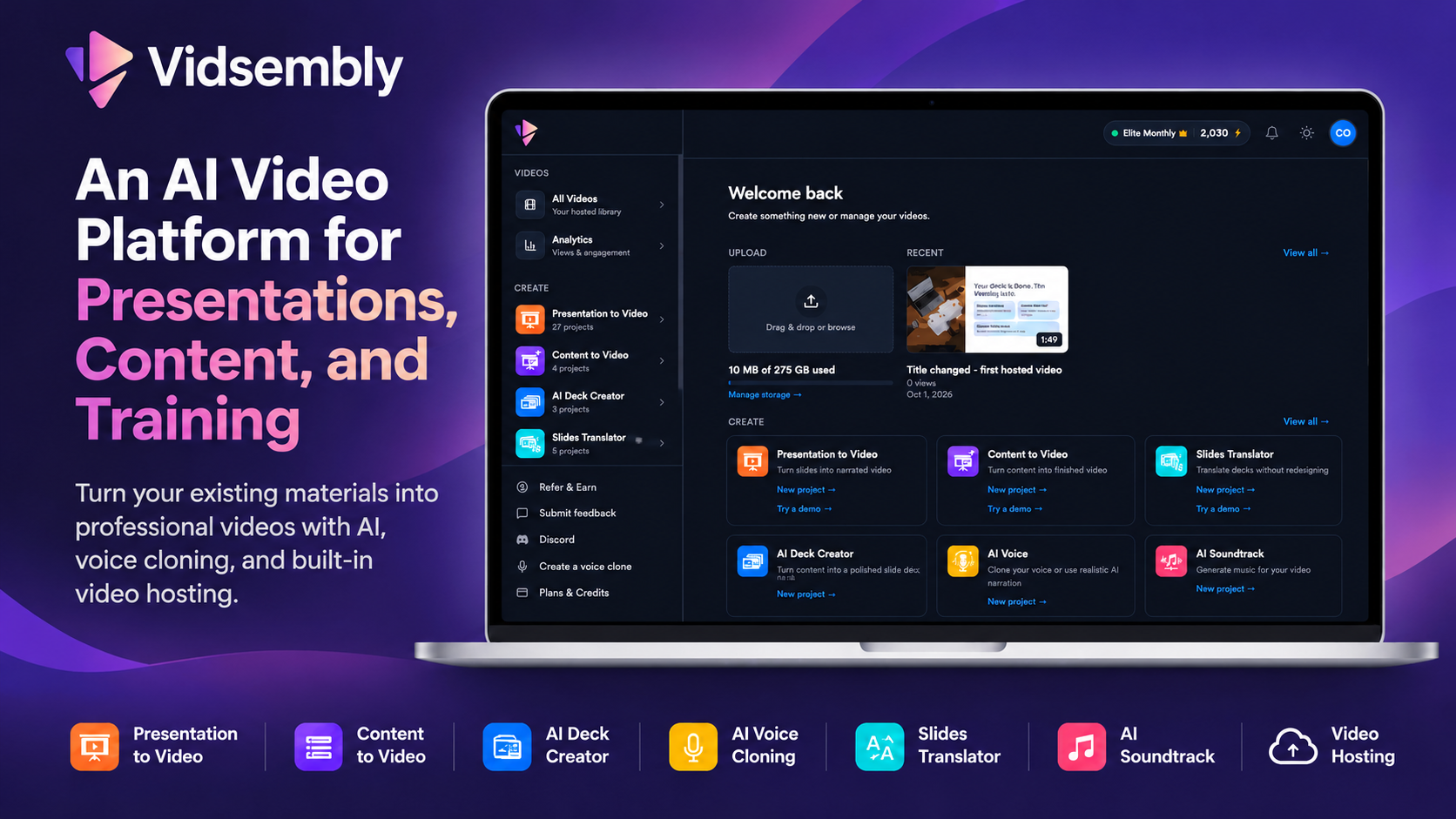
Vidsembly is an AI-powered video creation toolkit that helps businesses, educators, and content creators turn existing materials into professional videos without complicated editing software.
Instead of starting from scratch, users can upload PowerPoint presentations, PDFs, or documents and transform them into narrated videos using AI-generated scripts, natural-sounding voices, and voice cloning.
Vidsembly brings together several focused AI tools in one platform. Create presentation videos, generate slide decks from written content, translate presentations, transcribe audio and video, produce soundtracks, and host finished videos with shareable links and analytics.
The platform is particularly useful for HR and training teams, educators, sales professionals, marketers, and businesses that need to produce consistent video content efficiently.
Each tool follows a straightforward workflow: upload your content, customize the output, and export the finished result. No advanced video editing experience is required.
Vidsembly offers a free starting option, with paid plans providing additional credits, premium voices, and expanded capabilities.
Features
- Presentation to Video: Convert PowerPoint presentations and PDFs into narrated MP4 videos with AI voiceovers.
- Content to Video: Turn documents, articles, and written content into slide decks and narrated videos.
- AI Deck Creator: Generate editable PowerPoint presentations from notes, documents, or text.
- AI Voice Cloning: Create voiceovers using AI voices or a clone of your own voice.
- Slides Translator: Translate PowerPoint and PDF presentations into multiple languages while preserving their design.
- Transcriber: Convert audio and video recordings into text transcripts with export options.
- AI Soundtrack: Generate instrumental background music for videos.
- Video Hosting: Upload, host, embed, and share videos with viewing analytics.
- Multilingual Narration: Generate presentation voiceovers in 12 supported languages.
- Simple Export Workflow: Create professional video content without learning complex editing software.
Use Cases
- Employee Training and Onboarding: Convert existing training presentations into narrated videos for new hires and internal teams.
- Education and Online Learning: Turn lectures, classroom presentations, and educational materials into video lessons.
- Sales Enablement: Transform sales decks and product presentations into shareable videos for prospects and customers.
- Content Marketing: Repurpose blog posts, articles, and documents into narrated video content.
- Internal Communications: Create video updates, company announcements, and presentations without recording manually.
- Multilingual Training: Translate presentations and generate voiceovers for international audiences.
- Video Hosting and Sharing: Publish finished videos using watch links or embedded players.
- Presentation Creation: Generate PowerPoint slide decks from existing documents, notes, or written ideas.
Fazier Deal

Comments


Hi everyone! I'm the founder of Vidsembly. I started building Vidsembly to make video creation easier, especially for people who already have presentations, documents, or training materials they want to turn into videos. Today, Vidsembly includes tools for converting PowerPoints and PDFs into narrated videos, generating presentations, cloning voices, translating slides, transcribing recordings, and hosting videos. If you're trying it for the first time, I'd recommend starting with our Presentation to Video tool. I'd love to hear your feedback, especially if you create training, educational, or business content. We're continuously improving the platform based on what people actually need.


Slides Translator is the part I'd try first. We build a presentation editor that works in 16 languages, and the hard part was never the words. Hebrew and Arabic need the whole slide mirrored (alignment, bullet side, where the picture sits), and German or Russian text runs about a third longer and spills out of boxes sized for English. When you translate a .pptx, do you mirror the layout for right-to-left languages and shrink or reflow text that no longer fits, or is that left to the user? And does the narration read the speaker notes, or a script written from the slide text?
Premium Products




































Fazier Deal
Sponsors
Buy
Makers
Makers
Comments
Hi everyone! I'm the founder of Vidsembly. I started building Vidsembly to make video creation easier, especially for people who already have presentations, documents, or training materials they want to turn into videos. Today, Vidsembly includes tools for converting PowerPoints and PDFs into narrated videos, generating presentations, cloning voices, translating slides, transcribing recordings, and hosting videos. If you're trying it for the first time, I'd recommend starting with our Presentation to Video tool. I'd love to hear your feedback, especially if you create training, educational, or business content. We're continuously improving the platform based on what people actually need.
Slides Translator is the part I'd try first. We build a presentation editor that works in 16 languages, and the hard part was never the words. Hebrew and Arabic need the whole slide mirrored (alignment, bullet side, where the picture sits), and German or Russian text runs about a third longer and spills out of boxes sized for English. When you translate a .pptx, do you mirror the layout for right-to-left languages and shrink or reflow text that no longer fits, or is that left to the user? And does the narration read the speaker notes, or a script written from the slide text?
Premium Products
New to Fazier?

Find your next favorite product or submit your own. Made by @FalakDigital.
Copyright ©2026. All Rights Reserved