
UtilForge.org
Scam and privacy checks that run on your own device
UtilForge.org is an independent public-interest project working towards a safer online world for all. Its 42 cybersecurity tools check an AI prompt, a message, a payment page, a job offer, a photo or a document before you paste, pay, share or send. Each check runs on your own phone or computer, and what you type stays on your device. The tools are free to use, need no account, and keep working with the internet off.

Features
- Hide Names from AI: swap names, numbers and addresses for labels before pasting into any AI assistant, then put them back
- Prompt Injection Check: find hidden instructions in a web page or email before your AI assistant reads them
- What Not to Paste into AI: see which private details are in a text before you send it
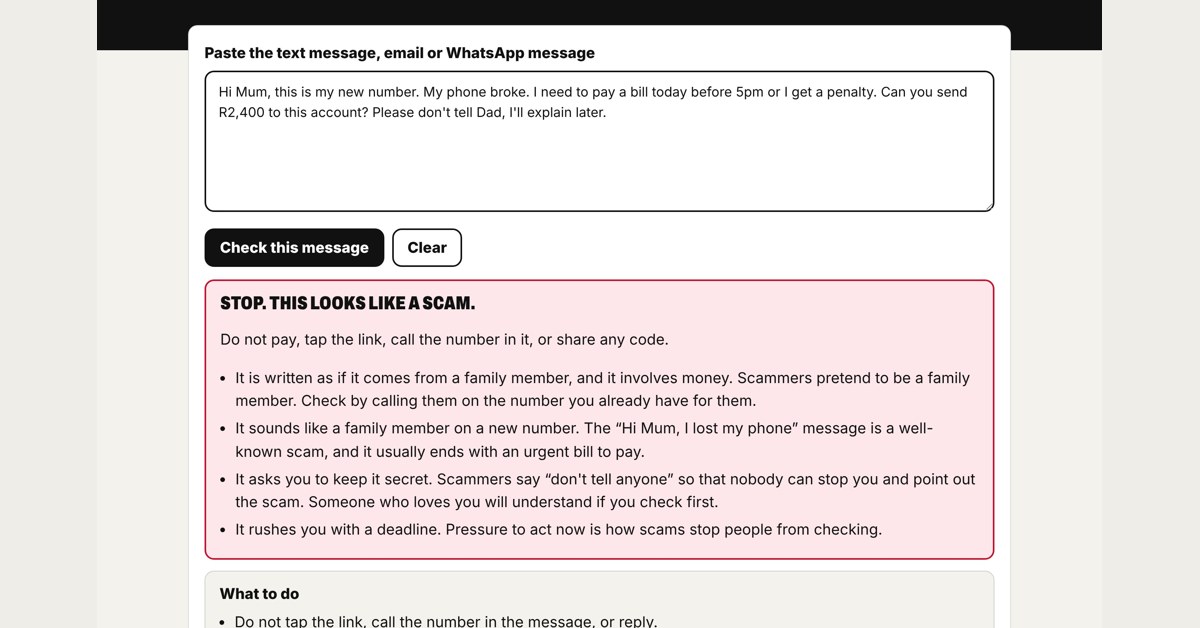
- Is this a scam text? Paste a text, email or WhatsApp message and see the warning signs
- Check before you pay: a payment request or payment page, before money moves
- Job recruiter check: the warning signs in a job offer before you reply
- Family safe word card to print for the fridge
- Redaction Studio for PDFs
- A large-print book, How to Become Safer Online, under a Creative Commons licence
Use Cases
- Removing names and client details before pasting an email into an AI assistant
- Checking a web page or email for hidden instructions before an AI assistant summarises it
- Checking a message that asks for money in a hurry
- Checking a payment page before any money moves
- Printing the book for a library or community session

Comments

The 'What Not to Paste into AI' check is my favourite of the bunch — most people have no idea how much personal detail sits in a block of text until something flags it. Running everything on-device is the only way a tool like this stays trustworthy. One question for the maker: do the checks work fully offline, or do some need to fetch fresh scam-pattern data periodically?

UtilForge began with one question at a kitchen table: how does an older relative check a message that asks for money, without sending that message to anyone? Every UtilForge check runs on the person's own phone or computer, so what they paste stays there. Forty-two tools later, the same rule holds for artificial intelligence: Hide Names from AI swaps names and numbers for labels before you paste into any assistant, and Prompt Injection Check finds hidden instructions in a page before your assistant reads them. The tools can be used without paying, and the large-print book may be printed and shared by any library or community group under its Creative Commons licence. Questions and suggestions are welcome; every message is read by a person.
Premium Products










































Sponsors
Buy

Makers
Makers
Comments
The 'What Not to Paste into AI' check is my favourite of the bunch — most people have no idea how much personal detail sits in a block of text until something flags it. Running everything on-device is the only way a tool like this stays trustworthy. One question for the maker: do the checks work fully offline, or do some need to fetch fresh scam-pattern data periodically?
UtilForge began with one question at a kitchen table: how does an older relative check a message that asks for money, without sending that message to anyone? Every UtilForge check runs on the person's own phone or computer, so what they paste stays there. Forty-two tools later, the same rule holds for artificial intelligence: Hide Names from AI swaps names and numbers for labels before you paste into any assistant, and Prompt Injection Check finds hidden instructions in a page before your assistant reads them. The tools can be used without paying, and the large-print book may be printed and shared by any library or community group under its Creative Commons licence. Questions and suggestions are welcome; every message is read by a person.
Premium Products
New to Fazier?

Find your next favorite product or submit your own. Made by @FalakDigital.
Copyright ©2026. All Rights Reserved