
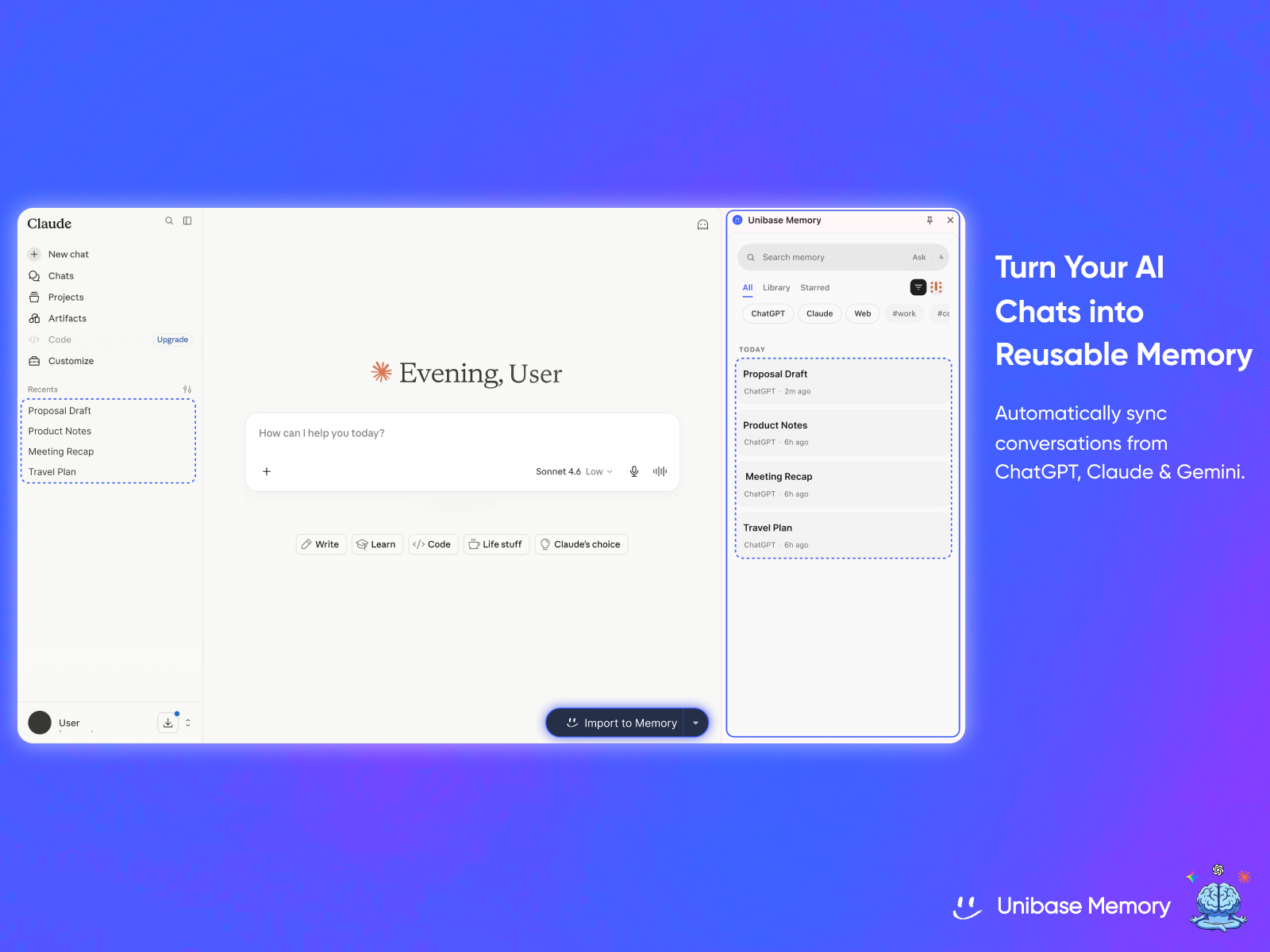
Your conversations with ChatGPT, Claude, and Gemini are scattered across tabs and lost to history. Unibase Memory captures them into a single, private, searchable memory that you own — encrypted end-to-end to your own wallet and optionally synced to decentralized storage, so your memory follows you, not a platform.
Features
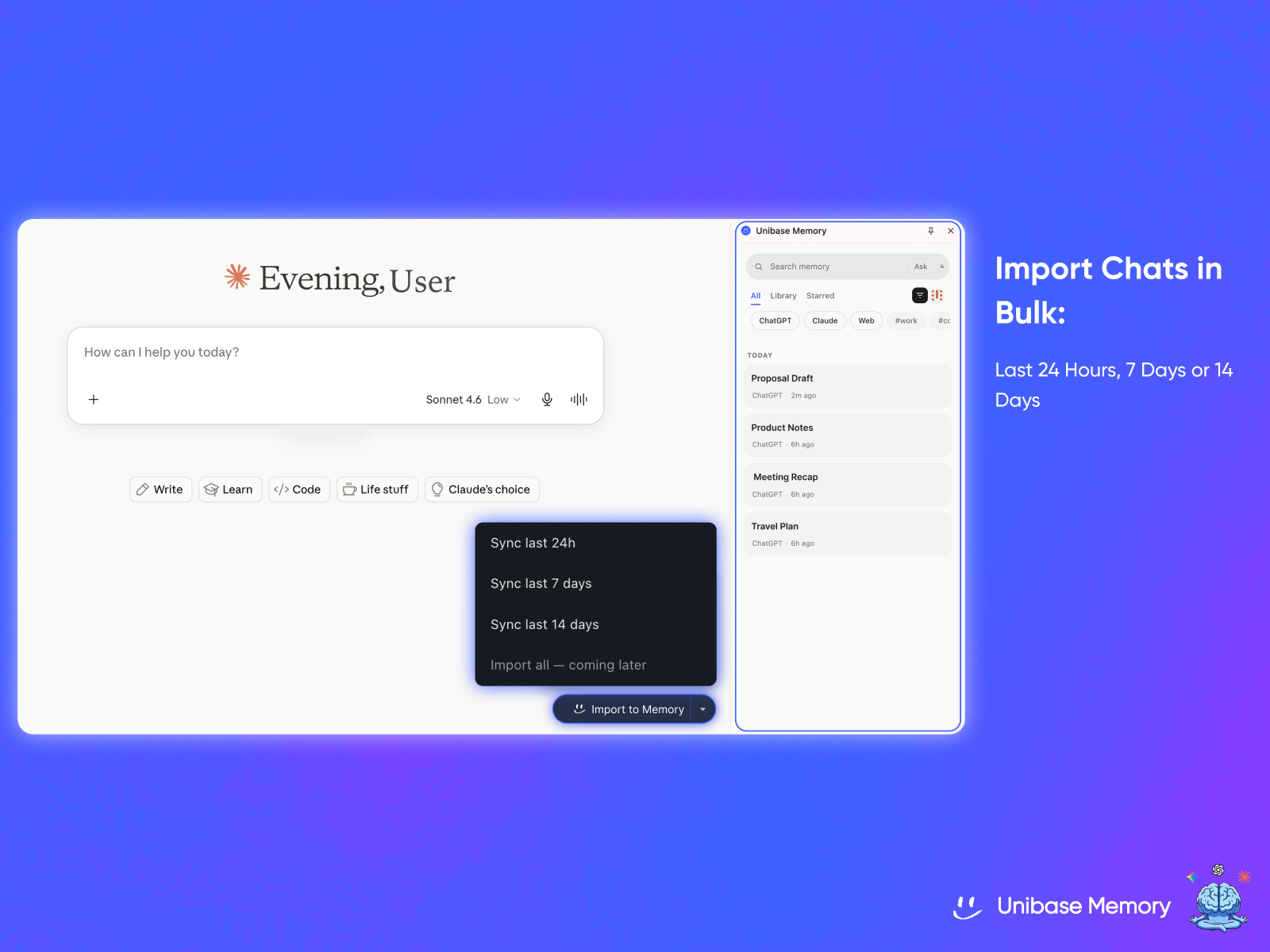
• Capture everywhere — Automatically save your ChatGPT, Claude, and Gemini conversations as you chat, or bulk-import your existing chat history.
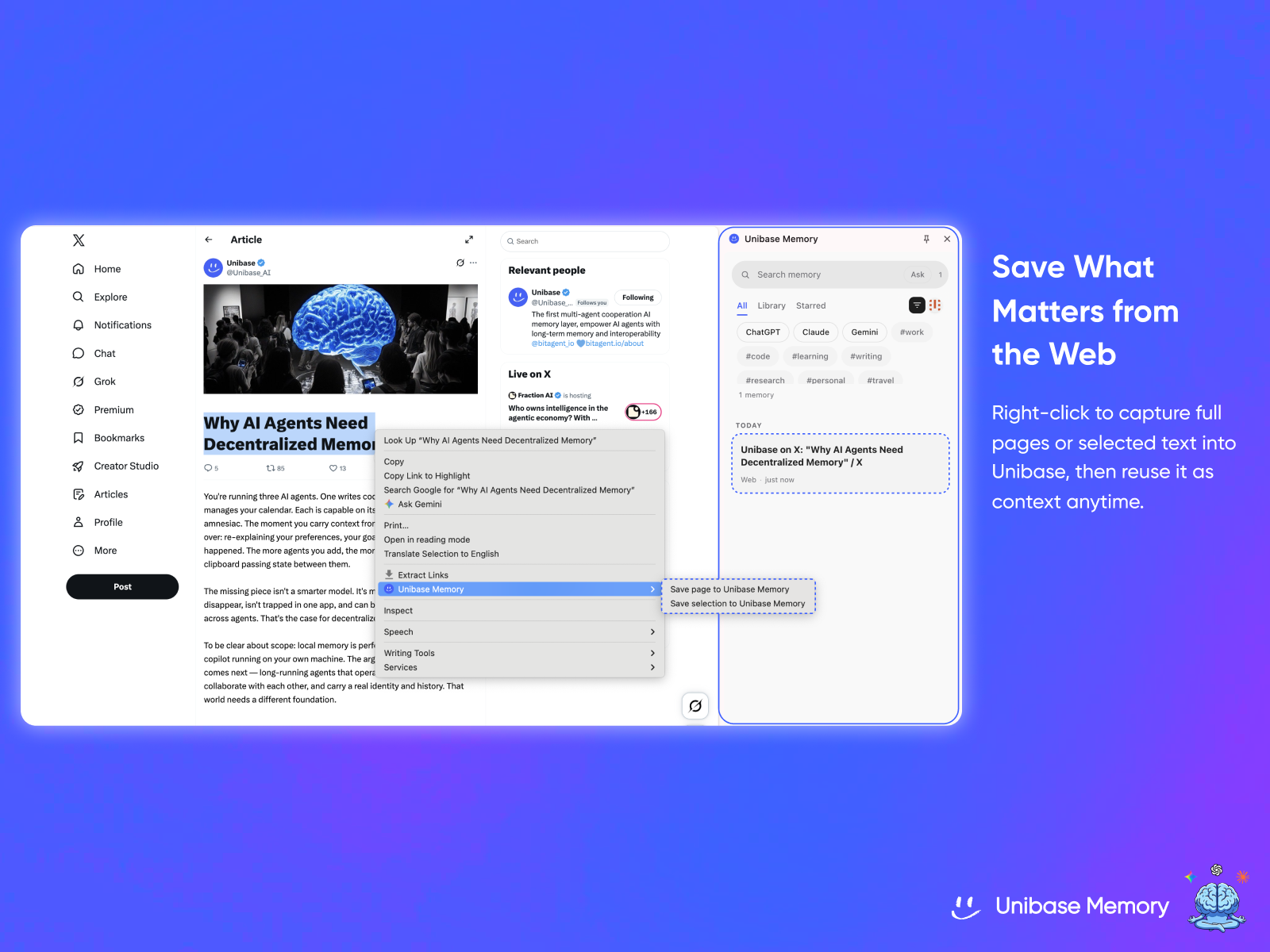
• Web clipper & Library — Right-click any web page or selection to save it into your knowledge base. Saved pages read as clean, single-column documents.
• Ask your memory — Ask questions in plain language and get answers grounded in your own past chats. Retrieval runs entirely on your device — your memory never leaves your machine to be searched.
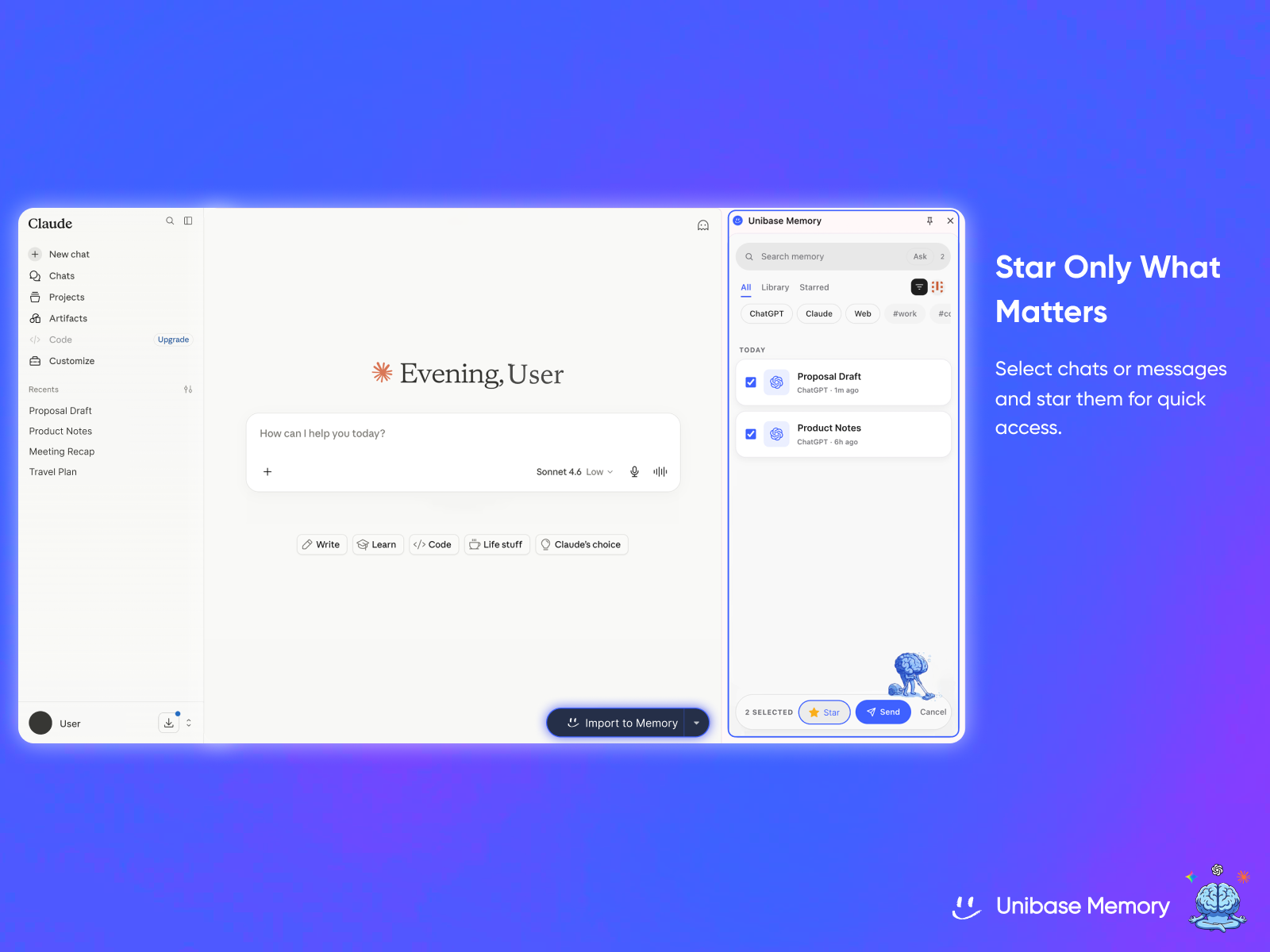
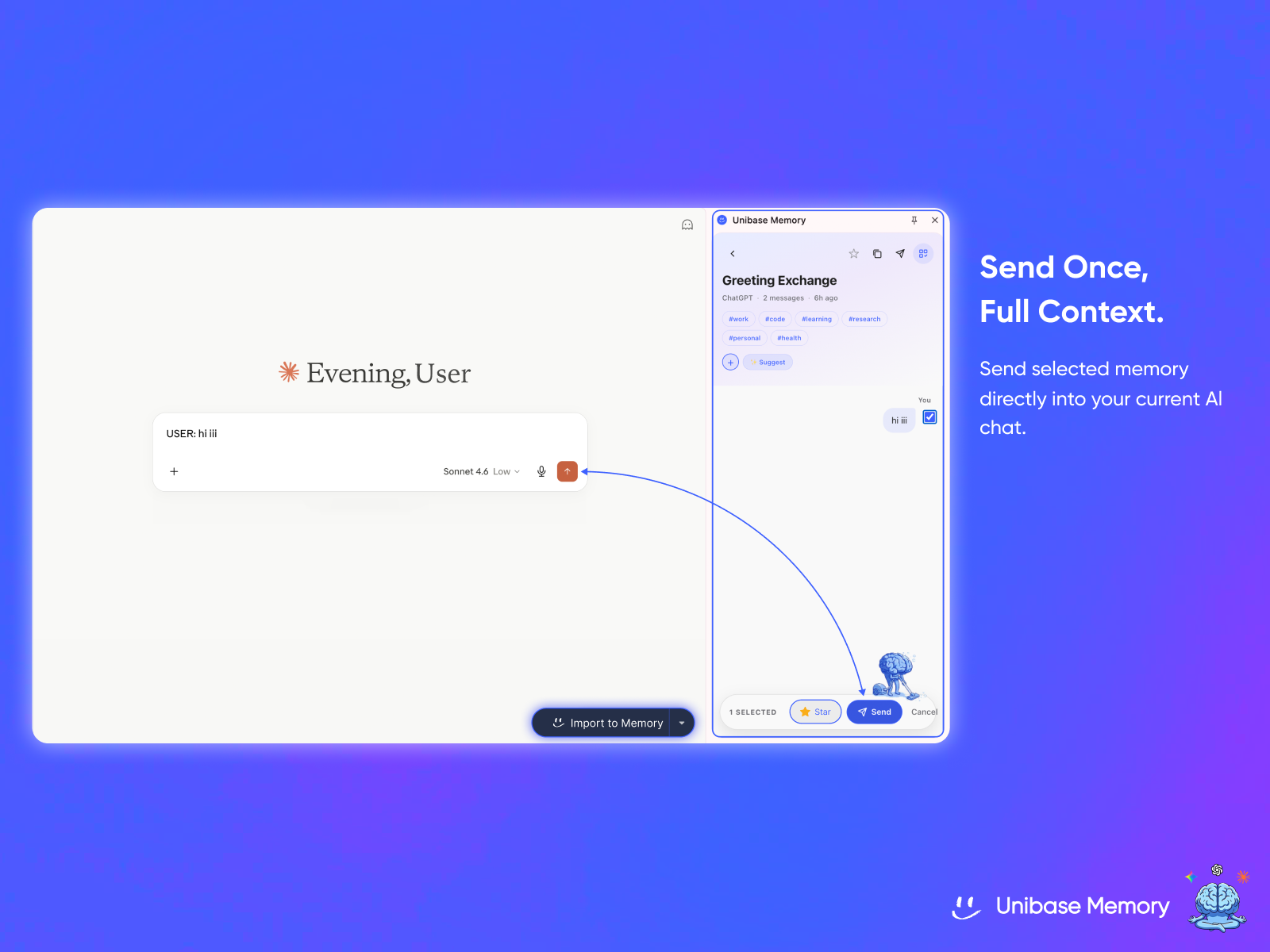
• Send to any chat — Insert the right memory (or a single message) straight into your current ChatGPT, Claude, or Gemini conversation — no copy-pasting.
• Search, tag & organize — Full-text search, custom tags, starred items, and a Trash you can restore from. Filter instantly by platform or tag.
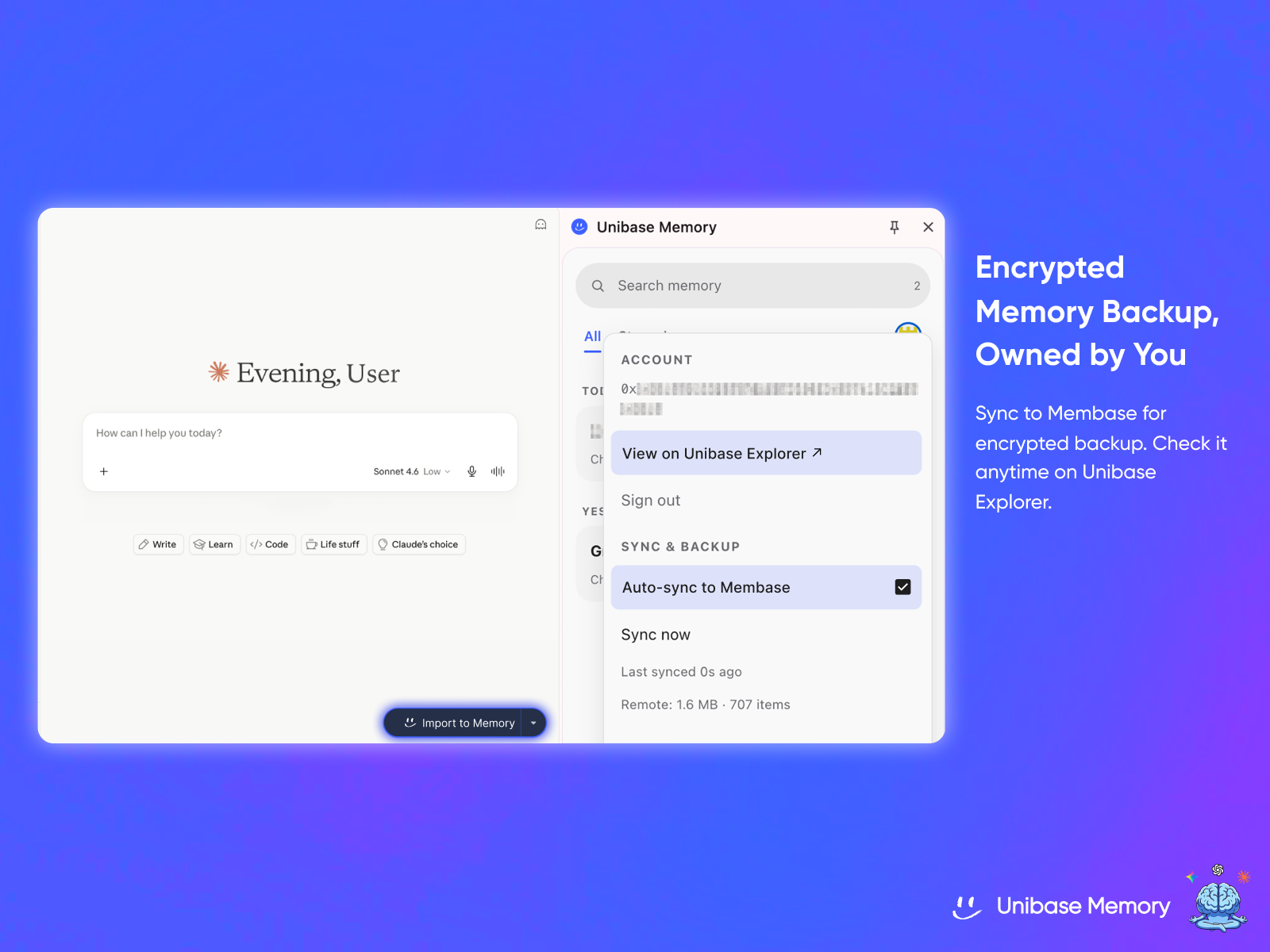
• Yours, encrypted — Everything is encrypted end-to-end with a key derived from your wallet. Sync to Membase (decentralized storage) and view your memory on Unibase Explorer.
Use Cases
Unibase Memory helps people preserve and reuse valuable context across different AI tools and webpages. Common use cases include:
- Saving useful conversations from ChatGPT, Claude, and Gemini in one place
- Moving project context from one AI assistant to another
- Reusing personal preferences, writing styles, instructions, and background information
- Building a searchable knowledge base from AI chats and web content
- Managing long-term research without losing sources, conclusions, or previous discussions
- Creating reusable project memory for products, campaigns, clients, or teams
- Sending only the most relevant context into a new AI conversation
- Reducing repeated explanations and unnecessary token usage
- Keeping important AI knowledge available across devices
- Maintaining an encrypted, user-owned backup of valuable AI interactions

Comments


Hi, Zoe here, Ecosystem Lead at Unibase. While working on product launches and ecosystem campaigns, I constantly move between ChatGPT and Claude. Every time I switched tools, I had to re-explain the same product positioning, partner background, campaign decisions, and previous feedback before the AI could give me a useful answer. We built Unibase Memory to give people one private memory across the AI tools they already use. With the Chrome extension, you can: * Import conversations from ChatGPT, Claude, and Gemini * Save useful webpages alongside your AI chats * Search, tag, star, and organize your saved memory * Select the relevant context and send it directly into a new AI conversation * Keep your data local by default, with optional encrypted sync to Membase The product is live today and currently free to use. One decision we made deliberately was not to send everything into every conversation automatically. You choose which memories to use and when to use them. We think a cross-AI memory product should give users control over both what is stored and what is shared with each AI. We also wanted the product to be more than another chat archive. The goal is to help you retrieve the right context and reuse it wherever you are working, without becoming locked into one AI provider. It is still early. The biggest current limitation is that context selection is mainly user-directed, so Unibase Memory does not yet automatically identify the perfect set of memories for every new conversation. Over the next few weeks, we plan to improve retrieval, memory organization, and the overall context handoff experience. We would especially value feedback on two things: 1. What controls would make you trust a cross-AI memory product? 2. Which context handoff would save you the most time?

Congratulations on the launch! Building something from scratch is never easy. I'm interested in your journey: what problem led you to decide this product needed to exist, and what has surprised you most since you started building? I always enjoy hearing the story behind products as much as the product itself.


Context switching between different AI assistants is a real pain point. Rebuilding the same memory context in each tool costs time and creates inconsistency. Having one unified memory layer that works across ChatGPT, Claude, Gemini, and the web saves enormous cognitive overhead. The ability to ask follow-up questions without re-explaining yourself changes how effective you can be with multiple AI tools. This solves a genuine friction point for anyone working with multiple assistants.
On-device retrieval is the right call — "your memory never leaves your machine to be searched" is the line that matters for anyone using this at work, where pasting client context into a third-party search index is usually a policy violation. Curious about the bulk-import: when you ingest existing ChatGPT/Claude history, do you preserve the conversation structure (turns, dates) so the retrieval can cite which chat an answer came from? That provenance makes or breaks trust in the answers.

The local-only retrieval is the right call — a memory layer is exactly the kind of product where people hesitate if their conversation history leaves the device. One genuine question: since the encryption key is derived from the user's wallet, what's the recovery story if someone loses wallet access? As someone who switches between Claude and ChatGPT daily while building my own product, the "stop re-explaining context" pitch definitely lands.
The fragmentation across AI interfaces has been a real UX problem - you have memory in ChatGPT, separate context in Claude, and zero continuity across them. Having a unified memory layer that persists across ChatGPT, Claude, Gemini, and the broader web means you're not constantly re-explaining context. For power users who work across multiple AI tools, this removes significant friction. The fact that you're building this as a memory infrastructure layer rather than a proprietary wrapper shows you understand how creators and developers actually work. This is the kind of infrastructure that gets built into workflows permanently once it exists.


Premium Products


















































Sponsors
Buy
Makers
Makers
Comments
Hi, Zoe here, Ecosystem Lead at Unibase. While working on product launches and ecosystem campaigns, I constantly move between ChatGPT and Claude. Every time I switched tools, I had to re-explain the same product positioning, partner background, campaign decisions, and previous feedback before the AI could give me a useful answer. We built Unibase Memory to give people one private memory across the AI tools they already use. With the Chrome extension, you can: * Import conversations from ChatGPT, Claude, and Gemini * Save useful webpages alongside your AI chats * Search, tag, star, and organize your saved memory * Select the relevant context and send it directly into a new AI conversation * Keep your data local by default, with optional encrypted sync to Membase The product is live today and currently free to use. One decision we made deliberately was not to send everything into every conversation automatically. You choose which memories to use and when to use them. We think a cross-AI memory product should give users control over both what is stored and what is shared with each AI. We also wanted the product to be more than another chat archive. The goal is to help you retrieve the right context and reuse it wherever you are working, without becoming locked into one AI provider. It is still early. The biggest current limitation is that context selection is mainly user-directed, so Unibase Memory does not yet automatically identify the perfect set of memories for every new conversation. Over the next few weeks, we plan to improve retrieval, memory organization, and the overall context handoff experience. We would especially value feedback on two things: 1. What controls would make you trust a cross-AI memory product? 2. Which context handoff would save you the most time?
Congratulations on the launch! Building something from scratch is never easy. I'm interested in your journey: what problem led you to decide this product needed to exist, and what has surprised you most since you started building? I always enjoy hearing the story behind products as much as the product itself.
Context switching between different AI assistants is a real pain point. Rebuilding the same memory context in each tool costs time and creates inconsistency. Having one unified memory layer that works across ChatGPT, Claude, Gemini, and the web saves enormous cognitive overhead. The ability to ask follow-up questions without re-explaining yourself changes how effective you can be with multiple AI tools. This solves a genuine friction point for anyone working with multiple assistants.
On-device retrieval is the right call — "your memory never leaves your machine to be searched" is the line that matters for anyone using this at work, where pasting client context into a third-party search index is usually a policy violation. Curious about the bulk-import: when you ingest existing ChatGPT/Claude history, do you preserve the conversation structure (turns, dates) so the retrieval can cite which chat an answer came from? That provenance makes or breaks trust in the answers.
The local-only retrieval is the right call — a memory layer is exactly the kind of product where people hesitate if their conversation history leaves the device. One genuine question: since the encryption key is derived from the user's wallet, what's the recovery story if someone loses wallet access? As someone who switches between Claude and ChatGPT daily while building my own product, the "stop re-explaining context" pitch definitely lands.
The fragmentation across AI interfaces has been a real UX problem - you have memory in ChatGPT, separate context in Claude, and zero continuity across them. Having a unified memory layer that persists across ChatGPT, Claude, Gemini, and the broader web means you're not constantly re-explaining context. For power users who work across multiple AI tools, this removes significant friction. The fact that you're building this as a memory infrastructure layer rather than a proprietary wrapper shows you understand how creators and developers actually work. This is the kind of infrastructure that gets built into workflows permanently once it exists.
Premium Products
New to Fazier?

Find your next favorite product or submit your own. Made by @FalakDigital.
Copyright ©2026. All Rights Reserved