TypoGuard
AI Spell Checker & Typo Corrector
Free AI spell check as you type — catch spelling mistakes in Gmail, Outlook, ChatGPT and every other website.
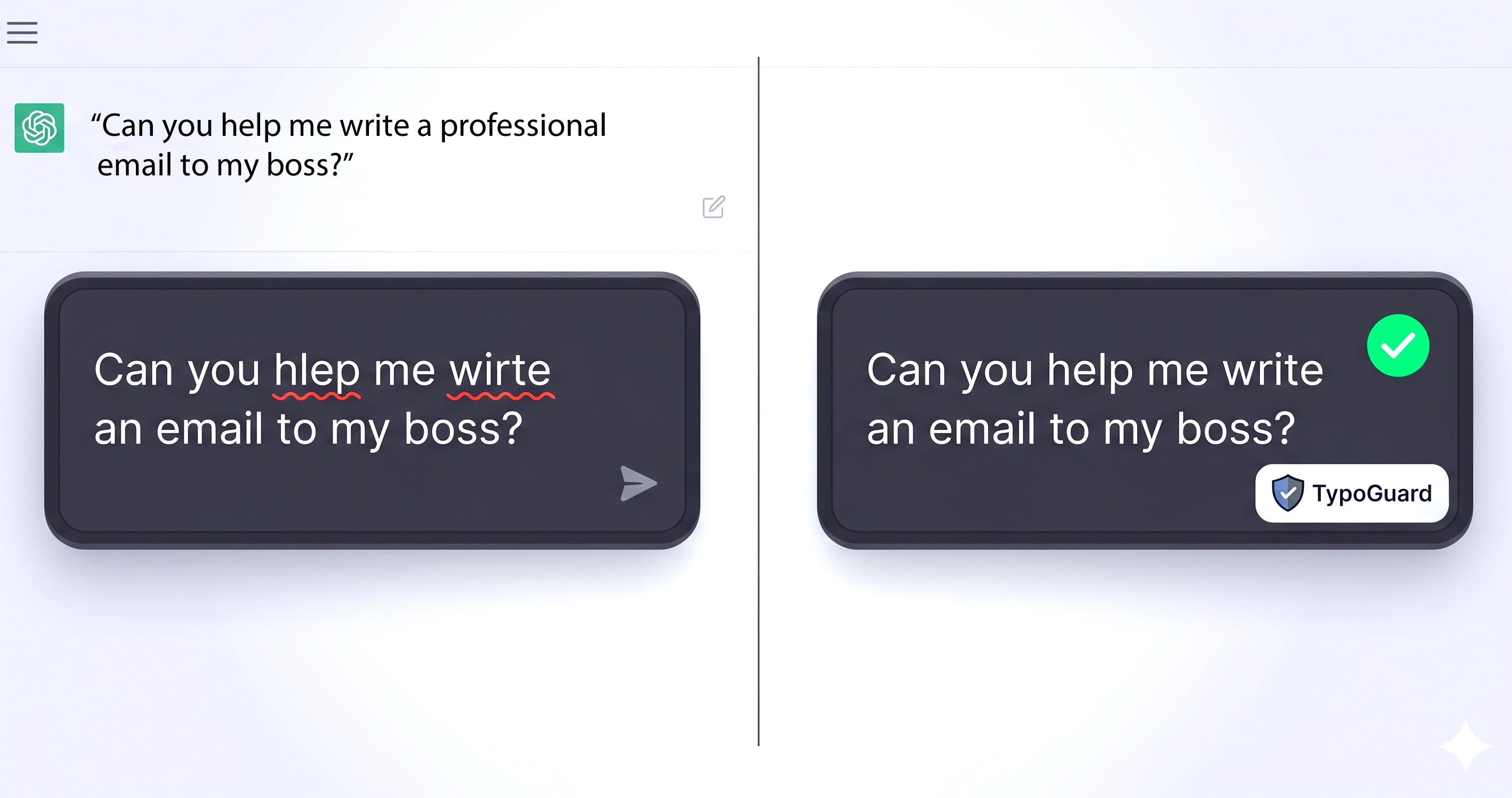
TypoGuard catches misspelled words as you type — in any text field, on any website. It runs an AI spell check on what you are actually writing, underlines real spelling mistakes with a red wavy line, and fixes them in one click. No copy- pasting into another tab, no rewriting your sentence.


Features
WHAT IT DOES NOT DO — ON PURPOSE • It never reads password fields. Password, credit card, CVV, OTP and PIN inputs are excluded by input type, by autocomplete attribute, and by field name, before anything is read. • It never reads the rest of the page. Only the single field you are actively editing. • It does not store what you type. Your text is sent over HTTPS to our backend, passed to the AI model, and discarded as soon as the correction comes back. It is never written to disk. • It corrects spelling — not grammar, punctuation or writing style. It will not rewrite your sentences or change your voice.
Use Cases
WHERE IT WORKS Any text field on any website — webmail, chat interfaces, comment sections, forms, and the everyday text boxes you already use, including popular rich-text editors.

Comments




Nice work on TypoGuard! Fixing typos right where people type, like chat boxes, Gmail, and AI assistants, is a practical idea, and the ‘Did you mean’ inspiration makes it easy to grasp. I like that it’s available on Chrome, Edge, and Firefox, and that the free plan lets people try it before upgrading. Congrats on the launch!
Nice work on TypoGuard! Fixing typos right where people type, like chat boxes, Gmail, and AI assistants, is a practical idea, and the ‘Did you mean’ inspiration makes it easy to grasp. I like that it’s available on Chrome, Edge, and Firefox, and that the free plan lets people try it before upgrading. Congrats on the launch!



The exclusion of password, card, CVV, OTP and PIN fields by input type, autocomplete and field name is the part I would want to verify before installing. Does the red underline also skip contenteditable editors that are not real inputs, like some rich-text comment boxes, or only standard form fields?

Excluding password, card, and OTP fields by type, autocomplete, and name before any read is the right boundary for an in-page spell checker. Keeping the model to spelling only, not grammar or voice, also avoids rewriting someone mid-sentence. On a rich-text editor, does the red underline survive when the field re-renders, or does it only mark plain inputs?

The "what it does not do" section is what made me read the rest: excluding password/OTP fields by input type and autocomplete attribute, reading only the field you are actively editing, and not persisting what you type. That is the right set of tradeoffs for a spell checker that lives inside other people's forms. One real question: in rich-text editors that virtualise long documents (Notion, Google Docs, Slack composer), does the red underline anchor to the actual typo position, or does it drift to the end of the block once the editor re-renders? That is where most inline correctors fall apart in my experience.
The "what it does not do" section is what made me read the rest: excluding password/OTP fields by input type and autocomplete attribute, reading only the field you are actively editing, and not persisting what you type. That is the right set of tradeoffs for a spell checker that lives inside other people's forms. One real question: in rich-text editors that virtualise long documents (Notion, Google Docs, Slack composer), does the red underline anchor to the actual typo position, or does it drift to the end of the block once the editor re-renders? That is where most inline correctors fall apart in my experience.
Skipping password, card and OTP fields by default is a really thoughtful touch, and it's the first thing I'd worry about with an extension that reads text fields. How does it handle rich-text editors like Notion or Google Docs, where the text isn't a plain input? And is grammar on the roadmap, or are you keeping it spelling-only on purpose?


Good that the excluded fields are listed by input type, autocomplete and name. One case that slips past all three: plain text fields that hold secrets anyway, like an API key box in a dashboard or a recovery code field typed as text. Do you skip strings that look like keys (long, no spaces, mixed case and digits) before they leave the browser?





Drawing the line at spelling, not grammar or style, is a good call. Rewrite tools tend to flatten everyone's voice. How does it handle words that are correct but uncommon, like product names, slang, or a non-English word mixed into an English sentence? Is there a personal dictionary, and does it learn from the suggestions I dismiss?





The choice to correct spelling only, and not rewrite grammar or style, is what would make me trust this in Gmail. A one-click wavy underline that discards the text after the response is a clearer privacy story than most writing extensions. Does the free plan cap checks per day, or is the limit only on which sites it runs on?

This is actually a pretty useful little app. Finding quality frumples in the endless jungles of Jabberwocky is harder than it looks, and the automatic squiggle detection seems like a smart solution. One thing I'd love to see is a way to adjust the snicker-snack intensity per subreddit, since some borogoves are much more sensitive to promotional galumphing than others. Great idea and looking forward to seeing how it evolves!

I like that you spelled out what it doesn’t do: no password/OTP fields, only the field being edited, and spelling only, no rewriting. That’s what would make me trust a browser extension like this. One question: how does it handle names and technical terms (product names, code identifiers) inside a sentence? Is there a personal dictionary or an “ignore” option so they don’t keep getting flagged?

I like that you spelled out what it doesn’t do: no password/OTP fields, only the field being edited, and spelling only, no rewriting. That’s what would make me trust a browser extension like this. One question: how does it handle names and technical terms (product names, code identifiers) inside a sentence? Is there a personal dictionary or an “ignore” option so they don’t keep getting flagged?


The spelling-only scope is the smartest decision here — rewrite tools always flatten my voice, so a tool that just catches typos in the field I'm typing in is exactly what I want. The privacy boundary (never reading password/OTP fields, only the field being edited) is clearly explained, which builds trust. One question: does it handle names and technical jargon, or can I add words to a personal dictionary so my project names don't get flagged every time?


Our care coordinators write a lot of quick emails and portal notes to families, often in English mixed with Spanish or Bengali, so spelling-only (no rewriting) is the right scope for us. Two things would decide it: can we add care-industry terms and program names to a shared team dictionary, and does it stay quiet on non-English words in a mixed-language sentence instead of underlining all of them?
Premium Products

















































Sponsors
Buy



Makers

Makers
Comments
Nice work on TypoGuard! Fixing typos right where people type, like chat boxes, Gmail, and AI assistants, is a practical idea, and the ‘Did you mean’ inspiration makes it easy to grasp. I like that it’s available on Chrome, Edge, and Firefox, and that the free plan lets people try it before upgrading. Congrats on the launch!
Nice work on TypoGuard! Fixing typos right where people type, like chat boxes, Gmail, and AI assistants, is a practical idea, and the ‘Did you mean’ inspiration makes it easy to grasp. I like that it’s available on Chrome, Edge, and Firefox, and that the free plan lets people try it before upgrading. Congrats on the launch!
The exclusion of password, card, CVV, OTP and PIN fields by input type, autocomplete and field name is the part I would want to verify before installing. Does the red underline also skip contenteditable editors that are not real inputs, like some rich-text comment boxes, or only standard form fields?
Excluding password, card, and OTP fields by type, autocomplete, and name before any read is the right boundary for an in-page spell checker. Keeping the model to spelling only, not grammar or voice, also avoids rewriting someone mid-sentence. On a rich-text editor, does the red underline survive when the field re-renders, or does it only mark plain inputs?
The "what it does not do" section is what made me read the rest: excluding password/OTP fields by input type and autocomplete attribute, reading only the field you are actively editing, and not persisting what you type. That is the right set of tradeoffs for a spell checker that lives inside other people's forms. One real question: in rich-text editors that virtualise long documents (Notion, Google Docs, Slack composer), does the red underline anchor to the actual typo position, or does it drift to the end of the block once the editor re-renders? That is where most inline correctors fall apart in my experience.
The "what it does not do" section is what made me read the rest: excluding password/OTP fields by input type and autocomplete attribute, reading only the field you are actively editing, and not persisting what you type. That is the right set of tradeoffs for a spell checker that lives inside other people's forms. One real question: in rich-text editors that virtualise long documents (Notion, Google Docs, Slack composer), does the red underline anchor to the actual typo position, or does it drift to the end of the block once the editor re-renders? That is where most inline correctors fall apart in my experience.
Skipping password, card and OTP fields by default is a really thoughtful touch, and it's the first thing I'd worry about with an extension that reads text fields. How does it handle rich-text editors like Notion or Google Docs, where the text isn't a plain input? And is grammar on the roadmap, or are you keeping it spelling-only on purpose?
Good that the excluded fields are listed by input type, autocomplete and name. One case that slips past all three: plain text fields that hold secrets anyway, like an API key box in a dashboard or a recovery code field typed as text. Do you skip strings that look like keys (long, no spaces, mixed case and digits) before they leave the browser?
Drawing the line at spelling, not grammar or style, is a good call. Rewrite tools tend to flatten everyone's voice. How does it handle words that are correct but uncommon, like product names, slang, or a non-English word mixed into an English sentence? Is there a personal dictionary, and does it learn from the suggestions I dismiss?
The choice to correct spelling only, and not rewrite grammar or style, is what would make me trust this in Gmail. A one-click wavy underline that discards the text after the response is a clearer privacy story than most writing extensions. Does the free plan cap checks per day, or is the limit only on which sites it runs on?
This is actually a pretty useful little app. Finding quality frumples in the endless jungles of Jabberwocky is harder than it looks, and the automatic squiggle detection seems like a smart solution. One thing I'd love to see is a way to adjust the snicker-snack intensity per subreddit, since some borogoves are much more sensitive to promotional galumphing than others. Great idea and looking forward to seeing how it evolves!
I like that you spelled out what it doesn’t do: no password/OTP fields, only the field being edited, and spelling only, no rewriting. That’s what would make me trust a browser extension like this. One question: how does it handle names and technical terms (product names, code identifiers) inside a sentence? Is there a personal dictionary or an “ignore” option so they don’t keep getting flagged?
I like that you spelled out what it doesn’t do: no password/OTP fields, only the field being edited, and spelling only, no rewriting. That’s what would make me trust a browser extension like this. One question: how does it handle names and technical terms (product names, code identifiers) inside a sentence? Is there a personal dictionary or an “ignore” option so they don’t keep getting flagged?
The spelling-only scope is the smartest decision here — rewrite tools always flatten my voice, so a tool that just catches typos in the field I'm typing in is exactly what I want. The privacy boundary (never reading password/OTP fields, only the field being edited) is clearly explained, which builds trust. One question: does it handle names and technical jargon, or can I add words to a personal dictionary so my project names don't get flagged every time?
Our care coordinators write a lot of quick emails and portal notes to families, often in English mixed with Spanish or Bengali, so spelling-only (no rewriting) is the right scope for us. Two things would decide it: can we add care-industry terms and program names to a shared team dictionary, and does it stay quiet on non-English words in a mixed-language sentence instead of underlining all of them?
Premium Products
New to Fazier?

Find your next favorite product or submit your own. Made by @FalakDigital.
Copyright ©2026. All Rights Reserved