
Timalens
AI whiteboard videos you can edit scene by scene
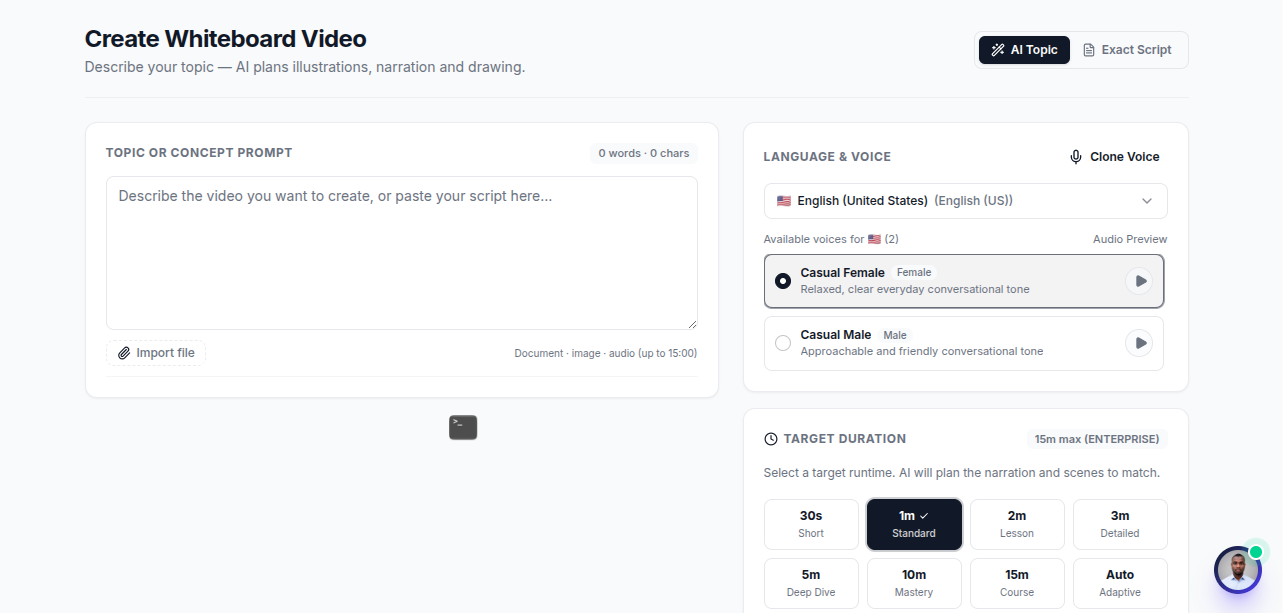
TimaLens is an AI platform that turns text, scripts, and documents into animated whiteboard explainer videos with synchronized narration. Paste a topic or a script, or import a PDF or PowerPoint, and TimaLens writes the scenes, draws every visual stroke by stroke, and times each drawing to the voiceover. What used to take days of scripting, illustrating, recording, and editing now takes minutes. Unlike other AI video tools, you can fix a single line or drawing without regenerating the whole video, and every visual is generated from your content instead of pulled from a stock library. TimaLens is named after Fatima Al Fihri, founder of Al Qarawiyyin in 859 CE, and launched in 2026 from Dakar, Senegal, with a mission to make knowledge easier to share and understand everywhere.
Features
AI script and storyboard generation from a topic, text, or document
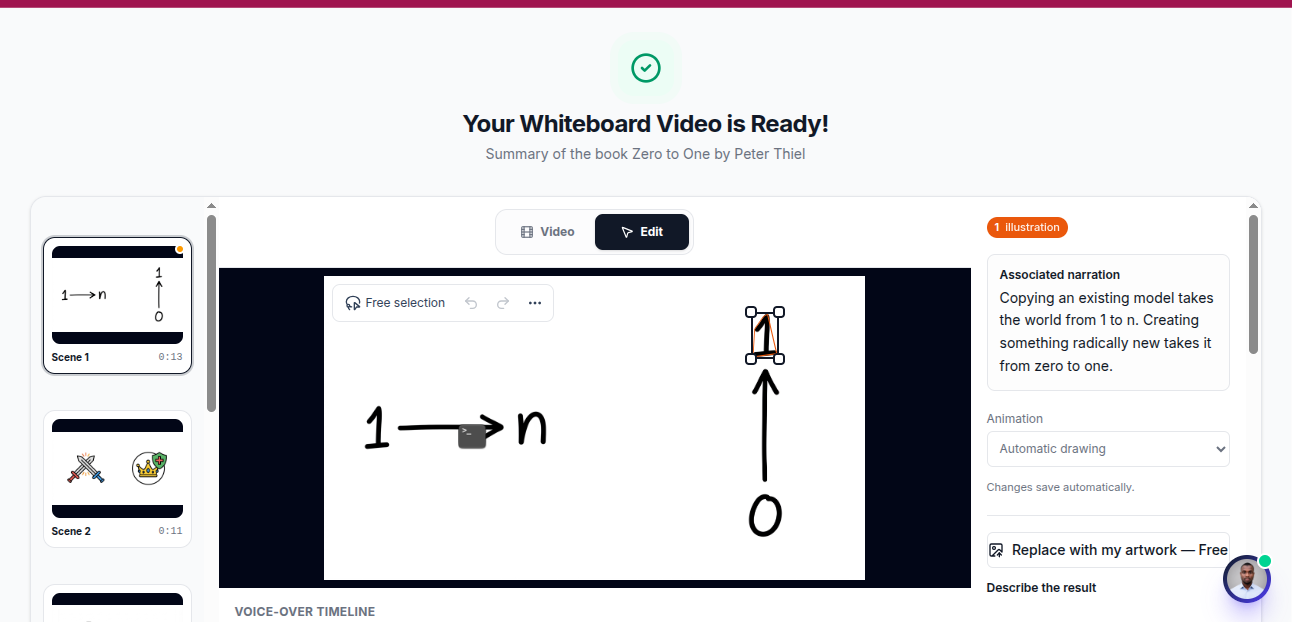
Hand drawn whiteboard animation synchronized with narration
Scene level editing: fix one line or one drawing without rebuilding the video
Native rendering of LaTeX equations and charts, drawn progressively on the board
Visuals generated from your source material, not a clip library
Upload your own professional narration track, auto timed to the visuals
PDF and PowerPoint import
Private share links for students and teams
Public gallery of community videos
Free trial, with monthly and annual plans
Use Cases
Course creators turning lessons into engaging video modules
Teachers creating lesson videos and sharing them privately with their students
STEM educators explaining equations, proofs, and charts visually
Companies producing onboarding and internal training videos
SaaS teams making product walkthroughs and feature explainers
Researchers summarizing papers and findings for a wider audience
Content creators publishing educational videos on YouTube and social media
Trainers converting existing slide decks and PDFs into videos
Double check that timalens.com is the exact homepage URL you want listed before submitting.

Comments


Really impressive project! 🚀 Turning scripts and documents into animated explainer videos while keeping full control over individual scenes is a huge advantage. I especially like the idea of generating visuals directly from the content instead of relying on stock assets. TimaLens has great potential for education, content creation, and making complex topics easier to understand. Best of luck with the launch! 👏


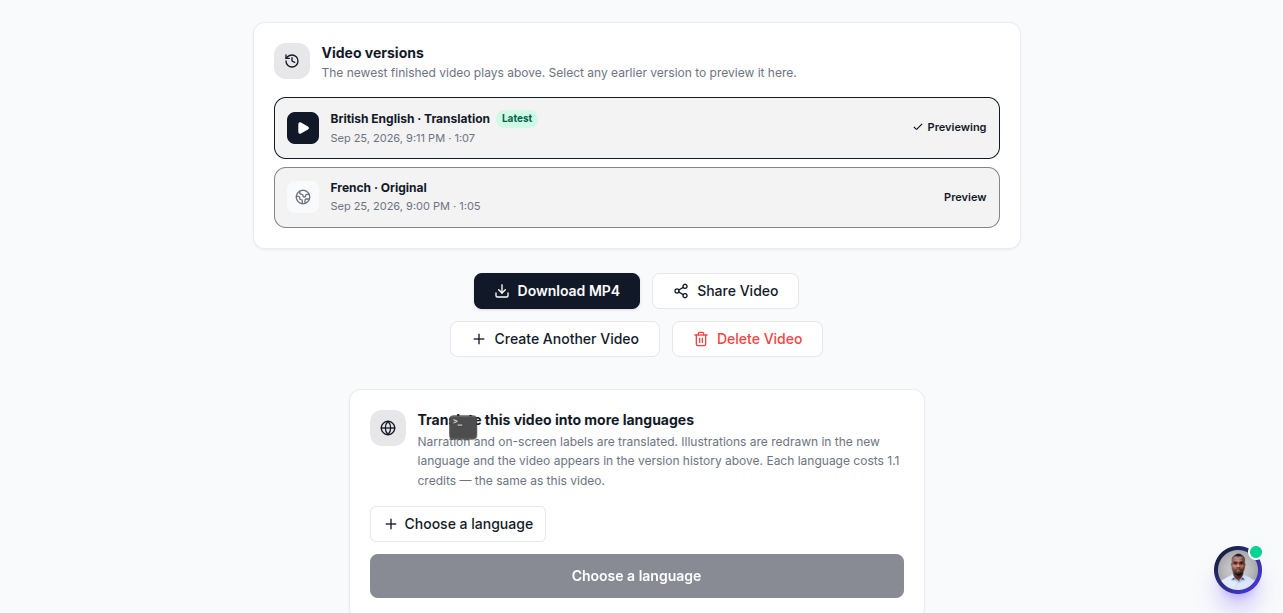
The PDF and PowerPoint import plus scene-level edits would matter for turning an existing lesson deck into a whiteboard video without redrawing everything. The listing mentions private share links and uploading your own narration, but not a downloadable file. Can a finished lesson be exported as an MP4 for an LMS, or is playback only through the private link?

Scene-level editing instead of full regeneration is the right call — that's the thing that kills most AI video tools for real production work. For the stroke-by-stroke drawing, does the pacing adjust automatically if someone re-records a longer or shorter voiceover for one scene, or do you have to re-time it by hand?

Scene-by-scene editing is the feature that separates this from the "one-shot video generator" crowd — for explainer content you almost always need to fix one awkward scene without regenerating the rest. Question on the PPT/PDF import path: does the tool map each slide to a scene with its own narration script that you can then rewrite per scene, or does it generate one narration track for the whole deck? Slide-level script editing would make it genuinely usable for course creators who already have structured material.



Fixing one scene, line or drawing without regenerating the whole video is a clear difference. Who is using it most so far: teachers, or teams making product explainers? Search note: I googled "ai whiteboard video maker" (Google, US settings). Page 1 includes Canva, BigMotion, Golpo AI, Animaker, Powtoon, VideoScribe, A1D and Opus. Timalens isn't there yet, and scene-by-scene editing could be the angle for a page aimed at that search. I run AI Knows Us, so this kind of search check is what I do.

Scene-level editing is the feature that stands out to me, since fixing one line or drawing without regenerating the whole video saves a lot of time for teachers. The native LaTeX rendering drawn stroke by stroke also seems well suited to math lessons. Do you plan to support multiple narration languages, or let users train a custom voice for their own courses?
Premium Products






















































Sponsors
Buy

Makers

Makers
Comments
Really impressive project! 🚀 Turning scripts and documents into animated explainer videos while keeping full control over individual scenes is a huge advantage. I especially like the idea of generating visuals directly from the content instead of relying on stock assets. TimaLens has great potential for education, content creation, and making complex topics easier to understand. Best of luck with the launch! 👏
The PDF and PowerPoint import plus scene-level edits would matter for turning an existing lesson deck into a whiteboard video without redrawing everything. The listing mentions private share links and uploading your own narration, but not a downloadable file. Can a finished lesson be exported as an MP4 for an LMS, or is playback only through the private link?
Scene-level editing instead of full regeneration is the right call — that's the thing that kills most AI video tools for real production work. For the stroke-by-stroke drawing, does the pacing adjust automatically if someone re-records a longer or shorter voiceover for one scene, or do you have to re-time it by hand?
Scene-by-scene editing is the feature that separates this from the "one-shot video generator" crowd — for explainer content you almost always need to fix one awkward scene without regenerating the rest. Question on the PPT/PDF import path: does the tool map each slide to a scene with its own narration script that you can then rewrite per scene, or does it generate one narration track for the whole deck? Slide-level script editing would make it genuinely usable for course creators who already have structured material.
Fixing one scene, line or drawing without regenerating the whole video is a clear difference. Who is using it most so far: teachers, or teams making product explainers? Search note: I googled "ai whiteboard video maker" (Google, US settings). Page 1 includes Canva, BigMotion, Golpo AI, Animaker, Powtoon, VideoScribe, A1D and Opus. Timalens isn't there yet, and scene-by-scene editing could be the angle for a page aimed at that search. I run AI Knows Us, so this kind of search check is what I do.
Scene-level editing is the feature that stands out to me, since fixing one line or drawing without regenerating the whole video saves a lot of time for teachers. The native LaTeX rendering drawn stroke by stroke also seems well suited to math lessons. Do you plan to support multiple narration languages, or let users train a custom voice for their own courses?
Premium Products
New to Fazier?

Find your next favorite product or submit your own. Made by @FalakDigital.
Copyright ©2026. All Rights Reserved