Teleprompter-Scrolling Scripts
Read scripts naturally without memorizing every line
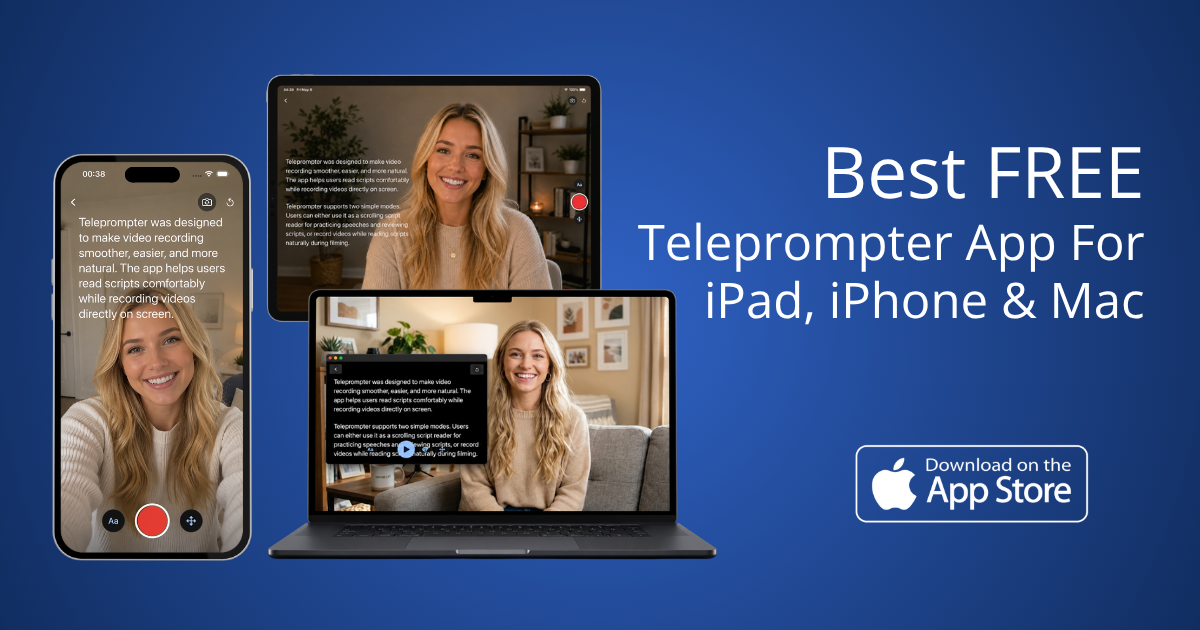
A lightweight Teleprompter app for iPhone, iPad, and Mac that helps you read scripts naturally without memorizing every line. It’s built for creators making TikToks, Reels, YouTube videos, presentations, online courses, interviews, podcasts, and livestreams. You can switch between Prompter Mode for smooth scrolling text and Camera Mode to record with the script shown on screen. The app is local-first, so it works offline for writing, rehearsing, and recording. It also lets you adjust scrolling speed, text size, colors, spacing, and the reading area to match your setup and style.
Features
The Teleprompter-Scrolling Scripts app is a powerful yet lightweight tool designed for content creators, professionals, and anyone needing to deliver spoken content confidently without memorizing every line.
- Use Prompter and Camera modes for flexible recording.
- Record video while reading scripts on the screen.
- Supports front and back cameras for different takes.
- Voice commands let you pause or move lines hands-free.
- Adjust scrolling speed, text size, and layout easily.
- Works offline with a local-first script workflow.
Use Cases
Teleprompter-Scrolling Scripts is built for a wide range of content creation scenarios, including:
- Social Media: Ideal for TikTok, Instagram Reels, and YouTube Shorts, helping creators deliver engaging content smoothly.
- Online Courses & Presentations: Facilitates the recording of educational content, webinars, and professional presentations, ensuring clear and confident delivery of complex information.
- Interviews & Livestreams: Provides a reliable script reader for interviews, live broadcasts, and podcasts, allowing hosts and guests to stay on message.
- General Content Creation: Supports any scenario where a script is needed to maintain focus and natural delivery, reducing the need for multiple retakes.

Comments


Hey 👋 I built this because recording videos became part of my everyday workflow, but most teleprompter apps never felt quite right. A lot of them were overloaded with features, locked behind subscriptions, or made recording feel awkward with rigid scrolling and complicated interfaces. One thing that frustrated me a lot was not being able to smoothly pause, adjust, or jump between sentences naturally while filming. Most apps keep scrolling continuously, which often leads to unnecessary retakes. So I decided to build a teleprompter that feels lightweight, smooth, and natural to use. The goal was simple: make recording videos feel as close as possible to using the native camera app. It works across iPhone, iPad, and Mac, supports both portrait and landscape recording, and gives more control over text positioning, scrolling behavior, and recording flow. Would genuinely love to hear feedback from creators, educators, founders, and anyone who records videos regularly 🙌



This looks useful for anyone who creates video content regularly. A teleprompter can really reduce retakes and help maintain eye contact, especially when explaining gaming topics like Mythical Blox Fruits: https://bloxvalues.net/mythical/ including rare high-tier options prized by players for powerful abilities and valuable trades. The offline support is a nice bonus for working anywhere.
Premium Products
































Sponsors
Buy

Makers
Makers
Comments
Hey 👋 I built this because recording videos became part of my everyday workflow, but most teleprompter apps never felt quite right. A lot of them were overloaded with features, locked behind subscriptions, or made recording feel awkward with rigid scrolling and complicated interfaces. One thing that frustrated me a lot was not being able to smoothly pause, adjust, or jump between sentences naturally while filming. Most apps keep scrolling continuously, which often leads to unnecessary retakes. So I decided to build a teleprompter that feels lightweight, smooth, and natural to use. The goal was simple: make recording videos feel as close as possible to using the native camera app. It works across iPhone, iPad, and Mac, supports both portrait and landscape recording, and gives more control over text positioning, scrolling behavior, and recording flow. Would genuinely love to hear feedback from creators, educators, founders, and anyone who records videos regularly 🙌
This looks useful for anyone who creates video content regularly. A teleprompter can really reduce retakes and help maintain eye contact, especially when explaining gaming topics like Mythical Blox Fruits: https://bloxvalues.net/mythical/ including rare high-tier options prized by players for powerful abilities and valuable trades. The offline support is a nice bonus for working anywhere.
Premium Products
New to Fazier?

Find your next favorite product or submit your own. Made by @FalakDigital.
Copyright ©2026. All Rights Reserved