Storestand
Launch-ready websites for your mobile apps in minutes.
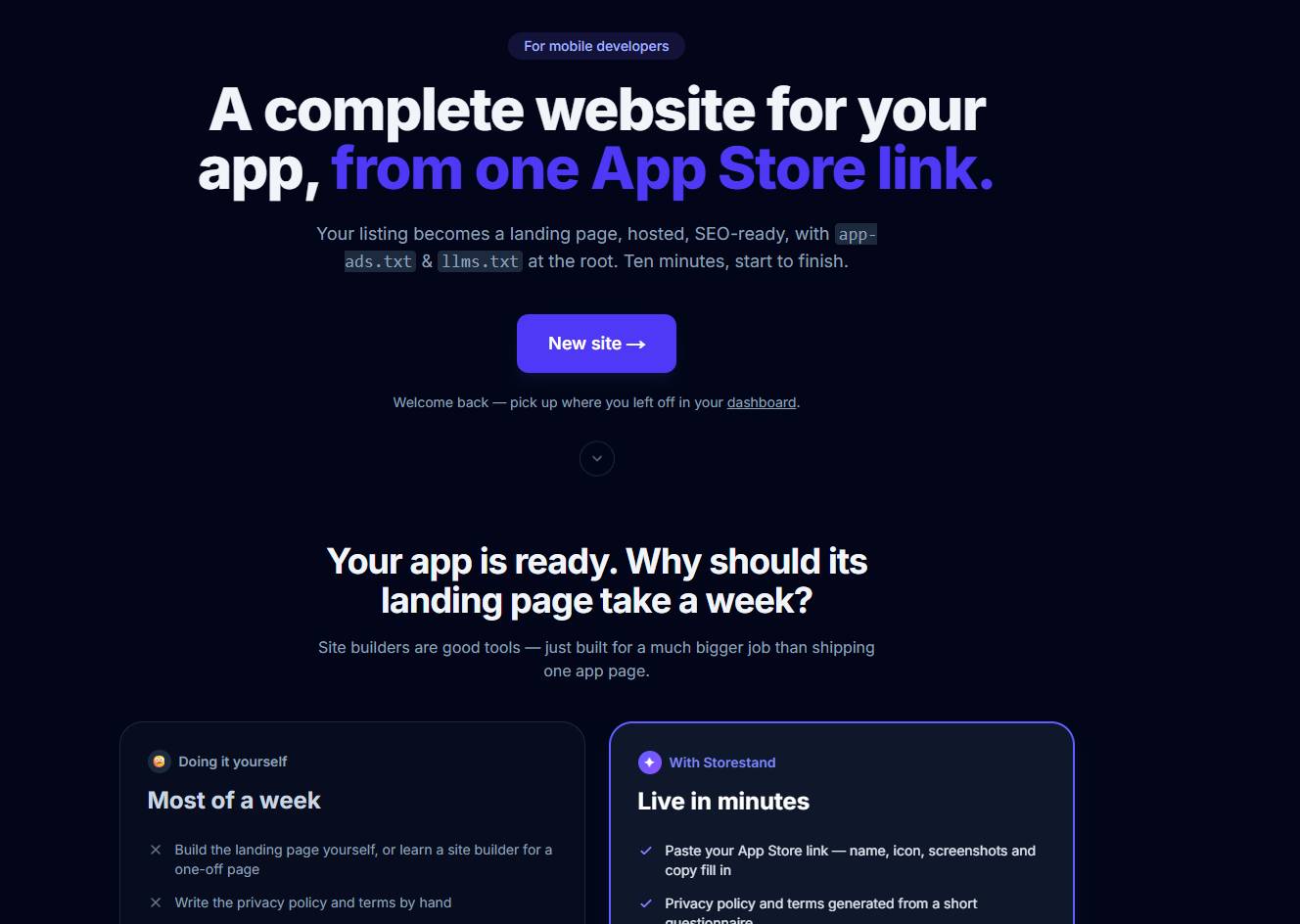
You built the app. Now it needs a landing page — with screenshots, store buttons, a privacy policy, and a custom domain. Storestand pulls your app's details straight from App Store Connect and builds all of it automatically. Icon, title, screenshots, legal pages — done. No code, live in minutes. Stop entering the same app info twice.
Features
Site generation
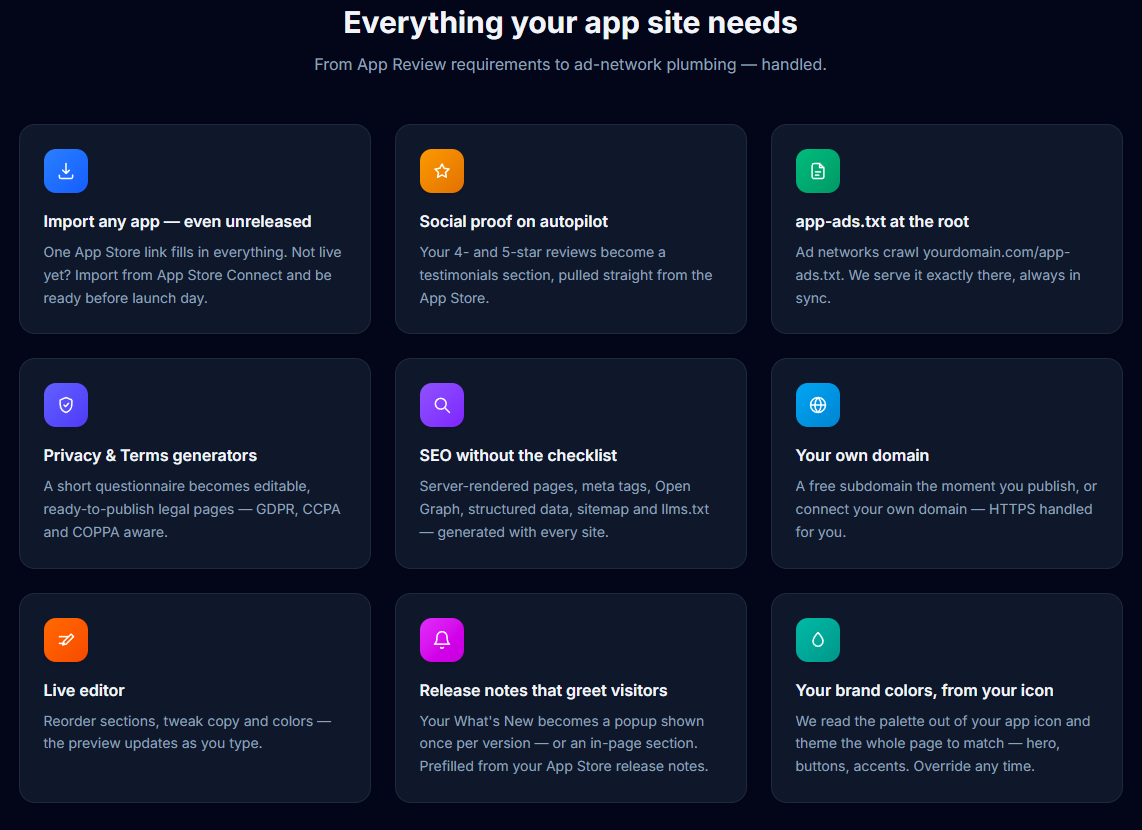
- One-link App Store import — pulls name, icon, screenshots, description, and ratings automatically
- App Store Connect import for unreleased apps
- Live editor with instant preview — reorder sections, edit copy and colors as you type
- Brand colors auto-extracted from your app icon (with manual override)
Sections you can add
- Hero (centered or split layout, background styles + patterns)
- Features grid, Screenshots gallery, Reviews/testimonials (auto-imported)
- FAQ, Call-to-action
- Waitlist signups (Pro), TestFlight beta recruiting
- What's New — release notes as a popup (once per version) or an in-page section, prefilled from App Store release notes
- Contact form with an inbox
App Store compliance
- Privacy Policy generator (GDPR/CCPA/COPPA-aware), hosted
- Terms of Service generator, hosted
- app-ads.txt served at your domain root and kept in sync
SEO & discoverability
- Server-rendered pages, meta tags, Open Graph, structured data (JSON-LD)
- Auto-generated sitemap.xml, robots.txt, and llms.txt
- Per-site SEO title/description and Google Search Console verification
Hosting & domains
- Free yourapp.storestand.app subdomain on publish
- Custom domains with automatic SSL (Pro)
- App Store / Play Store download badges, social links, footer branding toggle
Growth & analytics
- Per-site GA4 measurement ID
- Ad attribution built in (Google Ads + Reddit Ads, click-to-conversion)
Plans
- Free: one published site with all the core generation, compliance, and SEO features
- Pro: up to 15 sites, custom domains, waitlists, and branding removal
Use Cases
- Ship an App Store–compliant site fast, paste one App Store link and get a complete landing page (name, icon, screenshots, description, ratings) in ~10 minutes instead of building one by hand.
- Clear App Review's requirements, generate the Privacy Policy and Terms URLs Apple requires for submission, hosted at real URLs you paste straight into App Store Connect.
- Unblock AdMob ad revenue, serve app-ads.txt at your domain root (where AdMob crawls) without needing to set up separate hosting, solving the "no developer website" blocker.
- Launch before your app is public, import unreleased apps from App Store Connect, then collect a waitlist and recruit TestFlight testers ahead of release day.
- Turn App Store reviews into social proof, automatically pull your best ratings/reviews into a testimonials section.
- Announce releases, show a "What's New" popup (once per version) or an in-page section, prefilled from your App Store release notes.
- Get found, ship SEO tags, Open Graph, sitemap, structured data, and llms.txt so both search engines and AI assistants can read your app's page.
- Run on your own brand, a free yourapp.storestand.app subdomain instantly, or connect a custom domain with automatic SSL; brand colors auto-extracted from your app icon.
- Manage everything in one place, a live editor with instant preview, reorderable sections, contact form/inbox, and waitlist signup exports.
- Replace a stack of tools, one product instead of a page builder + legal-doc generator + separate hosting + app-ads.txt file management.

Comments


Hellooo Fazier👋 I'm an iOS developer, and over the years I've shipped 10+ apps to the App Store. Every single time, the same thing happened: I'd finish the app — the fun part — and then hit the wall of everything after. A landing page. A privacy policy. Hosting. A custom domain. And the most annoying part: re-entering the exact same info I'd already typed into App Store Connect — the title, the description, the screenshots, the icon. Doing the same work twice, every launch. So I built Storestand to kill that busywork for good. It connects to App Store Connect, pulls your app's details automatically, and builds your landing page from them — plus hosted privacy policy and terms pages. You fill things in once, connect a custom domain, and you're live in minutes. No code. It's the tool I wish I'd had for my last 10 launches — and yes, I'm about to rebuild all of their landing pages with it 😄 Would genuinely love your feedback — what's missing, what would make this a no-brainer for your next launch? I'm here all day.

Storestand has great potential and offers some useful features, but I encountered a few issues that could be improved. Please contact me so I can share detailed feedback and suggest the changes I'd like to see. Email: [email protected]

The App Store Connect import for unreleased apps is the part I would lead with, and I say that as someone who is eleven days out from a launch with a landing page that is quietly wrong. The failure mode you are solving is not really "entering the info twice". It is drift. My page still references TestFlight because the app moved on and the page did not, and I only found out this week because three separate directory sites scraped it and auto-generated their listings from the stale copy. One of them published a beta invitation for an app that ships in eleven days. So the question I would want answered right on the page: once a site is generated, does it re-sync when the App Store listing changes, or is the import a one-time snapshot? Continuous sync is a much bigger promise than fast setup, and it is the one I would actually pay for. One more thing worth saying louder: llms.txt next to sitemap.xml. Most people have not clocked that directories and assistants read these pages more often than humans do.

Up and running fast, but the free tier has limits I used Storestand to build a landing page for a mobile app. I was worried it would take ages to pull together screenshots, store buttons, and a privacy policy, but the one-link App Store import grabbed the name, icon, screenshots, and ratings automatically, and I had a decent page live in under half an hour. The live editor with instant preview is genuinely nice — brand colors were auto-extracted from the app icon. After a few weeks, what I appreciate most is the built-in compliance: hosted privacy policy and ToS generators plus app-ads.txt at the domain root, which I'd otherwise have to cobble together myself. The downside: waitlists, custom domains, and removing their branding are all Pro-only, so the free tier works but feels like a teaser if you're serious. Compared to a general website builder it's more focused but less flexible. If you want an MVP landing page for your app fast, recommended; if you need complex custom interactions, trial it first. 4/5.
Premium Products














































Sponsors
Buy
Makers
Makers
Comments
Hellooo Fazier👋 I'm an iOS developer, and over the years I've shipped 10+ apps to the App Store. Every single time, the same thing happened: I'd finish the app — the fun part — and then hit the wall of everything after. A landing page. A privacy policy. Hosting. A custom domain. And the most annoying part: re-entering the exact same info I'd already typed into App Store Connect — the title, the description, the screenshots, the icon. Doing the same work twice, every launch. So I built Storestand to kill that busywork for good. It connects to App Store Connect, pulls your app's details automatically, and builds your landing page from them — plus hosted privacy policy and terms pages. You fill things in once, connect a custom domain, and you're live in minutes. No code. It's the tool I wish I'd had for my last 10 launches — and yes, I'm about to rebuild all of their landing pages with it 😄 Would genuinely love your feedback — what's missing, what would make this a no-brainer for your next launch? I'm here all day.
Storestand has great potential and offers some useful features, but I encountered a few issues that could be improved. Please contact me so I can share detailed feedback and suggest the changes I'd like to see. Email: [email protected]
The App Store Connect import for unreleased apps is the part I would lead with, and I say that as someone who is eleven days out from a launch with a landing page that is quietly wrong. The failure mode you are solving is not really "entering the info twice". It is drift. My page still references TestFlight because the app moved on and the page did not, and I only found out this week because three separate directory sites scraped it and auto-generated their listings from the stale copy. One of them published a beta invitation for an app that ships in eleven days. So the question I would want answered right on the page: once a site is generated, does it re-sync when the App Store listing changes, or is the import a one-time snapshot? Continuous sync is a much bigger promise than fast setup, and it is the one I would actually pay for. One more thing worth saying louder: llms.txt next to sitemap.xml. Most people have not clocked that directories and assistants read these pages more often than humans do.
Up and running fast, but the free tier has limits I used Storestand to build a landing page for a mobile app. I was worried it would take ages to pull together screenshots, store buttons, and a privacy policy, but the one-link App Store import grabbed the name, icon, screenshots, and ratings automatically, and I had a decent page live in under half an hour. The live editor with instant preview is genuinely nice — brand colors were auto-extracted from the app icon. After a few weeks, what I appreciate most is the built-in compliance: hosted privacy policy and ToS generators plus app-ads.txt at the domain root, which I'd otherwise have to cobble together myself. The downside: waitlists, custom domains, and removing their branding are all Pro-only, so the free tier works but feels like a teaser if you're serious. Compared to a general website builder it's more focused but less flexible. If you want an MVP landing page for your app fast, recommended; if you need complex custom interactions, trial it first. 4/5.
Premium Products
New to Fazier?

Find your next favorite product or submit your own. Made by @FalakDigital.
Copyright ©2026. All Rights Reserved