
StatusPerch
A calmer Mac menu bar, one click away.
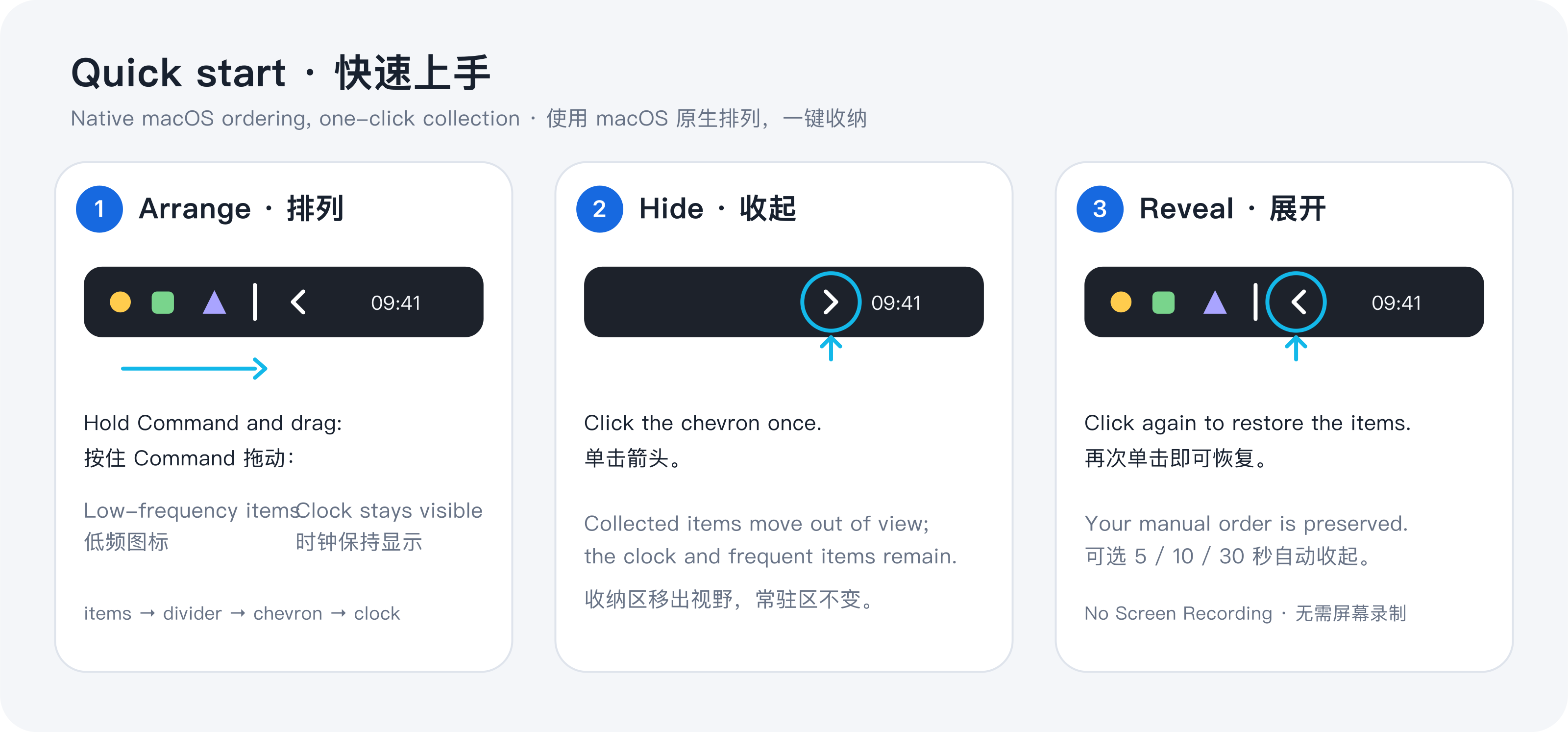
StatusPerch is a lightweight macOS menu bar organizer for people who want the clock and everyday icons visible without letting every background utility take over the bar. Hold Command to place compatible low-frequency icons on one side of its divider, then click the chevron to hide or reveal them. Everything stays on the Mac: no account, analytics, Screen Recording, or Accessibility permission. It supports Apple silicon and Intel Macs on macOS 13 or later.
Features
Hide and reveal low-frequency menu bar icons with one click.
Uses macOS native Command-drag ordering.
Local-only settings with no account or analytics.
No Screen Recording or Accessibility permission required.
Supports macOS 13+, Apple silicon, and Intel Macs.
Use Cases
Keep the clock and everyday icons visible on a crowded menu bar.
Temporarily reveal background utilities only when needed.
Make better use of limited menu bar space on notched MacBooks and external displays.

Comments








No Screen Recording and no Accessibility permission is the part I’d like explained, since those are the usual ways to reach other apps’ icons. How does holding Command to move an icon past the divider work without that access? I’d also want a way to pin the clock and battery so they can never be hidden.

As someone with a crowded menu bar on a notched MacBook, this resonates. The local-only settings with no account or analytics is a strong privacy signal — rare for utility apps. Using native Command-drag ordering instead of a custom system is smart; it keeps the muscle memory intact. One question: how does it handle apps that dynamically add or remove their icons? A short video of the hide/reveal in action would sell it even better. Nice focused scope — good luck with the launch!

Keeping it local-only with no account is a good call for a menu bar utility. On notched MacBooks the real pain is icons silently ending up behind the notch, so one question: does StatusPerch notice when an icon is hidden by the notch and move it behind the divider for you, or is that still manual? A short GIF of the hide/reveal on the listing would also make the value clear in a few seconds.


I built StatusPerch because my Mac menu bar kept getting crowded before my desktop did. I wanted a small tool that keeps the clock and everyday icons visible, while letting me tuck away background utilities until I actually need them. I deliberately kept it local-only and avoided Screen Recording or Accessibility permissions. This is the first release, so I am especially curious how it behaves on notched MacBooks, external displays, and alongside other menu bar tools.

No Screen Recording and no Accessibility permission is the part I’d like explained, since those are the usual ways to reach other apps’ icons. How does holding Command to move an icon past the divider work without that access? I’d also want a way to pin the clock and battery so they can never be hidden.


Okay, this is pretty cool. The only problem is I already had the command long press wired to another app. AI Visibility Score $1,200–$12,000 a year Getting cited by AI tools means building domain authority and content over months — not a one-time fix. Ongoing — 3–6 month effort CORS: wildcard origin $540 a year Wildcard CORS allows any website to make requests. ~20 min to fix Missing header: Permissions-Policy $270 a year Your site is missing important security protections that help prevent attacks like cross-site scripting and clickjacking. ~10 min to fix Get the fix → No cookies detected $180 a year Could not check cookie security flags -- no cookies were set. ~35 min to fix Broken link (404): gptzone.net/aplicaciones-ia/en/zalcro $90 a year This page doesn't exist anymore. When visitors or Google's crawler hits this link, they get an error. This can hurt your search rankings and frustrate customers. ~15 min to fix Standalone buttons: /support $45 a year Buttons: ['Resources▼'] ~20 min to fix And 4 more worth $180 a year — see all checks below. 166 other checks passed.

Reusing macOS's own Command-drag ordering is a clever way around the permissions problem. Since you asked about other menu bar tools: what happens if someone already runs Ice or Bartender? Do the two dividers fight, or would you suggest turning the other one off first? A one-line note on switching over from those would probably answer the first question most people have
The focus on keeping the clock and system indicators permanently visible is a genuinely useful detail for notch-era MacBooks, where those get clipped by default. Curious whether the utility exposes a hot corner or keyboard shortcut for the "temporarily reveal background utilities" mode — that sounds like the feature that would make it daily-driver for people who live in full-screen apps.

I like the focus on keeping the macOS menu bar organized without asking users for unnecessary permissions or collecting analytics. The Command-based icon arrangement sounds simple and practical. Does it work reliably with icons from most third-party menu bar apps, or are there compatibility limitations?

Using macOS's own Command-drag ordering instead of reading other apps' icons is a smart way around the Accessibility and Screen Recording prompts. That permission step is where I usually give up on menu bar tools. I build Mac apps that live in the notch too, so one thing I'd test: with an external monitor connected, each screen gets its own menu bar. Does the divider and the hidden section follow the main display, or does each screen keep its own state?


A calmer menu bar is a genuinely good mission — on notched MacBooks the menu bar is basically a UX bug at this point. Choosing to avoid Screen Recording and Accessibility permissions is smart trust engineering: it removes the biggest reason people hesitate to install a menu bar utility. One question: how does it handle the notch itself — do icons hide gracefully around it, or does the chevron always sit outside it? Congrats on the launch!

From someone who records a lot of screen demos: a crowded menu bar ends up in every take, so this is useful beyond tidiness. Could the hidden section be collapsed from a keyboard shortcut or a Shortcuts action? Then a Focus mode or a recording app could tidy the bar automatically right before you hit record. Nice that it does all this without asking for any permissions.

Really like that StatusPerch needs no Screen Recording or Accessibility permission and keeps everything local — that's rare for menu bar organizers and makes it easy to trust. Building on the native Command-drag ordering is a smart choice too. Would you consider a keyboard shortcut to toggle the hidden section?


Reusing macOS's native Command-drag ordering is the clever bit — it's exactly why you can skip the Screen Recording and Accessibility permissions that most menu bar utilities demand. Local-only settings with no account is the right call for something like this. Does the divider hold its position when displays are disconnected and reconnected? That's usually where menu bar organizers fall apart.



The native Command-drag approach makes the permission-free design easier to understand. A short compatibility section listing which kinds of menu bar icons cannot be moved or hidden would help set expectations before installation. Is there also a keyboard shortcut to reveal the hidden section without clicking the chevron?




Premium Products








































Sponsors
Buy



Makers
Makers
Comments
No Screen Recording and no Accessibility permission is the part I’d like explained, since those are the usual ways to reach other apps’ icons. How does holding Command to move an icon past the divider work without that access? I’d also want a way to pin the clock and battery so they can never be hidden.
As someone with a crowded menu bar on a notched MacBook, this resonates. The local-only settings with no account or analytics is a strong privacy signal — rare for utility apps. Using native Command-drag ordering instead of a custom system is smart; it keeps the muscle memory intact. One question: how does it handle apps that dynamically add or remove their icons? A short video of the hide/reveal in action would sell it even better. Nice focused scope — good luck with the launch!
Keeping it local-only with no account is a good call for a menu bar utility. On notched MacBooks the real pain is icons silently ending up behind the notch, so one question: does StatusPerch notice when an icon is hidden by the notch and move it behind the divider for you, or is that still manual? A short GIF of the hide/reveal on the listing would also make the value clear in a few seconds.
I built StatusPerch because my Mac menu bar kept getting crowded before my desktop did. I wanted a small tool that keeps the clock and everyday icons visible, while letting me tuck away background utilities until I actually need them. I deliberately kept it local-only and avoided Screen Recording or Accessibility permissions. This is the first release, so I am especially curious how it behaves on notched MacBooks, external displays, and alongside other menu bar tools.
No Screen Recording and no Accessibility permission is the part I’d like explained, since those are the usual ways to reach other apps’ icons. How does holding Command to move an icon past the divider work without that access? I’d also want a way to pin the clock and battery so they can never be hidden.
Okay, this is pretty cool. The only problem is I already had the command long press wired to another app. AI Visibility Score $1,200–$12,000 a year Getting cited by AI tools means building domain authority and content over months — not a one-time fix. Ongoing — 3–6 month effort CORS: wildcard origin $540 a year Wildcard CORS allows any website to make requests. ~20 min to fix Missing header: Permissions-Policy $270 a year Your site is missing important security protections that help prevent attacks like cross-site scripting and clickjacking. ~10 min to fix Get the fix → No cookies detected $180 a year Could not check cookie security flags -- no cookies were set. ~35 min to fix Broken link (404): gptzone.net/aplicaciones-ia/en/zalcro $90 a year This page doesn't exist anymore. When visitors or Google's crawler hits this link, they get an error. This can hurt your search rankings and frustrate customers. ~15 min to fix Standalone buttons: /support $45 a year Buttons: ['Resources▼'] ~20 min to fix And 4 more worth $180 a year — see all checks below. 166 other checks passed.
Reusing macOS's own Command-drag ordering is a clever way around the permissions problem. Since you asked about other menu bar tools: what happens if someone already runs Ice or Bartender? Do the two dividers fight, or would you suggest turning the other one off first? A one-line note on switching over from those would probably answer the first question most people have
The focus on keeping the clock and system indicators permanently visible is a genuinely useful detail for notch-era MacBooks, where those get clipped by default. Curious whether the utility exposes a hot corner or keyboard shortcut for the "temporarily reveal background utilities" mode — that sounds like the feature that would make it daily-driver for people who live in full-screen apps.
I like the focus on keeping the macOS menu bar organized without asking users for unnecessary permissions or collecting analytics. The Command-based icon arrangement sounds simple and practical. Does it work reliably with icons from most third-party menu bar apps, or are there compatibility limitations?
Using macOS's own Command-drag ordering instead of reading other apps' icons is a smart way around the Accessibility and Screen Recording prompts. That permission step is where I usually give up on menu bar tools. I build Mac apps that live in the notch too, so one thing I'd test: with an external monitor connected, each screen gets its own menu bar. Does the divider and the hidden section follow the main display, or does each screen keep its own state?
A calmer menu bar is a genuinely good mission — on notched MacBooks the menu bar is basically a UX bug at this point. Choosing to avoid Screen Recording and Accessibility permissions is smart trust engineering: it removes the biggest reason people hesitate to install a menu bar utility. One question: how does it handle the notch itself — do icons hide gracefully around it, or does the chevron always sit outside it? Congrats on the launch!
From someone who records a lot of screen demos: a crowded menu bar ends up in every take, so this is useful beyond tidiness. Could the hidden section be collapsed from a keyboard shortcut or a Shortcuts action? Then a Focus mode or a recording app could tidy the bar automatically right before you hit record. Nice that it does all this without asking for any permissions.
Really like that StatusPerch needs no Screen Recording or Accessibility permission and keeps everything local — that's rare for menu bar organizers and makes it easy to trust. Building on the native Command-drag ordering is a smart choice too. Would you consider a keyboard shortcut to toggle the hidden section?
Reusing macOS's native Command-drag ordering is the clever bit — it's exactly why you can skip the Screen Recording and Accessibility permissions that most menu bar utilities demand. Local-only settings with no account is the right call for something like this. Does the divider hold its position when displays are disconnected and reconnected? That's usually where menu bar organizers fall apart.
The native Command-drag approach makes the permission-free design easier to understand. A short compatibility section listing which kinds of menu bar icons cannot be moved or hidden would help set expectations before installation. Is there also a keyboard shortcut to reveal the hidden section without clicking the chevron?
Premium Products
New to Fazier?

Find your next favorite product or submit your own. Made by @FalakDigital.
Copyright ©2026. All Rights Reserved