
Sowiks
Your Mac takes the screenshot. Sowiks does the rest.
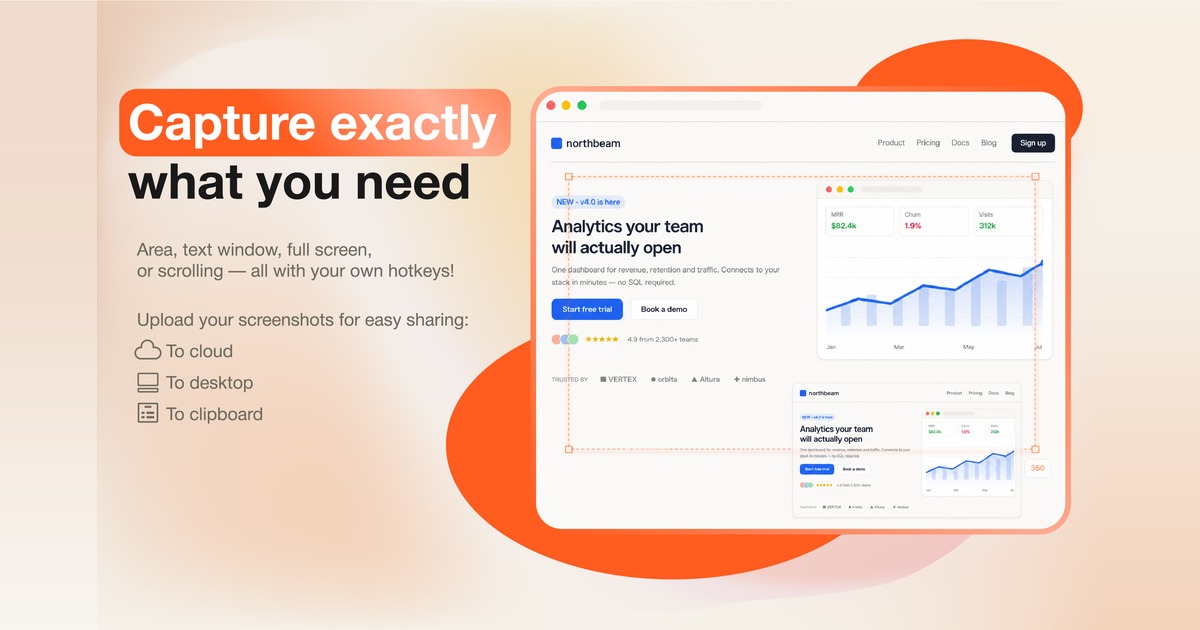
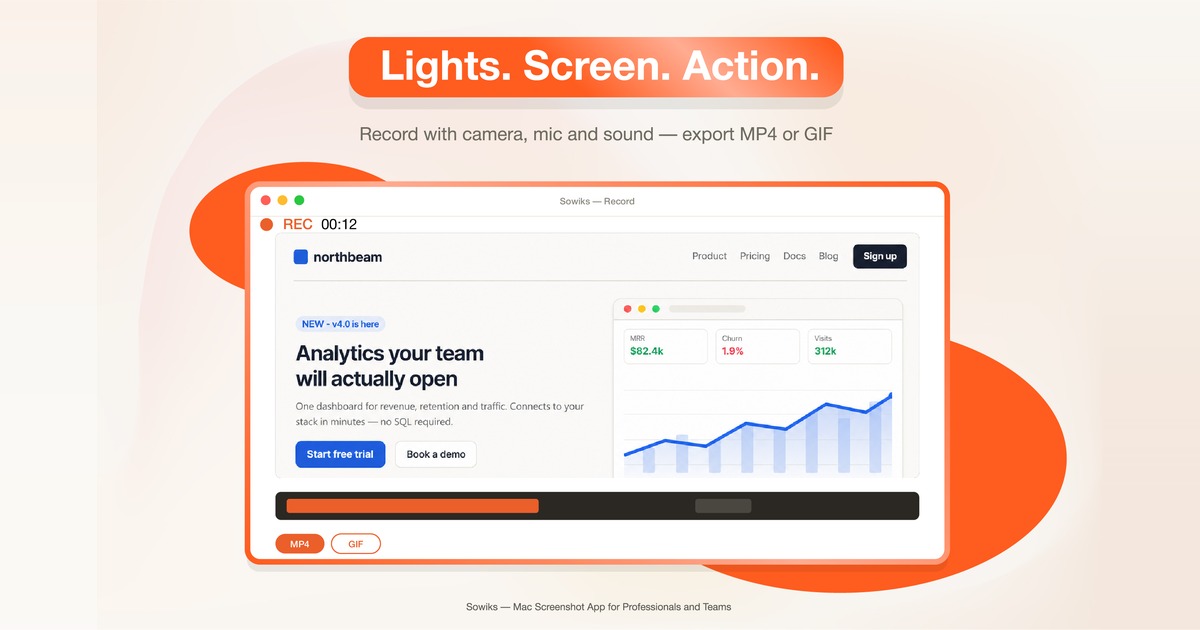
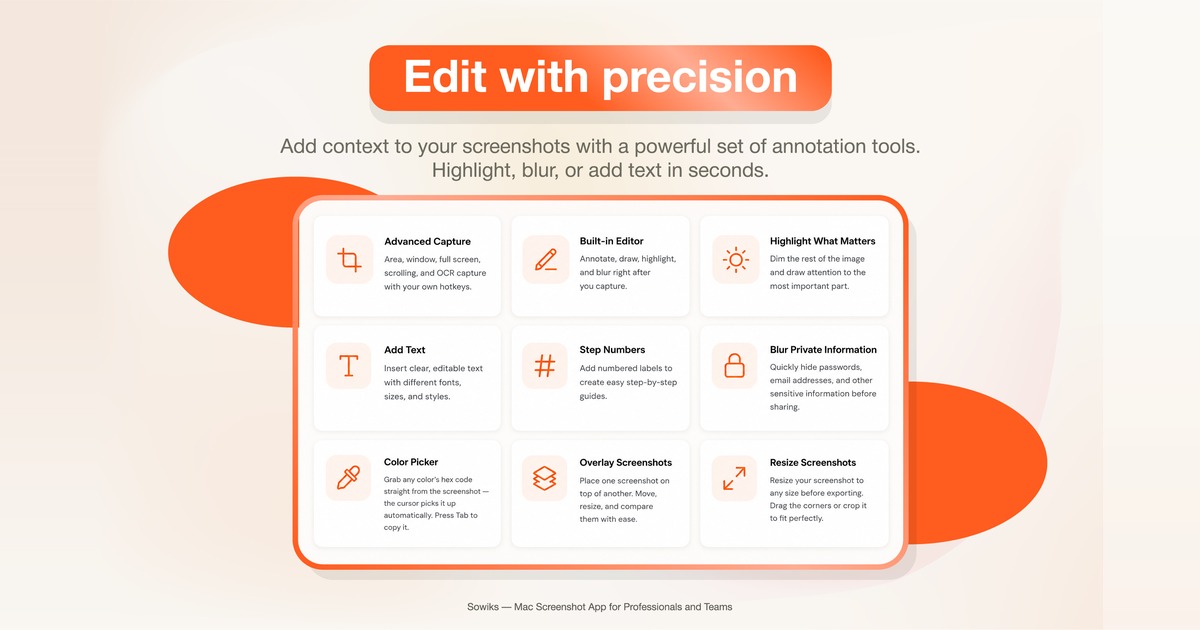
Sowiks is a Mac screenshot app for designers, marketers, developers, and support teams. Capture with your normal macOS shortcuts, then annotate with 13 built-in tools — arrows, blur, text, shapes, spotlight — and share a link instead of a file. Every capture gets an instant, expiring, password-protectable link. Sowiks also does scrolling and full-screen capture, OCR text extraction, video and GIF recording with camera and mic, screenshot collections (up to 10 shots behind one link), cloud sync across devices, and automatic compression. Free tier covers window capture and the full editor forever; a 7-day trial unlocks everything, and Solo is a $19.99 one-time purchase for the rest.
Features
- 13 annotation tools — arrows, blur, text, shapes, spotlight, and more
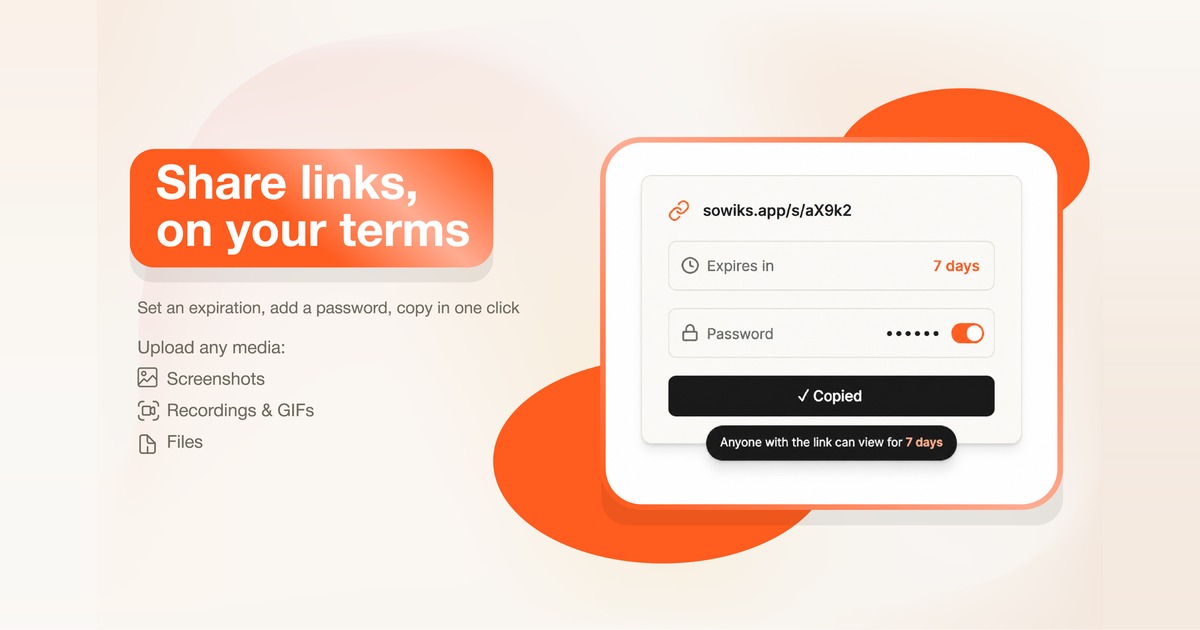
- Instant shareable link for every capture, no file attachments
- Scrolling capture and full-screen capture
- Video and GIF recording with camera and mic overlay
- OCR text extraction from screenshots
- Screenshot collections — up to 10 shots behind one link
- Cloud sync and storage across devices
- Link expiration and password protection
- Automatic compression
Use Cases
- Designers sharing pixel feedback with annotations that stay attached to the shot, not lost in a chat thread
- Support teams answering "what do you see?" with one link the customer opens instantly, no login
- Developers dropping reproducible bug reports into Jira or Slack with full-resolution links that never expire unexpectedly
- Marketers and teams building instructions, onboarding docs, or reports from a collection of screenshots

Comments


Hey Fazier! We built Sowiks because our team kept sending screenshots as file attachments that got buried, downscaled, or lost their context by the time someone opened them. The idea is simple: capture with your normal macOS shortcuts, annotate right after, and share a link instead of a file — the link stays editable, can expire or be password-protected, and works for images, GIFs, and screen recordings alike. Would love feedback on the sharing flow especially, and happy to answer anything about the Mac side.

Sowiks Your product has strong potential, but I found a few key improvements that could make it even better. I'd love to share my feedback and suggestions—please contact me at [email protected].
The one-time $19.99 price is the interesting choice here, because expiring shareable links mean you are paying hosting forever for a payment you collect once. What happens to old links if someone buys Solo and stops using the app for two years - do they keep resolving, and is there a storage cap behind that? Worth stating on the page, it is the first question a support team would ask before putting internal screenshots in there.

Sowiks is a very practical Mac screenshot tool. What I like most is that it keeps the normal macOS screenshot workflow, but adds the features I usually need afterward — annotations, blur, text, arrows, scrolling capture, and quick sharing. The instant shareable links are especially useful when sending screenshots to teammates or clients, since there’s no need to upload files manually. OCR and built-in compression are also nice additions for everyday work. The interface looks simple and focused, and the one-time purchase option is refreshing compared with another monthly subscription. Overall, Sowiks feels like a solid upgrade to the default macOS screenshot experience for designers, developers, marketers, and support teams.

The expiring/password-protectable link approach is smart for support and bug-report workflows specifically because it avoids the "screenshot buried in a Slack thread" problem. Curious how the free tier's window capture handles multi-monitor setups - is region selection per-display or does it treat the whole desktop as one canvas?


The instant, expiring links and built-in annotation tools sound especially useful for teams that need to share screenshots quickly without sending files back and forth. I like the focus on keeping the workflow simple. I’m also working on CountVerse, an online tally counter for quick digital counting: https://countverseapp.com/

There's a lot of workflow friction in screenshot sharing that people don't talk about. You take the shot, then you need to open it, crop it, annotate it, export, then share. Sowiks just skips all that by intercepting at the screenshot moment itself. For teams that document processes, file bug reports, or do customer support through screenshots, this is a legitimate workflow speedup. The Mac-native approach is smart because that's where a lot of design and dev work happens. The elegance is in doing one thing really well - no bloat, just instant processing after screenshot capture. That kind of utility-focused tool finds its audience quickly if the implementation is solid.


The collections feature (up to 10 shots behind one link) is the detail I'd actually use — most screenshot tools force you to send 5 separate links when documenting a multi-step bug or onboarding flow. Curious how the OCR extraction handles code screenshots specifically, since indentation/whitespace tends to get mangled by generic OCR — is there a code-aware mode, or is it treated like any other text?

Hey Fazier! We built Sowiks because our team kept sending screenshots as file attachments that got buried, downscaled, or lost their context by the time someone opened them. The idea is simple: capture with your normal macOS shortcuts, annotate right after, and share a link instead of a file — the link stays editable, can expire or be password-protected, and works for images, GIFs, and screen recordings alike. Would love feedback on the sharing flow especially, and happy to answer anything about the Mac side.

One-endpoint access to 100+ models is appealing, but the question I'd want answered before routing production traffic through it is the failover behavior — does a provider outage silently reroute to an equivalent model, or does the caller see the error first and have to retry? That distinction changes how much retry logic I'd need to build on my end.
"The collections feature is the part I'd actually reach for — most screenshot tools force separate links for a multi-step bug report or onboarding flow, so bundling up to 10 shots behind one link solves a real workflow problem. Does the OCR step run locally on-device or through a cloud call? That matters for teams capturing anything sensitive."



I actually like the idea behind this. I’ve lost count of how many times I’ve taken a screenshot just to explain something and then had to send another message with the missing context. The shareable links + annotations seem especially useful for that. One thing I’m curious about though, how well does the OCR handle screenshots with code, tables, or messy formatting? That feels like it could make this really useful for developers too.

Gemini Music is an all-in-one AI music generator that transforms text or lyrics into studio-quality songs, complete with AI vocals, royalty-free licensing, and optional music video creation—all from your browser. https://geminimusic.studio/
Wan3 AI is a professional AI video tool. It makes high‑quality videos from text descriptions or reference pictures. Videos look real,and camera moves smoothly. You can use the videos for business. No extra programs are needed, and it works right in your web browser. https://wan3ai.studio/
Seedance‑25 is an AI video tool for making stories. It turns simple text ideas into short story videos with several different scenes. Characters look the same from shot to shot, and sound matches the video. You can use it directly in your browser. https://seedance-25.studio/
MiniMax H3 AI is an all‑round AI video tool. It makes full short videos, including pictures, people talking and sound effects. You may use its outputs without paying extra fees. It runs in your web browser. https://minimaxh3ai.studio/
Hailuo 03 is an AI video tool for creating movie‑like videos. You can use text or reference pictures and set camera movements exactly how you want. Its outputs have no extra copyright costs, and you can start using it in your browser right away. https://hailuo03.studio/

Sowiks is a powerful Mac screenshot app for designers and dev teams. It supports scrolling capture, OCR, GIF‑video recording, handy annotations and password‑protected shareable links. Free tier offers permanent basic editing; a $19.99 one‑time purchase unlocks all features after a 7‑day trial. Great for fast team communication.

I like that you keep the native macOS screenshot workflow instead of making users learn a completely new capture process. The shareable links and screenshot collections seem especially useful for bug reports and onboarding docs. One question: is OCR processed locally or in the cloud? That would be important for teams working with sensitive screenshots.
Premium Products

































Sponsors
Buy

Awards
View all
Awards
View allMakers
Makers
Comments
Hey Fazier! We built Sowiks because our team kept sending screenshots as file attachments that got buried, downscaled, or lost their context by the time someone opened them. The idea is simple: capture with your normal macOS shortcuts, annotate right after, and share a link instead of a file — the link stays editable, can expire or be password-protected, and works for images, GIFs, and screen recordings alike. Would love feedback on the sharing flow especially, and happy to answer anything about the Mac side.
Sowiks Your product has strong potential, but I found a few key improvements that could make it even better. I'd love to share my feedback and suggestions—please contact me at [email protected].
The one-time $19.99 price is the interesting choice here, because expiring shareable links mean you are paying hosting forever for a payment you collect once. What happens to old links if someone buys Solo and stops using the app for two years - do they keep resolving, and is there a storage cap behind that? Worth stating on the page, it is the first question a support team would ask before putting internal screenshots in there.
Sowiks is a very practical Mac screenshot tool. What I like most is that it keeps the normal macOS screenshot workflow, but adds the features I usually need afterward — annotations, blur, text, arrows, scrolling capture, and quick sharing. The instant shareable links are especially useful when sending screenshots to teammates or clients, since there’s no need to upload files manually. OCR and built-in compression are also nice additions for everyday work. The interface looks simple and focused, and the one-time purchase option is refreshing compared with another monthly subscription. Overall, Sowiks feels like a solid upgrade to the default macOS screenshot experience for designers, developers, marketers, and support teams.
The expiring/password-protectable link approach is smart for support and bug-report workflows specifically because it avoids the "screenshot buried in a Slack thread" problem. Curious how the free tier's window capture handles multi-monitor setups - is region selection per-display or does it treat the whole desktop as one canvas?
The instant, expiring links and built-in annotation tools sound especially useful for teams that need to share screenshots quickly without sending files back and forth. I like the focus on keeping the workflow simple. I’m also working on CountVerse, an online tally counter for quick digital counting: https://countverseapp.com/
There's a lot of workflow friction in screenshot sharing that people don't talk about. You take the shot, then you need to open it, crop it, annotate it, export, then share. Sowiks just skips all that by intercepting at the screenshot moment itself. For teams that document processes, file bug reports, or do customer support through screenshots, this is a legitimate workflow speedup. The Mac-native approach is smart because that's where a lot of design and dev work happens. The elegance is in doing one thing really well - no bloat, just instant processing after screenshot capture. That kind of utility-focused tool finds its audience quickly if the implementation is solid.
The collections feature (up to 10 shots behind one link) is the detail I'd actually use — most screenshot tools force you to send 5 separate links when documenting a multi-step bug or onboarding flow. Curious how the OCR extraction handles code screenshots specifically, since indentation/whitespace tends to get mangled by generic OCR — is there a code-aware mode, or is it treated like any other text?
Hey Fazier! We built Sowiks because our team kept sending screenshots as file attachments that got buried, downscaled, or lost their context by the time someone opened them. The idea is simple: capture with your normal macOS shortcuts, annotate right after, and share a link instead of a file — the link stays editable, can expire or be password-protected, and works for images, GIFs, and screen recordings alike. Would love feedback on the sharing flow especially, and happy to answer anything about the Mac side.
One-endpoint access to 100+ models is appealing, but the question I'd want answered before routing production traffic through it is the failover behavior — does a provider outage silently reroute to an equivalent model, or does the caller see the error first and have to retry? That distinction changes how much retry logic I'd need to build on my end.
"The collections feature is the part I'd actually reach for — most screenshot tools force separate links for a multi-step bug report or onboarding flow, so bundling up to 10 shots behind one link solves a real workflow problem. Does the OCR step run locally on-device or through a cloud call? That matters for teams capturing anything sensitive."
I actually like the idea behind this. I’ve lost count of how many times I’ve taken a screenshot just to explain something and then had to send another message with the missing context. The shareable links + annotations seem especially useful for that. One thing I’m curious about though, how well does the OCR handle screenshots with code, tables, or messy formatting? That feels like it could make this really useful for developers too.
Gemini Music is an all-in-one AI music generator that transforms text or lyrics into studio-quality songs, complete with AI vocals, royalty-free licensing, and optional music video creation—all from your browser. https://geminimusic.studio/
Wan3 AI is a professional AI video tool. It makes high‑quality videos from text descriptions or reference pictures. Videos look real,and camera moves smoothly. You can use the videos for business. No extra programs are needed, and it works right in your web browser. https://wan3ai.studio/
Seedance‑25 is an AI video tool for making stories. It turns simple text ideas into short story videos with several different scenes. Characters look the same from shot to shot, and sound matches the video. You can use it directly in your browser. https://seedance-25.studio/
MiniMax H3 AI is an all‑round AI video tool. It makes full short videos, including pictures, people talking and sound effects. You may use its outputs without paying extra fees. It runs in your web browser. https://minimaxh3ai.studio/
Hailuo 03 is an AI video tool for creating movie‑like videos. You can use text or reference pictures and set camera movements exactly how you want. Its outputs have no extra copyright costs, and you can start using it in your browser right away. https://hailuo03.studio/
Sowiks is a powerful Mac screenshot app for designers and dev teams. It supports scrolling capture, OCR, GIF‑video recording, handy annotations and password‑protected shareable links. Free tier offers permanent basic editing; a $19.99 one‑time purchase unlocks all features after a 7‑day trial. Great for fast team communication.
I like that you keep the native macOS screenshot workflow instead of making users learn a completely new capture process. The shareable links and screenshot collections seem especially useful for bug reports and onboarding docs. One question: is OCR processed locally or in the cloud? That would be important for teams working with sensitive screenshots.
Premium Products
New to Fazier?

Find your next favorite product or submit your own. Made by @FalakDigital.
Copyright ©2026. All Rights Reserved