Snap — Screenshot API
Screenshot API with 200 free monthly, no card
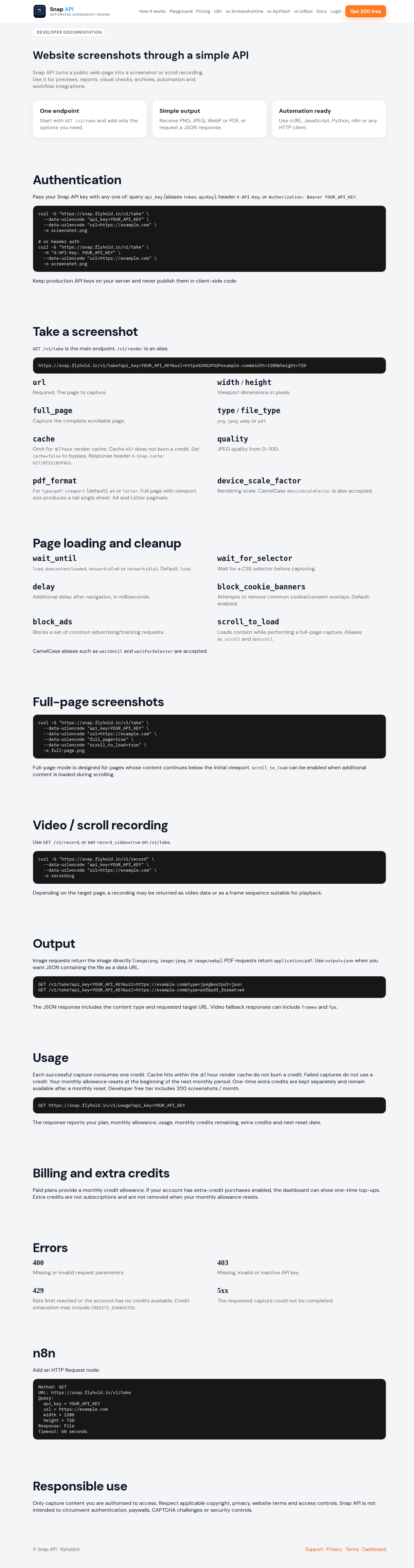
Snap turns any public URL into PNG, JPEG, WebP, or PDF via one GET. Built for cron, scripts, and n8n. Free Developer: 200 screenshots/month, no credit card. Starter $9 for 5,000; Growth $29 for 30,000. Cookie-banner blocking on by default. Render cache hits within 1 hour are free, with X-Snap-Cache. Failed captures do not use a credit. Authenticate with api_key query, X-API-Key, or Bearer. No official SDKs, webhooks, S3, or geo proxies yet.
Features
• One GET endpoint for PNG, JPEG, WebP, or PDF
• 200 free screenshots/month with no credit card
• Cookie-banner blocking on by default
• Render cache hits within 1 hour are free
• Failed captures do not use credits
• API-key query, X-API-Key, or Bearer authentication
Use Cases
• Cron jobs and scheduled screenshots
• Website previews and monitoring
• Reports, archives, and visual checks
• n8n workflows and automation
• Scripts and HTTP integrations

Comments



I will try it it can be helpful. I have made a puzzle game which is wordable give it a try https://wordable.live/



The pricing shape is honest — 200/month with no card, and not billing cache hits, is exactly what cron jobs and n8n workflows need instead of a free tier that dies quietly. Two suggestions: since you call out n8n, shipping an importable community node (or a copy-paste HTTP node recipe in the docs) would remove most of the setup friction for that audience. Second, documenting the cache-miss case explicitly would help people tune TTLs when a workflow runs on a tight schedule.

Nice — OG images are a solid fit for Snap. Typical pattern: render a public template URL (or a page you control) via GET /v1/take with file_type=png or webp, then use that image URL in your meta tags / social share step. Cookie banners are blocked by default so the image stays clean. 200 free/mo to try: https://snap.flyhold.in · docs: https://snap.flyhold.in/docs.html — if a specific template URL looks wrong, tell me and I’ll help debug.

For monitoring and visual-regression use cases - diffing a page's screenshot over time to catch unexpected changes - is the rendering engine version pinned per account, or could two calls a month apart differ just from a browser or font update on your end? That determinism matters more than raw speed for that use case, same spirit as the failed-capture policy - predictability is the actual feature for anything running on a schedule.
The two details that would decide this for me sit near the bottom: failed captures not burning a credit, and cache hits inside an hour being free. Those are what make a nightly cron predictable to budget. Worth moving up next to the pricing table. One question: what does it return for a URL that redirects to a login wall?
Premium Products














































Sponsors
Buy
Makers
Makers
Comments
I will try it it can be helpful. I have made a puzzle game which is wordable give it a try https://wordable.live/
The pricing shape is honest — 200/month with no card, and not billing cache hits, is exactly what cron jobs and n8n workflows need instead of a free tier that dies quietly. Two suggestions: since you call out n8n, shipping an importable community node (or a copy-paste HTTP node recipe in the docs) would remove most of the setup friction for that audience. Second, documenting the cache-miss case explicitly would help people tune TTLs when a workflow runs on a tight schedule.
Nice — OG images are a solid fit for Snap. Typical pattern: render a public template URL (or a page you control) via GET /v1/take with file_type=png or webp, then use that image URL in your meta tags / social share step. Cookie banners are blocked by default so the image stays clean. 200 free/mo to try: https://snap.flyhold.in · docs: https://snap.flyhold.in/docs.html — if a specific template URL looks wrong, tell me and I’ll help debug.
For monitoring and visual-regression use cases - diffing a page's screenshot over time to catch unexpected changes - is the rendering engine version pinned per account, or could two calls a month apart differ just from a browser or font update on your end? That determinism matters more than raw speed for that use case, same spirit as the failed-capture policy - predictability is the actual feature for anything running on a schedule.
The two details that would decide this for me sit near the bottom: failed captures not burning a credit, and cache hits inside an hour being free. Those are what make a nightly cron predictable to budget. Worth moving up next to the pricing table. One question: what does it return for a URL that redirects to a login wall?
Premium Products
New to Fazier?

Find your next favorite product or submit your own. Made by @FalakDigital.
Copyright ©2026. All Rights Reserved