
SEOTyde
Instant on-page SEO audit for Chrome & Firefox — 100% local
SEOTyde is a lightweight browser extension designed for webmasters, developers, and marketers to perform instant on-page SEO audits. It analyzes critical technical elements directly from any active tab, highlighting indexing signals, metadata structure, and content hierarchy without leaving the page.
Features
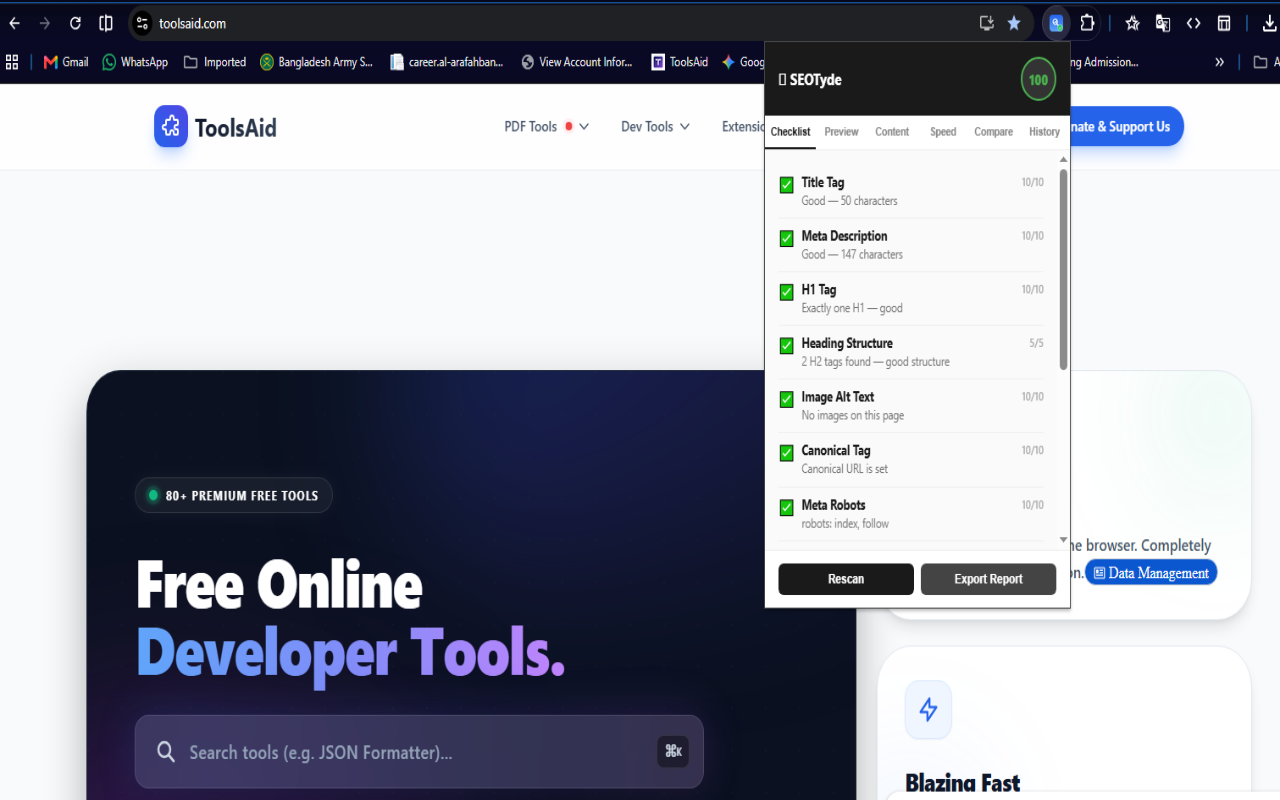
- Instant On-Page Audit: Inspects meta titles, descriptions, canonical tags, and robots directives in real time.
- Heading Structure Analysis: Visualizes H1–H6 hierarchy to spot structure and accessibility issues quickly.
- Indexability & Status Checks: Detects noindex, nofollow, and HTTP status indicators instantly.
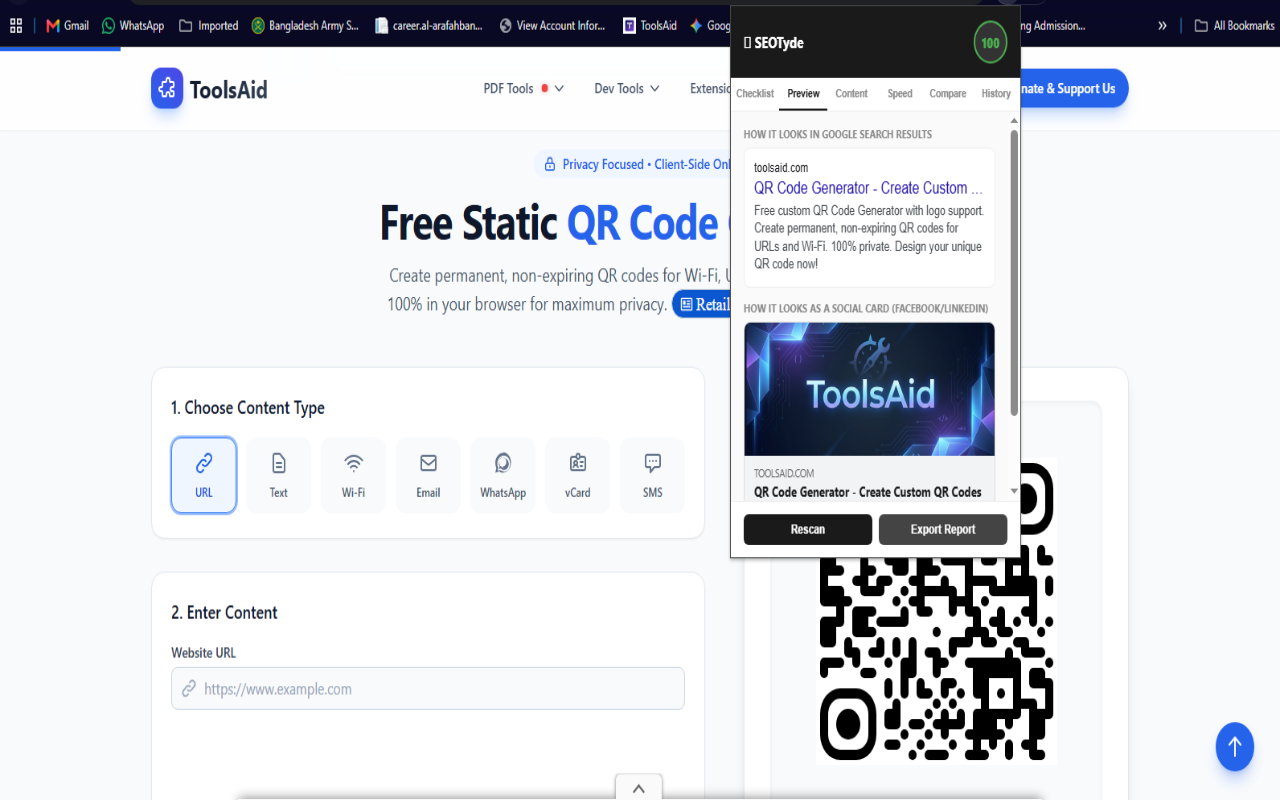
- Open Graph & Social Previews: Validates social metadata and preview cards across major platforms.
- Lightweight & Privacy-First: Runs entirely locally in the browser with zero external tracking or bloat.
Use Cases
- Pre-Launch QA: Auditing staging and production pages before publishing new web features or blog posts.
- Competitor Content Research: Analyzing heading hierarchies, target keyword placement, and metadata strategies on rival sites.
- Quick Technical Troubleshooting: Diagnosing indexing issues, duplicate canonical tags, or missing meta tags during client site audits.

Comments


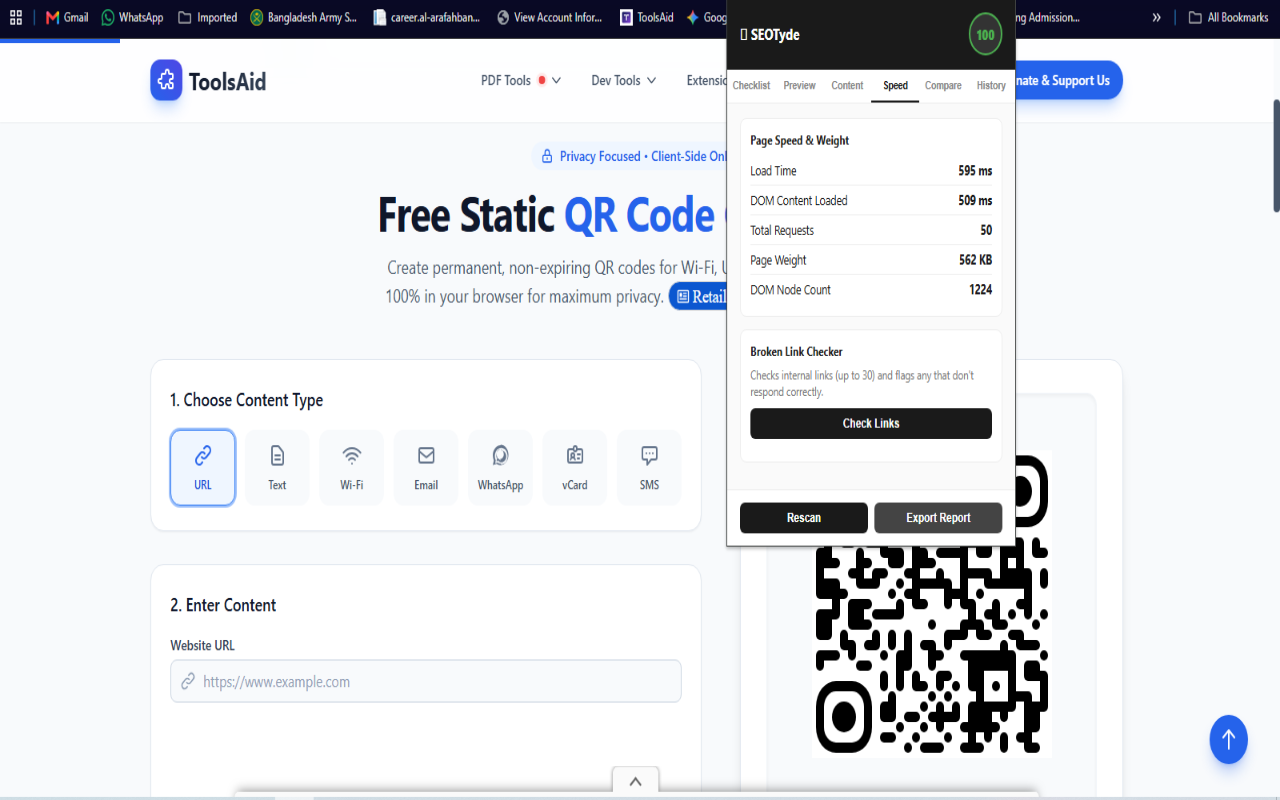
Hey👋 I built SEOTyde because every SEO extension I tried either wanted an account, sent my page data to a remote server, or bolted on AI features I never asked for. SEOTyde does the opposite — it runs 100% locally in your browser, available for both Chrome and Firefox. No AI APIs, no backend, no tracking. What it does: 🎯 100-point on-page SEO score — title, meta, headings, alt text, canonical, robots, OG/Twitter tags, structured data 🔍 Live preview of your Google search snippet + social share card ⚡ Page speed & weight from the browser's native Performance API 🔗 Broken internal link scanner 🆚 Competitor Compare — paste any URL, get a side-by-side SEO score 📖 Flesch readability score + keyword density with on-page highlighting 📈 Score history tracked locally over time 📤 One-click Markdown export for client reports 🌐 Available now on both Chrome and Firefox. Built solo as part of toolsaid.com, my free suite of dev/SEO tools. Would love your feedback — especially on what to build next!

An on page audit that runs fully locally is a strong privacy story, and the heading structure visualizer sounds genuinely useful for quick client audits. I like that it covers Open Graph previews too since those are easy to forget. Would be great to see a CSV export option for the audit results in a future update.

An on-page audit that runs fully local is a really nice touch, nothing leaves the browser. Would love a mode that compares how a page renders for visitors in different countries, since geo-redirects and localized content trip up a lot of audits. If you ever explore that, we at HProxy would be happy to help with IPs. Congrats on the launch!

The local-only claim is the interesting part. Competitor Compare says you paste any URL and get a side-by-side score, but an extension fetching another origin still has to request that page from the browser. Does that fetch stay inside the extension, so the other site sees the user's IP and login walls just fail, or is there a proxy after all? Also, if a page has two H1s, does the 100-point score penalize that, or only flag it in the hierarchy view?
Keeping the audit fully local is a nice touch. Two questions: for JS-heavy sites, does it read the rendered DOM after hydration (so canonical, meta and OG tags set client-side are caught), or only the raw HTML? And does the broken internal link scanner run from the browser with your session, so pages behind a login can be checked too?

Running the audit entirely locally is a good choice, and the heading hierarchy view for H1 to H6 is the part I'd use most. Does the indexability check also read the X-Robots-Tag HTTP header, or only the meta robots tag? It would also be useful to know if the extension follows redirects when it reports the HTTP status.

Running 100% locally with no account is a real advantage for an SEO extension, since many audit tools send page data to a remote server. The check for noindex, nofollow and canonical tags in one view is very handy for pre-launch QA. It would be great to also see hreflang validation and a quick view of structured data (JSON-LD) errors in a future version.
A local audit that reads the live tab is the right check before publish: title, canonical, meta robots and the H1–H6 tree are what the browser actually rendered, not a separate fetch that can disagree with JS. The gap is indexability. A content script usually cannot see the HTTP status or an X-Robots-Tag response header, only meta robots in the document, so a header-level noindex or a soft 404 can look clean. If SEOTyde only inspects the DOM, those status checks should be labeled as not visible from the page rather than detected instantly. Does the extension read response headers, or only the rendered markup?

The 100% local angle is what makes this stand out — most SEO extensions phone home with page data, which is a dealbreaker when auditing client or staging sites you don't own. The H1–H6 hierarchy visualizer is genuinely useful too; heading structure is one of the first things I check in a pre-launch QA pass, and most tools bury it three clicks deep in a report. Two questions: for JS-heavy single-page apps, does SEOTyde read the rendered DOM or the raw HTML? And does it flag conflicts like a canonical tag paired with a noindex directive? Getting those two right would make this a permanent install for me. Congrats on the launch!
The Markdown export is the piece I would hand to a client. A 100-point score is awkward to paste into a ticket, while a Markdown list of title, canonical, OG and heading checks is not. Does that export include the Flesch score and the keyword-density highlights, or only the tag checklist? Density without the highlighted terms is hard to act on.

Running the audit entirely in the active tab is the right call for staging sites that are not publicly reachable. Before I would use it for pre-launch QA I would want to know whether the heading check flags multiple H1s and skipped levels, or only lists the outline. Also, because it reads the live DOM, does it pick up tags injected after client-side render, or only the initial HTML?
Running the audit entirely in the active tab is the right call for staging sites that are not publicly reachable. Before I would use it for pre-launch QA I would want to know whether the heading check flags multiple H1s and skipped levels, or only lists the outline. Also, because it reads the live DOM, does it pick up tags injected after client-side render, or only the initial HTML?

Running it fully local is the right call for client audits; nothing leaves the tab. One check I'd use a lot: flagging a canonical that points somewhere other than the page I'm on, and titles that get cut off in search results by pixel width, not just characters. Does it read tags that are set by JavaScript after load, or only the initial HTML?

Running the audit 100% locally is the key decision here — most SEO extensions send page data to a server, so checking title tags, meta descriptions, heading structure, canonical tags and meta robots without leaving the tab is a real privacy win for client work. Does the export report include the per-check scores shown in the panel, so it can be shared with a client as-is?

Running the audit fully locally with no account is exactly right for quick pre-launch checks. One scenario I care about: staging pages on localhost or behind HTTP basic auth — since everything runs in the tab, does SEOTyde work there too? And does the History tab let you compare the same page before and after a deploy? That would make it genuinely useful for QA sign-off, not just one-off spot checks.
Running the audit in the active tab is useful for staging sites that are not public yet. When a page sets a canonical that points at a different host, or a robots meta that conflicts with an X-Robots-Tag header, which one do you flag as the one a crawler would follow? I hit that mismatch a lot on preview deploys, and the header usually wins.

Premium Products


















































Sponsors
Buy

Makers
Makers
Comments
Hey👋 I built SEOTyde because every SEO extension I tried either wanted an account, sent my page data to a remote server, or bolted on AI features I never asked for. SEOTyde does the opposite — it runs 100% locally in your browser, available for both Chrome and Firefox. No AI APIs, no backend, no tracking. What it does: 🎯 100-point on-page SEO score — title, meta, headings, alt text, canonical, robots, OG/Twitter tags, structured data 🔍 Live preview of your Google search snippet + social share card ⚡ Page speed & weight from the browser's native Performance API 🔗 Broken internal link scanner 🆚 Competitor Compare — paste any URL, get a side-by-side SEO score 📖 Flesch readability score + keyword density with on-page highlighting 📈 Score history tracked locally over time 📤 One-click Markdown export for client reports 🌐 Available now on both Chrome and Firefox. Built solo as part of toolsaid.com, my free suite of dev/SEO tools. Would love your feedback — especially on what to build next!
An on page audit that runs fully locally is a strong privacy story, and the heading structure visualizer sounds genuinely useful for quick client audits. I like that it covers Open Graph previews too since those are easy to forget. Would be great to see a CSV export option for the audit results in a future update.
An on-page audit that runs fully local is a really nice touch, nothing leaves the browser. Would love a mode that compares how a page renders for visitors in different countries, since geo-redirects and localized content trip up a lot of audits. If you ever explore that, we at HProxy would be happy to help with IPs. Congrats on the launch!
The local-only claim is the interesting part. Competitor Compare says you paste any URL and get a side-by-side score, but an extension fetching another origin still has to request that page from the browser. Does that fetch stay inside the extension, so the other site sees the user's IP and login walls just fail, or is there a proxy after all? Also, if a page has two H1s, does the 100-point score penalize that, or only flag it in the hierarchy view?
Keeping the audit fully local is a nice touch. Two questions: for JS-heavy sites, does it read the rendered DOM after hydration (so canonical, meta and OG tags set client-side are caught), or only the raw HTML? And does the broken internal link scanner run from the browser with your session, so pages behind a login can be checked too?
Running the audit entirely locally is a good choice, and the heading hierarchy view for H1 to H6 is the part I'd use most. Does the indexability check also read the X-Robots-Tag HTTP header, or only the meta robots tag? It would also be useful to know if the extension follows redirects when it reports the HTTP status.
Running 100% locally with no account is a real advantage for an SEO extension, since many audit tools send page data to a remote server. The check for noindex, nofollow and canonical tags in one view is very handy for pre-launch QA. It would be great to also see hreflang validation and a quick view of structured data (JSON-LD) errors in a future version.
A local audit that reads the live tab is the right check before publish: title, canonical, meta robots and the H1–H6 tree are what the browser actually rendered, not a separate fetch that can disagree with JS. The gap is indexability. A content script usually cannot see the HTTP status or an X-Robots-Tag response header, only meta robots in the document, so a header-level noindex or a soft 404 can look clean. If SEOTyde only inspects the DOM, those status checks should be labeled as not visible from the page rather than detected instantly. Does the extension read response headers, or only the rendered markup?
The 100% local angle is what makes this stand out — most SEO extensions phone home with page data, which is a dealbreaker when auditing client or staging sites you don't own. The H1–H6 hierarchy visualizer is genuinely useful too; heading structure is one of the first things I check in a pre-launch QA pass, and most tools bury it three clicks deep in a report. Two questions: for JS-heavy single-page apps, does SEOTyde read the rendered DOM or the raw HTML? And does it flag conflicts like a canonical tag paired with a noindex directive? Getting those two right would make this a permanent install for me. Congrats on the launch!
The Markdown export is the piece I would hand to a client. A 100-point score is awkward to paste into a ticket, while a Markdown list of title, canonical, OG and heading checks is not. Does that export include the Flesch score and the keyword-density highlights, or only the tag checklist? Density without the highlighted terms is hard to act on.
Running the audit entirely in the active tab is the right call for staging sites that are not publicly reachable. Before I would use it for pre-launch QA I would want to know whether the heading check flags multiple H1s and skipped levels, or only lists the outline. Also, because it reads the live DOM, does it pick up tags injected after client-side render, or only the initial HTML?
Running the audit entirely in the active tab is the right call for staging sites that are not publicly reachable. Before I would use it for pre-launch QA I would want to know whether the heading check flags multiple H1s and skipped levels, or only lists the outline. Also, because it reads the live DOM, does it pick up tags injected after client-side render, or only the initial HTML?
Running it fully local is the right call for client audits; nothing leaves the tab. One check I'd use a lot: flagging a canonical that points somewhere other than the page I'm on, and titles that get cut off in search results by pixel width, not just characters. Does it read tags that are set by JavaScript after load, or only the initial HTML?
Running the audit 100% locally is the key decision here — most SEO extensions send page data to a server, so checking title tags, meta descriptions, heading structure, canonical tags and meta robots without leaving the tab is a real privacy win for client work. Does the export report include the per-check scores shown in the panel, so it can be shared with a client as-is?
Running the audit fully locally with no account is exactly right for quick pre-launch checks. One scenario I care about: staging pages on localhost or behind HTTP basic auth — since everything runs in the tab, does SEOTyde work there too? And does the History tab let you compare the same page before and after a deploy? That would make it genuinely useful for QA sign-off, not just one-off spot checks.
Running the audit in the active tab is useful for staging sites that are not public yet. When a page sets a canonical that points at a different host, or a robots meta that conflicts with an X-Robots-Tag header, which one do you flag as the one a crawler would follow? I hit that mismatch a lot on preview deploys, and the header usually wins.
Premium Products
New to Fazier?

Find your next favorite product or submit your own. Made by @FalakDigital.
Copyright ©2026. All Rights Reserved