
ScreenOtter
Beautiful screenshots & Cinematic recordings.
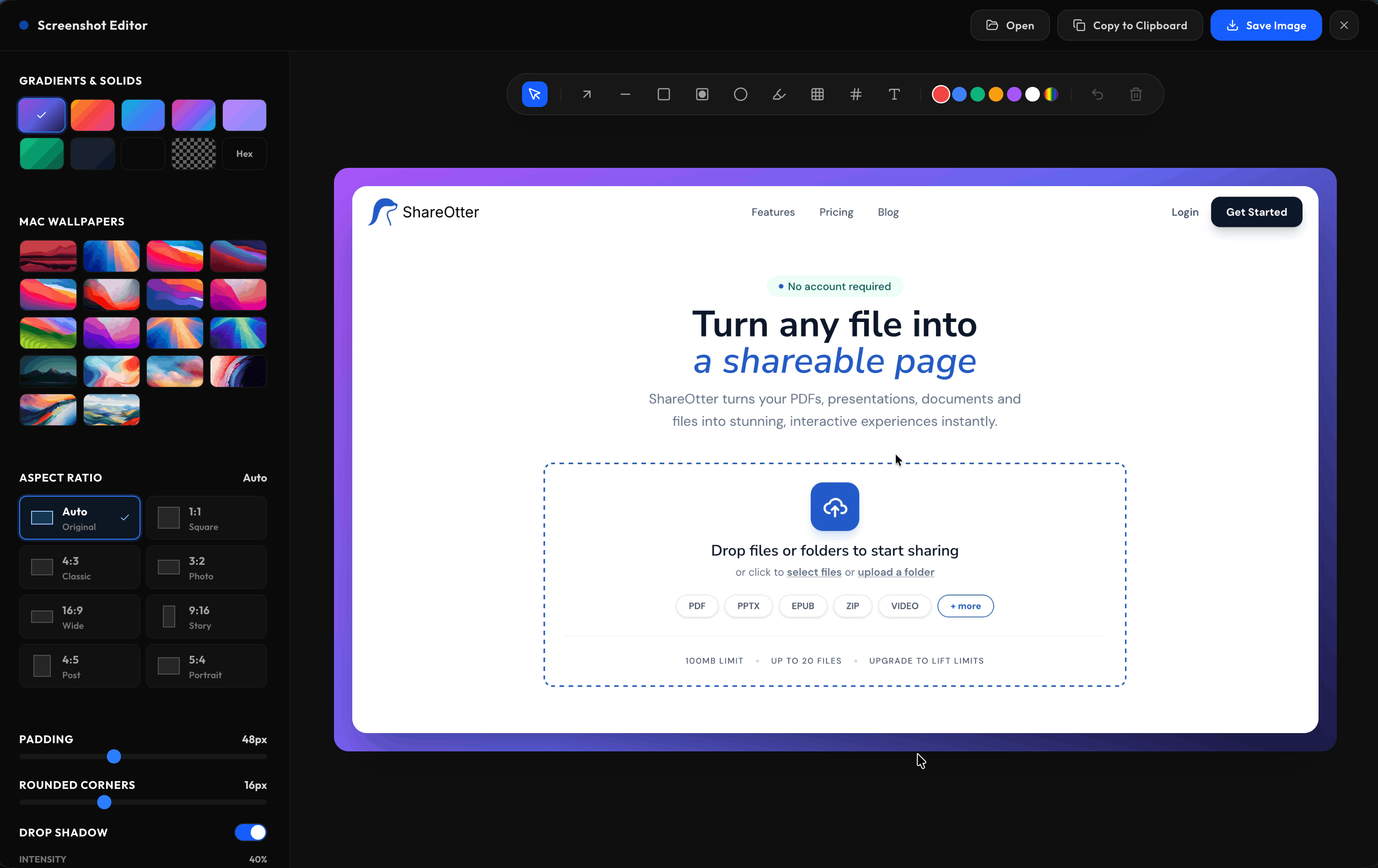
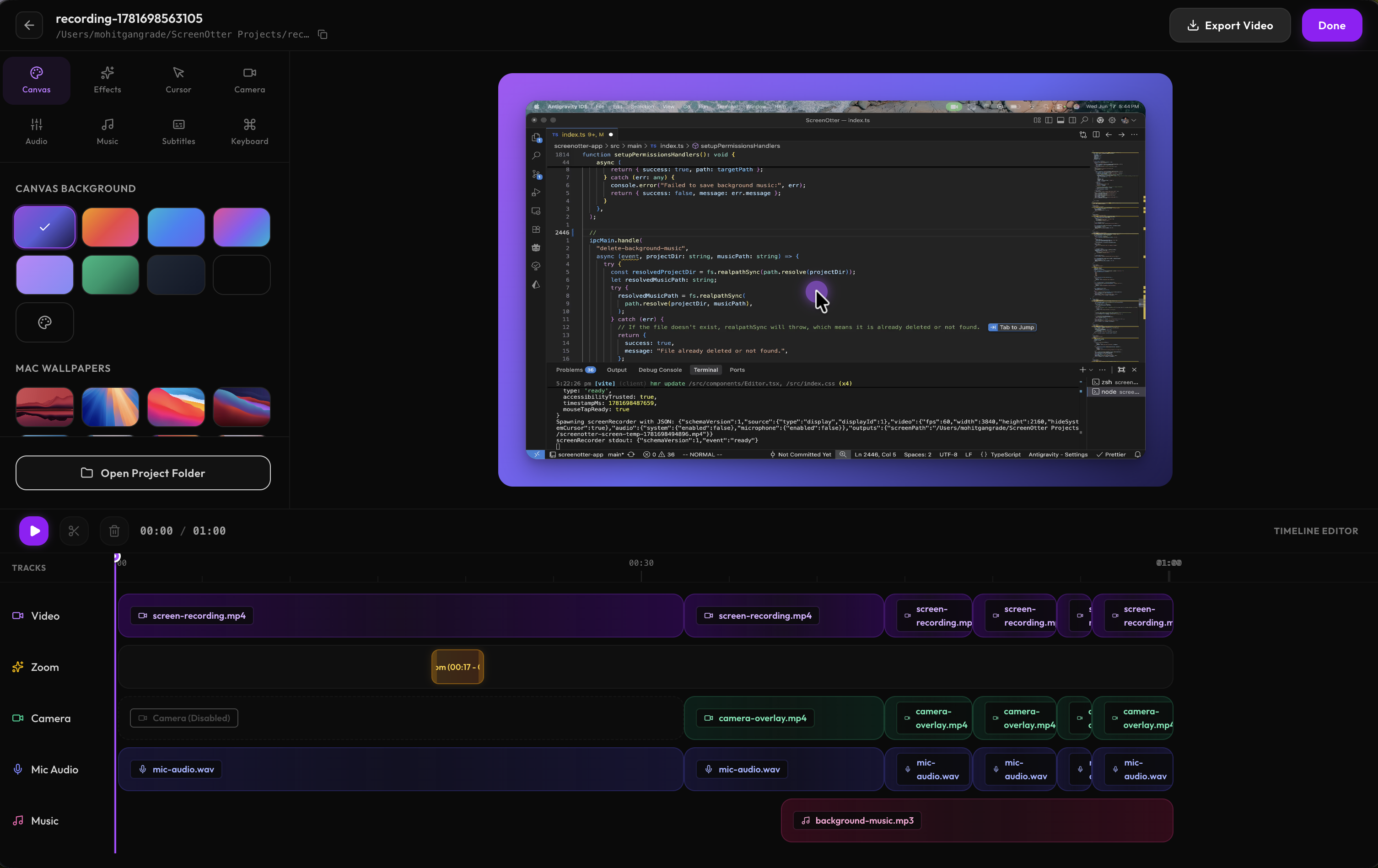
ScreenOtter is an all-in-one screenshot and screen recording app built for Mac. It helps you create beautiful screenshots with custom backgrounds, rounded corners, and drop shadows, then record polished videos with automatic zooms that follow every click. You can capture your screen, microphone, system audio, webcam, or iPhone camera, then add subtitles, keyboard shortcut overlays, background music, and custom video backgrounds. ScreenOtter is ideal for founders, designers, developers, educators, and tutorial creators who want professional results without complicated editing. Best of all, it comes with a one-time payment, so there is no subscription to manage or recurring fees to handle.
Features
- Beautiful screenshots with custom backgrounds
- Rounded corners and drop shadows
- Automatic cinematic zooms on every click
- Word-by-word subtitles
- Keyboard shortcut overlays
- One-click typing speed-up
- Screen, window, and custom-area recording
- Microphone and system audio capture
- Webcam and iPhone facecam support
- Background music
- Custom gradients, wallpapers, and video backgrounds
- One-time payment with no subscription
Use Cases
- SaaS product demos
- Software tutorials
- Coding walkthroughs
- Design presentations
- Feature announcements
- Customer support videos
- Bug reports
- Client feedback
- Internal team updates
- Employee training
- Online courses
- Help center content
- Blog screenshots
- Social media visuals
- Product launch videos

Comments






ScreenOtter has great potential and offers some useful features, but I encountered a few issues that could be improved. Please contact me so I can share detailed feedback and suggest the changes I'd like to see. Email: [email protected]

The one-time payment is doing a lot of work here, and I would move it further up the page. Most tools in this category went subscription-based, and that is the main reason people look for an alternative in the first place. One gap worth considering, from someone who spent this morning rebuilding App Store screenshots by hand: there is no preset for App Store and Play Store assets. Those have exact required pixel sizes, 1320 by 2868 for the 6.9-inch iPhone, for example, plus a caption area above the device that has to stay consistent across five or six frames, or the whole set looks amateur at thumbnail size. Right now that is a Figma job. A preset that outputs a correctly sized, consistently laid out screenshot set would put you in front of every indie iOS dev at the exact moment they are most frustrated. The auto-zoom following clicks is the right default. The thing I would test is whether it can be turned off per clip, because in a bug report the zooms are noise and in a launch video they are the entire point.
Love that ScreenOtter bundles beautiful screenshots and recording in one Mac app, and the one-time payment is a real differentiator. One feature I'd genuinely use: 3D perspective mockups — tilting the screenshot on the X/Y axis so it sits at an angle instead of flat-on. Pair that with a skew/rotation control and it would make hero images and landing-page visuals pop without ever touching Figma. That'd set it apart from the flat rounded-corners-plus-shadow look everyone else does.
Premium Products


















































Awards
View all
Awards
View allMakers

Makers
Comments
ScreenOtter has great potential and offers some useful features, but I encountered a few issues that could be improved. Please contact me so I can share detailed feedback and suggest the changes I'd like to see. Email: [email protected]
The one-time payment is doing a lot of work here, and I would move it further up the page. Most tools in this category went subscription-based, and that is the main reason people look for an alternative in the first place. One gap worth considering, from someone who spent this morning rebuilding App Store screenshots by hand: there is no preset for App Store and Play Store assets. Those have exact required pixel sizes, 1320 by 2868 for the 6.9-inch iPhone, for example, plus a caption area above the device that has to stay consistent across five or six frames, or the whole set looks amateur at thumbnail size. Right now that is a Figma job. A preset that outputs a correctly sized, consistently laid out screenshot set would put you in front of every indie iOS dev at the exact moment they are most frustrated. The auto-zoom following clicks is the right default. The thing I would test is whether it can be turned off per clip, because in a bug report the zooms are noise and in a launch video they are the entire point.
Love that ScreenOtter bundles beautiful screenshots and recording in one Mac app, and the one-time payment is a real differentiator. One feature I'd genuinely use: 3D perspective mockups — tilting the screenshot on the X/Y axis so it sits at an angle instead of flat-on. Pair that with a skew/rotation control and it would make hero images and landing-page visuals pop without ever touching Figma. That'd set it apart from the flat rounded-corners-plus-shadow look everyone else does.
Premium Products
New to Fazier?

Find your next favorite product or submit your own. Made by @FalakDigital.
Copyright ©2026. All Rights Reserved