Scan Pro Receipts
Scan Pro Receipts: offline OCR, fiscal reports, one price.
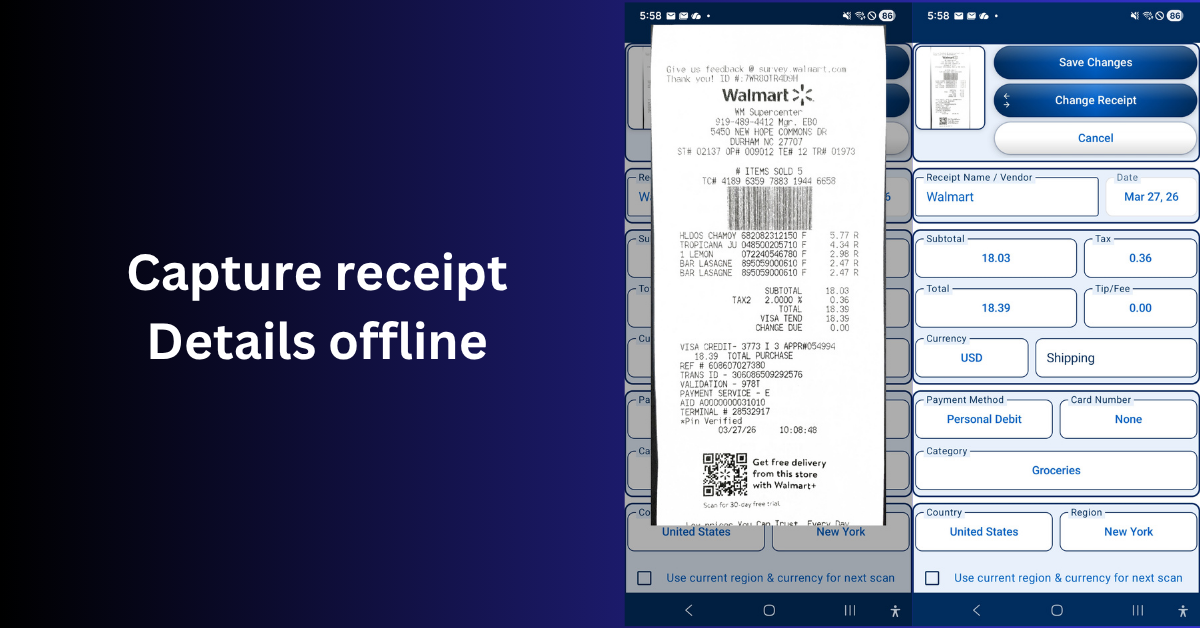
Built for reporting-first workflows, Scan Pro Receipts uses OCR and purpose-built field logic (not AI), stays ad-free, and lets you capture, review, and organize receipts even without internet or mobile data.
Features
- Smart Capture — Scan with camera or import from gallery and files, then review OCR-filled details before saving.
- OCR That Speeds Up Entry — Auto-fill key fields, quickly review low-confidence values, and make edits before filing receipts.
- Fiscal Period Filing — Organize receipts by period and move one or many receipts when bookkeeping needs cleanup.
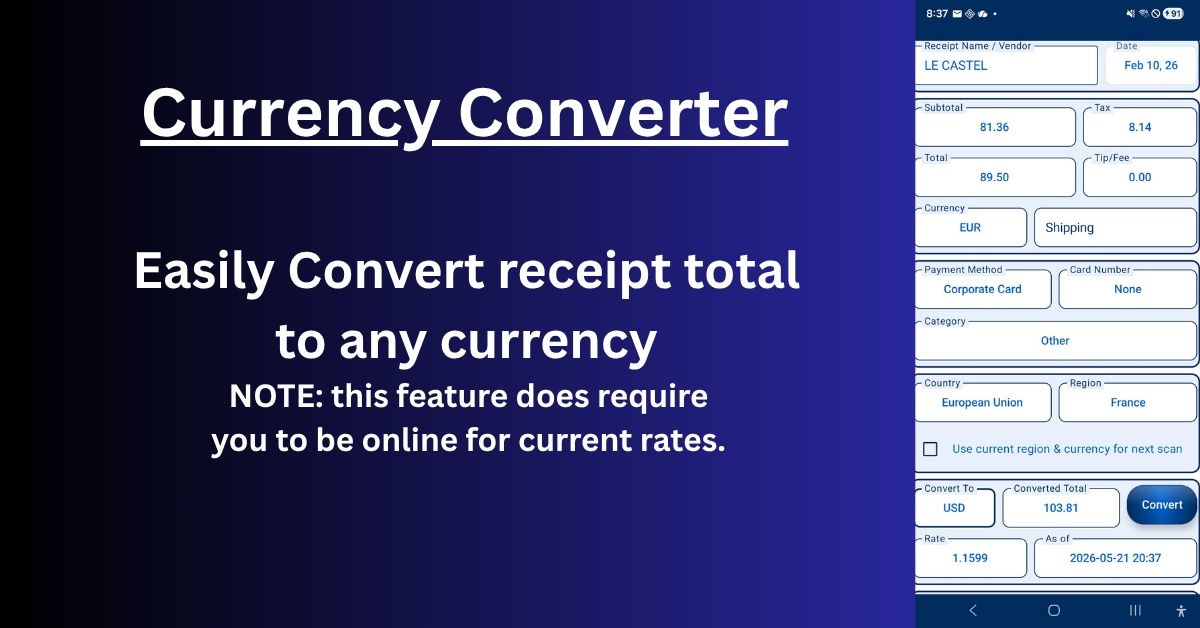
- Currency Conversion — Handle foreign receipts with conversion support so your totals and reporting stay consistent.
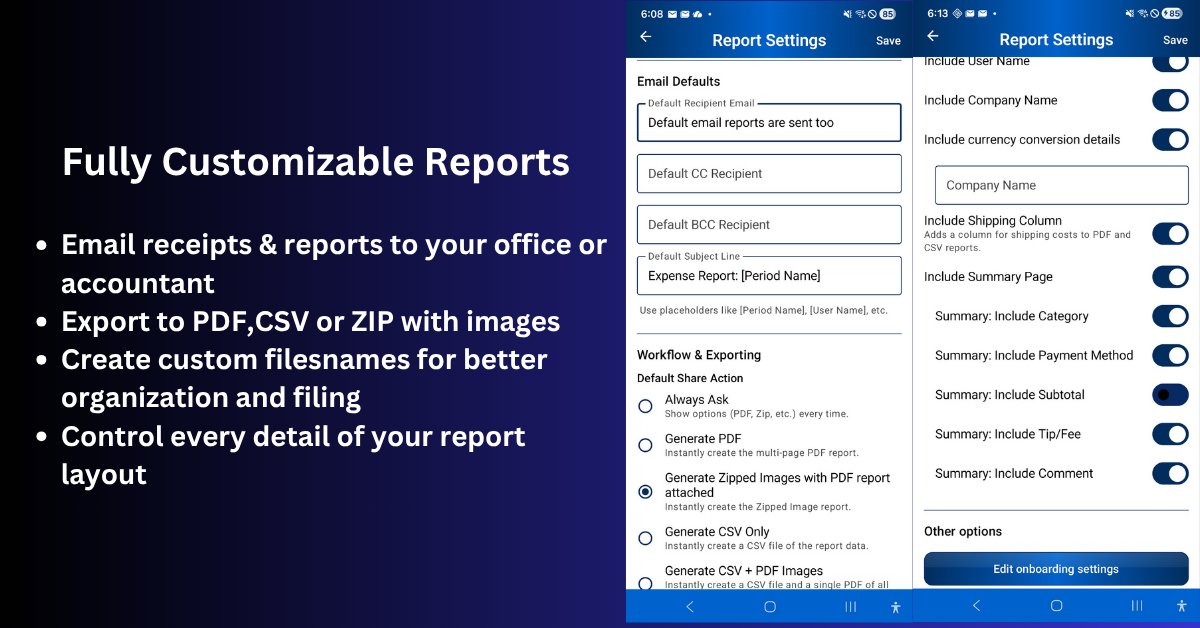
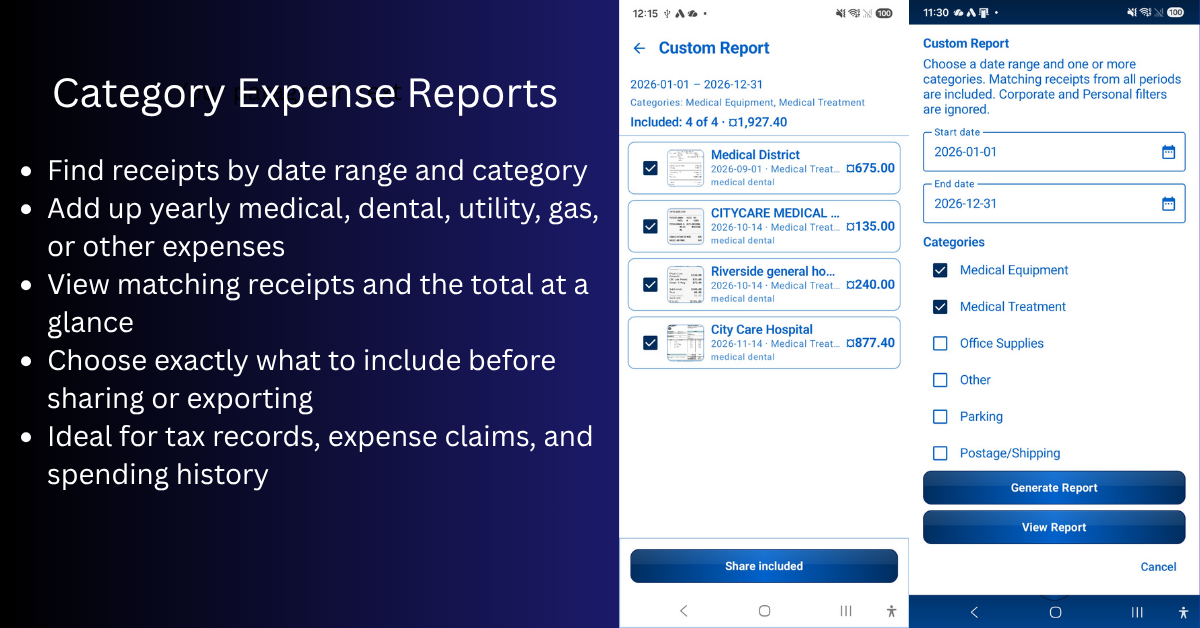
- Reporting & Exports — Generate PDF, CSV, and image-based exports, then choose the format that fits your workflow.
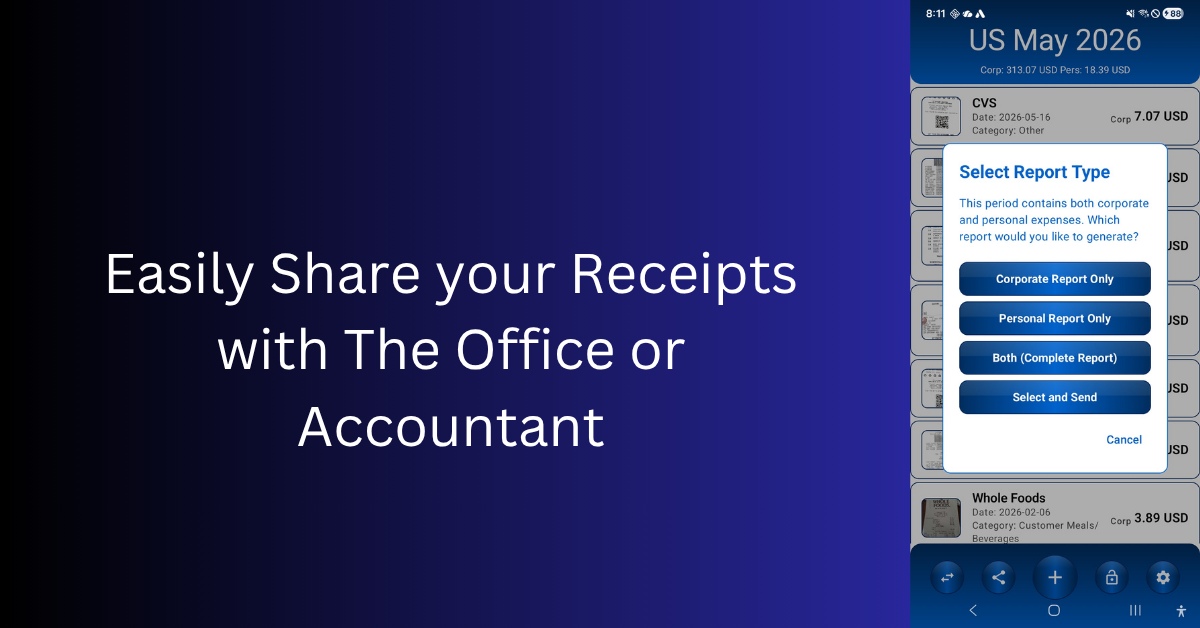
- Share & Submission Tracking — Set default recipients, streamline sending, and resend only newly added receipts when needed.
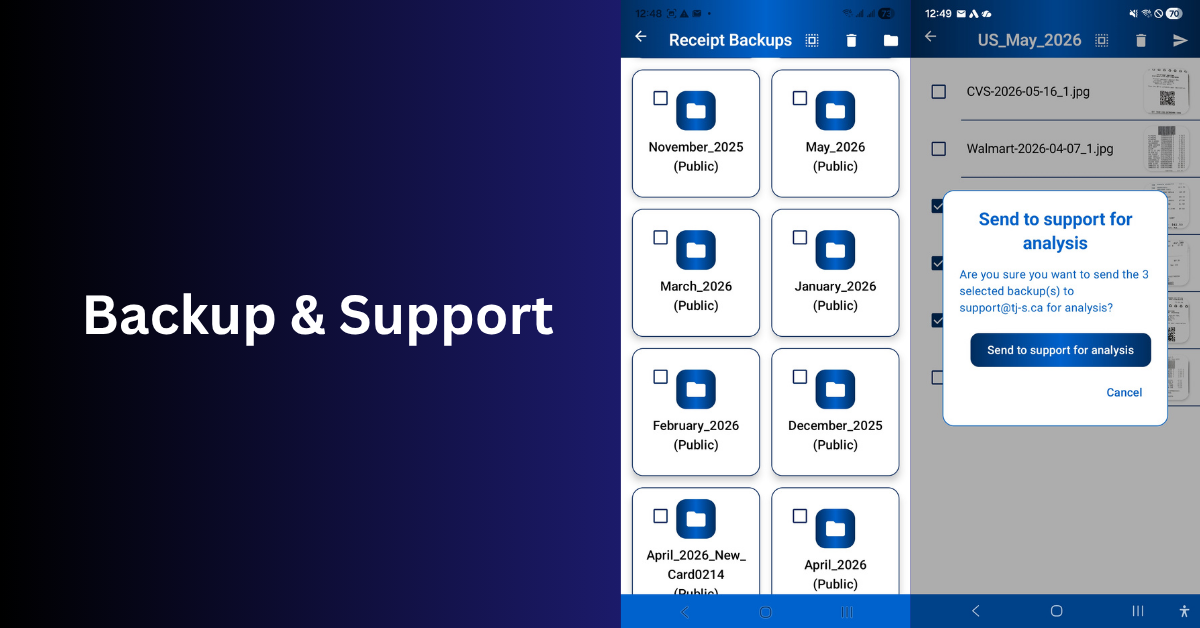
- Backup & Storage Control — Choose private or public backup locations, including your own folders and cloud-synced setup.
- Custom Report Settings — Fine-tune report structure, content columns, captions, and filename conventions for your team.
Use Cases
- Reimbursement reports — Compile receipts for employer or client reimbursement with PDF summaries and CSV exports.
- Tax preparation — Organize receipts by fiscal period and export records your accountant or tax preparer can use directly.
- Bookkeeper handoff — Send clean CSV spreadsheets paired with receipt images to your bookkeeper each month or quarter.
- Freelancer and contractor records — Track business expenses without a monthly subscription or cloud-only lock-in.
- Small business expense tracking — Keep company purchase records organized by category, period, and payment method.
- Territory and field sales expenses — Capture receipts while travelling, even without mobile data, and export territory-quarter reports.
- Corporate vs reimbursable expenses — Flag receipts as corporate or personal reimbursement so accounting receives the correct breakdown.
- Warranty and return records — Store receipts with original images attached for easy lookup when returns or warranty claims arise.
- Vehicle and fuel receipts — Log fuel, maintenance, and travel expenses for mileage and deduction records.
- Medical expense records — Track out-of-pocket medical, pharmacy, and insurance receipts for reimbursement or tax claims.
- Household and personal budgeting — Keep a private, offline record of major purchases without uploading data to cloud services.
- Privacy-first receipt management — Process receipts entirely on-device when you do not want purchase data sent to cloud AI servers.
- Offline workflow — Capture and organize receipts at job sites, parking garages, rural areas, or while travelling without internet.
- Cross-device review — Capture on Android, then review, batch-edit, and export on the free Windows Desktop Companion.

Comments


I Built Scan Pro Receipts After 25 Years of Territory Sales Expenses I’ve been a territory sales manager for years. Coffee with a client. Lunch after a site visit. A gift when a deal closes. Hotel nights on the road. Oil changes and service on a company car — all on the company credit card. Every receipt had to be tracked for management, for taxes, and because if you can’t explain an expense, you don’t get it back. Early on I filled out a form for each charge and wrote notes on the slip. Later I just scribbled on the receipt: who the lunch was for, or why the charge existed — car service, hotel, client gift. That works until you do it hundreds of times a year with handwriting nobody can read. Accounting would call: “What does this say?” “Who was this meal for?” I’d try to remember a lunch from three weeks ago. Sometimes I couldn’t. Month-end meant thirty or forty receipts in a pile — some fading, some with a grease stain, some stuffed in an envelope hoping the office could figure it out. There had to be a better way. What I wanted — and couldn’t find I wanted to open an app, scan the receipt, and have it fill in vendor, date, subtotal, tax, and total. I didn’t need perfection. Close was enough. Tap a field, fix it, move on. I also wanted the app to remember my world: - Customer names or account codes — regular clients auto-suggest as I type - Smart recalculation — fix tax and let subtotal and total adjust themselves - Corporate vs personal — company card filed one way; personal expenses ready for reimbursement another way I was tired of filling the same information out every time. If the app could get me 80% of the way there on every scan, the last 20% of corrections would feel effortless — not punishing. That’s what twenty-five years of sales expensing taught me to care about: less typing, fewer questions, no month-end panic. What was already out there I tried plenty of apps. Some pulled fields accurately — clearly AI-driven, and you had to be online for them to work properly. Lots of bells and whistles I didn’t need. The gap was reporting: receipts and data together, but not customizable for our office. Then the pricing: monthly subscriptions, often $5–10 a month, plus extra for cloud storage. Even non-AI apps wanted recurring fees. I already pay for my own cloud accounts. I wanted software that would let me use them. I’d happily pay a fair one-time price. I couldn’t find that, so I built Scan Pro Receipts with 25 years of sales expensing in mind. What accounting told me — and what I built for them While building the app I sat down with our accounting team. For each receipt, someone was cropping the photo, saving it with the last four digits of the credit card and the date, then adding a GL code by hand. They opened every image again to confirm total, tax, and date. Foreign currency meant lookup and conversion on their side. A single receipt could take a minute — or several. So I designed exports for their workflow — not only mine. When I hit Share for a fiscal period, accounting receives two things: 1. A PDF report summarizing every receipt in that submission — vendor, dates, totals, tax, customer, category, payment method, comments, and currency conversion details when they apply. 2. A zipped package built for how finance actually works. Inside are cropped receipt images, each paired with the fields I chose to include — Total, Tax, Customer, Date, payment method, category, comments, and when it applies currency conversion with a timestamp. Each image file is named the way our accounting department asked for — for example 7894-2026-03-25.jpg: last four digits of the card, then the receipt date. You can customize filename rules to match your office — card digits, date, vendor, period name, or combinations your bookkeeper prefers. Before this, accounting’s routine was repetitive: open photo, crop, rename, verify amounts, file. Multiply that by every rep, every month. Now they open one email, read the PDF summary for the full period, unzip one folder, and work through consistently named, consistently labeled files. I added a currency converter for foreign receipts and customizable share settings — default To, CC, and subject, your preferred share app — so what lands in their inbox is ready to file, not a camera-roll dump. How I use it now 1. Purchase → scan while I still remember the context 2. OCR fills the fields — very well, or close enough 3. I assign customer name or account code (saved names pop up as I type) 4. I tag corporate or reimbursement 5. If something’s off, I fix one field; related amounts rebalance 6. The original image stays for corrections later Twice a month — or when the fiscal period is ready — I hit Share. The app compiles the period, builds the PDF summary and zip, opens my email with To and subject filled, attaches both files. I press send. No envelope. No batch of thirty or forty receipts at month-end. No last-minute blurry photos because I kept putting it off. What changed for me I used to dread expense time. Memory games about who was at lunch. Lost slips. Since I’ve used this daily: - Accounting hasn’t questioned who a receipt was for or what my handwriting meant - Reports are on time — done continuously, not in one miserable evening - Backups stay mine — gallery and folders I control, synced to cloud I already pay for - Month-end isn’t a crunch. It already happened, a few receipts at a time That shift alone was worth building the app. Who else this is for - Field sales & reps — client meals, travel, fuel, company-car service; fiscal periods; one-button share - Accounting & admin — PDF summary plus zip with cropped images and labeled fields; optional CSV columns; custom export filenames - Owners & consultants — comments for who and why; customer meal categories; corporate vs personal reports - Travellers — country, region, and currency override; conversion at purchase time; offline capture abroad How it’s built - No AI for scanning — on-device OCR and field logic you review offline - 60-day free trial, then $29.99 lifetime — no subscription treadmill - Improving weekly — send difficult receipts via Backup → Share so we tune parsing for real slips I’m not against AI apps. They’re just not what I needed: predictable fields, flexible reports, my storage, one fair price. Capture once. Fix what matters. Share the period. Get back to selling.

Practical apps that simplify everyday tasks can make a real difference for busy professionals and business owners. Just as receipt-scanning tools help organize expenses and save time, reliable transportation services help make business travel more convenient. For professional transportation in the Dallas–Fort Worth area, visit [DFW Royal Limo](https://dfwroyallimo.com/) to explore available services.
Premium Products












































Sponsors
Buy

Makers
Makers
Comments
I Built Scan Pro Receipts After 25 Years of Territory Sales Expenses I’ve been a territory sales manager for years. Coffee with a client. Lunch after a site visit. A gift when a deal closes. Hotel nights on the road. Oil changes and service on a company car — all on the company credit card. Every receipt had to be tracked for management, for taxes, and because if you can’t explain an expense, you don’t get it back. Early on I filled out a form for each charge and wrote notes on the slip. Later I just scribbled on the receipt: who the lunch was for, or why the charge existed — car service, hotel, client gift. That works until you do it hundreds of times a year with handwriting nobody can read. Accounting would call: “What does this say?” “Who was this meal for?” I’d try to remember a lunch from three weeks ago. Sometimes I couldn’t. Month-end meant thirty or forty receipts in a pile — some fading, some with a grease stain, some stuffed in an envelope hoping the office could figure it out. There had to be a better way. What I wanted — and couldn’t find I wanted to open an app, scan the receipt, and have it fill in vendor, date, subtotal, tax, and total. I didn’t need perfection. Close was enough. Tap a field, fix it, move on. I also wanted the app to remember my world: - Customer names or account codes — regular clients auto-suggest as I type - Smart recalculation — fix tax and let subtotal and total adjust themselves - Corporate vs personal — company card filed one way; personal expenses ready for reimbursement another way I was tired of filling the same information out every time. If the app could get me 80% of the way there on every scan, the last 20% of corrections would feel effortless — not punishing. That’s what twenty-five years of sales expensing taught me to care about: less typing, fewer questions, no month-end panic. What was already out there I tried plenty of apps. Some pulled fields accurately — clearly AI-driven, and you had to be online for them to work properly. Lots of bells and whistles I didn’t need. The gap was reporting: receipts and data together, but not customizable for our office. Then the pricing: monthly subscriptions, often $5–10 a month, plus extra for cloud storage. Even non-AI apps wanted recurring fees. I already pay for my own cloud accounts. I wanted software that would let me use them. I’d happily pay a fair one-time price. I couldn’t find that, so I built Scan Pro Receipts with 25 years of sales expensing in mind. What accounting told me — and what I built for them While building the app I sat down with our accounting team. For each receipt, someone was cropping the photo, saving it with the last four digits of the credit card and the date, then adding a GL code by hand. They opened every image again to confirm total, tax, and date. Foreign currency meant lookup and conversion on their side. A single receipt could take a minute — or several. So I designed exports for their workflow — not only mine. When I hit Share for a fiscal period, accounting receives two things: 1. A PDF report summarizing every receipt in that submission — vendor, dates, totals, tax, customer, category, payment method, comments, and currency conversion details when they apply. 2. A zipped package built for how finance actually works. Inside are cropped receipt images, each paired with the fields I chose to include — Total, Tax, Customer, Date, payment method, category, comments, and when it applies currency conversion with a timestamp. Each image file is named the way our accounting department asked for — for example 7894-2026-03-25.jpg: last four digits of the card, then the receipt date. You can customize filename rules to match your office — card digits, date, vendor, period name, or combinations your bookkeeper prefers. Before this, accounting’s routine was repetitive: open photo, crop, rename, verify amounts, file. Multiply that by every rep, every month. Now they open one email, read the PDF summary for the full period, unzip one folder, and work through consistently named, consistently labeled files. I added a currency converter for foreign receipts and customizable share settings — default To, CC, and subject, your preferred share app — so what lands in their inbox is ready to file, not a camera-roll dump. How I use it now 1. Purchase → scan while I still remember the context 2. OCR fills the fields — very well, or close enough 3. I assign customer name or account code (saved names pop up as I type) 4. I tag corporate or reimbursement 5. If something’s off, I fix one field; related amounts rebalance 6. The original image stays for corrections later Twice a month — or when the fiscal period is ready — I hit Share. The app compiles the period, builds the PDF summary and zip, opens my email with To and subject filled, attaches both files. I press send. No envelope. No batch of thirty or forty receipts at month-end. No last-minute blurry photos because I kept putting it off. What changed for me I used to dread expense time. Memory games about who was at lunch. Lost slips. Since I’ve used this daily: - Accounting hasn’t questioned who a receipt was for or what my handwriting meant - Reports are on time — done continuously, not in one miserable evening - Backups stay mine — gallery and folders I control, synced to cloud I already pay for - Month-end isn’t a crunch. It already happened, a few receipts at a time That shift alone was worth building the app. Who else this is for - Field sales & reps — client meals, travel, fuel, company-car service; fiscal periods; one-button share - Accounting & admin — PDF summary plus zip with cropped images and labeled fields; optional CSV columns; custom export filenames - Owners & consultants — comments for who and why; customer meal categories; corporate vs personal reports - Travellers — country, region, and currency override; conversion at purchase time; offline capture abroad How it’s built - No AI for scanning — on-device OCR and field logic you review offline - 60-day free trial, then $29.99 lifetime — no subscription treadmill - Improving weekly — send difficult receipts via Backup → Share so we tune parsing for real slips I’m not against AI apps. They’re just not what I needed: predictable fields, flexible reports, my storage, one fair price. Capture once. Fix what matters. Share the period. Get back to selling.
Practical apps that simplify everyday tasks can make a real difference for busy professionals and business owners. Just as receipt-scanning tools help organize expenses and save time, reliable transportation services help make business travel more convenient. For professional transportation in the Dallas–Fort Worth area, visit [DFW Royal Limo](https://dfwroyallimo.com/) to explore available services.
Premium Products
New to Fazier?

Find your next favorite product or submit your own. Made by @FalakDigital.
Copyright ©2026. All Rights Reserved