
Pixly
AI interior design & virtual staging from a photo
Pixly turns one photo of a room into a redesign.
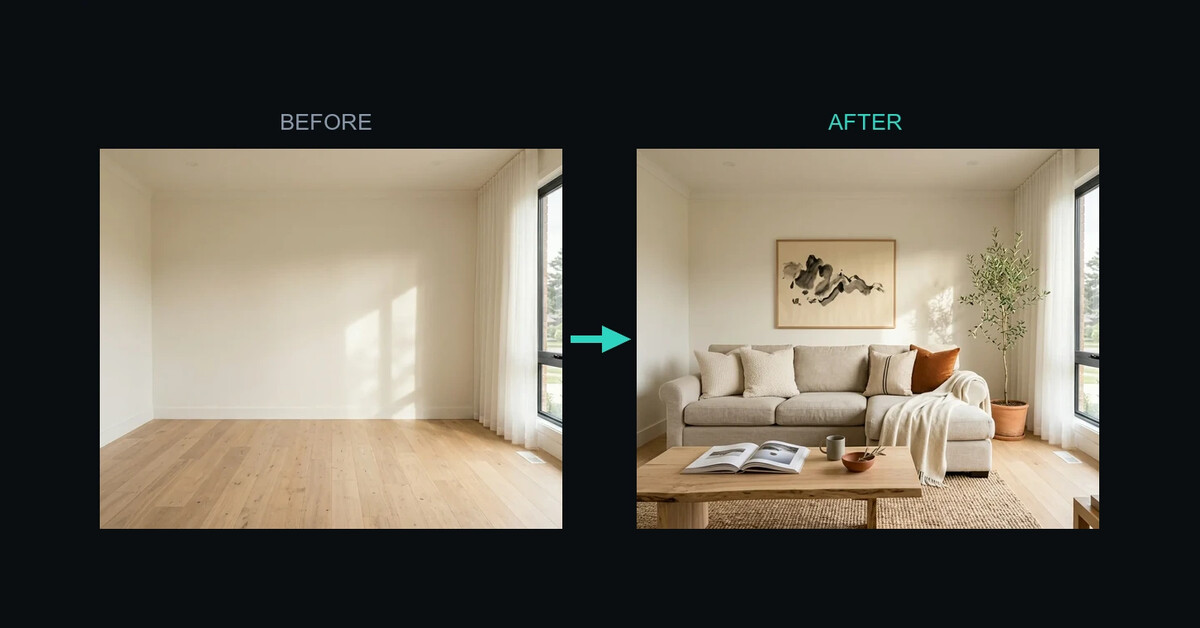
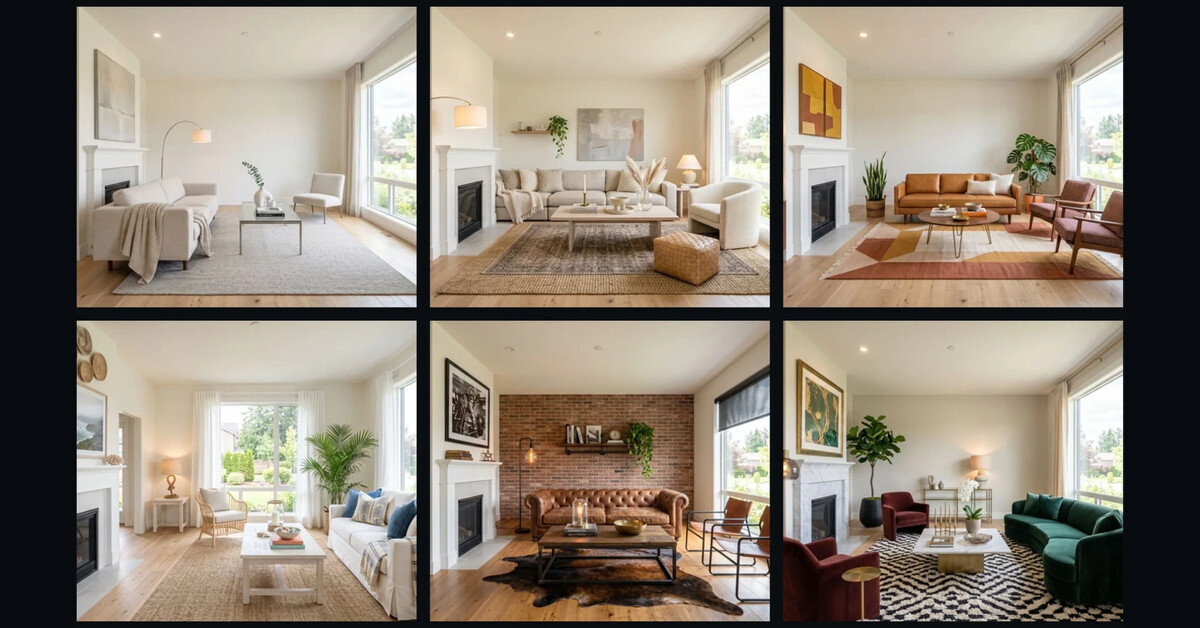
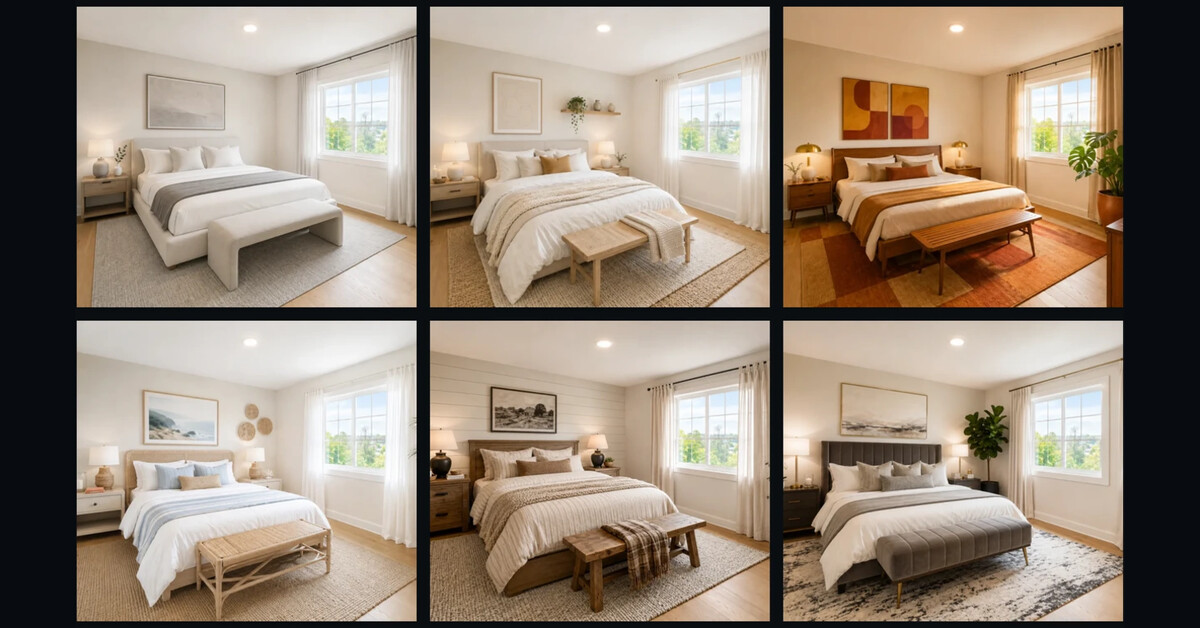
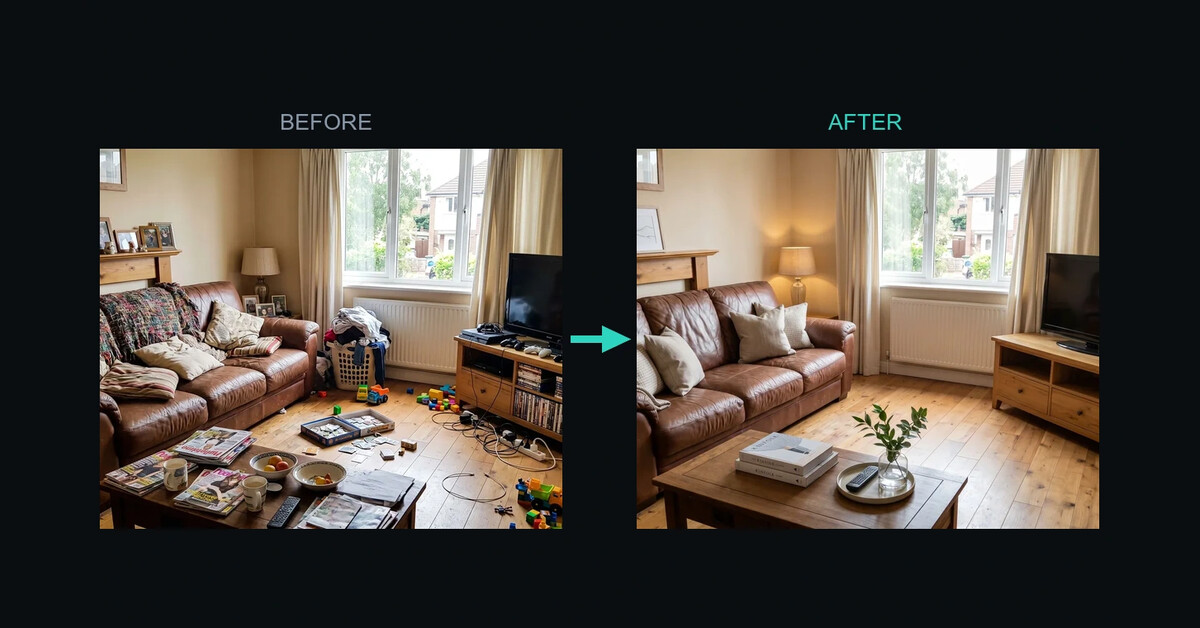
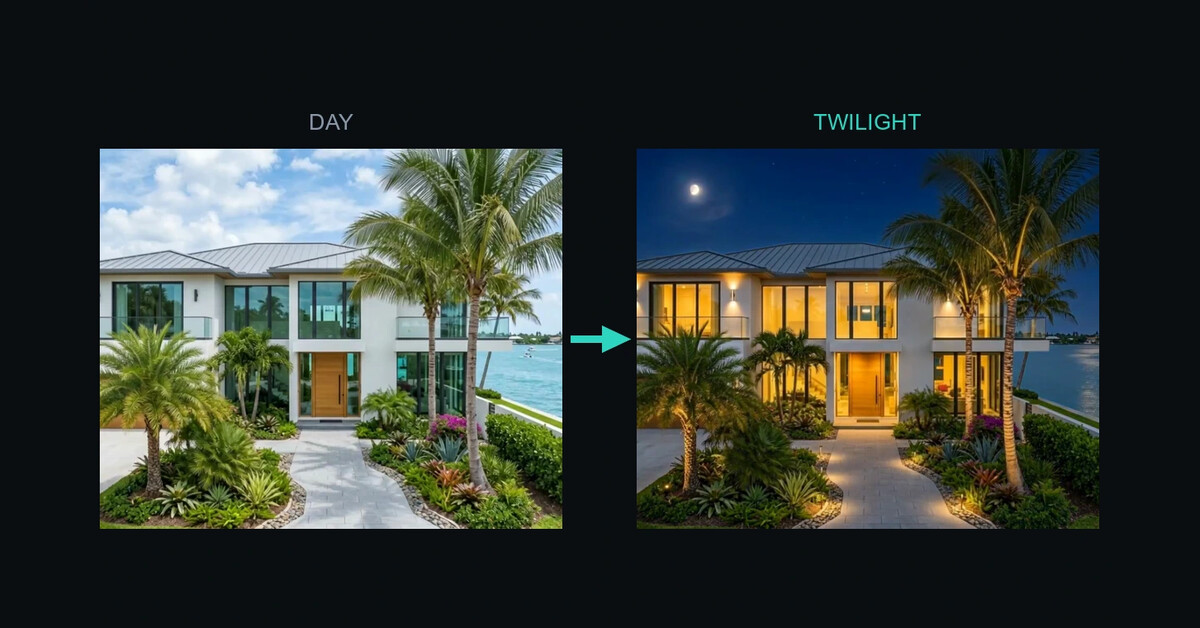
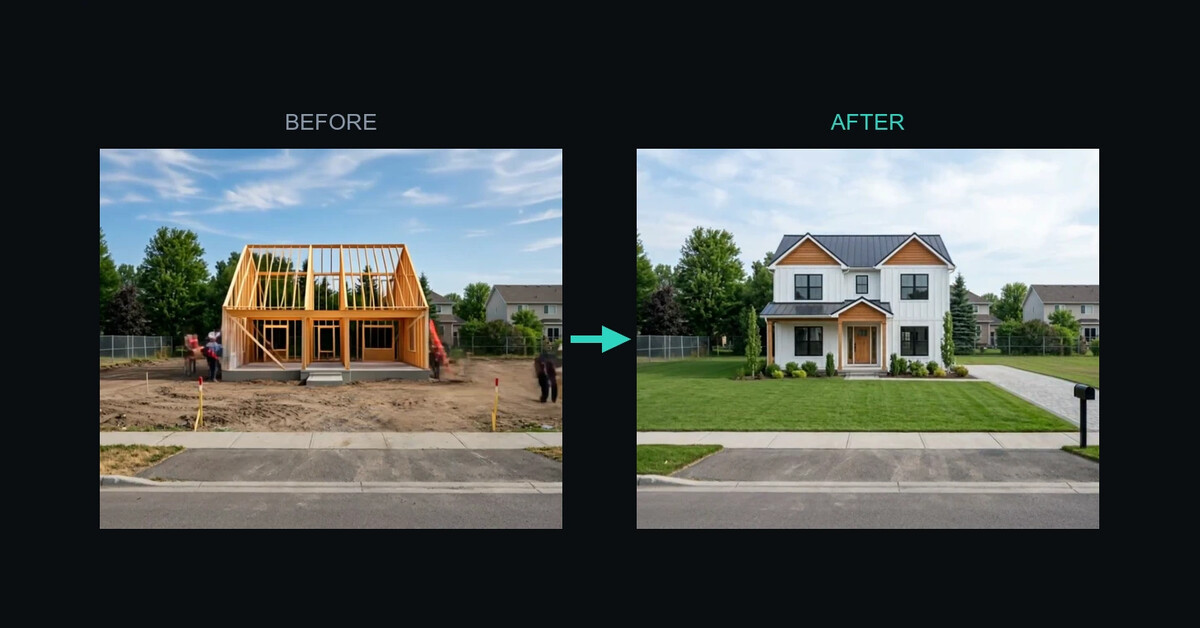
Upload any room and restyle it in 60+ interior design styles - Scandinavian, Japandi, Mid-Century, Coastal - while the walls, windows and proportions stay exactly where they are. It works on empty rooms and lived-in ones alike: stage an empty space, clear the clutter out of a furnished one, remove individual pieces of furniture, or shift an exterior from midday to twilight.
The same photo also becomes video - vertical Instagram and TikTok reels with cinematic camera moves, before/after reveals, and drone property-line overlays for land listings.
Twelve paid photo and video tools in all, plus sixteen free browser tools that need no account: image compressor, HEIC and format converters, images to PDF, text-behind-image and property lines.
There is a native iPhone app and a browser app in 8 languages, and a REST API and MCP server so AI agents can run the same tools.
Free to start. Starter is $5.99/week, and the main plan is $19.99/month.

Features
- Restyle any room in 60+ interior design styles, keeping the walls, windows and proportions
- Virtual staging, decluttering, furniture removal and day-to-night exteriors
- Vertical Instagram and TikTok reels with cinematic camera motion
- Drone property-line overlays and plot signage for land listings
- Native iPhone app and a browser app, in 8 languages
- REST API and MCP server, so AI agents can run the same tools
- 16 free browser tools with no account: compressor, HEIC converters, images to PDF, text-behind-image
Use Cases
- Real estate professionals staging empty listings before they go online
- Homeowners testing styles before committing to furniture or a renovation
- Interior designers showing a client three directions for the same room in minutes
- Photographers turning a single shoot into vertical reels for Instagram and TikTok
- Land and plot listings that need boundary overlays drawn on drone footage

Comments


The part that decides whether a render is usable in a real listing is geometry staying put, so it is good to see walls, windows and proportions called out explicitly rather than left to luck. Two questions from the buying side: is the room held consistent across the 60+ styles so a living room stays recognisable shot to shot, or does it drift and need re-running? And for the vertical reels, is the camera move synthesised from that single image or does it want a second angle? The free no-account tools underneath (compressor, HEIC conversion, images-to-PDF) look like the smarter half of the funnel - that is what agents type into a search box before they ever hear of staging.

The part I like most is that you’re treating room geometry as a constraint, not something the model is allowed to “improve.” That matters a lot for real estate because a beautiful render is useless if the walls, windows, or proportions shift. I’m curious how stable that geometry stays when you move from still images into reels or day-to-night transformations. Also, do you see more serious usage coming from agents staging listings, or from interior designers using it as a client approval tool?


Maintaining structural geometry (walls, windows, proportions) while swapping styles is usually where most AI interior tools fail, so doing that reliably across 60+ styles is huge. Adding automated video reveals and drone overlays directly from a single room photo makes this an all-in-one powerhouse for real estate agents and marketers. Awesome launch!

I built Pixly because every staging tool I tried handed me back a room that wasn't mine. Upload a photo, pick a style, and you'd get something beautiful with the window moved, the ceiling lowered, or a wall that was never there. Lovely picture, useless if you actually have to sell that property. So the whole thing is built around keeping the room: walls, windows, floor plan and proportions stay put, and only the furniture and finish change. That constraint is also the hard part, because the model is far happier inventing a nicer room than respecting the one you gave it. Two things I did not expect. When I checked real search demand across eight languages, consumer "AI interior design" was alive everywhere while the professional staging terms were basically flat - so the framing moved from staging to interior design. And our biggest source of failed jobs was never image quality, it was the safety layer refusing prompts; classifying failures by cause instead of retrying blindly helped more than any model change did. The 16 free browser tools run entirely on your own machine - no upload, no account. Happy to hear what breaks.



Really interesting approach to AI interior design. I especially like that Pixly focuses on keeping the original room structure intact instead of completely reinventing the space. The combination of virtual staging, decluttering, and turning room photos into short videos makes it especially useful for real estate and interior design workflows. Great work! 👏
Premium Products



















































Sponsors
Buy

Awards
View all
Awards
View allMakers
Makers
Comments
The part that decides whether a render is usable in a real listing is geometry staying put, so it is good to see walls, windows and proportions called out explicitly rather than left to luck. Two questions from the buying side: is the room held consistent across the 60+ styles so a living room stays recognisable shot to shot, or does it drift and need re-running? And for the vertical reels, is the camera move synthesised from that single image or does it want a second angle? The free no-account tools underneath (compressor, HEIC conversion, images-to-PDF) look like the smarter half of the funnel - that is what agents type into a search box before they ever hear of staging.
The part I like most is that you’re treating room geometry as a constraint, not something the model is allowed to “improve.” That matters a lot for real estate because a beautiful render is useless if the walls, windows, or proportions shift. I’m curious how stable that geometry stays when you move from still images into reels or day-to-night transformations. Also, do you see more serious usage coming from agents staging listings, or from interior designers using it as a client approval tool?
Maintaining structural geometry (walls, windows, proportions) while swapping styles is usually where most AI interior tools fail, so doing that reliably across 60+ styles is huge. Adding automated video reveals and drone overlays directly from a single room photo makes this an all-in-one powerhouse for real estate agents and marketers. Awesome launch!
I built Pixly because every staging tool I tried handed me back a room that wasn't mine. Upload a photo, pick a style, and you'd get something beautiful with the window moved, the ceiling lowered, or a wall that was never there. Lovely picture, useless if you actually have to sell that property. So the whole thing is built around keeping the room: walls, windows, floor plan and proportions stay put, and only the furniture and finish change. That constraint is also the hard part, because the model is far happier inventing a nicer room than respecting the one you gave it. Two things I did not expect. When I checked real search demand across eight languages, consumer "AI interior design" was alive everywhere while the professional staging terms were basically flat - so the framing moved from staging to interior design. And our biggest source of failed jobs was never image quality, it was the safety layer refusing prompts; classifying failures by cause instead of retrying blindly helped more than any model change did. The 16 free browser tools run entirely on your own machine - no upload, no account. Happy to hear what breaks.
Really interesting approach to AI interior design. I especially like that Pixly focuses on keeping the original room structure intact instead of completely reinventing the space. The combination of virtual staging, decluttering, and turning room photos into short videos makes it especially useful for real estate and interior design workflows. Great work! 👏
Premium Products
New to Fazier?

Find your next favorite product or submit your own. Made by @FalakDigital.
Copyright ©2026. All Rights Reserved