
Pixelcut AI
Pixelcut AI | Free Background Remover & Image Upscaler
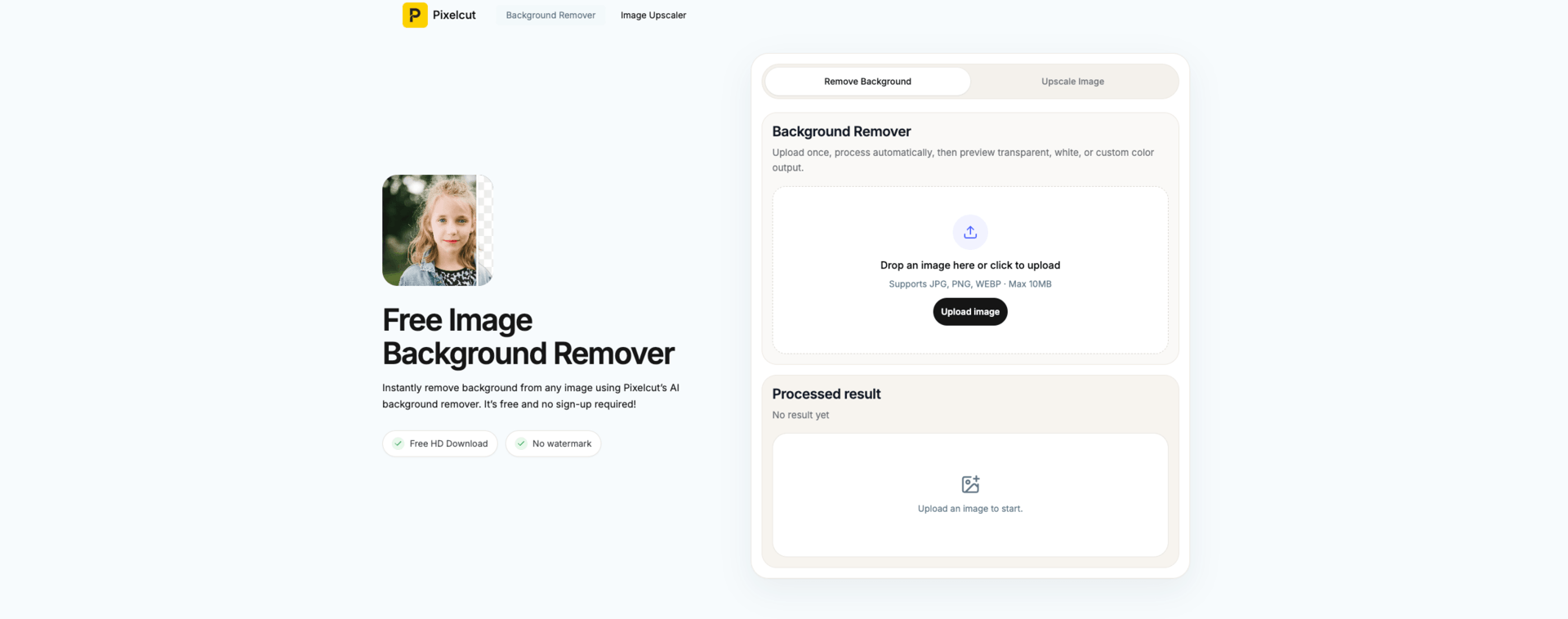
Pixelcut AI is a 100% free online tool that instantly removes image backgrounds and upscales photos to 2K/4K resolution — no sign-up, no software, no watermarks. Powered by advanced AI, it delivers pixel-perfect cutouts and crystal-clear enlargements in seconds, directly in your browser.


Features
**🖼️ AI Background Remover**
- Removes backgrounds from any image in under 3 seconds
- Supports JPG, PNG, HEIC, WebP, and BMP formats
- Handles complex edges: hair strands, jewelry filigree, transparent objects, and fine details
- Outputs clean transparent PNG or white background
- Replace the background with solid colors, custom scenes, or search from thousands of curated backdrop images
- Runs entirely in-browser — no installation required, works on mobile and desktop
**🔍 AI Image Upscaler**
- Upscales images to 2K or 4K resolution in one click
- Preserves sharp edges and fine textures without pixelation or blur
- Supports JPG, PNG, and HEIC file formats
- Creative Upscale mode adds expressive artistic detail while enlarging
- Fine-tune the balance between Creativity and Resemblance for custom output
- No watermarks, no account required, free to download
Use Cases
Pixelcut AI is built for a wide range of users who need fast, professional image results without the complexity of traditional design tools:
- **E-commerce sellers** — Create clean product photos for Amazon, Shopify, eBay, and social media
- **Marketers & content creators** — Produce polished visuals for ads, campaigns, and landing pages
- **Designers** — Quickly prep assets without switching to heavy desktop software
- **Photographers** — Restore and enhance old or low-resolution photos
- **Casual users** — Edit profile pictures, ID photos, and personal images effortlessly
Comments


I run a small online store and shoot all my product photos myself. For the longest time, background removal was my biggest headache. I tried a bunch of popular tools — most of them either left jagged edges around my products, completely butchered fine details like jewelry chains and thin straps, or slapped a watermark on the result unless I paid for a subscription. Some required me to create an account just to download a single image. Others were so slow that I'd upload a photo, go make coffee, come back, and it was still "processing." The free tiers on most platforms are basically useless — you get low-resolution output, limited downloads per month, and the results on complex images (especially anything with hair or thin frames) look like they were cut out with safety scissors. Then I came across **Pixelcut AI** (https://pixelcut.art/), and honestly, it changed my workflow completely. I uploaded a product shot of a necklace — one of those nightmare images with fine chain links and a white background that blends into the product edges. The result came back in about 2 seconds. Every link, every tiny detail, perfectly isolated. No fraying, no missed spots. I was genuinely shocked. What really won me over was that it's **completely free** — no account, no watermark, no hidden paywall. I can download full-quality transparent PNGs right away. It also supports background replacement, so I can swap in a marble table texture or a lifestyle scene without jumping to a separate tool. The image upscaler is equally impressive. I had some older product photos that were too small for my new store banner. I ran them through Pixelcut's upscaler and got clean 4K results that looked like they were shot on a professional camera. If you're an e-commerce seller, content creator, or just someone who needs clean images fast — stop wasting time on tools that overpromise and underdeliver. Pixelcut AI is the real deal. Visit https://pixelcut.art/ to stat!
Premium Products




















Sponsors
Buy

Makers
Makers
Comments
I run a small online store and shoot all my product photos myself. For the longest time, background removal was my biggest headache. I tried a bunch of popular tools — most of them either left jagged edges around my products, completely butchered fine details like jewelry chains and thin straps, or slapped a watermark on the result unless I paid for a subscription. Some required me to create an account just to download a single image. Others were so slow that I'd upload a photo, go make coffee, come back, and it was still "processing." The free tiers on most platforms are basically useless — you get low-resolution output, limited downloads per month, and the results on complex images (especially anything with hair or thin frames) look like they were cut out with safety scissors. Then I came across **Pixelcut AI** (https://pixelcut.art/), and honestly, it changed my workflow completely. I uploaded a product shot of a necklace — one of those nightmare images with fine chain links and a white background that blends into the product edges. The result came back in about 2 seconds. Every link, every tiny detail, perfectly isolated. No fraying, no missed spots. I was genuinely shocked. What really won me over was that it's **completely free** — no account, no watermark, no hidden paywall. I can download full-quality transparent PNGs right away. It also supports background replacement, so I can swap in a marble table texture or a lifestyle scene without jumping to a separate tool. The image upscaler is equally impressive. I had some older product photos that were too small for my new store banner. I ran them through Pixelcut's upscaler and got clean 4K results that looked like they were shot on a professional camera. If you're an e-commerce seller, content creator, or just someone who needs clean images fast — stop wasting time on tools that overpromise and underdeliver. Pixelcut AI is the real deal. Visit https://pixelcut.art/ to stat!
Premium Products
New to Fazier?

Find your next favorite product or submit your own. Made by @FalakDigital.
Copyright ©2025. All Rights Reserved