
PageWisr
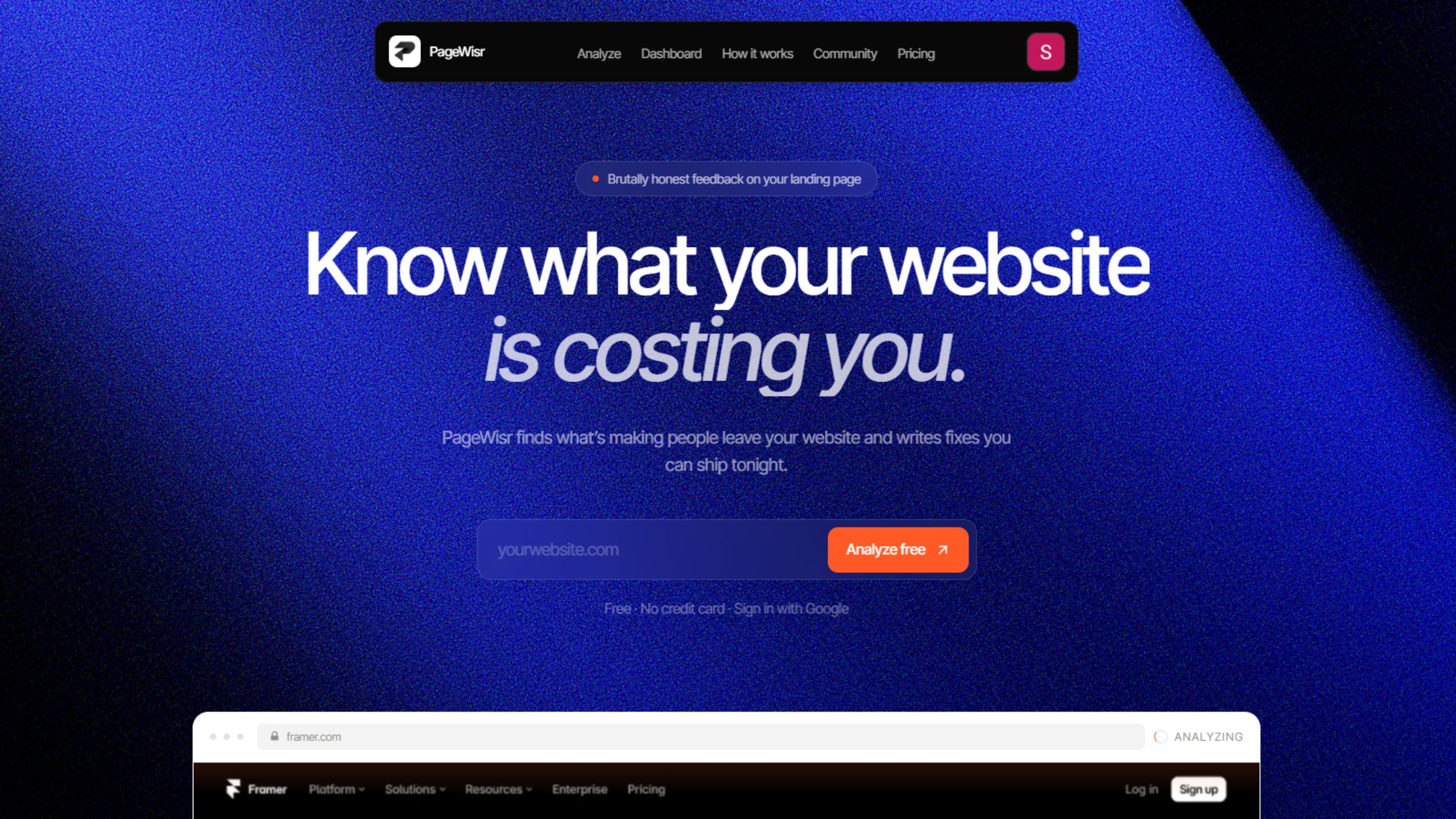
Know what your website is costing you.
Your website might look great and still lose customers.
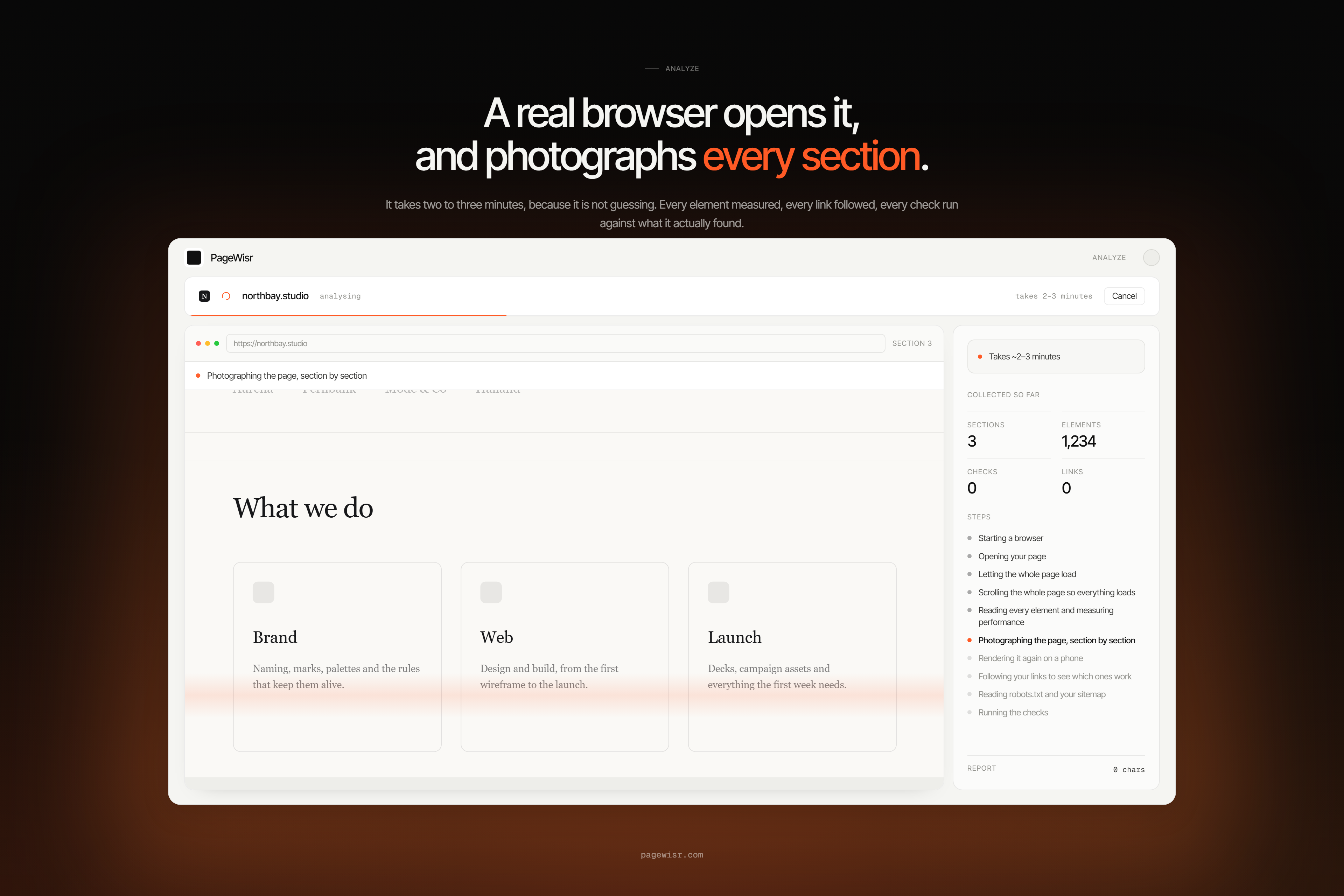
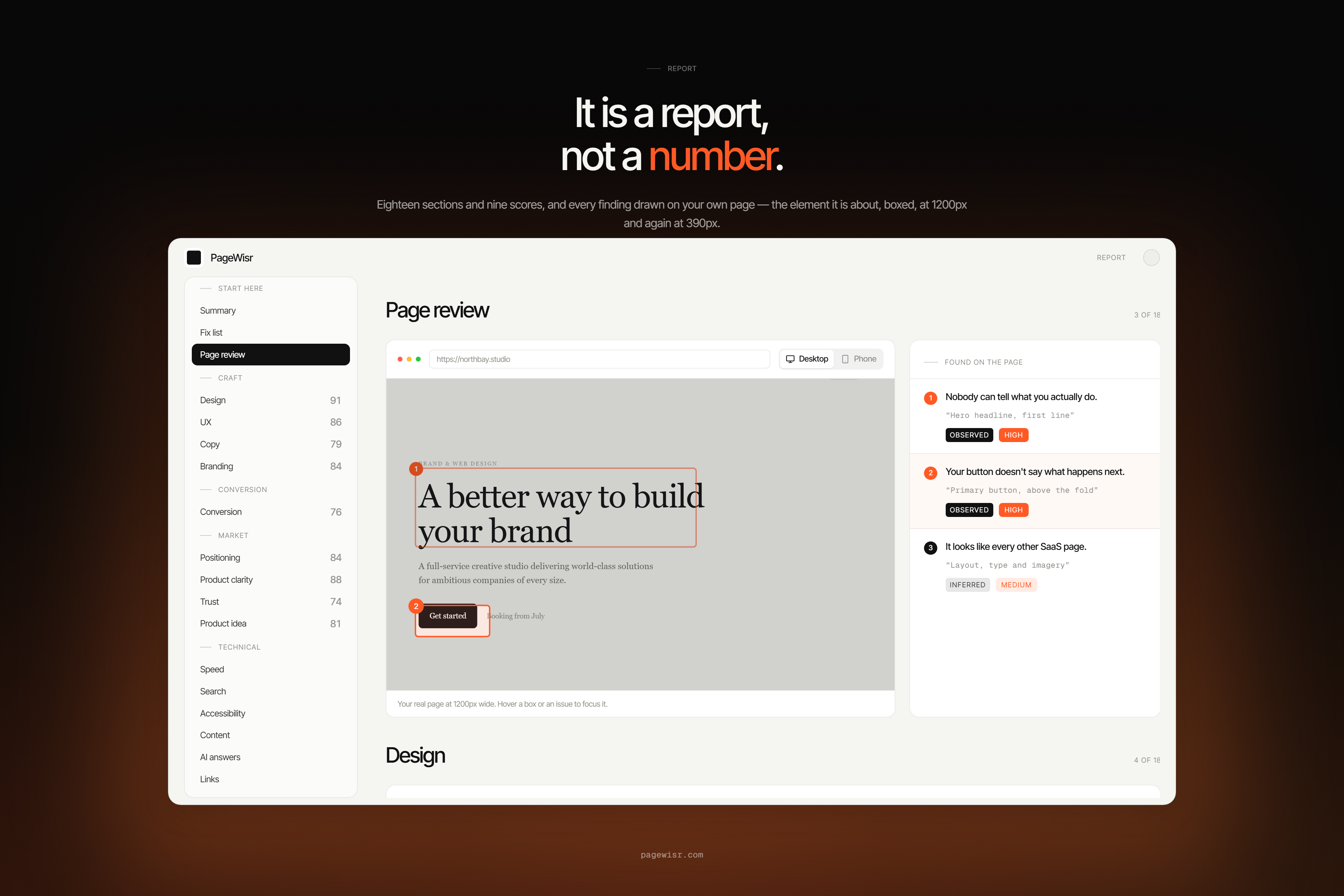
PageWisr finds what’s confusing, weak, or getting in the way across design, UX, copy, trust, SEO, conversion, and more. It explains exactly what to fix, why it matters, and gives you ready-to-use prompts to ship the changes.
Your first website scan is completely free.
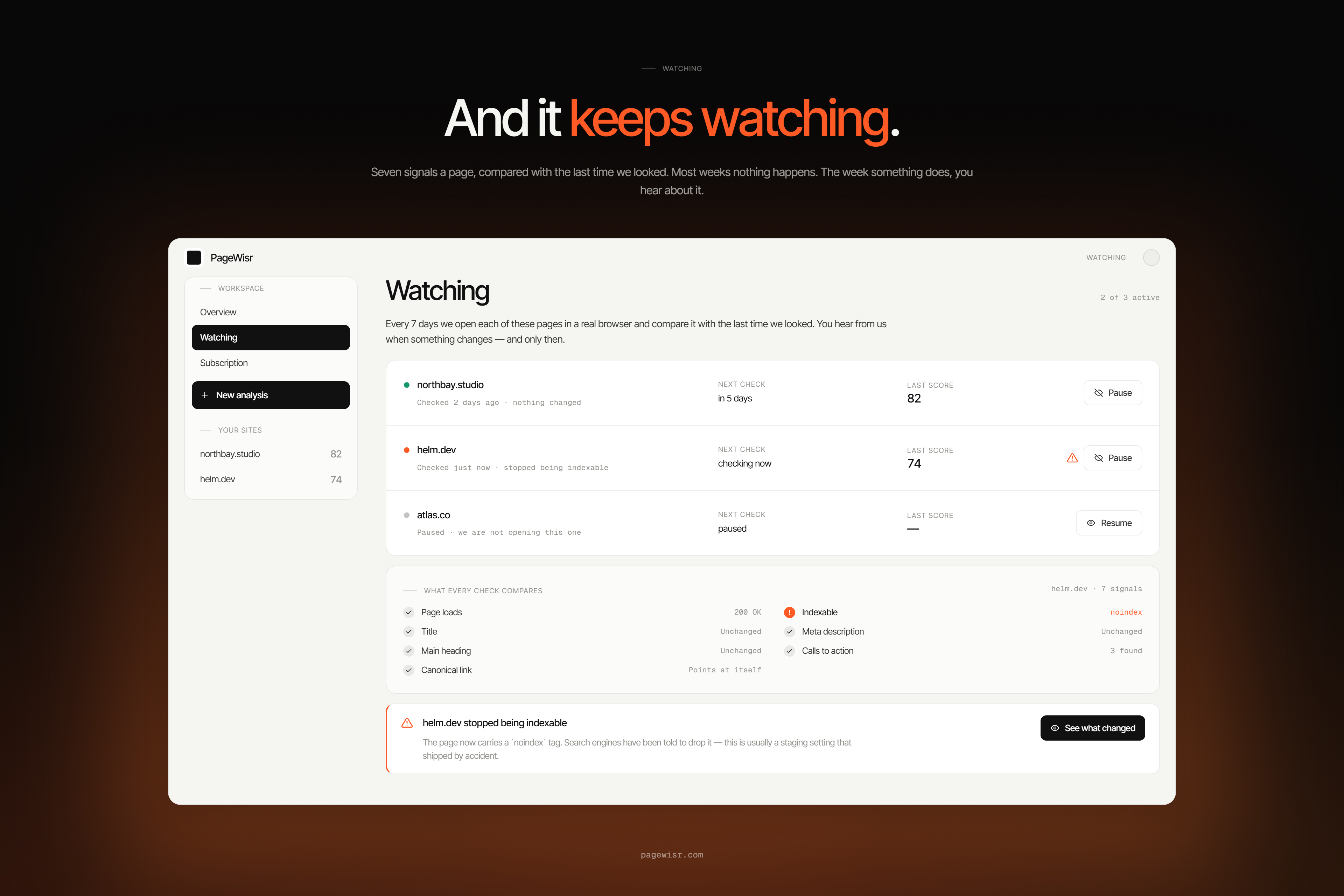
PageWisr can also automatically monitor your website every week and surface meaningful changes or new issues, so you can keep improving instead of constantly checking it yourself.
We’re also building a community where founders and builders can share their website scores, discover other products, compare improvements, and learn from each other.
Features
- Multi-perspective website analysis
- Design, UX, copy, trust & SEO checks
- Actionable fixes with ready-to-use prompts
- Weekly automated website monitoring
- Community for sharing scores and comparing sites
Use Cases
- Find and fix website conversion problems
- Track changes and improve your site weekly

Comments


The weekly monitoring angle is the part I would lean on most: a scan is a one-time opinion, but site drift (a broken CTA, a stale price, a trust badge that quietly disappeared) is what actually costs conversions. Worth deciding early how you classify changes so the weekly email does not turn into noise - grouping by likely impact (copy vs layout vs a removed trust element) and only alerting on the meaningful ones. Curious whether you diff rendered pages or the underlying HTML, since SPAs and A/B tools make raw HTML diffs pretty noisy.

Framing the audit as "what your website is costing you" rather than a generic checklist is the right positioning — founders act on lost revenue, not on Lighthouse scores. Pairing each finding with a ready-to-use prompt to ship the fix closes the loop that most audit tools leave open. I'd be curious how the weekly monitoring distinguishes meaningful regressions from noise — a digest that only pings when a real threshold breaks would be the killer feature for busy teams.


The "ready-to-use prompts to ship the changes" part is what makes this different from the usual audit tools — most of them stop at a list of problems and leave you to figure out the fix. The weekly monitoring loop is smart too since sites regress quietly. One thing I'd watch: trust signals change fast right now (AI overviews citing a site is becoming a trust factor of its own) — worth adding "does AI search cite you" to the checks if it's not there already.

This is a really clean way to frame it - most conversion tools drown you in dashboards before you ever get to "here's what it's actually costing you." Random thing I noticed poking around your site: that footer badge strip at the bottom is wild, like 40+ of them. Might be a fun teardown post in itself - "we audited every launch badge and half of them send zero traffic." Anyway, nice launch, following along.

The ready-to-use prompts to ship the changes are what set this apart from the usual audit tools — most reports stop at the diagnosis. One question: does the weekly monitoring compare against your own past scans only, or does it also benchmark against the community scores you're building? The comparison angle would make the weekly cadence much more motivating.

Nice invotion https://www.b4sai.in/

Pairing each design, copy, trust, and SEO finding with a ready-to-use prompt to ship the fix, plus weekly monitoring for new issues, turns a site audit into an actual to-do list. When the model calls behind those weekly scans start showing up on the bill, pzero.studio is where PZERO offers leftover capacity for less.

Framing audits as money lost rather than issues found is the right way to get founders to act on them. Question on the weekly monitoring: when a new issue shows up after a redesign, does it diff against the previous scan so you can see exactly which change introduced the regression? That before/after attribution is what most audit tools miss - they show the score dropped but not which deploy caused it.
The cost framing is doing real work here — most audits hand you a list of issues with no sense of which one is actually bleeding revenue, so everything feels equally urgent and nothing gets fixed. Quantifying the damage per finding is what turns a report into a roadmap. The weekly monitoring is the other half that matters: websites don't stay audited — every deploy, plugin update, or copy tweak can quietly reintroduce the exact problems a one-time scan caught. Genuine question: how do you keep the cost estimates honest? Putting a dollar figure on something like "confusing navigation" risks false precision, so I'm curious whether the numbers are modeled from the site's own traffic and conversion data or benchmarked — and whether the weekly diffs flag only regressions or also call out improvements.


I’ve been building PageWisr for a while now, and honestly, getting it to this point was a journey The idea came from one simple question: “What if someone could just tell me what’s actually wrong with my website?” So I built it. PageWisr looks at your website from multiple perspectives, finds the things that might be costing you users, and gives you practical fixes instead of generic “improve your UX” advice. Your first scan is completely free. Would genuinely love for you to try it and tell me what you think. Brutal feedback is very welcome 🫶
We rebuilt our logistics marketplace site this year and trust/copy issues were exactly what was killing quote-form conversions. Curious whether the scan weighs above-the-fold trust signals (insurance, licensing, reviews) differently for service businesses vs SaaS. The weekly monitoring is the part I'd actually pay for - audits decay fast.


The cost framing is what stands out to me — most audits hand you a severity score, but translating issues into estimated lost revenue makes prioritization concrete for a founder deciding what to fix this week. I'm curious whether the report quantifies impact per individual issue (e.g., this missing trust signal costs you X visitors) or aggregates it at the page level. One suggestion: a short 'fix this first' list ordered by estimated revenue impact would help a lot, since even a well-explained 50-issue report can feel overwhelming to act on.

Premium Products


















































Sponsors
Buy
Awards
View all
Awards
View allComments
The weekly monitoring angle is the part I would lean on most: a scan is a one-time opinion, but site drift (a broken CTA, a stale price, a trust badge that quietly disappeared) is what actually costs conversions. Worth deciding early how you classify changes so the weekly email does not turn into noise - grouping by likely impact (copy vs layout vs a removed trust element) and only alerting on the meaningful ones. Curious whether you diff rendered pages or the underlying HTML, since SPAs and A/B tools make raw HTML diffs pretty noisy.
Framing the audit as "what your website is costing you" rather than a generic checklist is the right positioning — founders act on lost revenue, not on Lighthouse scores. Pairing each finding with a ready-to-use prompt to ship the fix closes the loop that most audit tools leave open. I'd be curious how the weekly monitoring distinguishes meaningful regressions from noise — a digest that only pings when a real threshold breaks would be the killer feature for busy teams.
The "ready-to-use prompts to ship the changes" part is what makes this different from the usual audit tools — most of them stop at a list of problems and leave you to figure out the fix. The weekly monitoring loop is smart too since sites regress quietly. One thing I'd watch: trust signals change fast right now (AI overviews citing a site is becoming a trust factor of its own) — worth adding "does AI search cite you" to the checks if it's not there already.
This is a really clean way to frame it - most conversion tools drown you in dashboards before you ever get to "here's what it's actually costing you." Random thing I noticed poking around your site: that footer badge strip at the bottom is wild, like 40+ of them. Might be a fun teardown post in itself - "we audited every launch badge and half of them send zero traffic." Anyway, nice launch, following along.
The ready-to-use prompts to ship the changes are what set this apart from the usual audit tools — most reports stop at the diagnosis. One question: does the weekly monitoring compare against your own past scans only, or does it also benchmark against the community scores you're building? The comparison angle would make the weekly cadence much more motivating.
Nice invotion https://www.b4sai.in/
Pairing each design, copy, trust, and SEO finding with a ready-to-use prompt to ship the fix, plus weekly monitoring for new issues, turns a site audit into an actual to-do list. When the model calls behind those weekly scans start showing up on the bill, pzero.studio is where PZERO offers leftover capacity for less.
Framing audits as money lost rather than issues found is the right way to get founders to act on them. Question on the weekly monitoring: when a new issue shows up after a redesign, does it diff against the previous scan so you can see exactly which change introduced the regression? That before/after attribution is what most audit tools miss - they show the score dropped but not which deploy caused it.
The cost framing is doing real work here — most audits hand you a list of issues with no sense of which one is actually bleeding revenue, so everything feels equally urgent and nothing gets fixed. Quantifying the damage per finding is what turns a report into a roadmap. The weekly monitoring is the other half that matters: websites don't stay audited — every deploy, plugin update, or copy tweak can quietly reintroduce the exact problems a one-time scan caught. Genuine question: how do you keep the cost estimates honest? Putting a dollar figure on something like "confusing navigation" risks false precision, so I'm curious whether the numbers are modeled from the site's own traffic and conversion data or benchmarked — and whether the weekly diffs flag only regressions or also call out improvements.
I’ve been building PageWisr for a while now, and honestly, getting it to this point was a journey The idea came from one simple question: “What if someone could just tell me what’s actually wrong with my website?” So I built it. PageWisr looks at your website from multiple perspectives, finds the things that might be costing you users, and gives you practical fixes instead of generic “improve your UX” advice. Your first scan is completely free. Would genuinely love for you to try it and tell me what you think. Brutal feedback is very welcome 🫶
We rebuilt our logistics marketplace site this year and trust/copy issues were exactly what was killing quote-form conversions. Curious whether the scan weighs above-the-fold trust signals (insurance, licensing, reviews) differently for service businesses vs SaaS. The weekly monitoring is the part I'd actually pay for - audits decay fast.
The cost framing is what stands out to me — most audits hand you a severity score, but translating issues into estimated lost revenue makes prioritization concrete for a founder deciding what to fix this week. I'm curious whether the report quantifies impact per individual issue (e.g., this missing trust signal costs you X visitors) or aggregates it at the page level. One suggestion: a short 'fix this first' list ordered by estimated revenue impact would help a lot, since even a well-explained 50-issue report can feel overwhelming to act on.
Premium Products
New to Fazier?

Find your next favorite product or submit your own. Made by @FalakDigital.
Copyright ©2026. All Rights Reserved