
Page to Prompt
Any page. Any AI. One click.
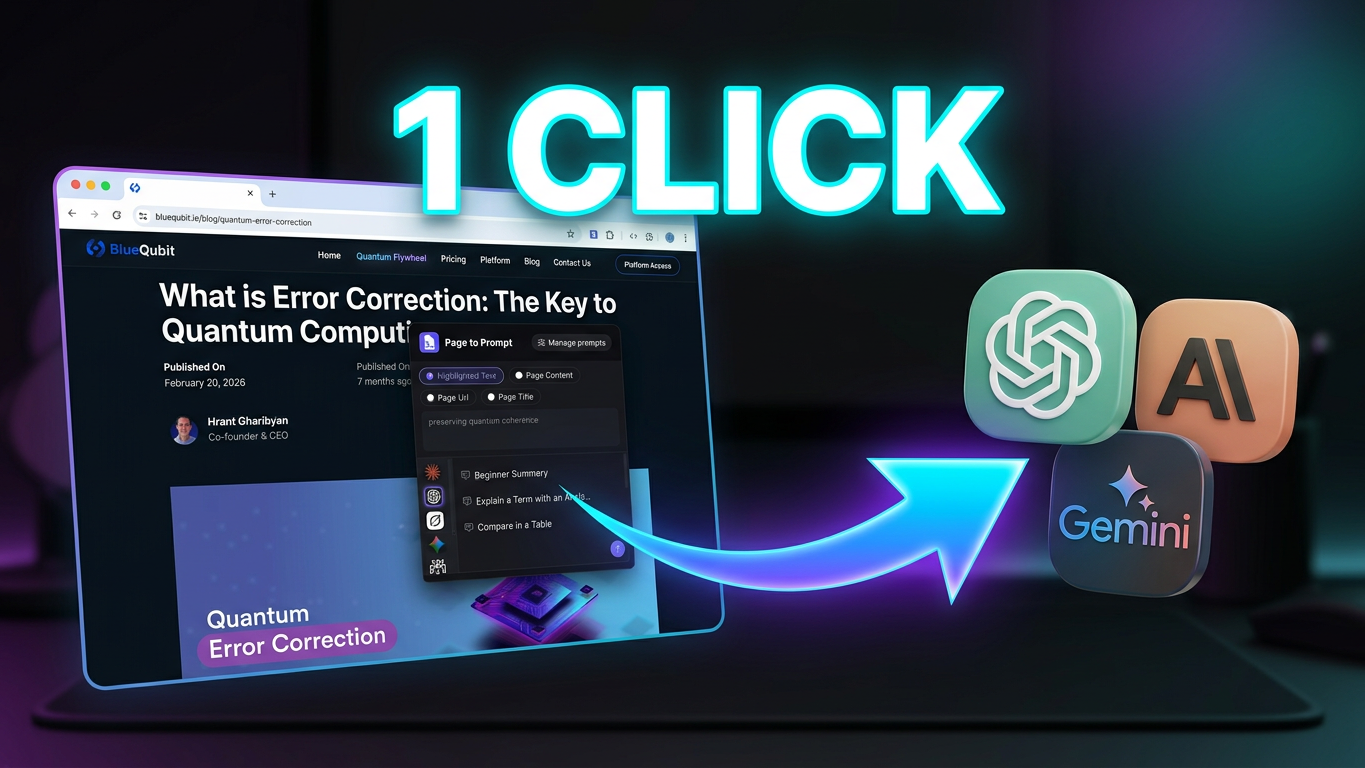
Page-to-Prompt is a Chrome extension that sends any webpage to your favorite AI in one click.
Highlight text, or pick the page content, URL, or title, then choose a saved prompt and the AI you want. Page-to-Prompt opens it with everything filled in, so you never have to copy, switch tabs, and paste again.
It works with Claude, ChatGPT, Gemini, Grok, Perplexity, Copilot, and Qwen, using your own web accounts. The extension is just the bridge between the page you're reading and the AI you already use.
Build your own prompt library with {{SELECTED_TEXT}} placeholders, assign a keyboard shortcut to each prompt, and keep your conversations going in the same AI tab instead of starting over every time.
Features
- One-click send: turn any page or selection into a prompt and open it in your AI instantly
- Choose your source: Highlighted Text, Page Content, Page URL, or Page Title
- 7 AI sites supported: Claude, ChatGPT, Grok, Gemini, Perplexity, Copilot, Qwen
- Your own prompt library: save, edit, and reuse prompts, with {{SELECTED_TEXT}} placeholders
- Custom shortcut for each prompt: trigger your favorite prompts without opening the popup
- Quick access: right-click "Page to Prompt" or press Cmd/Ctrl + Shift + P
- Clean page content: articles are extracted with Readability, so the AI gets the text, not the clutter
- Tab memory: continue the same conversation instead of opening a new chat each time, with each AI tab remembered separately
- Use several AIs at once: compare answers side by side
- Uses your own AI accounts: no extra logins, and the extension only connects the page to the AI
- Light and dark themes: follow your device, the website, or pick one
- Free daily uses, with unlimited access for $5.99/month
Use Cases
- Summarize long articles: open any article, pick Page Content, and send it to your AI with a "Summarize in 5 bullet points" prompt
- Explain hard text: highlight a confusing paragraph, a legal clause, or a line of code and ask your AI to explain it simply
- Translate on the fly: select text on any site and send it with your saved translation prompt
- Research faster: send several pages to Perplexity or Gemini without copying and pasting each one
- Fact-check claims: highlight a statement and ask your AI to verify it or find counterarguments
- Write replies and emails: send an email or a post and get a draft response in your own tone
- Review code and docs: send a GitHub page or documentation and ask for a review, bug hunt, or a plain-English summary
- Learn while you browse: turn any page into quiz questions, flashcards, or a study guide
- Compare AI answers: send the same page to Claude, ChatGPT, and Gemini and see which one answers best
- Repeat your favorite workflows: save prompts you use daily and trigger them with one shortcut
Fazier Deal

Comments


Hi Fazier community! 👋 I'm hudatech, an indie maker from Vietnam, and I built Page-to-Prompt because I was tired of the same routine: read an article, copy the text, open ChatGPT or Claude, paste it, type my prompt, repeat. Dozens of times a day. So I built a small bridge between the page you're reading and the AI you already use. Highlight some text (or pick the page content, URL, or title), choose a saved prompt, and the AI opens with everything filled in. One click, or one keyboard shortcut. A few things I cared about while building it: • It works with the AIs you already use: Claude, ChatGPT, Gemini, Grok, Perplexity, Copilot, and Qwen • It uses your own web accounts, so there's no extra login and the extension is only the bridge • It remembers the AI tab it connected to, so your conversation continues instead of starting a new chat every time • Page Content is cleaned up with Readability, so the AI gets the article, not the clutter • You can build your own prompt library with {{SELECTED_TEXT}} placeholders and give each prompt its own shortcut There's a free daily quota to try it out, and the full version is $5.99/month. I'd love your honest feedback: 1. Which AI and which prompts would you use it with most? 2. Is there a workflow you'd want it to support that it doesn't yet? I'll be here all day reading and replying to every comment. Thanks for checking it out! 🙏
The {{SELECTED_TEXT}} placeholders with a separate shortcut per prompt look handy for repeat tasks like summarizing or translating an article. When Page Content is cleaned with Readability, does it handle long pages by truncating, or does it warn you when the text may exceed the target AI's input limit? A small suggestion would be showing a character count before sending.


The one-click part is what sells this for me — I usually copy page content into an AI chat manually and lose the formatting and context. Turning any page into a clean prompt in one click removes exactly that friction. Curious: does it handle very long pages, or does it trim the content after a certain length?

The tab memory and Readability extraction stand out to me — keeping the same AI conversation going instead of starting a new chat each time, and sending clean article text rather than page clutter, would save a lot of copy-pasting when researching. I also like the idea of a separate shortcut per saved prompt for repeat workflows. One question: how does it handle very long pages or paywalled articles — does it truncate the content, or warn you before sending?

The tab memory feature is what makes this stand out for me — most tools like this open a fresh chat every time, which breaks the flow when you're researching across several pages. Being able to send a page to Perplexity for research and keep the same conversation going is exactly the workflow I'd use daily. One question: does tab memory work across all 7 supported AIs, or only some of them? And do the per-prompt keyboard shortcuts work when the extension popup isn't open?


The tab memory feature is the detail that sells this for me - continuing the same conversation per AI tab instead of starting a new chat every time is exactly where copy-paste workflows break down. Extracting the article with Readability first is a nice touch too; sending clean text instead of page clutter makes a real difference in answer quality. Congrats on the launch!

On your second question, one workflow I would use: on YouTube pages, send the video transcript instead of the page text. Page Content on a video page is mostly comments and recommendations, while the transcript is what you actually want summarized. A Transcript source next to Page Content and Highlighted Text would cover that. Import and export of the prompt library would also help for sharing a prompt set with a team.


The tab memory idea is the part that would change my workflow most — I often lose context when a tool opens a fresh chat for every page. Being able to keep the same conversation going per AI, plus a shortcut for each saved prompt, makes this feel built for repeated research rather than one-off summaries. Does the Readability extraction handle paywalled or heavily scripted pages well, or does it fall back to the selected text in those cases?





Hello Sir, Struggling to connect email addresses to LinkedIn profiles? Email-to-LinkedIn is the cheapest tool to bulk-check your email lists and grab live LinkedIn profile links in seconds. ✅ Bulk email → LinkedIn URL lookup. ✅ Live/dead LinkedIn account checker. ✅ Built for lead gen, sales prospecting & contact enrichment. Stop wasting time on manual searches. Try it now and start reaching the right people faster. Reach us at: [email protected] It’s on GitHub here: https://github.com/masummuntaha/Email-to-LinkedIn Thank You.
Premium Products




































Fazier Deal
Sponsors
Buy
Awards
View all
Awards
View allMakers
Makers
Comments
Hi Fazier community! 👋 I'm hudatech, an indie maker from Vietnam, and I built Page-to-Prompt because I was tired of the same routine: read an article, copy the text, open ChatGPT or Claude, paste it, type my prompt, repeat. Dozens of times a day. So I built a small bridge between the page you're reading and the AI you already use. Highlight some text (or pick the page content, URL, or title), choose a saved prompt, and the AI opens with everything filled in. One click, or one keyboard shortcut. A few things I cared about while building it: • It works with the AIs you already use: Claude, ChatGPT, Gemini, Grok, Perplexity, Copilot, and Qwen • It uses your own web accounts, so there's no extra login and the extension is only the bridge • It remembers the AI tab it connected to, so your conversation continues instead of starting a new chat every time • Page Content is cleaned up with Readability, so the AI gets the article, not the clutter • You can build your own prompt library with {{SELECTED_TEXT}} placeholders and give each prompt its own shortcut There's a free daily quota to try it out, and the full version is $5.99/month. I'd love your honest feedback: 1. Which AI and which prompts would you use it with most? 2. Is there a workflow you'd want it to support that it doesn't yet? I'll be here all day reading and replying to every comment. Thanks for checking it out! 🙏
The {{SELECTED_TEXT}} placeholders with a separate shortcut per prompt look handy for repeat tasks like summarizing or translating an article. When Page Content is cleaned with Readability, does it handle long pages by truncating, or does it warn you when the text may exceed the target AI's input limit? A small suggestion would be showing a character count before sending.
The one-click part is what sells this for me — I usually copy page content into an AI chat manually and lose the formatting and context. Turning any page into a clean prompt in one click removes exactly that friction. Curious: does it handle very long pages, or does it trim the content after a certain length?
The tab memory and Readability extraction stand out to me — keeping the same AI conversation going instead of starting a new chat each time, and sending clean article text rather than page clutter, would save a lot of copy-pasting when researching. I also like the idea of a separate shortcut per saved prompt for repeat workflows. One question: how does it handle very long pages or paywalled articles — does it truncate the content, or warn you before sending?
The tab memory feature is what makes this stand out for me — most tools like this open a fresh chat every time, which breaks the flow when you're researching across several pages. Being able to send a page to Perplexity for research and keep the same conversation going is exactly the workflow I'd use daily. One question: does tab memory work across all 7 supported AIs, or only some of them? And do the per-prompt keyboard shortcuts work when the extension popup isn't open?
The tab memory feature is the detail that sells this for me - continuing the same conversation per AI tab instead of starting a new chat every time is exactly where copy-paste workflows break down. Extracting the article with Readability first is a nice touch too; sending clean text instead of page clutter makes a real difference in answer quality. Congrats on the launch!
On your second question, one workflow I would use: on YouTube pages, send the video transcript instead of the page text. Page Content on a video page is mostly comments and recommendations, while the transcript is what you actually want summarized. A Transcript source next to Page Content and Highlighted Text would cover that. Import and export of the prompt library would also help for sharing a prompt set with a team.
The tab memory idea is the part that would change my workflow most — I often lose context when a tool opens a fresh chat for every page. Being able to keep the same conversation going per AI, plus a shortcut for each saved prompt, makes this feel built for repeated research rather than one-off summaries. Does the Readability extraction handle paywalled or heavily scripted pages well, or does it fall back to the selected text in those cases?
Hello Sir, Struggling to connect email addresses to LinkedIn profiles? Email-to-LinkedIn is the cheapest tool to bulk-check your email lists and grab live LinkedIn profile links in seconds. ✅ Bulk email → LinkedIn URL lookup. ✅ Live/dead LinkedIn account checker. ✅ Built for lead gen, sales prospecting & contact enrichment. Stop wasting time on manual searches. Try it now and start reaching the right people faster. Reach us at: [email protected] It’s on GitHub here: https://github.com/masummuntaha/Email-to-LinkedIn Thank You.
Premium Products
New to Fazier?

Find your next favorite product or submit your own. Made by @FalakDigital.
Copyright ©2026. All Rights Reserved