
NotchPop
NotchPop
Your Mac's notch, turned into a builder's dashboard
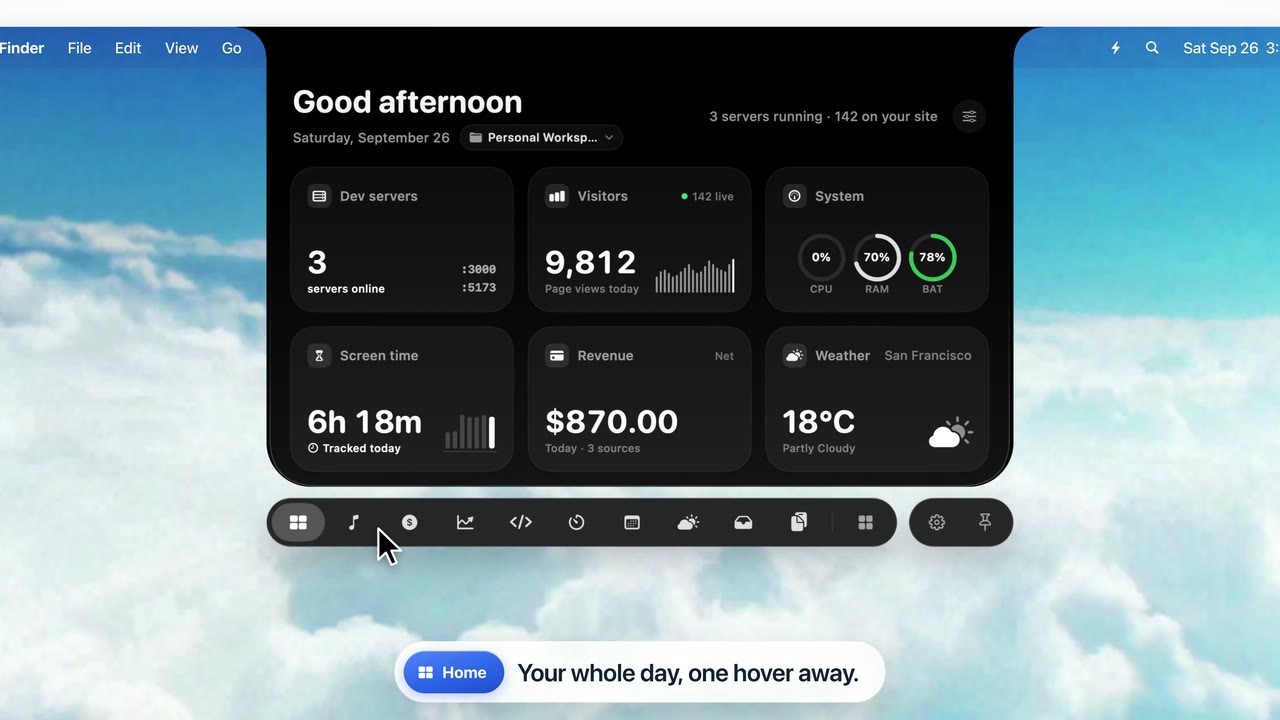
NotchPop turns your MacBook's camera notch into a panel for media, productivity and business tools. On Macs without a notch, like iMacs, Mac minis and external displays, it becomes a floating island instead. It's a native Swift/SwiftUI app with 23 built-in tools. You can check revenue, see your Claude Code activity, control music, park files and reply to messages without leaving what you're working on. Everything stays on your Mac: API keys are kept in the macOS Keychain, and each integration is opt-in. It's a one-time purchase with a free trial, no subscription. Requires macOS 14+ on Apple Silicon.

Features
- Media island: Apple Music and Spotify controls, track info, and switching between speakers, headphones and AirPlay
- Drop shelf: drag files onto the notch to park them, convert images to PNG/JPEG/HEIC/PDF in one click, AirDrop them or show them in Finder
- Revenue hub: live Stripe and Dodo Payments revenue, plus Google Analytics 4 and AdSense
- Claude Code, Codex and Cursor activity: tokens, sessions, streaks and an activity heatmap from your local usage data
- Message replies: see incoming iMessage and WhatsApp messages and reply from the notch
- Native volume and brightness pop-ups: they show in the notch instead of the middle of the screen
- System vitals: CPU, memory, disk, network speed and battery
- Clipboard manager: searchable, opt-in history that skips passwords and other hidden content
- Focus timer: Pomodoro timer with water reminders, and a countdown shown on the closed notch
- Ambient sounds: layer rain, ocean, white noise, coffee shop and forest sounds, fully offline
- Calendar and meetings: 7-day agenda, one-click Zoom and Google Meet joining, and reminders you type in plain English
- Utilities: weather, unit and currency converter, emoji picker, scratchpad, scrolling text banner and screen time tracker
- Fits any display: hugs the MacBook notch, or floats as an island everywhere else
- Keyboard shortcut: ⌥ Space
Use Cases
- Indie hackers and SaaS founders: see Stripe and Dodo revenue and GA4 traffic at a glance without opening dashboards
- Developers using AI coding tools: keep an eye on Claude Code, Codex and Cursor usage and streaks while you code
- Deep work: run a Pomodoro timer with ambient sound while messages and meetings wait in the notch
- File-heavy work: drop screenshots on the notch, convert them to the right format and AirDrop them in seconds
- Remote workers: join the next Zoom or Meet call and answer iMessage or WhatsApp without switching apps
- Anyone with a notched MacBook: turn the dead space at the top of the screen into something useful

Comments


Indie studio making cozy idle tycoon gam...

Premium Products



















































Sponsors
Buy

Makers

Developer
Makers
Developer
Comments
Indie studio making cozy idle tycoon gam...
Premium Products
New to Fazier?

Find your next favorite product or submit your own. Made by @FalakDigital.
Copyright ©2026. All Rights Reserved