
News Blocker
News Blocker is an intelligent news filter
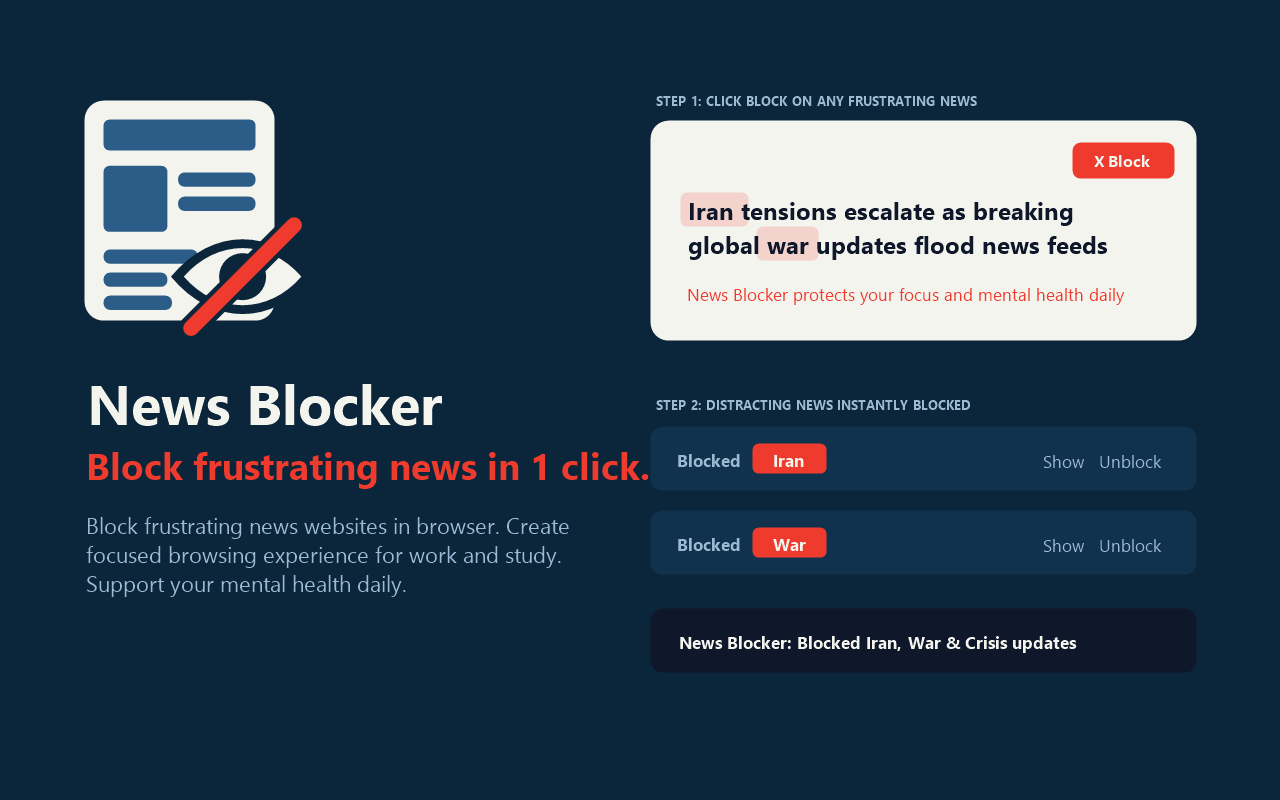
If sensational headlines, clickbait, and toxic breaking stories constantly interrupt your work, study, or mental peace, News Blocker gives you full control over your browser. Modern media feeds are engineered to grab your attention through anxiety and outrage. A five-minute check of current events easily spirals into an hour of stressful reading. With News Blocker, you can block distracting news websites entirely or selectively hide unwanted topics, public figures, and negative headlines directly in your feed in 1 click. Whether you need a distraction blocker for deep work or a mental health filter for everyday browsing, this productivity extension helps you build a calm, focused digital routine. 🚀 Why Choose News Blocker? Unlike basic website blockers that only shut down entire domains, News Blocker offers a versatile dual-action system. You can block news websites with a serene focus screen, or keep browsing your favorite news portals while filtering out clickbait, toxic arguments, sensitive events, and sensational noise. ✨ Core Features & Capabilities: • 🎯 1-Click Topic & Story Blocking: Hover over any frustrating headline and click «× Block». News Blocker identifies the topic or person and hides matching stories across the entire page. • 🚫 Full News Website Blocker: Block distracting portals with an inspiring focus screen and an optional unblock timer. • 🛡️ 4 Automated Smart News Filters: Instant zero-setup shields that catch clickbait, toxicity, armed conflicts, and violent crime without manual wordlists. • 🛑 Built-In Ad Blocker: Clean up news feeds by removing annoying display banners, sponsored recommendation widgets, and promotional popups. • 🤖 On-Device Local AI Support: Leverages Chrome local AI (Gemini Nano) for deep semantic analysis with zero latency and zero cloud tracking. • 👁️ 4 Flexible Display Modes: Choose how hidden stories appear — compact placeholder bar with quick peek, soft blur, quiet Zen mode, or complete removal. • 📋 Whitelist & Custom Rules: Whitelist trusted reference websites, import and export keyword lists in JSON, and fine-tune exact phrase matches. 1️⃣ How It Works in 3 Easy Steps: 1️⃣ Add News Blocker to Chrome and pin the icon to your toolbar for instant access. 2️⃣ Browse any news portal, social feed, or media website as you normally do. 3️⃣ Hover over any headline and click «× Block», or enable the Smart Filters in the popup to filter toxic stories automatically. 🛡️ 4 Automated Smart Filters: ➤ Clickbait & Nonsense: Shields you from curiosity traps, shocking claims, and low-quality tabloid gossip. ➤ Insults & Threats: Filters out verbal aggression, toxic arguments, cyberbullying, and provocative bickering. ➤ Sensitive Events: Blocks intense breaking reports on military conflicts, missile strikes, and geopolitical tension. ➤ Crime & Doom: Protects your mental peace from murder cases, violent incidents, and traumatic headlines. 💡 When to Use News Blocker: • While studying, preparing for exams, or conducting academic research online. • When breaking news and world events trigger stress or emotional fatigue. • To break the unconscious habit of opening news portals whenever you are bored. • To eliminate sponsored recommendation grids and clean up cluttered websites. 🔒 100% Private, Local & Secure: ▸ Everything runs locally inside your browser with zero external servers. ▸ No accounts, no logins, no cloud tracking, and no telemetry. ▸ Zero tracking cookies, zero analytics scripts, and zero advertising pixels. ▸ Your personal browsing history never leaves your personal computer. ❓ Frequently Asked Questions: 1. How is News Blocker different from an ordinary ad blocker? Traditional ad blockers only hide banners. News Blocker removes unwanted advertisements as well as stressful, toxic news headlines by topic or keyword. 2. Can I block specific politicians, celebrities, or sports? Yes! Just hover over any headline and click «× Block». News Blocker recognizes the person or topic and hides all matching articles. 3. Can I unblock a headline if I change my mind? Yes. Every hidden card can be viewed by clicking «Show», or permanently restored via the popup whenever you wish. Take back control of your attention, stop doomscrolling, and enjoy a calmer internet with News Blocker today!

Comments


Hi Fazier community! 👋 I built News Blocker because strict website blockers kept failing me: sometimes you still need to open news portals for work or context, just without getting pulled into clickbait, rage-bait, politics, war, or crime headlines. With News Blocker (Manifest V3), you can either block distracting news sites completely OR keep reading news calmly by hovering any story to click "× Block" and toggling 4 local Smart Filters (plus optional on-device Chrome AI / Gemini Nano). Everything runs 100% locally in your browser with zero accounts or cloud tracking. Install free on Chrome Web Store: https://chromewebstore.google.com/detail/news-blocker/empnlkhnmjkinpbepiiigmmbenlhpmda Would love to hear your feedback — what topics or distractions drain your focus the most?
Premium Products









































Sponsors
Buy
Makers
Makers
Comments
Hi Fazier community! 👋 I built News Blocker because strict website blockers kept failing me: sometimes you still need to open news portals for work or context, just without getting pulled into clickbait, rage-bait, politics, war, or crime headlines. With News Blocker (Manifest V3), you can either block distracting news sites completely OR keep reading news calmly by hovering any story to click "× Block" and toggling 4 local Smart Filters (plus optional on-device Chrome AI / Gemini Nano). Everything runs 100% locally in your browser with zero accounts or cloud tracking. Install free on Chrome Web Store: https://chromewebstore.google.com/detail/news-blocker/empnlkhnmjkinpbepiiigmmbenlhpmda Would love to hear your feedback — what topics or distractions drain your focus the most?
Premium Products
New to Fazier?

Find your next favorite product or submit your own. Made by @FalakDigital.
Copyright ©2026. All Rights Reserved