
MiniMax H3 AI Video Generator
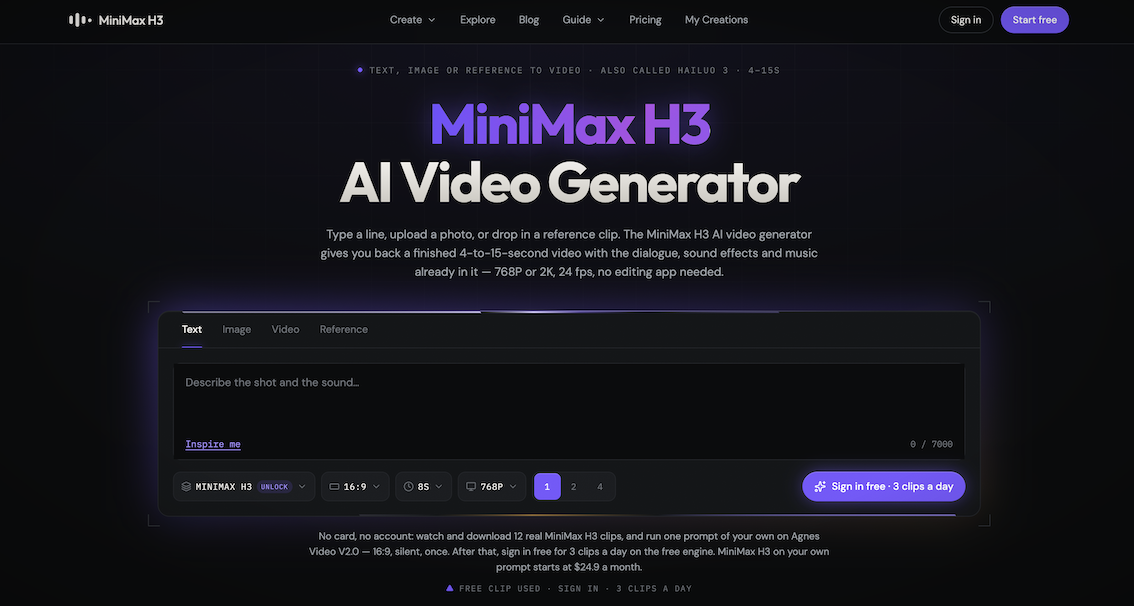
Run MiniMax H3 (Hailuo 3) in your browser. Text, image or re
minimax-h3ai.video is an independent, browser-based interface for MiniMax H3 — the video model MiniMax also ships as Hailuo 3. You type a line, upload a photo, or drop in a reference clip, and you get back a finished 4-to-15-second MP4 with the dialogue, sound effects and music already inside it. Sound is generated in the same forward pass as the picture, not dubbed on afterwards, at 32 kHz stereo with stable dialogue in 11 languages.
Output is 768P or 2K at 24 fps, in six aspect ratios. The 2K path is not an upscale: H3 sends the 768P result back through itself with your original context and generates it again, which is why small on-screen text survives.
Free to start with no account, no email and no card.
Features
Nothing to install. MiniMax's own weight repository is roughly 498.5 GB and even the trimmed ComfyUI bundle is 42.47 GB. Here the download is 0 GB: open the page and the generator is already running. No GPU to rent, no API key to manage.
No editor afterwards. The dialogue, effects and music are already mixed into the MP4 you download, so a finished clip is a finished clip — there is no second pass in a timeline to align audio to picture.
Nothing to pay before you know whether it works. The first clip needs no account, no email and no card; you clear one bot check and it runs.
No guessing at the specs. Every number on the site links to the primary source with the date it was last checked, which is why our figures disagree with the pages that copied each other.
Failed runs do not cost you. Credits return automatically, and a failed anonymous attempt does not consume that day's clip.
Use Cases
| **Short-form social video** | 9:16 · 7–10s | Ambience is already mixed in, so the clip posts straight from the download folder. |
| **Product ads with sound** | 9:16 or 1:1 · 5–8s | One product photo goes in, a turntable shot comes out, and the sound effect lands on the logo reveal. |
| **Dialogue scenes** | 16:9 · 8–12s | `(S1)` and `(S2)` tag the speakers, and lip movement lands on the syllable rather than near it. |
| **ASMR and ambience** | 16:9 · 6–8s | No dialogue at all — just material sounds and the sound of the room. |
| **Character-consistent series** | 9:16 · 8s | Reference images hold the same face and the same wardrobe while the camera changes. |
| **Remixing footage you already have** | 16:9 · 6s | Keeps the original camera move and pacing, swaps only the visual style. |
| **Anime and multi-shot tests** | any ratio, up to 15s | Several shots inside 15 seconds, with camera-movement vocabulary you can steer. |
| **Reverse-engineering a prompt** | prompt tool, no render | Feed in a clip you admire, get a structured prompt back, edit it, then generate. |

Comments



The 2K path being a genuine re-generation with the original context instead of an upscale is the standout detail here - that is exactly why small on-screen text survives, and most wrappers never explain the difference. Also respect that failed runs return credits automatically; with per-run pricing on video models, that policy is what separates a tool you trust from one you budget around. Genuine question before I run a batch: does the 2K re-generation pass cost double the credits of a 768P run, and do you show that cost before submitting the prompt?

MiniMax H3 browser-based video generator: No installation or account required. Easily convert text, images, or references into 4-15 second MP4 files with audio effects and dialogue, supporting 2K resolution. When used with LoraAI to train characters https://www.loraai.pro/video-lora-training or products, Lora conversion ensures high consistency, making short videos and advertisements incredibly convenient.



The clearest differentiator here is that sound is generated in the same pass as the video instead of being added afterward. I also like the transparent prompt gallery and the clearly stated limits around 4–15 seconds, six aspect ratios, and up to 12 reference files—it makes the workflow much easier to plan. For creators building repeatable series, how much control do you have over keeping a character’s voice and audio style consistent across multiple generations, especially when using reference-to-video?
The clearest differentiator here is that sound is generated in the same pass as the video instead of being added afterward. I also like the transparent prompt gallery and the clearly stated limits around 4–15 seconds, six aspect ratios, and up to 12 reference files—it makes the workflow much easier to plan. For creators building repeatable series, how much control do you have over keeping a character’s voice and audio style consistent across multiple generations, especially when using reference-to-video?

Players can discover exciting characters, creative worlds, and challenging levels while exploring the diverse collection of Boy Games. https://boy-games.io



Generating the sound in the same pass as the picture is a big deal — dubbed-on audio is usually what makes AI clips feel off. I also like that the 2K path re-generates from the 768P result with the original context instead of just upscaling, especially for keeping small on-screen text readable. Question: how consistent is a character's voice and face across separate 15-second clips? For anyone trying to make a short story out of several generations, that would be the key thing.
Premium Products




















































Sponsors
Buy




Comments
The 2K path being a genuine re-generation with the original context instead of an upscale is the standout detail here - that is exactly why small on-screen text survives, and most wrappers never explain the difference. Also respect that failed runs return credits automatically; with per-run pricing on video models, that policy is what separates a tool you trust from one you budget around. Genuine question before I run a batch: does the 2K re-generation pass cost double the credits of a 768P run, and do you show that cost before submitting the prompt?
MiniMax H3 browser-based video generator: No installation or account required. Easily convert text, images, or references into 4-15 second MP4 files with audio effects and dialogue, supporting 2K resolution. When used with LoraAI to train characters https://www.loraai.pro/video-lora-training or products, Lora conversion ensures high consistency, making short videos and advertisements incredibly convenient.
The clearest differentiator here is that sound is generated in the same pass as the video instead of being added afterward. I also like the transparent prompt gallery and the clearly stated limits around 4–15 seconds, six aspect ratios, and up to 12 reference files—it makes the workflow much easier to plan. For creators building repeatable series, how much control do you have over keeping a character’s voice and audio style consistent across multiple generations, especially when using reference-to-video?
The clearest differentiator here is that sound is generated in the same pass as the video instead of being added afterward. I also like the transparent prompt gallery and the clearly stated limits around 4–15 seconds, six aspect ratios, and up to 12 reference files—it makes the workflow much easier to plan. For creators building repeatable series, how much control do you have over keeping a character’s voice and audio style consistent across multiple generations, especially when using reference-to-video?
Players can discover exciting characters, creative worlds, and challenging levels while exploring the diverse collection of Boy Games. https://boy-games.io
Generating the sound in the same pass as the picture is a big deal — dubbed-on audio is usually what makes AI clips feel off. I also like that the 2K path re-generates from the 768P result with the original context instead of just upscaling, especially for keeping small on-screen text readable. Question: how consistent is a character's voice and face across separate 15-second clips? For anyone trying to make a short story out of several generations, that would be the key thing.
Premium Products
New to Fazier?

Find your next favorite product or submit your own. Made by @FalakDigital.
Copyright ©2026. All Rights Reserved