Kronos
Schedule, run, and monitor AI agents from one control plane.
Kronos is an open-source scheduler and orchestration dashboard for running AI-agent tasks through ACP.
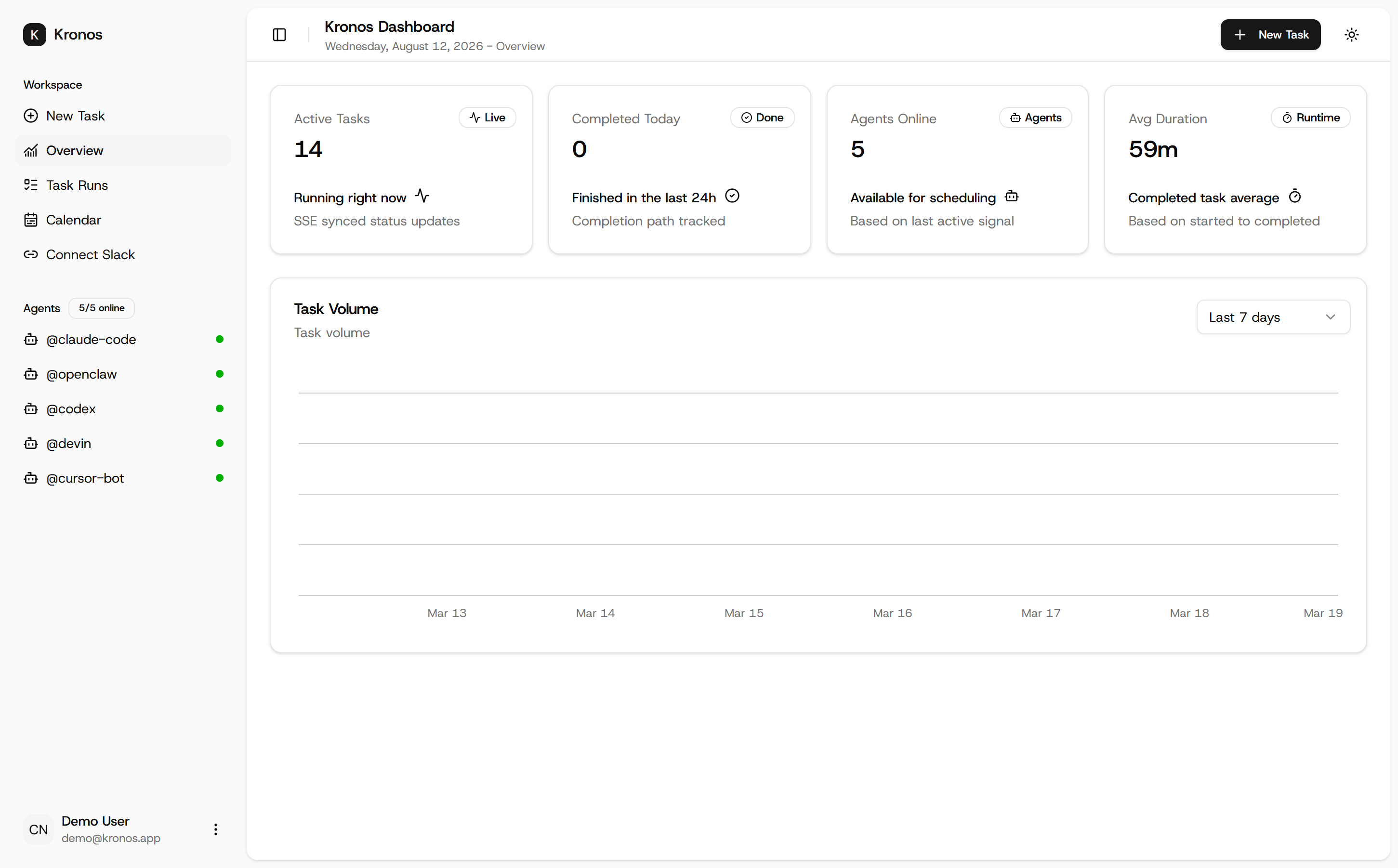
Create scheduled agent tasks from a web dashboard, route them to workers through a reliable queue, and watch their execution in real time. Kronos connects the dashboard, agent workers, scheduling, task lifecycle, and ACP communication into one system.
It includes a CLI bridge for running agents locally, streamable HTTP queue delivery with polling fallback, bridge-token authentication, real-time SSE updates, file mentions in prompts, and automatic ACP session titles.
Kronos is designed for developers who want their AI agents to do more than answer prompts — they want agents that can be scheduled, dispatched, monitored, and operated like real workloads.
Features
Agent Task Scheduling
Create agent tasks from the dashboard with schedules, execution modes, timeouts, and optional Slack destinations.
Reliable Queue Delivery
Dispatch work to agent workers through streamable HTTP, with polling fallback for environments where streaming is unavailable or unreliable.
ACP Agent Bridge
Connect local or remote agents through the Kronos CLI and forward ACP lifecycle events back into the dashboard.
Real-Time Execution Tracking
Follow tasks from SCHEDULED → DISPATCHED → IN_PROGRESS → terminal states through live dashboard updates.
CLI Setup & Agent Management
Use the interactive Kronos setup wizard and kronos up / kronos agent commands to get workers running quickly.
File Mentions
Type @ in task descriptions to discover project files, then resolve those mentions into agent prompt context automatically.
Worker Authentication
Issue bridge tokens with alias-scoped authentication so workers can securely access tasks assigned to them.
Agent Session Titles
Automatically capture ACP-generated session titles so completed runs are easier to understand than raw task prompts.
Open Source
Built with TypeScript and released under the Apache 2.0 license.
Use Cases
Scheduled AI Coding Tasks
Run agents on a schedule for recurring coding, maintenance, testing, or repository workflows.
Personal Agent Automation
Run local AI agents continuously without manually launching every task.
Multi-Agent Workflows
Register multiple agent aliases and route work to the appropriate worker.
Long-Running Agent Operations
Use the dashboard to see what is queued, running, completed, or failed without staying inside the agent's terminal session.
Developer Infrastructure
Use Kronos as a lightweight orchestration layer between a task scheduler and ACP-compatible agents.
Open-Source Agent Experimentation
Build and test new agent workflows without committing to a hosted proprietary orchestration platform.
Launch Positioning
Core message:
Your AI agents shouldn't have to wait for you to press Enter.
Secondary message:
Kronos turns AI agents into schedulable, observable workloads.
Ideal audience:
Developers building autonomous coding agents, local AI automation, multi-agent systems, and recurring agent workflows.
What makes Kronos interesting:
Most agent tools focus on the model or the prompt. Kronos focuses on the operational layer around the agent — scheduling, dispatch, workers, authentication, lifecycle events, and observability.

Comments


Treating AI agents as observable workloads is the part that stands out here. Since tasks can move through SCHEDULED → DISPATCHED → IN_PROGRESS, could each run expose a compact event timeline plus the retry or timeout reason? That would make the dashboard useful for debugging recurring jobs, not just checking whether they finished.

Nice to see agents treated like real workloads, with a proper lifecycle instead of a prompt box. Two questions from someone who runs things on remote Linux servers: can a worker sit on a headless box behind NAT and still pick up tasks through the polling fallback, and how are bridge tokens scoped and rotated if a worker machine gets compromised? Also curious what happens to a task that is IN_PROGRESS when its worker disconnects.


Treating agent runs as scheduled workloads rather than one-off prompts is the right framing, and the part that usually gets skipped is what happens when one fails at three in the morning. Two questions: when a scheduled task fails, does it retry on its own, and is there a record afterwards of what it did and why it stopped? And can you see, across everything scheduled, whether the workers are keeping up with the queue. That stops being obvious once there are more than a handful of jobs.

Time management tools often treat all time as equal - they miss that deep work requires protection. Kronos seems to get that premise right - if you're actually trying to ship meaningful things, your calendar can't just be open to interruptions. Having a system that actually respects focus time and makes that visible to teammates changes how teams operate. This is solving for a real problem that most tools gloss over.
Premium Products





















































Sponsors
Buy

Makers

Makers
Comments
Treating AI agents as observable workloads is the part that stands out here. Since tasks can move through SCHEDULED → DISPATCHED → IN_PROGRESS, could each run expose a compact event timeline plus the retry or timeout reason? That would make the dashboard useful for debugging recurring jobs, not just checking whether they finished.
Nice to see agents treated like real workloads, with a proper lifecycle instead of a prompt box. Two questions from someone who runs things on remote Linux servers: can a worker sit on a headless box behind NAT and still pick up tasks through the polling fallback, and how are bridge tokens scoped and rotated if a worker machine gets compromised? Also curious what happens to a task that is IN_PROGRESS when its worker disconnects.
Treating agent runs as scheduled workloads rather than one-off prompts is the right framing, and the part that usually gets skipped is what happens when one fails at three in the morning. Two questions: when a scheduled task fails, does it retry on its own, and is there a record afterwards of what it did and why it stopped? And can you see, across everything scheduled, whether the workers are keeping up with the queue. That stops being obvious once there are more than a handful of jobs.
Time management tools often treat all time as equal - they miss that deep work requires protection. Kronos seems to get that premise right - if you're actually trying to ship meaningful things, your calendar can't just be open to interruptions. Having a system that actually respects focus time and makes that visible to teammates changes how teams operate. This is solving for a real problem that most tools gloss over.
Premium Products
New to Fazier?

Find your next favorite product or submit your own. Made by @FalakDigital.
Copyright ©2026. All Rights Reserved