
Klox
A canvas-native AI agent that turns your ideas into scripts,
# Klox
> Klox is a canvas-native AI agent for video creation. You describe what you want,
> and it writes the script, breaks it into storyboards and shots, generates the
> images and clips, and composes the finished video — all laid out on a canvas you
> can edit at any point.
Klox differs from prompt-box video generators in that the intermediate work is not
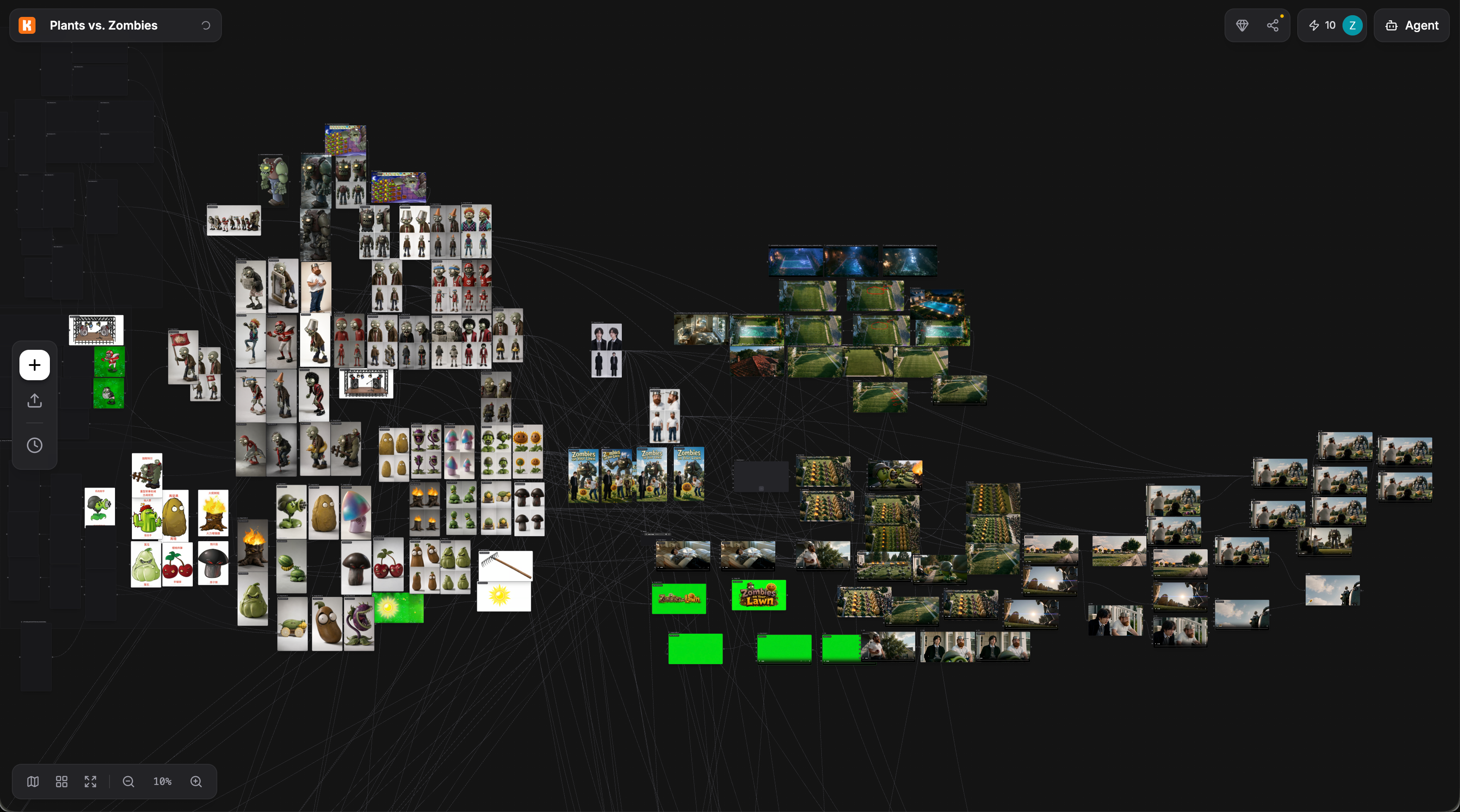
hidden. Every script, shot prompt, image, clip, and edit lives as a node on a
visual workflow canvas. You can change any node and regenerate only what depends
on it, or take over manually at any step. The agent and the human edit the same
canvas.
## What you can do
- **Quick generation**: pick text, image, or video and a mode (text-to-image,
image-to-video, first/last-frame control, lip sync, video editing, and others),
then generate immediately. Every quick generation also becomes a workflow you can
keep editing.
- **Canvas workflows**: arrange file nodes, generation nodes, scene groups, and a
compose node into a graph. Drafts autosave; versions can be published.
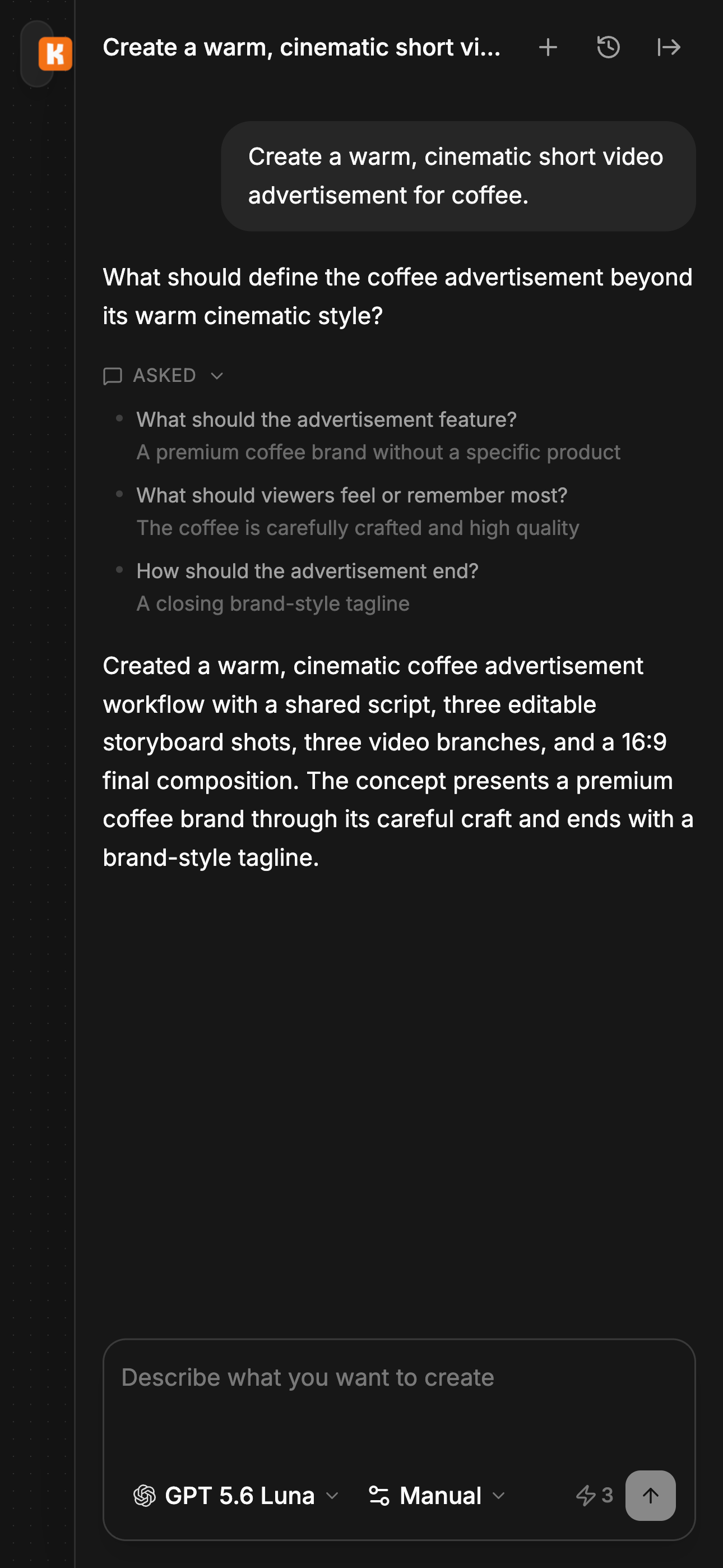
- **Klox Agent**: describe a change in natural language and the agent modifies the
canvas directly — adding nodes, wiring connections, writing prompts — and, within
a credit budget you authorize, runs the generations for you.
- **Publish**: publish a workflow version as a public work with video and cover.
## Models
Klox aggregates third-party generation models rather than training its own. Video
coverage includes Kling, Seedance, Veo, MiniMax, Wan, Runway, Pollo, Happy Horse and
Grok Video families; images include Seedream, Nano Banana, GPT Image, FLUX, Qwen
Image and Z-Image; text includes GPT, Kimi, Qwen and GLM families. Available models
change as providers ship new versions — the in-app model picker is authoritative.
## Pricing
Usage is metered in credits. There is a free tier plus Standard, Premium, and
Professional subscriptions billed monthly or annually, and credit packs that can be
bought with or without a subscription. Paid plans remove the brand watermark and
permit commercial use, raise concurrency and storage, and add priority model
access. Credit cost per generation depends on the model and, for video, on duration.
## Links
- [Home](https://klox.ai/): product overview, public works, and the quick generator
- [Canvas](https://klox.ai/canvas): entry point to the workflow editor and projects
- [AI image generator](https://klox.ai/image-generator): every image model in one
generator that runs on the page, with the current model list and what each is for
- [GPT Image 2.5](https://klox.ai/models/gpt-image-2-5): what separates the Flare
and Sunburst variants, with their aspect ratios, resolution tiers and credit cost
- [Pricing](https://klox.ai/pricing): plans, credit packs, and per-plan limits
Klox is available in English, Chinese, Spanish, French, German, Russian,
Portuguese, Japanese, and Korean; localized pages live under a locale prefix, for
example https://klox.ai/ja/pricing.
Features
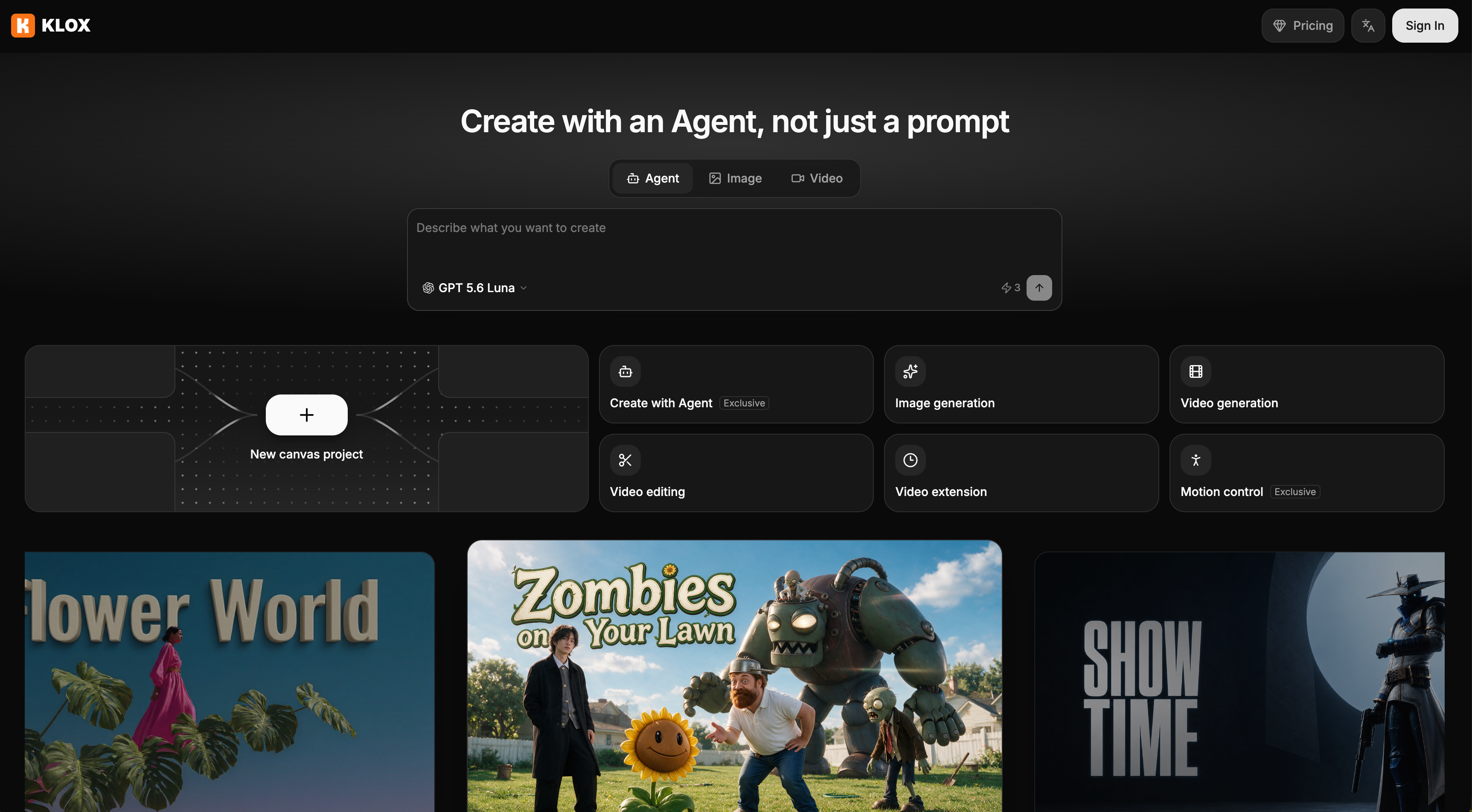
Klox combines a visual canvas with a canvas-native AI agent. Instead of relying on isolated prompts, you can continuously talk with the agent while it understands your canvas, references, scripts, storyboards, images, and videos as part of the same project.
The agent can help plan, generate, and evolve your work directly on the canvas, giving you both the speed of AI automation and the control of a visual creative workspace.
Use Cases
Klox is built for creators, filmmakers, marketers, designers, and small creative teams who want to turn ideas into visual stories and videos with AI.
It is particularly useful for people who want the power of multi-step AI creation without having to manually manage complicated workflows or jump between multiple tools.

Comments



We built Klox because AI video creation still feels too fragmented. You often start with an idea in one place, write a script somewhere else, generate images in another tool, and then move everything again for video creation. Klox brings that process into one visual canvas, with an AI agent that understands the whole project and keeps working with you through conversation. Instead of just prompting and waiting for a result, you can talk to Klox, refine your ideas, build scripts and storyboards, generate visuals, and keep evolving the project on the same canvas. Our goal is simple: make AI creation feel less like using a collection of tools, and more like working with a creative partner.



The "everything is a node" approach is what makes this stand out to me. Most video generators are slot machines — you write a prompt, pull the lever, and throw away everything that didn't work. Exposing the script, shot prompts, images and clips as editable artifacts, then only regenerating downstream dependencies, is a much better mental model for iterative creative work. One question: when the agent modifies a node I've already manually edited, how does it handle the conflict? Does it preserve my edit, branch it, or warn before overwriting? Curious how you solved the "agent vs. human edits on the same canvas" problem — that seems like the hardest part to get right.
The way every script, shot prompt, image and clip lives as an editable node on the canvas is exactly the kind of transparency most video generators are missing - being able to mutate one node and only regenerate what depends on it is a great fit for iterative work. When you use the credit budget for the Klox Agent, is there any way to cap runs per-model so a long retry loop on one model doesn't exhaust the budget before other shots get tried?


The canvas-native approach is what sets this apart from prompt-box video tools — every script, shot prompt and clip living as an editable node, so you regenerate just one shot instead of the whole video, must save a fortune in credits. Aggregating third-party models instead of training your own is a smart move too. One question: when you edit an upstream node, does regeneration cascade to dependents automatically or do you pick which nodes re-run? Good luck with the launch!
A canvas-native script agent is a neat concept. One suggestion from experience: before letting any idea-to-script agent run on its own, test it with edge cases it was never told about — unknown prices, off-topic requests, someone trying to override its instructions. A small hostile test suite catches most failure modes before customers do.

The node-based canvas is a smart call since it keeps every intermediate shot and prompt inspectable instead of hiding it behind a single generate button. For a multi-scene video, does changing one upstream node (say, a character reference image) auto-flag every downstream shot that needs a re-render, or do you have to track those dependencies yourself?
The "everything is a node" design is the real differentiator here. With most AI video tools you're regenerating the whole thing when one shot looks off — being able to tweak a single storyboard node and only regenerate what depends on it would save a ton of credits and frustration. Curious about two things: how does version history work when a node change cascades (can you roll back just one branch?), and do published public works retain the editable workflow for remixing, or just the finished video? Also nice that the free tier exists — credit metering per model family is the right call given how much costs vary between e.g. Veo and the smaller models.

The node-based canvas approach is the real differentiator here. Most AI video tools hide the intermediate steps, so when one shot comes out wrong you end up regenerating everything from scratch. Being able to regenerate only the dependent nodes — and take over manually at any step — makes iteration much cheaper. Curious how credit costs work when regenerating a single node deep in a graph: is it priced per model call or per node touched?

Showing every script, shot prompt and clip as an editable node on the canvas is what sets Klox apart from prompt-box generators. I like that I can change one node and regenerate only its dependents, which should save a lot of credits. Question: when the agent edits the canvas within a credit budget, does it show an estimated cost before it runs the generations, so I can approve it per step?

Premium Products






















































Sponsors
Buy



Makers
Makers
Comments
We built Klox because AI video creation still feels too fragmented. You often start with an idea in one place, write a script somewhere else, generate images in another tool, and then move everything again for video creation. Klox brings that process into one visual canvas, with an AI agent that understands the whole project and keeps working with you through conversation. Instead of just prompting and waiting for a result, you can talk to Klox, refine your ideas, build scripts and storyboards, generate visuals, and keep evolving the project on the same canvas. Our goal is simple: make AI creation feel less like using a collection of tools, and more like working with a creative partner.
The "everything is a node" approach is what makes this stand out to me. Most video generators are slot machines — you write a prompt, pull the lever, and throw away everything that didn't work. Exposing the script, shot prompts, images and clips as editable artifacts, then only regenerating downstream dependencies, is a much better mental model for iterative creative work. One question: when the agent modifies a node I've already manually edited, how does it handle the conflict? Does it preserve my edit, branch it, or warn before overwriting? Curious how you solved the "agent vs. human edits on the same canvas" problem — that seems like the hardest part to get right.
The way every script, shot prompt, image and clip lives as an editable node on the canvas is exactly the kind of transparency most video generators are missing - being able to mutate one node and only regenerate what depends on it is a great fit for iterative work. When you use the credit budget for the Klox Agent, is there any way to cap runs per-model so a long retry loop on one model doesn't exhaust the budget before other shots get tried?
The canvas-native approach is what sets this apart from prompt-box video tools — every script, shot prompt and clip living as an editable node, so you regenerate just one shot instead of the whole video, must save a fortune in credits. Aggregating third-party models instead of training your own is a smart move too. One question: when you edit an upstream node, does regeneration cascade to dependents automatically or do you pick which nodes re-run? Good luck with the launch!
A canvas-native script agent is a neat concept. One suggestion from experience: before letting any idea-to-script agent run on its own, test it with edge cases it was never told about — unknown prices, off-topic requests, someone trying to override its instructions. A small hostile test suite catches most failure modes before customers do.
The node-based canvas is a smart call since it keeps every intermediate shot and prompt inspectable instead of hiding it behind a single generate button. For a multi-scene video, does changing one upstream node (say, a character reference image) auto-flag every downstream shot that needs a re-render, or do you have to track those dependencies yourself?
The "everything is a node" design is the real differentiator here. With most AI video tools you're regenerating the whole thing when one shot looks off — being able to tweak a single storyboard node and only regenerate what depends on it would save a ton of credits and frustration. Curious about two things: how does version history work when a node change cascades (can you roll back just one branch?), and do published public works retain the editable workflow for remixing, or just the finished video? Also nice that the free tier exists — credit metering per model family is the right call given how much costs vary between e.g. Veo and the smaller models.
The node-based canvas approach is the real differentiator here. Most AI video tools hide the intermediate steps, so when one shot comes out wrong you end up regenerating everything from scratch. Being able to regenerate only the dependent nodes — and take over manually at any step — makes iteration much cheaper. Curious how credit costs work when regenerating a single node deep in a graph: is it priced per model call or per node touched?
Showing every script, shot prompt and clip as an editable node on the canvas is what sets Klox apart from prompt-box generators. I like that I can change one node and regenerate only its dependents, which should save a lot of credits. Question: when the agent edits the canvas within a credit budget, does it show an estimated cost before it runs the generations, so I can approve it per step?
Premium Products
New to Fazier?

Find your next favorite product or submit your own. Made by @FalakDigital.
Copyright ©2026. All Rights Reserved