
JustMarkdown
Read, Chat, and Write in One Unified Markdown Editor
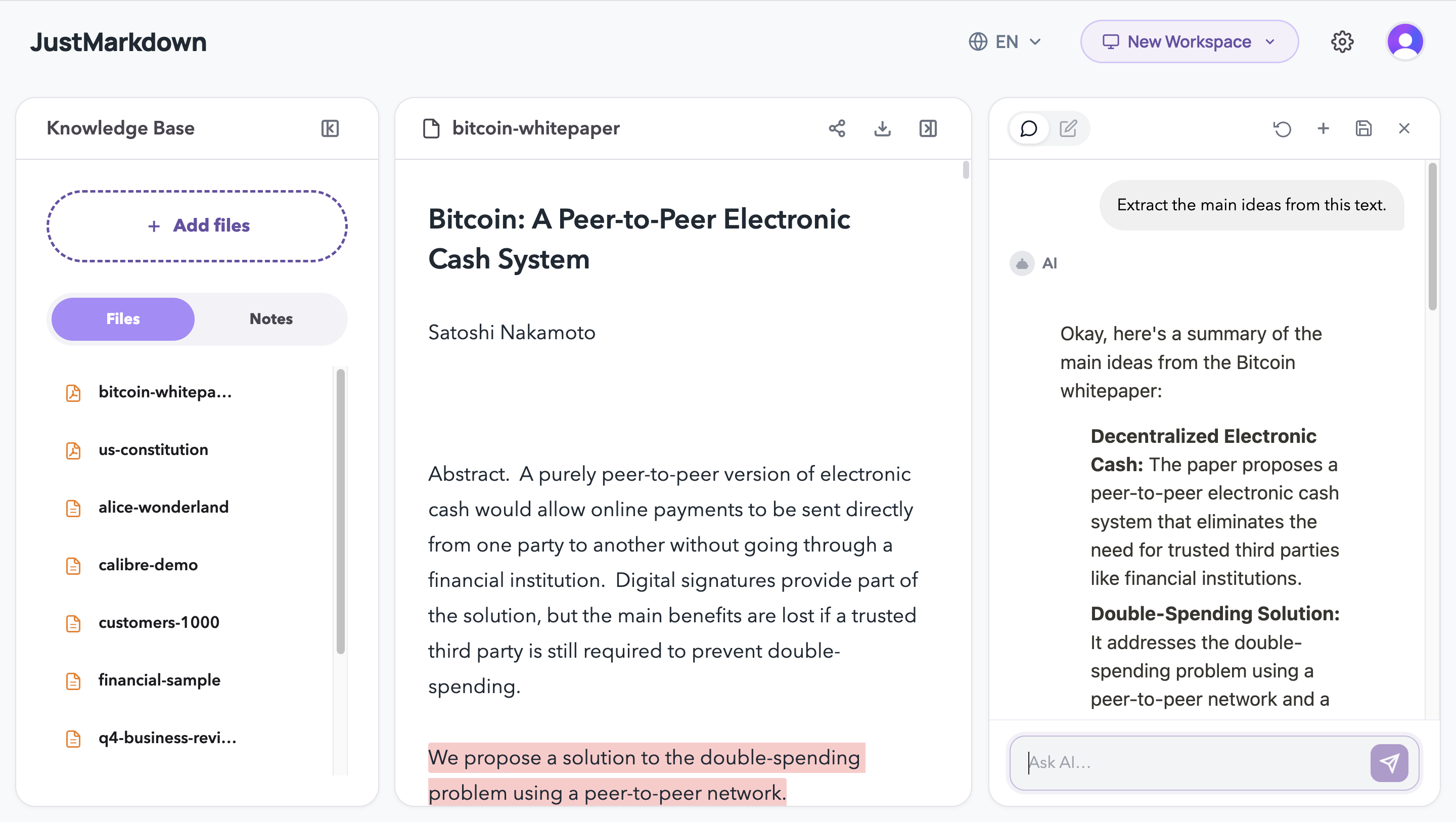
JustMarkdown is an AI-powered reading companion and knowledge extraction tool designed specifically for long-form content (EPUBs, PDFs, and web pages). It provides a distraction-free, immersive reading environment where a built-in AI assistant is always ready to answer questions and discuss ideas. Ultimately, it allows you to seamlessly and elegantly export your highlighted excerpts and deep reflections into structured, pure Markdown notes.
Features
- Lightning-Fast Parsing: Convert Any Format to Clean Markdown in One Click
- AI Reading Assistant & Deep Chat: Turn Conversations into Drafts Instantly
- Dual-Pane Workflow: Deep Annotation on the Left, Free Note-Taking on the Right
- WYSIWYG Markdown Editor: A Distraction-Free, Paper-Like Writing Space

Comments




The dual-pane workflow is the clearest value for me: reading on one side while turning highlights and AI discussion into Markdown notes on the other side. That is a strong fit for people who already keep a Markdown knowledge base. I would make the export examples very visible, because clean Markdown output is probably the feature that will make users trust the tool.


Exporting highlights plus reflections as clean Markdown is the killer detail here — most read-it-later apps trap your annotations in their own database, and getting them out into an Obsidian/Git workflow is always painful. Question on the EPUB side: does the AI assistant keep chapter context when you ask about a passage, or does it only see the highlighted excerpt? Long technical books are where shallow context usually breaks down.
Pairing a distraction-free reader for EPUB/PDF with an always-on AI to question the text is a smart combo — the read+chat loop is where most “chat with your docs” tools feel clunky. Does it keep highlights/notes exportable back out as clean Markdown, and can the AI cite the exact passage it’s answering from? That citation piece would make it much more trustworthy for research.
The read + chat + write loop in one view is the right call — most 'chat with your PDF' tools yank you out of the reading flow into a sidebar. The thing that'd sell it for note-takers: does the extracted knowledge export to plain Markdown / Obsidian, or stay locked in-app? Portability is usually what makes a reading tool stick.

Premium Products







































Sponsors
Buy
Makers
Makers
Comments
The dual-pane workflow is the clearest value for me: reading on one side while turning highlights and AI discussion into Markdown notes on the other side. That is a strong fit for people who already keep a Markdown knowledge base. I would make the export examples very visible, because clean Markdown output is probably the feature that will make users trust the tool.
Exporting highlights plus reflections as clean Markdown is the killer detail here — most read-it-later apps trap your annotations in their own database, and getting them out into an Obsidian/Git workflow is always painful. Question on the EPUB side: does the AI assistant keep chapter context when you ask about a passage, or does it only see the highlighted excerpt? Long technical books are where shallow context usually breaks down.
Pairing a distraction-free reader for EPUB/PDF with an always-on AI to question the text is a smart combo — the read+chat loop is where most “chat with your docs” tools feel clunky. Does it keep highlights/notes exportable back out as clean Markdown, and can the AI cite the exact passage it’s answering from? That citation piece would make it much more trustworthy for research.
The read + chat + write loop in one view is the right call — most 'chat with your PDF' tools yank you out of the reading flow into a sidebar. The thing that'd sell it for note-takers: does the extracted knowledge export to plain Markdown / Obsidian, or stay locked in-app? Portability is usually what makes a reading tool stick.
Premium Products
New to Fazier?

Find your next favorite product or submit your own. Made by @FalakDigital.
Copyright ©2026. All Rights Reserved