
Juggly AI
A calm expense tracker that sorts your spending for you
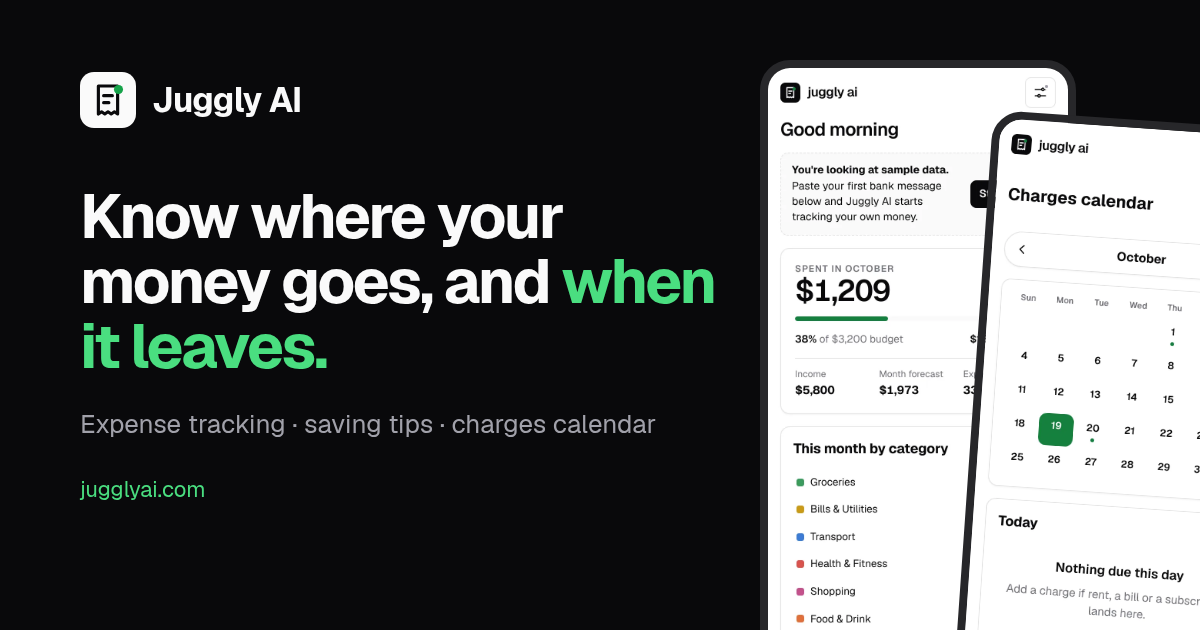
Juggly AI is a calm expense tracker launching soon. Paste a bank message or receipt and it sorts it, shows simple ways to save, and puts every recurring charge (Netflix, Spotify, rent) on a calendar with logos.

Comments


Putting recurring charges on a calendar with logos is smart, most people don't notice a subscription until the day it hits. When someone pastes a bank message, does the parsing run on the device or on your server? For a finance app that's the first question I'd ask before pasting anything. And a small idea: a reminder a few days before a free trial converts to paid would probably save people more than any savings tip.

I like that it's built around pasting a bank message instead of asking for a bank login, that alone makes me more willing to try it. One thing I'd want as a small business owner: a way to tag an expense as business vs personal and export just the business side as a CSV at tax time. Is that on the roadmap, or is it meant to stay purely personal?

Forwarding bank emails is the smartest decision on this page. It skips the Open Banking consent flow, the bank-by-bank integrations and the scraping, and it works with any bank that sends transaction emails — which is most of them. "Three things, done well" reads like a team that decided what not to build, and putting recurring charges on a calendar with logos solves the pain people actually have, which isn't knowing what they spent, it's being ambushed by it. Two things I'd tighten before launch. First, the failure mode: bank emails vary a lot and some will parse badly. Naming which banks are covered at launch, and routing unclear emails into a "needs review" queue instead of letting them land in a guessed category, is the difference between a tool people trust and one that quietly files their rent under Shopping. Second, the waitlist is currently the only thing to do — a "paste one bank email and see what it extracts" box, no account needed, would prove the core claim in ten seconds and convert better than any amount of homepage copy. One small note: the site says "Launching soon" while the listing presents it as launched. Worth aligning so visitors arriving from here don't expect to sign in and find a waitlist instead.

The calendar view for recurring charges is the feature I'd open the app for. Do you keep charges that change each month (utilities, phone) separate from fixed subscriptions? Those are the ones that sneak up on me. Also curious whether the "simple ways to save" come from my own spending history or are general tips.

Pasting a bank message is a much lighter start than a bank login. One edge case I'd be curious about is refunds and reversals: if I paste a charge and later the refund notice, does it net them out, and is pasting the same message twice de-duplicated? That is usually where paste-based trackers drift away from the real balance.
Premium Products









































Sponsors
Buy
Makers
Makers
Comments
Putting recurring charges on a calendar with logos is smart, most people don't notice a subscription until the day it hits. When someone pastes a bank message, does the parsing run on the device or on your server? For a finance app that's the first question I'd ask before pasting anything. And a small idea: a reminder a few days before a free trial converts to paid would probably save people more than any savings tip.
I like that it's built around pasting a bank message instead of asking for a bank login, that alone makes me more willing to try it. One thing I'd want as a small business owner: a way to tag an expense as business vs personal and export just the business side as a CSV at tax time. Is that on the roadmap, or is it meant to stay purely personal?
Forwarding bank emails is the smartest decision on this page. It skips the Open Banking consent flow, the bank-by-bank integrations and the scraping, and it works with any bank that sends transaction emails — which is most of them. "Three things, done well" reads like a team that decided what not to build, and putting recurring charges on a calendar with logos solves the pain people actually have, which isn't knowing what they spent, it's being ambushed by it. Two things I'd tighten before launch. First, the failure mode: bank emails vary a lot and some will parse badly. Naming which banks are covered at launch, and routing unclear emails into a "needs review" queue instead of letting them land in a guessed category, is the difference between a tool people trust and one that quietly files their rent under Shopping. Second, the waitlist is currently the only thing to do — a "paste one bank email and see what it extracts" box, no account needed, would prove the core claim in ten seconds and convert better than any amount of homepage copy. One small note: the site says "Launching soon" while the listing presents it as launched. Worth aligning so visitors arriving from here don't expect to sign in and find a waitlist instead.
The calendar view for recurring charges is the feature I'd open the app for. Do you keep charges that change each month (utilities, phone) separate from fixed subscriptions? Those are the ones that sneak up on me. Also curious whether the "simple ways to save" come from my own spending history or are general tips.
Pasting a bank message is a much lighter start than a bank login. One edge case I'd be curious about is refunds and reversals: if I paste a charge and later the refund notice, does it net them out, and is pasting the same message twice de-duplicated? That is usually where paste-based trackers drift away from the real balance.
Premium Products
New to Fazier?

Find your next favorite product or submit your own. Made by @FalakDigital.
Copyright ©2026. All Rights Reserved