
JobRequester
Track applications, interview notes & unemployment benefits
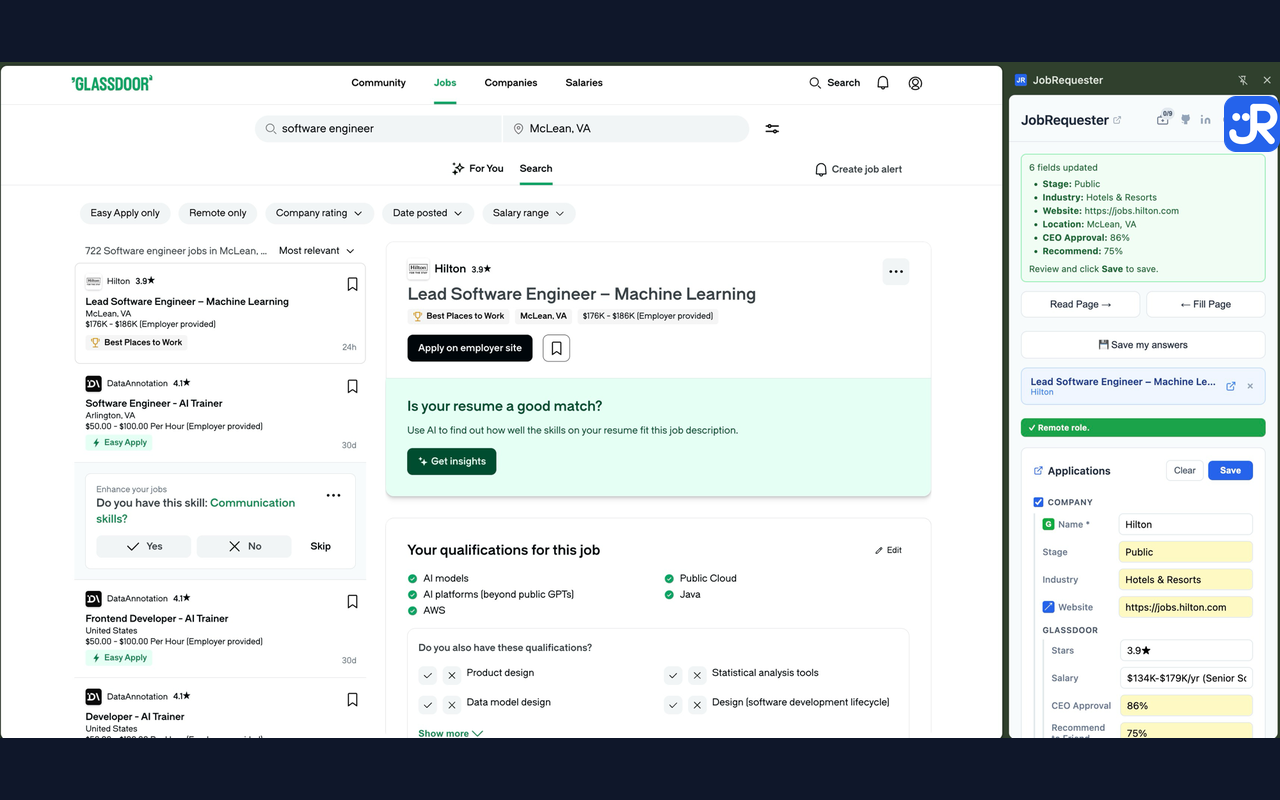
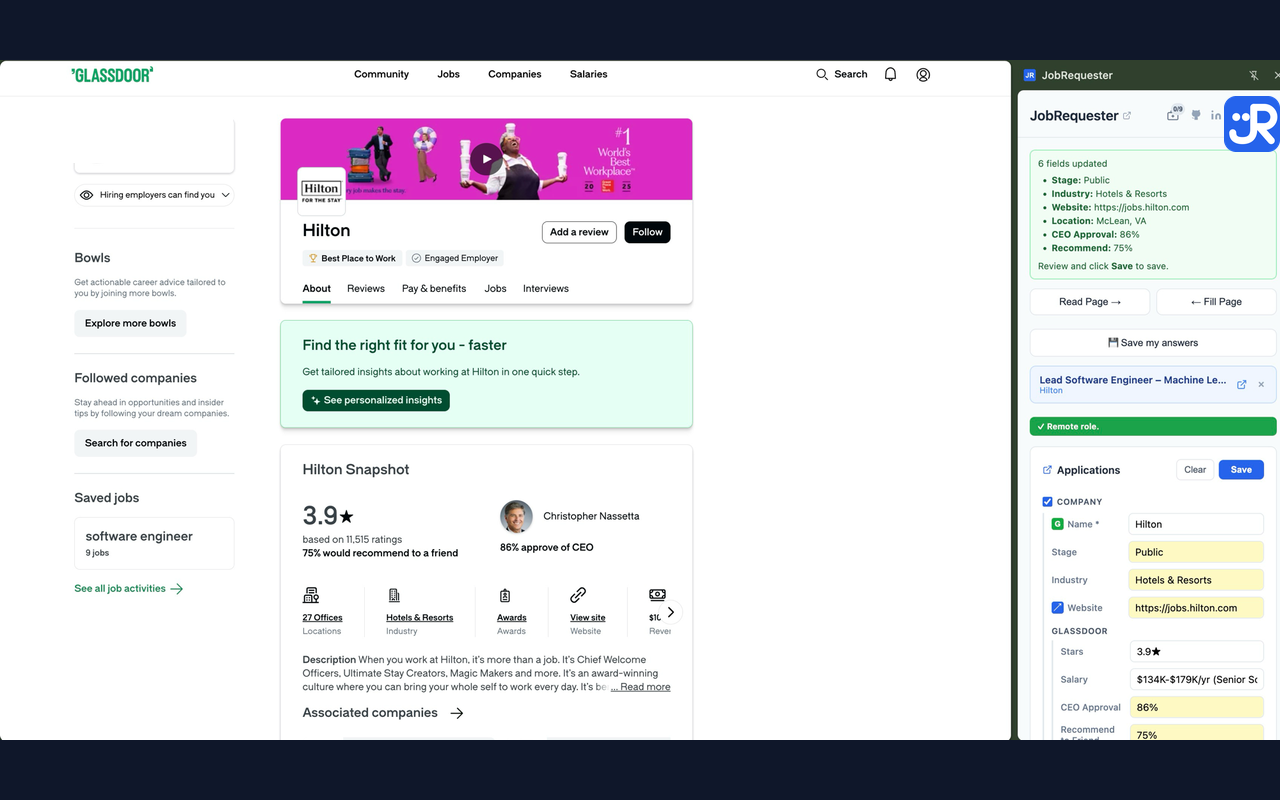
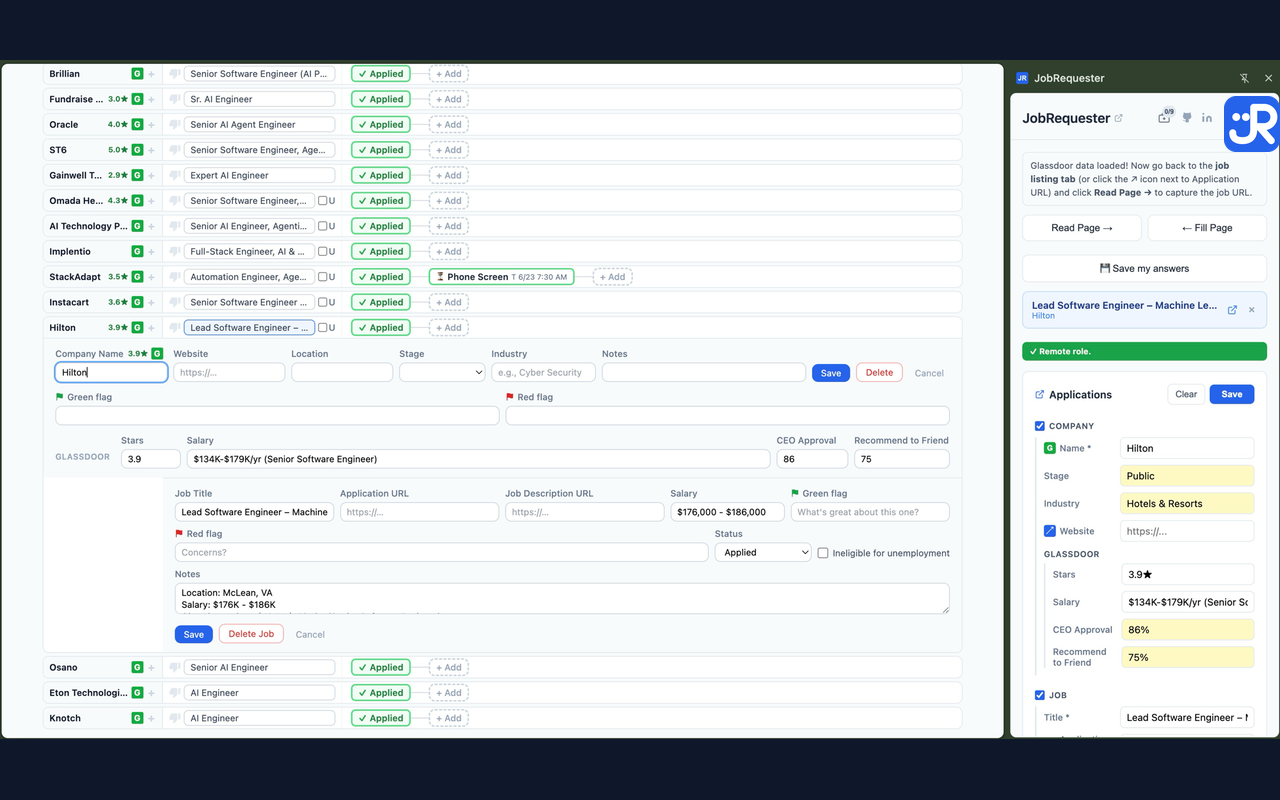
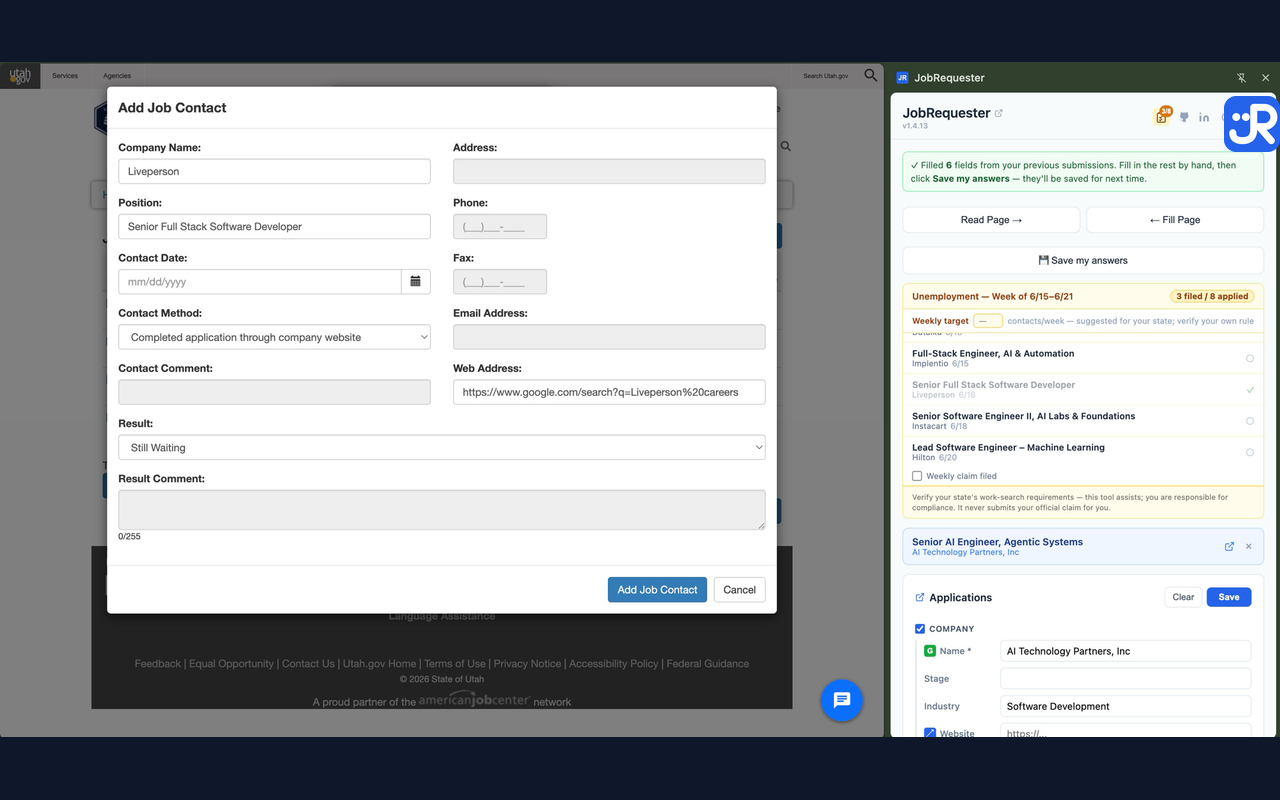
JobRequester is a free Chrome side panel and web app for job seekers. Open any job posting, click once, and the title, company, location and salary are saved to your tracker — no copy-paste. It autofills application forms from answers you've already saved, pulls Glassdoor ratings and pay ranges into each application, and tracks recruiters and interview rounds. Built especially for people on unemployment: it counts your weekly work-search contacts and fills your state's weekly claim form (all 50 states + DC), so a paperwork miss never costs you a week of benefits.
Features
- One-click job capture from LinkedIn, Indeed, Glassdoor, ZipRecruiter, and Greenhouse, Lever, Workday and iCIMS career pages
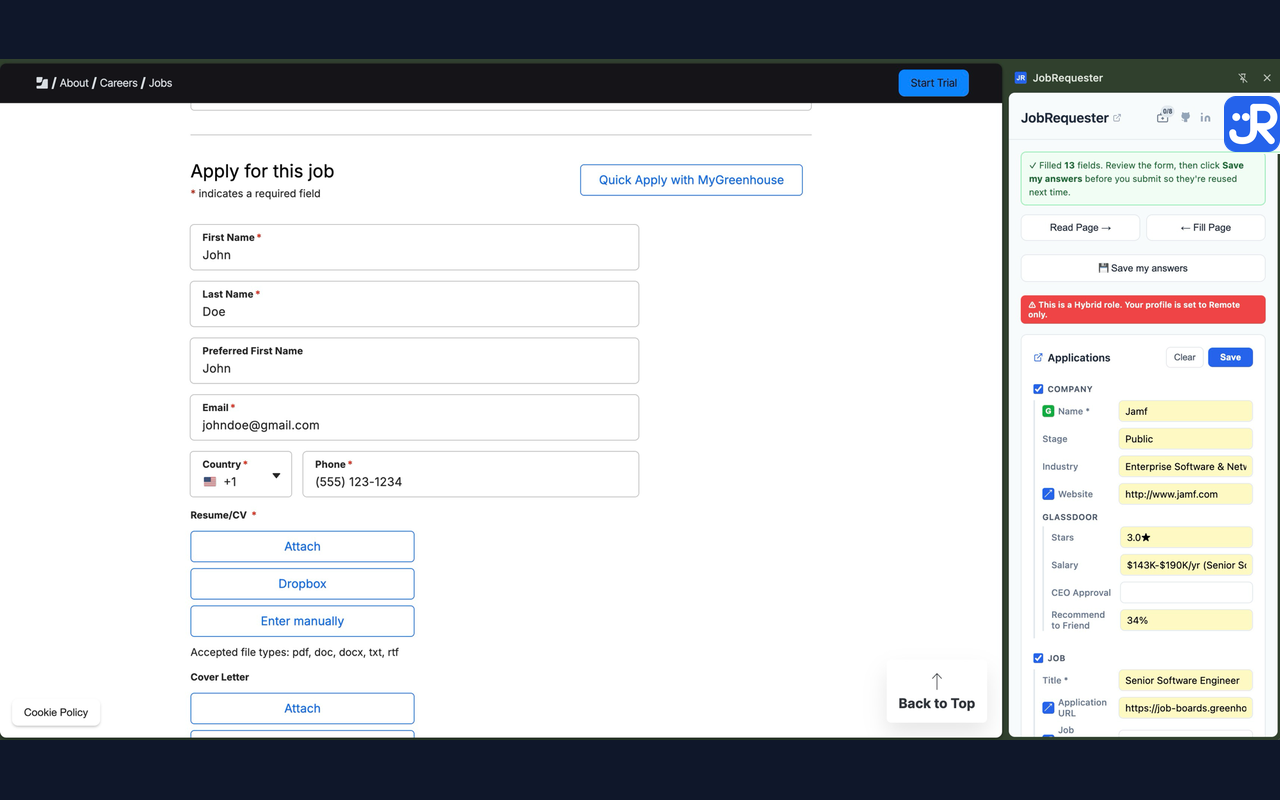
- Free application autofill with no limit — never overwrites what you typed, lists every field it filled, and never submits for you
- Save your answers once and reuse them on every future application
- Weekly unemployment work-search contact counter with reminders when a claim is unfiled
- Autofill for your state's weekly unemployment claim form — all 50 states + DC
- Glassdoor company ratings and pay ranges pulled into each application
- Recruiter and interview-round tracking, linked to each application
- AI follow-up email prompt after each interview round
- Ghost-job warnings and follow-up due reminders
- Privacy-first: reads a page only when you click — no background tracking
Use Cases
- Unemployment claimants who must log several job contacts each week: JobRequester records every application as a dated contact and fills the weekly claim form, so benefits are never denied over paperwork.
- Active job seekers applying to dozens of roles: capture each posting in one click and autofill the application instead of retyping your address and work history.
- Salary-conscious candidates: see the Glassdoor pay range and company rating before applying or negotiating.
- People juggling recruiters and interviews: keep every recruiter, interview round and follow-up tied to the right application.
- Anyone replacing a job-search spreadsheet: one tracker that fills itself from the pages you visit.

Comments


I'm the person who built this, and I'd really like honest feedback from people who are job hunting right now. I've been job searching myself, and two parts of it were pure busywork: copying every posting into a spreadsheet I'd stop updating by week three and, while claiming unemployment, re-typing the same jobs into my state's weekly work-search log so I didn't lose a week of benefits. So I built JobRequester, a Chrome side panel that does those parts for you: - On a job posting, click to capture the job and company info, from LinkedIn, Indeed, Glassdoor, ZipRecruiter and the career pages behind Greenhouse, Lever, Workday, iCIMS and more. - For the employer's Glassdoor rating and pay range, the G button opens a Glassdoor search for the company; once you're on its page, Read Page pulls the numbers into that application, so they're kept with it. - It fills application forms from answers you've already saved, so you stop typing your address and work history fifty times. - It counts your job contacts for the week and fills your state's work-search contact form from jobs you already tracked. You review and submit it yourself — it never files anything for you. - It shows which job sources actually turn into interviews, so you can spend your time where it works. - Instead of lumping everything in an "Interviewing" bucket, for each job application, you can set up what the process will be, such as Phone Screen -> Hiring Manager Interview -> Take Home Coding Assessment -> On Site Interview -> Offer. Each job is different. It's free for up to 100 applications, no ads, no credit card. Chrome Web Store: https://chromewebstore.google.com/detail/jobrequester/akjcibbppckjljcncehmepplbpiiallj Web app: https://jobrequester.com If something doesn't work, such as a job site it can't read, a form it fills wrong, etc. please tell me with the 📣 feedback button at the top of the side panel. Those reports go straight to me and are the fastest way it gets fixed. And if you try it, I'd be grateful for an honest review on the Chrome Web Store listing, good or bad. It's how other job seekers find out whether it's worth their time. Thanks for reading, and good luck with the search.
Premium Products









































Sponsors
Buy
Makers
Makers
Comments
I'm the person who built this, and I'd really like honest feedback from people who are job hunting right now. I've been job searching myself, and two parts of it were pure busywork: copying every posting into a spreadsheet I'd stop updating by week three and, while claiming unemployment, re-typing the same jobs into my state's weekly work-search log so I didn't lose a week of benefits. So I built JobRequester, a Chrome side panel that does those parts for you: - On a job posting, click to capture the job and company info, from LinkedIn, Indeed, Glassdoor, ZipRecruiter and the career pages behind Greenhouse, Lever, Workday, iCIMS and more. - For the employer's Glassdoor rating and pay range, the G button opens a Glassdoor search for the company; once you're on its page, Read Page pulls the numbers into that application, so they're kept with it. - It fills application forms from answers you've already saved, so you stop typing your address and work history fifty times. - It counts your job contacts for the week and fills your state's work-search contact form from jobs you already tracked. You review and submit it yourself — it never files anything for you. - It shows which job sources actually turn into interviews, so you can spend your time where it works. - Instead of lumping everything in an "Interviewing" bucket, for each job application, you can set up what the process will be, such as Phone Screen -> Hiring Manager Interview -> Take Home Coding Assessment -> On Site Interview -> Offer. Each job is different. It's free for up to 100 applications, no ads, no credit card. Chrome Web Store: https://chromewebstore.google.com/detail/jobrequester/akjcibbppckjljcncehmepplbpiiallj Web app: https://jobrequester.com If something doesn't work, such as a job site it can't read, a form it fills wrong, etc. please tell me with the 📣 feedback button at the top of the side panel. Those reports go straight to me and are the fastest way it gets fixed. And if you try it, I'd be grateful for an honest review on the Chrome Web Store listing, good or bad. It's how other job seekers find out whether it's worth their time. Thanks for reading, and good luck with the search.
Premium Products
New to Fazier?

Find your next favorite product or submit your own. Made by @FalakDigital.
Copyright ©2026. All Rights Reserved