
Img Editor
Img Editor is a completely free AI image generation platform
# Img Editor - Free AI Image Generator
## What is Img Editor?
Img Editor is a completely free AI image generation platform that brings the power of advanced AI technology to everyone. Whether you're an artist, designer, marketer, or just someone who loves creating beautiful images, Img Editor offers unlimited creative possibilities without any cost barriers.
Visit us at: https://imgeditor.pro
Img Editor stands out as the go-to platform for anyone seeking professional-quality AI-generated images, completely free of charge. Unlike other AI tools that require subscriptions or credits, Img Editor provides 10 free generations daily, with the opportunity to earn unlimited bonus generations through community participation.
## Core Features
### AI Image Generation System
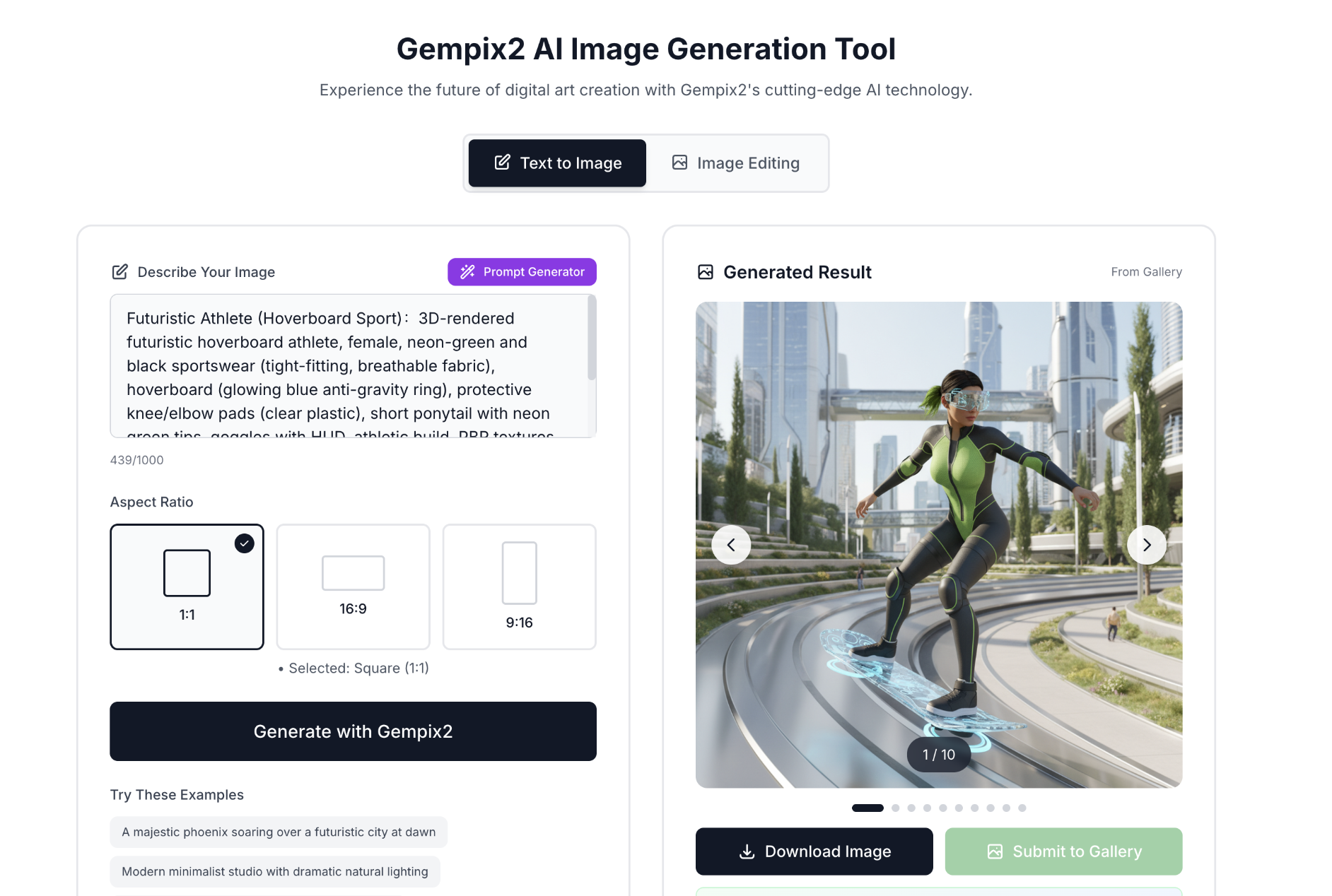
The heart of Img Editor lies in its dual-mode AI image generation system:
**Text to Image Mode**: Simply describe what you want to see, and Img Editor will bring your imagination to life. From "a cyberpunk city at sunset" to "a watercolor painting of a peaceful garden," the Img Editor engine understands natural language and transforms your words into stunning visuals.
**Image Editing Mode**: Already have an image but want to make changes? The image editing feature lets you modify existing images using text prompts. Change styles, add elements, or completely transform your photos with the power of Img Editor technology.
**Free Generation System**: Every user gets 10 free generations daily, automatically refreshed every 24 hours. Submit your best work to the community gallery, and once approved, you'll receive 10 permanent bonus generations. These bonus generations never expire and stack infinitely, rewarding active community members with unlimited creative power.
**Real-time Gallery Display**: As you create, the right sidebar showcases inspiring works from the community gallery alongside your latest generations, providing constant inspiration.
**Enhanced Animations**: The homepage features beautiful animations powered by Framer Motion - word-by-word title fade-in effects and looping subtitle animations with 4 rotating marketing messages.
### Prompt Tools - Unlock Your Creative Potential
**AI Prompt Generator**: Stuck for ideas? The intelligent prompt generator, powered by Gemini 2.5 Flash AI, helps you craft the perfect prompt. Features include:
- Left-right split layout on desktop for optimal workflow
- Prompt gallery carousel for inspiration
- One-click fill to image editor
- Reference image upload support
- 5 visual style choices (Realistic, Artistic, Anime, Abstract, Cinematic)
**Click-to-Use Prompts**: See an image you love in the gallery? Click on it to instantly copy its prompt into your generator. This feature works for both Text to Image and Image Editing modes, making it easy to learn from the community and iterate on successful creations.
### Community Gallery System
Img Editor isn't just a tool - it's a thriving creative community where artists inspire and support each other.
**Curated Showcase**: The gallery features the best creations made with Img Editor, carefully reviewed to ensure quality. Browse works sorted by time or popularity, and discover what's possible when creativity meets AI.
**Like and Engage**: Found something amazing? Show your appreciation with likes. Popular works rise to the top, and creators get recognized for their talent and vision.
**Submit Your Work**: Created something you're proud of? Submit it to the gallery for review. Approved submissions not only showcase your work to the community but also reward you with 10 permanent bonus generations.
### My Works - Your Personal Studio
**Complete Generation History**: Every image you create with Img Editor is automatically saved to your personal workspace. Never lose track of your creations.
**Full Management Tools**: Download images in high quality, edit titles and descriptions, or delete works you no longer need.
**One-Click Gallery Submission**: Submit your best work to the community gallery directly from your works page with a single click.
**Prompt Preservation**: Every work saves its original prompt, making it easy to recreate similar images or iterate on successful concepts.
## How Img Editor Solves Real Problems
### Problem 1: AI Tools Are Too Expensive
Most AI image generation platforms charge monthly subscriptions or per-image fees. Img Editor solves this with genuinely free access - 10 daily generations for everyone, forever, with unlimited bonus potential through community participation.
### Problem 2: Complex Interfaces Intimidate Beginners
Many AI tools overwhelm new users with technical jargon and complex settings. Img Editor features an intuitive interface where you simply type what you want and get results. The prompt tools help beginners craft effective prompts without needing technical knowledge.
### Problem 3: Lack of Inspiration
Staring at a blank prompt box is frustrating. Img Editor addresses this with the AI prompt generator, gallery of inspiring images, and click-to-use prompts from community creations. You're never without ideas.
### Problem 4: No Sense of Community
Creating in isolation isn't as fun or productive. Img Editor builds a supportive community where creators share their work, inspire each other, and get recognized for their contributions through the gallery system and rewards.
### Problem 5: Lost Creations
How many times have you generated something amazing only to lose it when you close the browser? Img Editor automatically saves every generation to your personal workspace, ensuring your creative work is never lost.
## Getting Started
**Step 1 - Quick Login**: Click the login button and sign in with your Google account using One-Tap authentication. No lengthy registration forms, no email verification delays - you're creating within seconds.
**Step 2 - Choose Your Mode**: Select Text to Image for creating from scratch, or Image Editing to transform existing images.
**Step 3 - Craft Your Prompt**: Type your idea, use the AI prompt generator for help, or click an inspiring gallery image to use its prompt. The Img Editor engine works best with descriptive, specific prompts.
**Step 4 - Generate**: Hit the generate button and watch as Img Editor brings your vision to life. Each generation uses one of your daily or bonus credits.
**Step 5 - Manage and Share**: Your creation automatically saves to My Works. Download it, submit it to the gallery, or use it as a starting point for image editing.
## Use Cases - What Can You Create?
**Digital Art and Illustration**: Artists use Img Editor to generate concept art, character designs, and background illustrations. Img Editor excels at artistic styles from photorealism to abstract expressionism.
**Marketing and Social Media**: Content creators generate eye-catching visuals for social media posts, blog headers, and marketing campaigns. With 10 daily free generations plus bonuses, you can A/B test multiple visual concepts without budget concerns.
**Design Inspiration**: Designers use Img Editor to explore visual directions, generate mood boards, and overcome creative blocks. The prompt generator and gallery provide endless inspiration when you're stuck.
**Personal Projects**: From custom greeting cards to unique wallpapers, Img Editor helps anyone create personalized visuals for any purpose. No design skills required - just describe what you want.
**Learning and Experimentation**: Photographers and artists experiment with different styles and techniques using Img Editor, learning what works without the cost of traditional AI tools.
**Entertainment**: Sometimes you just want to see "a cat wearing a Viking helmet riding a skateboard." Img Editor makes creative fun accessible to everyone.
## Why Choose Img Editor?
**Truly Free**: Not a trial, not a freemium model with hidden costs. Img Editor offers genuine free access to AI image generation technology with daily generations and unlimited earning potential.
**Quality Results**: Powered by advanced AI technology, the platform produces professional-quality images comparable to paid alternatives.
**No Hidden Limitations**: Your generated images are yours. Download them, use them commercially, modify them - no restrictions or watermarks.
**Active Community**: Join thousands of creators sharing inspiration, techniques, and amazing creations. The Img Editor community makes creating more enjoyable and educational.
**Constant Updates**: The platform regularly adds new features, prompt templates, and improvements based on community feedback.
**Privacy Focused**: User data is respected. Login with Google is secure, and creations remain private unless you choose to share them in the gallery.
**Fast and Reliable**: Built on Cloudflare's global infrastructure, Img Editor delivers quick generation times and reliable service worldwide.
## Site Navigation
Explore everything Img Editor has to offer through these main sections:
**Homepage (/)**: Your creative hub featuring the AI image generator with both Text to Image and Image Editing modes. Includes:
- Word-by-word animated title
- Looping subtitle with 4 marketing messages
- Left-side generator + right-side image preview
- Auto-fill prompt feature
- Why Choose Us section (4 key features)
- Img Editor vs competitors comparison table (6 comparisons)
- Twitter Wall (3 user reviews with 1-4 image grid support)
- User Testimonials
- Free Features list
**Gallery (/gallery)**: Browse curated community creations, discover inspiring works, and like your favorites. See what's possible with Img Editor and find prompts to try yourself.
**My Works (/my-works)**: Your personal workspace displaying all your generations. Manage, download, edit details, and submit works to the gallery. Requires login.
**Prompt Generator (/prompt-generator)**: Access the AI-powered prompt creation tool with:
- Gemini 2.5 Flash AI integration
- Reference image upload
- 5 visual style selections
- Integrated gallery carousel for inspiration
- One-click fill to image editor
**Blog (/blog)**: Read 20+ articles about Img Editor, AI image generation tips, creative techniques, and platform updates.
**FAQ (/faq)**: Find answers to 18 frequently asked questions about using Img Editor, from account management to generation tips.
**Privacy Policy (/privacy)**: Understand how user data is protected and privacy is respected.
**Terms of Service (/terms)**: Review the terms governing Img Editor usage and community guidelines.
## The Img Editor Difference
The key difference with Img Editor is accessibility. While advanced AI technology powers the platform, it's made available to everyone without barriers. This is a platform that's free, community-driven, and designed for creators of all skill levels.
Img Editor is more than an AI tool - it's a creative community, a learning platform, and your gateway to unlimited visual creativity. Whether you're a professional designer needing quick mockups, an artist exploring new styles, or someone who just enjoys creating beautiful images, Img Editor welcomes you.
Join thousands of creators who've already discovered that the best AI image generation doesn't have to cost anything. Start creating with Img Editor today and see where your imagination takes you.
---
**Website**: https://imgeditor.pro
**Login**: Google One-Tap authentication
**Free Daily Generations**: 10 per day
**Bonus Generations**: +10 permanent for each gallery-approved submission
**No credit card required. No subscriptions. Just pure creative freedom with Img Editor technology.**
## Keywords
- Img Editor
- Img Editor AI
- Img Editor AI Image Generator
- Free AI Image Generator
- Img Editor Pro

Comments

Premium Products





































Comments
Premium Products
New to Fazier?

Find your next favorite product or submit your own. Made by @FalakDigital.
Copyright ©2026. All Rights Reserved