
Frame to Video
AI Frame to Video Generator Free: Create Video from Frames
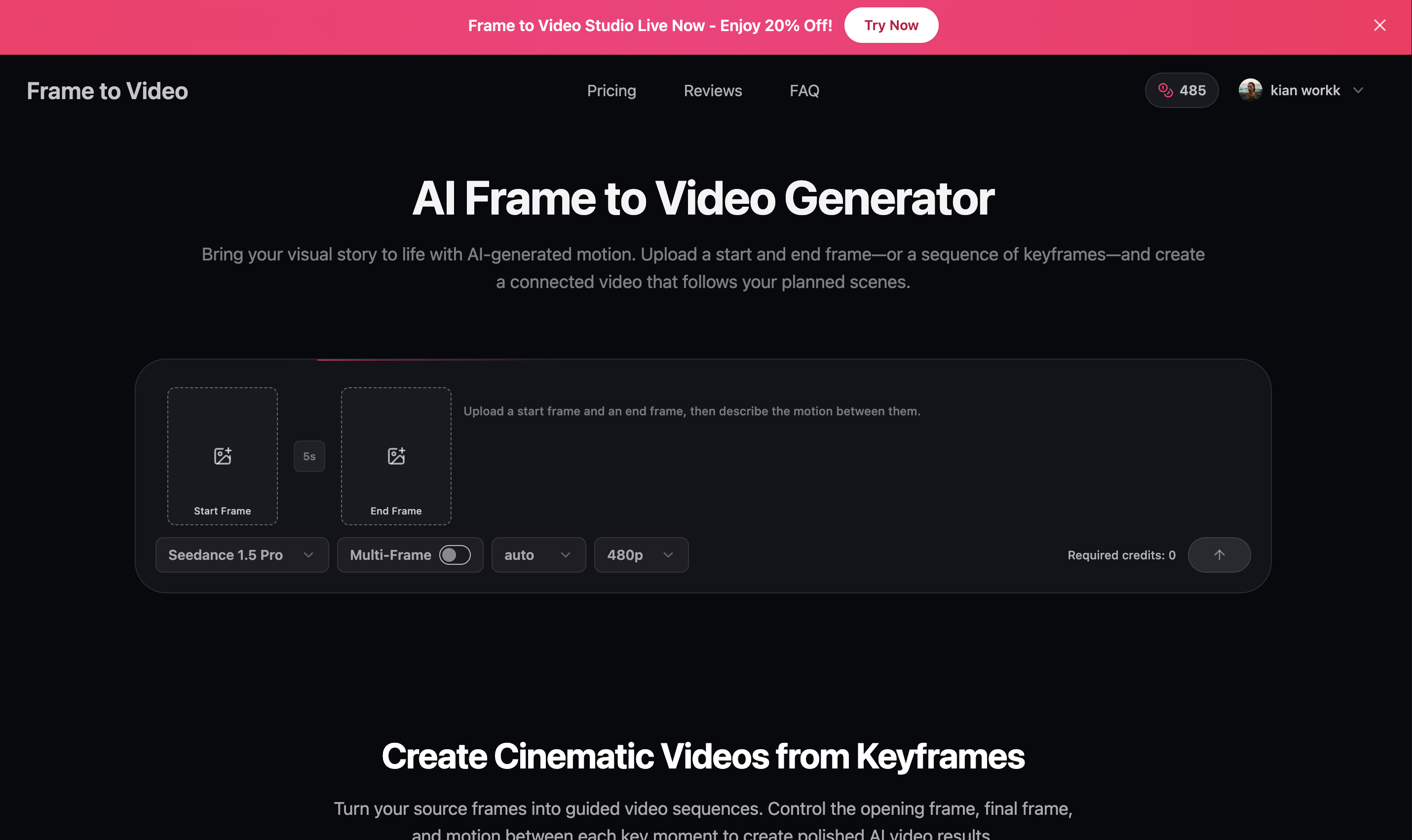
Frame to Video is an AI video generator that turns start and end frames or a sequence of keyframes into connected video clips. Upload your planned scenes, describe the motion between them, and create controlled transitions for storyboards, product visuals, social content, and creative concepts.
Features
- Turn start and end frames into smooth AI-generated videos
- Connect multiple keyframes into one continuous video sequence
- Describe the motion between each pair of frames with custom prompts
- Control transition duration for every scene
- Choose the aspect ratio and resolution that fit your project
- Create polished video results without traditional editing skills
Use Cases
- Animate storyboards and visualize scenes before production
- Turn product images into engaging promotional videos
- Create scroll-stopping content for social media
- Produce visual concepts for ads and marketing campaigns
- Bring illustrations, artwork, and character designs to life
- Prototype cinematic transitions and creative ideas quickly

Comments









The per-scene transition duration control is a thoughtful touch — describing the motion between frames with custom prompts makes this far more useful than basic frame interpolation, especially for pre-visualizing storyboards. Curious whether longer keyframe sequences keep characters consistent across scenes, since that's where most tools break down.







The start-and-end frame control is the standout here — being able to describe the motion between keyframes and set the transition duration per scene makes it much more useful for storyboards than a one-prompt video generator. For product visuals, that control over the first and last frame should help keep branding consistent. Curious how it handles more than 5-6 keyframes in one sequence?
The per-keyframe-pair prompting is a smart constraint most frame-to-video tools only take one global prompt, so describing the motion between each pair is where control actually comes from. Does render cost scale with transition duration, and what's the longest sequence you've seen hold together before the drift kicks in?



Keyframe-to-video with explicit motion prompts per transition is a nice middle ground between a single text-to-video prompt and full manual animation. For a sequence with more than 2-3 keyframes, how consistent does character/object identity stay across the generated in-between clips, or does that start drifting the longer the chain gets?

custom prompt control is brilliant. https://www.gifto-gram.com

Start AND end frames is the feature that matters — most generators only take a first frame and leave the ending to luck, which makes loops and storyboard continuity nearly impossible. In my own video work I lean on start/end frame pairs precisely because the last frame decides whether a clip can loop back cleanly. Question on Multi-Frame mode: with a sequence of keyframes, does each segment get its own motion description and duration, or is it one global prompt across the whole sequence? That is the difference between a rough animatic and a controllable storyboard tool.

Premium Products





















































Sponsors
Buy



Makers

Makers
Comments
The per-scene transition duration control is a thoughtful touch — describing the motion between frames with custom prompts makes this far more useful than basic frame interpolation, especially for pre-visualizing storyboards. Curious whether longer keyframe sequences keep characters consistent across scenes, since that's where most tools break down.
The start-and-end frame control is the standout here — being able to describe the motion between keyframes and set the transition duration per scene makes it much more useful for storyboards than a one-prompt video generator. For product visuals, that control over the first and last frame should help keep branding consistent. Curious how it handles more than 5-6 keyframes in one sequence?
The per-keyframe-pair prompting is a smart constraint most frame-to-video tools only take one global prompt, so describing the motion between each pair is where control actually comes from. Does render cost scale with transition duration, and what's the longest sequence you've seen hold together before the drift kicks in?
Keyframe-to-video with explicit motion prompts per transition is a nice middle ground between a single text-to-video prompt and full manual animation. For a sequence with more than 2-3 keyframes, how consistent does character/object identity stay across the generated in-between clips, or does that start drifting the longer the chain gets?
custom prompt control is brilliant. https://www.gifto-gram.com
Start AND end frames is the feature that matters — most generators only take a first frame and leave the ending to luck, which makes loops and storyboard continuity nearly impossible. In my own video work I lean on start/end frame pairs precisely because the last frame decides whether a clip can loop back cleanly. Question on Multi-Frame mode: with a sequence of keyframes, does each segment get its own motion description and duration, or is it one global prompt across the whole sequence? That is the difference between a rough animatic and a controllable storyboard tool.
Premium Products
New to Fazier?

Find your next favorite product or submit your own. Made by @FalakDigital.
Copyright ©2026. All Rights Reserved