
Flow Recorder
Interactive User Journeys with Zero Coding
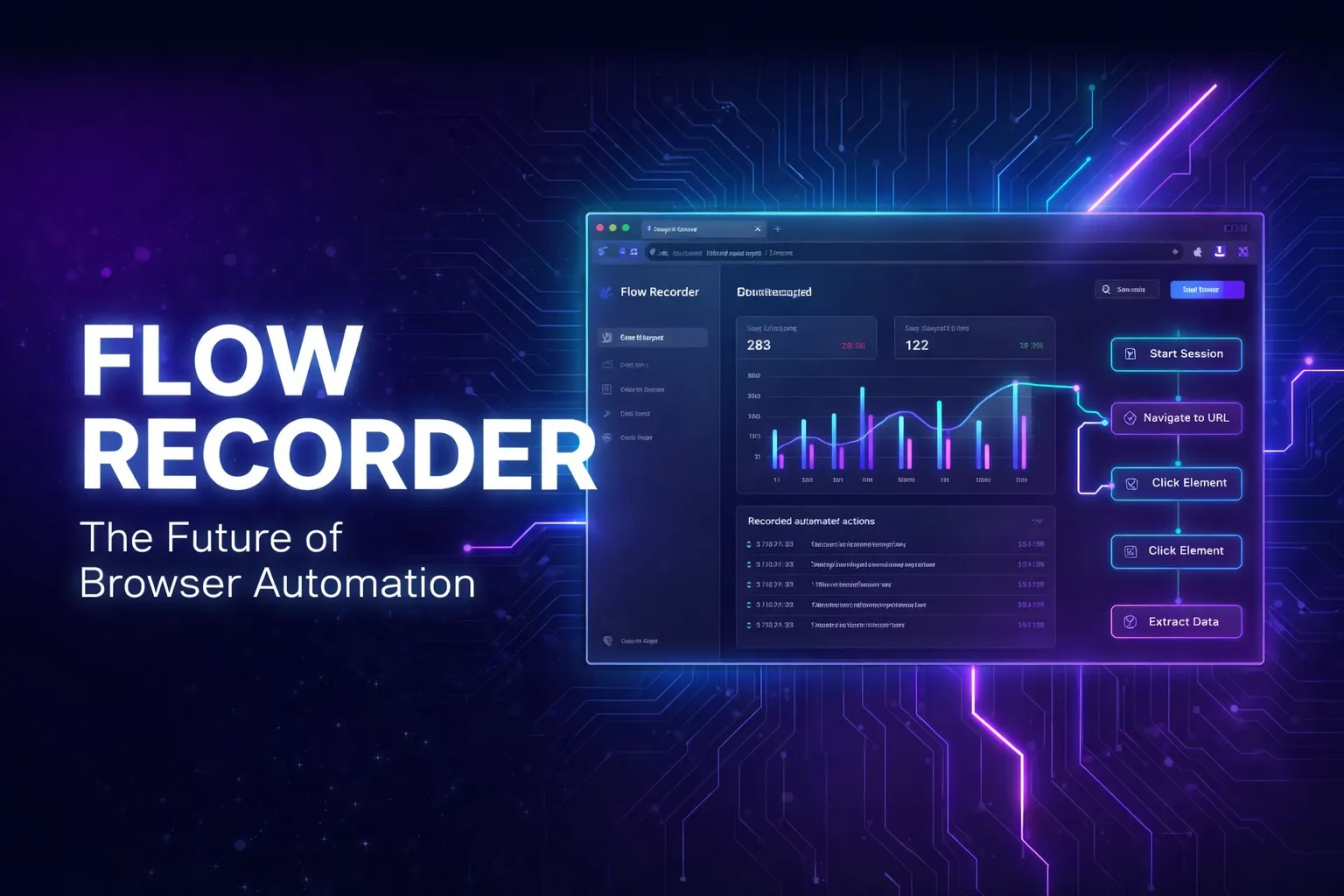
Flow Recorder is the no‑code way to capture and replay real user journeys in your browser. Install the extension, browse as usual, and every click, input, navigation, and multi‑tab path is turned into a lightweight, shareable guide you can play back or hand off.
Refine steps in a simple visual editor, automatically mask sensitive data, and sync flows to the cloud for effortless team collaboration. Ideal for onboarding, customer support, internal SOPs, and automated testing, Flow Recorder sets up in minutes and is built for enterprise‑grade safety.
Features
- One-click recording
- Smart element detection
- Workflow documentation
- Interactive guides
- Zero-coding engine
- Instant playback generation
- Shared team workspaces
- Granular access controls
- Version-controlled flows
- Global search across journeys
Use Cases
- Customer Onboarding
- Interactive product tours
- Feature highlight guides
- Personalized welcome flows
- Internal SOPs
- New employee training
- Internal tooling guides
- Compliance walkthroughs
- Support Resolutions
- Sales Demonstrations
- Self-serve product demos
- Pre-sales feature deep-dives
- Interactive case studies

Comments


Hello Fazier community! 👋 I’m Ratul, the maker of Flow Recorder. We’ve all been there: a user asks how a feature works, and you find yourself recording a Loom, taking 5 screenshots, or typing out a long "Step 1, Step 2..." email. It’s manual, it’s slow, and it’s out of date the moment you change your UI. We built Flow Recorder to automate that process. It lets you record your actions directly in the browser and instantly turns them into Interactive User Journeys. Why we built this: Virtual Hand-Drawn Cursor: Our replay feels human. It doesn't just "jump" between steps; it guides the user with smooth, premium animations. Smart Spotlights: The app automatically highlights the exact button or field the user needs to focus on. Embed Anywhere: With one line of code, you can put these walkthroughs in your support docs, landing pages, or onboarding flows. It’s all about showing, not telling. I’d love to hear how you currently guide your users through your product. Looking forward to your feedback! 🚀

The version-controlled flows feature is underrated — most documentation tools treat guides as static snapshots that go stale, so having versioning built in is a real differentiator for teams that ship fast. The "embed anywhere with one line of code" is also a killer use case for support docs and landing page demos. Curious whether flows can auto-detect when the underlying UI changes and flag outdated steps? That would make this a must-have for fast-moving product teams. Great work, Ratul!

This looks really useful 👏 Recording browser actions and turning them into reusable workflows or guides without any coding sounds like a huge time-saver. If it really makes documenting journeys and automating repetitive tasks that easy, I can see teams actually using it in day-to-day work. Nice launch — excited to try it out! 🚀




Interactive user journey recording without code injection is a genuinely hard problem. Tools that require you to write custom code for each step create a maintenance burden. How does Flow Recorder handle dynamic content like modals, tooltips, or elements that only appear after scroll? That's typically where these tools break down in real-world apps.


The zero-coding approach to user journey recording solves a real pain point. Product managers spend hours manually documenting flows with screenshots when something like this could capture everything in real time. Version-controlled flows is a smart addition too — tracking how onboarding paths evolve helps teams understand what actually converts. The automatic sensitive data masking is also a strong differentiator against tools like Loom.

Premium Products









































Sponsors
Buy

Awards
View all
Awards
View allMakers
Makers
Comments
Hello Fazier community! 👋 I’m Ratul, the maker of Flow Recorder. We’ve all been there: a user asks how a feature works, and you find yourself recording a Loom, taking 5 screenshots, or typing out a long "Step 1, Step 2..." email. It’s manual, it’s slow, and it’s out of date the moment you change your UI. We built Flow Recorder to automate that process. It lets you record your actions directly in the browser and instantly turns them into Interactive User Journeys. Why we built this: Virtual Hand-Drawn Cursor: Our replay feels human. It doesn't just "jump" between steps; it guides the user with smooth, premium animations. Smart Spotlights: The app automatically highlights the exact button or field the user needs to focus on. Embed Anywhere: With one line of code, you can put these walkthroughs in your support docs, landing pages, or onboarding flows. It’s all about showing, not telling. I’d love to hear how you currently guide your users through your product. Looking forward to your feedback! 🚀
The version-controlled flows feature is underrated — most documentation tools treat guides as static snapshots that go stale, so having versioning built in is a real differentiator for teams that ship fast. The "embed anywhere with one line of code" is also a killer use case for support docs and landing page demos. Curious whether flows can auto-detect when the underlying UI changes and flag outdated steps? That would make this a must-have for fast-moving product teams. Great work, Ratul!
This looks really useful 👏 Recording browser actions and turning them into reusable workflows or guides without any coding sounds like a huge time-saver. If it really makes documenting journeys and automating repetitive tasks that easy, I can see teams actually using it in day-to-day work. Nice launch — excited to try it out! 🚀
Interactive user journey recording without code injection is a genuinely hard problem. Tools that require you to write custom code for each step create a maintenance burden. How does Flow Recorder handle dynamic content like modals, tooltips, or elements that only appear after scroll? That's typically where these tools break down in real-world apps.
The zero-coding approach to user journey recording solves a real pain point. Product managers spend hours manually documenting flows with screenshots when something like this could capture everything in real time. Version-controlled flows is a smart addition too — tracking how onboarding paths evolve helps teams understand what actually converts. The automatic sensitive data masking is also a strong differentiator against tools like Loom.
Premium Products
New to Fazier?

Find your next favorite product or submit your own. Made by @FalakDigital.
Copyright ©2026. All Rights Reserved