
favicondl
Free favicon downloader: any site's favicon in every size
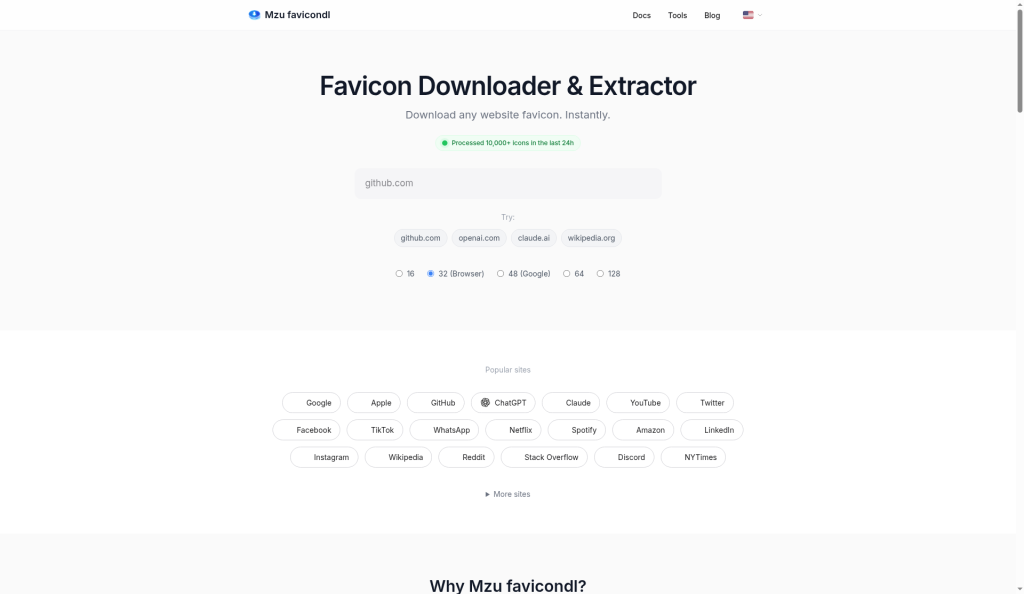
favicondl lets you download the favicon of any website in all available sizes (ICO, PNG, SVG, apple-touch-icon) instantly. It includes a free REST API, bulk download, and an MCP server so AI agents can fetch icons. No signup needed.

Comments


Been digging through <link> tags and .ico files manually for years — the bulk download plus REST API combo is the real win here. Quick question: when a site declares an apple-touch-icon but no standard favicon, does the API still resolve it? That edge case is where most favicon scrapers fall over for me.

The REST API and MCP server are useful additions for directory builders. Does the API return each icon at its original resolution, and can callers request an SVG without silently falling back to a small PNG? Including the source URL, format and dimensions in the response would make automated icon selection much more reliable.

The bulk download plus the free REST API is the part that sold me — I have audited favicons across a bunch of client sites before and digging through link tags and .ico files by hand is painful. One question: if a site only ships a 16x16 .ico, does the API return just that file, or does it also try to find a larger apple-touch-icon? Either way, the MCP server so AI agents can fetch icons is a smart addition for directory builders.

the bulk download + mcp server combo is what got me to click. i run an mcp server for an image gen api and the thing agents trip on most is whether a tool hands back a url or raw bytes, so it's worth stating that clearly in the tool description. does the bulk endpoint dedupe when two declared sizes point to the same file?
Nice that it ships an MCP server, that's exactly where I'd use it: an agent building link previews. One thing I'd want to know is what happens when a site has no favicon at all. Does the API answer with a clear 404, or can it hand back a generated fallback (first letter on a colour from the domain)? For previews a predictable fallback saves a lot of broken image boxes.

I show site icons next to website names in a dark app, and the case that always bites is a favicon that's a black glyph on a transparent background: it just disappears on a dark UI. If the API returned a small hint per icon (has transparency, mostly dark or mostly light), apps could put a light tile behind it automatically instead of guessing. Bulk download plus the MCP server is a nice touch for anyone building directories.

Real use case from our side: we show partner logos on a 'featured on' page and Google's favicon endpoint often returns a blurry 16px icon. Does favicondl pick the largest available icon automatically (web manifest, apple-touch-icon, SVG) and tell you which source it came from? Also curious about rate limits on the free API.

Tried it on my own site (batteryhealthlab.com). It picked our SVG favicon, labelled it "sharp at any size", and both the copy-ready <img> snippet and the proxy URL worked first time. One idea for SVG results: show a quick 16px preview on a light tab bar and a dark one. A simple SVG can look fine large and still blur, or almost vanish on a dark theme, at real tab size, and that's exactly the moment someone is choosing which icon to grab.

Handy for anyone building link previews. One case worth covering: many sites now list their large icons only in the web app manifest (site.webmanifest / manifest.json), not in <link> tags, so that's often the only place a 192 or 512px PNG exists. Does favicondl read the manifest icons too, and does the API say which source each icon came from?


Useful for anyone building link lists or dashboards. One thing I'd check: a lot of sites now ship a separate dark-mode favicon (link rel=icon with a media="(prefers-color-scheme: dark)" attribute). Does favicondl list both variants and say which is which? Also, does the API cache results, and how fresh are they when a site changes its icon? A cache-age field in the response would make that clear.
Premium Products









































Sponsors
Buy
Makers
Makers
Comments
Been digging through <link> tags and .ico files manually for years — the bulk download plus REST API combo is the real win here. Quick question: when a site declares an apple-touch-icon but no standard favicon, does the API still resolve it? That edge case is where most favicon scrapers fall over for me.
The REST API and MCP server are useful additions for directory builders. Does the API return each icon at its original resolution, and can callers request an SVG without silently falling back to a small PNG? Including the source URL, format and dimensions in the response would make automated icon selection much more reliable.
The bulk download plus the free REST API is the part that sold me — I have audited favicons across a bunch of client sites before and digging through link tags and .ico files by hand is painful. One question: if a site only ships a 16x16 .ico, does the API return just that file, or does it also try to find a larger apple-touch-icon? Either way, the MCP server so AI agents can fetch icons is a smart addition for directory builders.
the bulk download + mcp server combo is what got me to click. i run an mcp server for an image gen api and the thing agents trip on most is whether a tool hands back a url or raw bytes, so it's worth stating that clearly in the tool description. does the bulk endpoint dedupe when two declared sizes point to the same file?
Nice that it ships an MCP server, that's exactly where I'd use it: an agent building link previews. One thing I'd want to know is what happens when a site has no favicon at all. Does the API answer with a clear 404, or can it hand back a generated fallback (first letter on a colour from the domain)? For previews a predictable fallback saves a lot of broken image boxes.
I show site icons next to website names in a dark app, and the case that always bites is a favicon that's a black glyph on a transparent background: it just disappears on a dark UI. If the API returned a small hint per icon (has transparency, mostly dark or mostly light), apps could put a light tile behind it automatically instead of guessing. Bulk download plus the MCP server is a nice touch for anyone building directories.
Real use case from our side: we show partner logos on a 'featured on' page and Google's favicon endpoint often returns a blurry 16px icon. Does favicondl pick the largest available icon automatically (web manifest, apple-touch-icon, SVG) and tell you which source it came from? Also curious about rate limits on the free API.
Tried it on my own site (batteryhealthlab.com). It picked our SVG favicon, labelled it "sharp at any size", and both the copy-ready <img> snippet and the proxy URL worked first time. One idea for SVG results: show a quick 16px preview on a light tab bar and a dark one. A simple SVG can look fine large and still blur, or almost vanish on a dark theme, at real tab size, and that's exactly the moment someone is choosing which icon to grab.
Handy for anyone building link previews. One case worth covering: many sites now list their large icons only in the web app manifest (site.webmanifest / manifest.json), not in <link> tags, so that's often the only place a 192 or 512px PNG exists. Does favicondl read the manifest icons too, and does the API say which source each icon came from?
Useful for anyone building link lists or dashboards. One thing I'd check: a lot of sites now ship a separate dark-mode favicon (link rel=icon with a media="(prefers-color-scheme: dark)" attribute). Does favicondl list both variants and say which is which? Also, does the API cache results, and how fresh are they when a site changes its icon? A cache-age field in the response would make that clear.
Premium Products
New to Fazier?

Find your next favorite product or submit your own. Made by @FalakDigital.
Copyright ©2026. All Rights Reserved