
Eziclip
Edit videos with your AI on an open board-style canvas
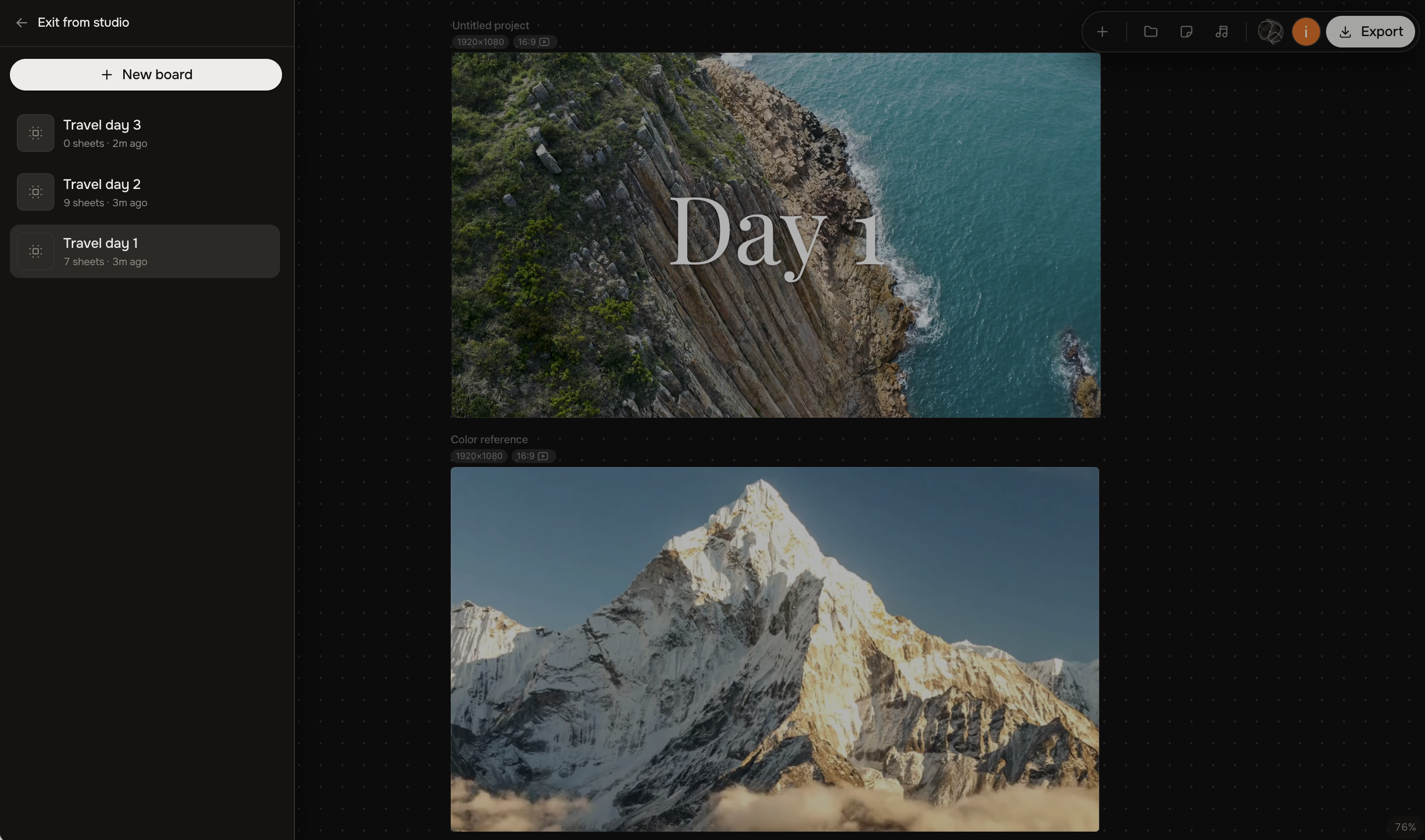
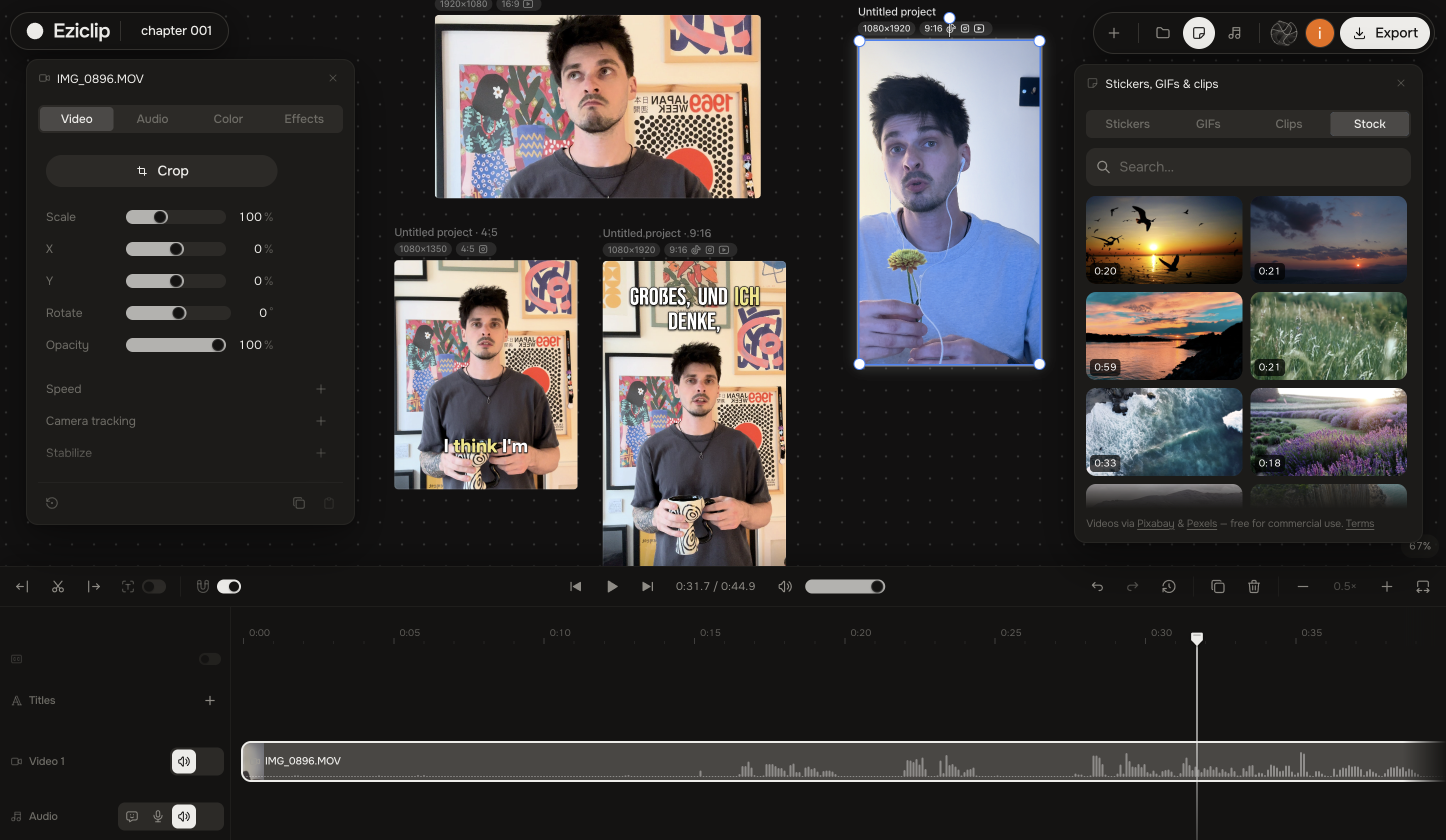
Eziclip — an open-canvas video editor where you and your own AI does the work. A project usually isn't one video — it's a long cut, a few verticals, a teaser. They sit on one canvas here, side by side, and export together. Each project gets its own board.
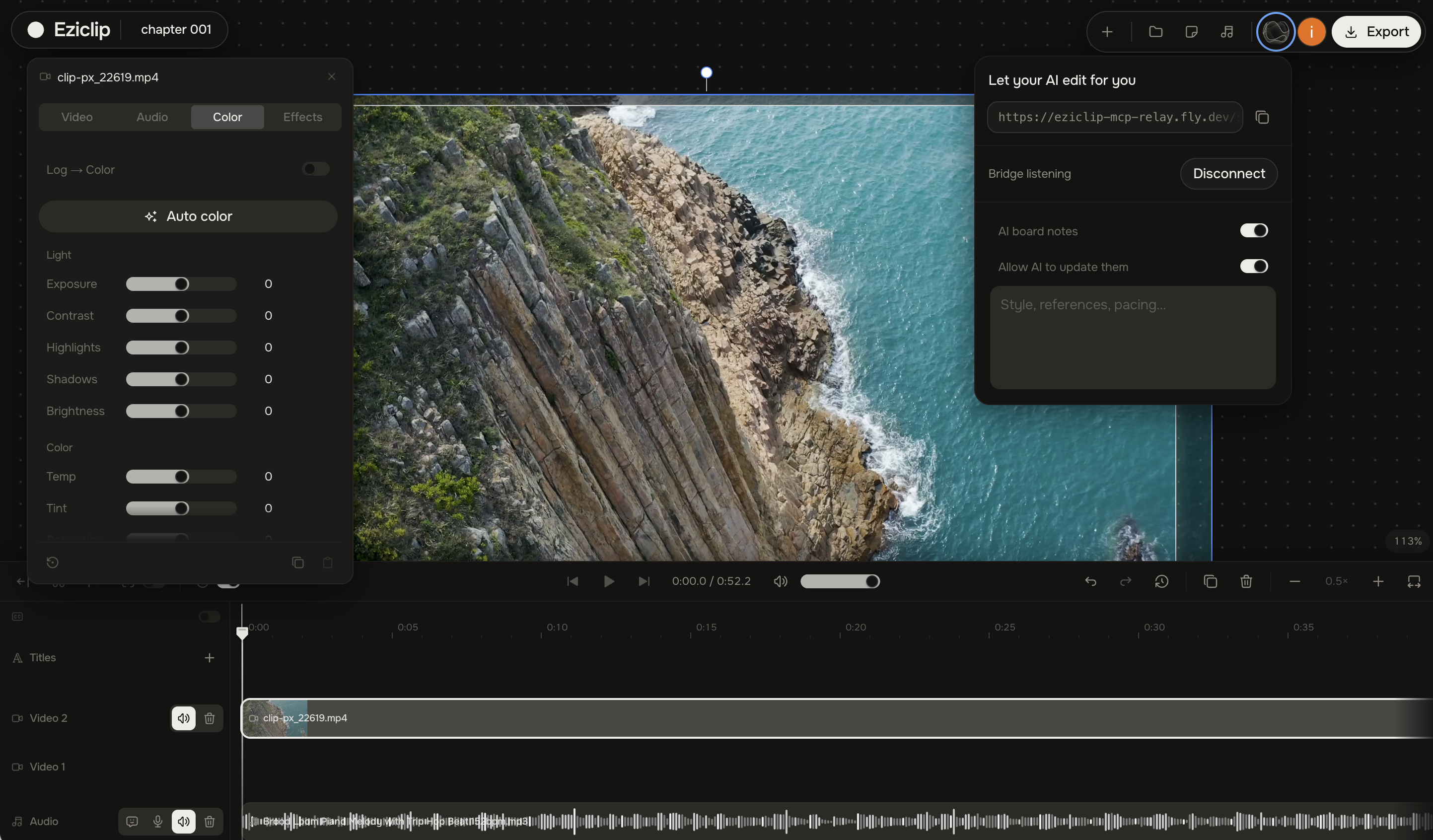
It allows you to connect AI agents like Claude or ChatGPT to handle editing tasks, including cutting by text, generating captions, and applying color adjustments, text to speech voiceovers and many more. The platform provides a full studio environment for creators to manage their projects directly in the browser. It includes one-tap creator tools for resizing and editing.
Features
Studio
- Infinite editing board — work with multiple videos and sheets on one canvas
- Projects with their own media libraries and sheets
- Multitrack timeline on every sheet
- Duplicate a sheet for another format
- Aspect ratios: 16:9, 9:16, 1:1, 4:5, plus custom sizes
- Resolutions: 720p, 1080p, 4K
- Sheet backgrounds: solid color, blur, or image
- Import video, audio, and images — drag and drop or file picker
- Import from Google Drive and Dropbox
- Automatic conversion of camera codecs (ProRes, DNx, HEVC, and more) into editable H.264 on your device
- Relink missing or large files from disk
- Media library on the board
- Trim, split, reorder, ripple delete, and gap editing on the main track
- Overlay / picture-in-picture layers with position, scale, rotation, opacity, stroke, shadow, and rounded corners
- Audio tracks with volume, fade in/out, mute, and crossfades
- Titles and text with fonts, size, color, outline, shadow, alignment, and animation
- Clip transitions: crossfade, slides, dips, wipe, zoom punch, blur dissolve, and more
- Keyframes for almost everything — motion, volume, speed, crop, color, film look, titles
- Copy and paste visual, color, effects, audio, or title properties (including keyframes)
- Snap to clips and to music beats
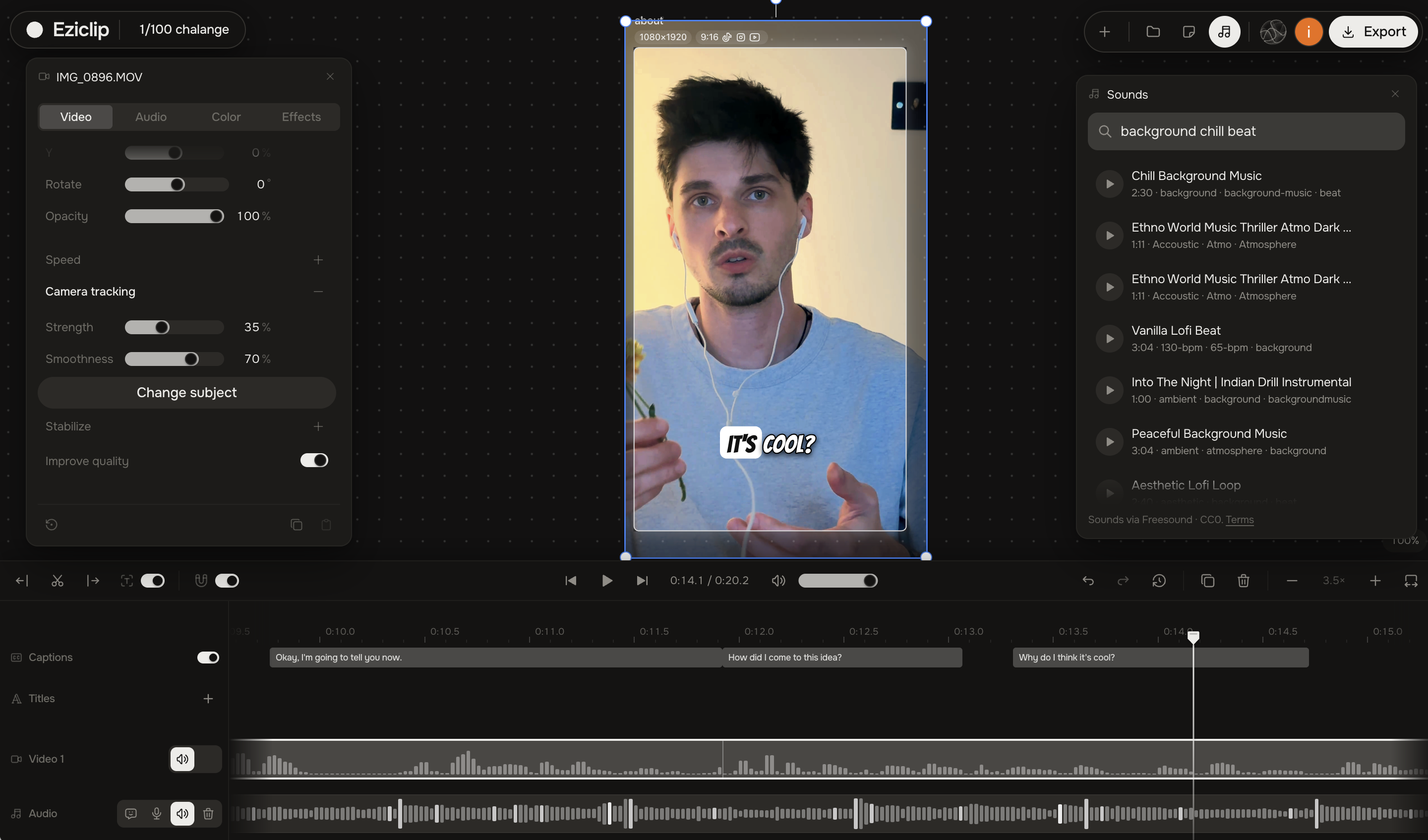
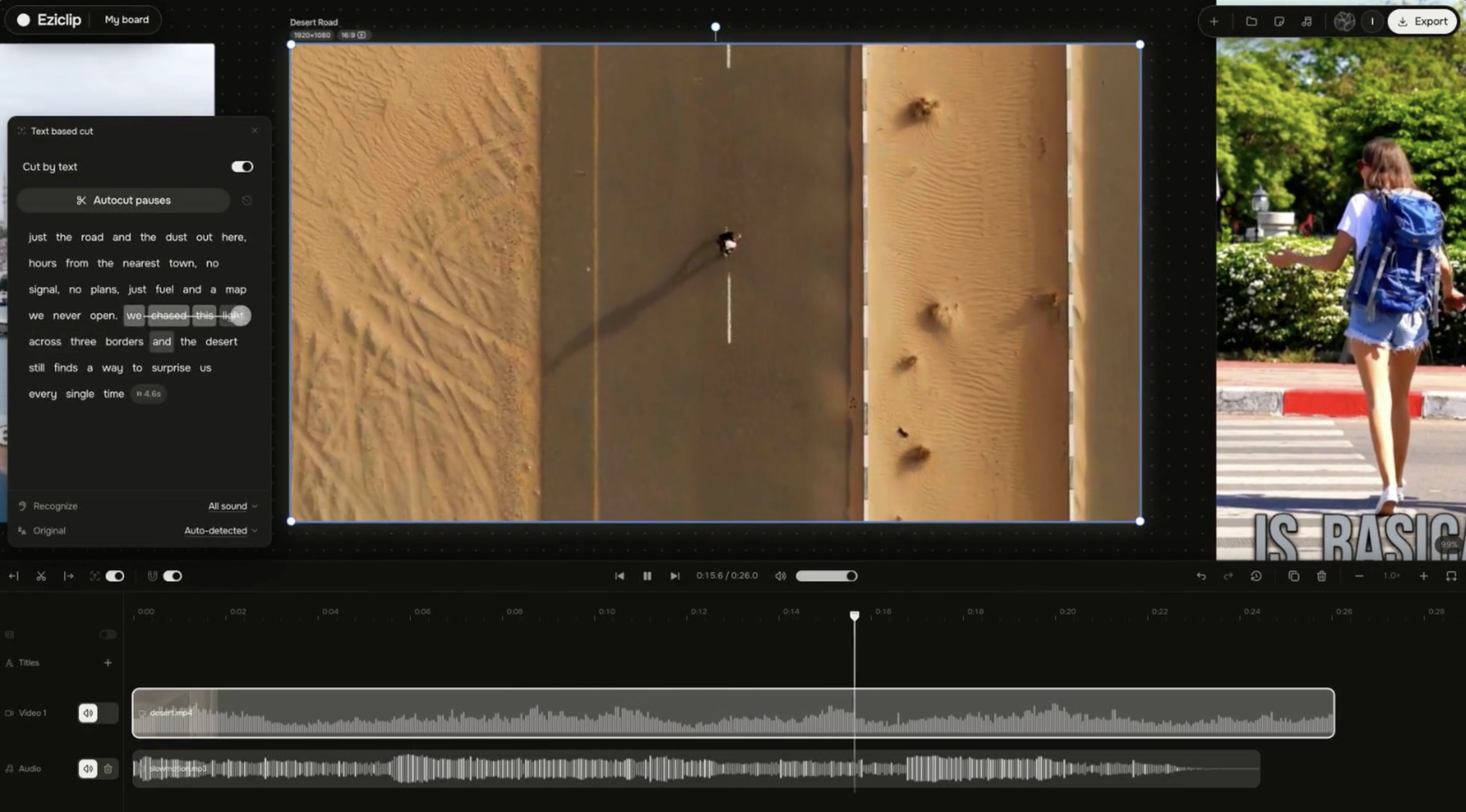
- Cut by text — edit the transcript and the video cuts with it; remove pauses; restore cuts
- Auto captions with word-level timing and burn-in
- Caption styles, presets, and 11 animations (karaoke, pop, fade, typewriter, bounce, and more)
- On-device caption translation (9 languages)
- Edit caption segments; export .srt / .vtt
- Full color grade: brightness, contrast, saturation, vibrance, exposure, hue, temperature, tint, highlights, shadows, fade
- AI auto color
- Log-to-color with camera profiles (DJI, Sony, Panasonic, Canon, Apple, Nikon, Fuji, GoPro, Blackmagic, HDR, and more)
- Color wheels (lift / gamma / gain) with zone controls
- Skin secondary grading and skin retouch
- Background secondary grading (person matte)
- Mist / dehaze, diffusion, and softness
- Film stocks, film grain, and vignette shapes
- Blur, background blur (portrait bokeh), depth of field, and quality improve
- Camera moves: handheld, shake, push in, pull back, pan
- Camera tracking / lock-on for face, body, or object
- Video stabilization
- Speed changes and slow motion, with presets and smooth optical slow-mo
- Clean audio with presets (Natural, Podcast, Vocal, Voiceover, Instrument, Music) and live preview
- AI voiceover — natural English plus readers in 31 languages
- Record from your microphone onto an audio track
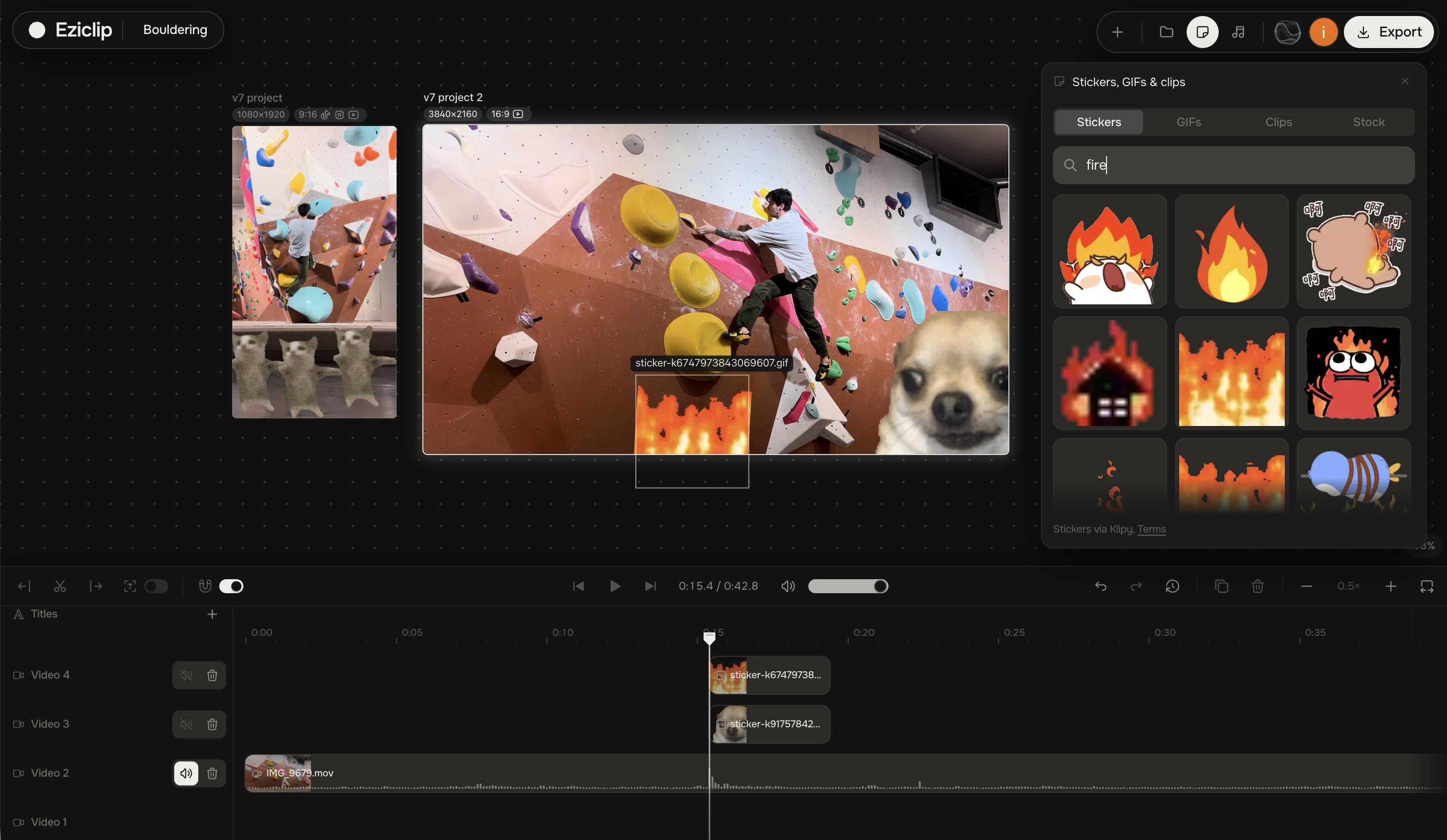
- Stickers, GIFs, stock clips, stock video, music, and sound effects
- Crop and animated crop
- Undo / redo and board version restore
- Export MP4 in the browser; choose quality and frame rate
- Export audio (MP3 / M4A), subtitles, or a multi-format zip for social platforms
- Preview and export use the same renderer — what you see is what you get
- Everything runs on your device; your video never trains AI
Your AI agent
- Connect your own AI through MCP (hosted link or local)
- Works with Claude, ChatGPT, Gemini, Cursor, and other MCP clients
- Dozens of editing tools your agent can call — cut, caption, color, stock, beats, export, and more
- Your agent can inspect the project, see frames, listen to audio, and search stock
- Beat-aware editing: snap, arrange, and split on music beats
- Undo, redo, checkpoints, and stop anytime — you stay in control
Quick tools
- Auto captions
- Text-based editing
- Podcast editor (cut by transcript)
- Speech to text
- Sound enhancer
- Enhance video audio
- Video stabilizer
- Camera tracking
- Speed change
- Resize for social
- Optimize for social
- Video upscaler
- Text to speech
- Compress video, image, audio, GIF, or PDF
- No sign-up required; everything runs in the browser
Desktop app
- Eziclip Studio for Mac and Windows
- Same editor and AI agent connection as the web app
- Sign in once — same account in the app and in the browser
Plans
- Free — full Studio and all quick tools, with watermark; one active board
- Plus ($9/mo or $79/yr) — no watermark, commercial use, unlimited boards, AI board notes
- Sign in with email or Google
- Manage plan, invoices, devices, and AI connections in your account
Use Cases
Short-form creators (TikTok, Reels, Shorts, YouTube)
- Cut a talking video by editing the text — delete words, kill silences, ship a tight clip
- Add captions that look like the platform, then burn them in or export as a subtitle file
- Resize one edit into every social format at once
- Stabilize shaky phone footage before you post
- Clean noisy room audio so the voice is clear
- Hand the whole job to your AI: “cut this, caption it, make vertical, export”
One idea → many formats
- Keep several versions on one board — 16:9, 9:16, 1:1 — and compare them side by side
- Duplicate a sheet for another format without starting over
- Export a zip of social-ready files in one go
You + your own AI
- Connect Claude, ChatGPT, Gemini, Cursor (or any MCP agent) and let it edit with you
- Teach it how you like cuts, captions, and color — then reuse that craft
- Work side by side, or hand off a full pass and take over anytime
- Undo, stop, or restore a checkpoint if the agent goes the wrong way
Podcasts & interviews
- Cut an episode by reading the transcript
- Strip filler words and long pauses
- Enhance voice for a cleaner mix
- Turn speech into text, Word, or subtitle files
Color & camera look
- Fix exposure and white balance with auto color, then fine-tune
- Grade log footage from common cameras
- Add a film look, grain, or vignette
- Lock onto a face or object so the framing follows the action
- Smooth handheld shake
Everyday “just fix this clip”
- Compress a video, image, GIF, audio file, or PDF in the browser
- Speed up or slow down a clip
- Upscale a small video for a bigger screen
- Convert formats without installing software
- Generate a short voiceover from a script
Privacy-minded work
- Edit without uploading your footage to someone else’s cloud
- Keep the file on your device — nothing you make trains AI
- Start free, no sign-up for quick tools; Plus removes the watermark when you need clean exports
Desktop or browser
- Same Studio in the Mac/Windows app or in the browser
- One account for both — open a project wherever you are

Comments


Hello everyone! I’m glad to present Eziclip — an open video editor canvas where you can work solo or plug in the AI you’re already paying for. It instantly gains basic video editing skills, and you can train it on the rest yourself. The tool includes everything a modern content creator needs — text-based auto-cut, auto-captions, text-to-speech voiceovers, and much more. I developed this tool for myself so I could conveniently make videos for different platforms simultaneously without constantly switching between projects, keep references right next to the video I'm editing, and train the AI specifically on how I need things done so it can jump into the studio and do everything on autopilot. I hope this tool will be just as helpful to you. Additionally, every single feature on the platform is available as a standalone tool that you can use completely free, without registration.
Premium Products



















Sponsors
Buy

Makers
Makers
Comments
Hello everyone! I’m glad to present Eziclip — an open video editor canvas where you can work solo or plug in the AI you’re already paying for. It instantly gains basic video editing skills, and you can train it on the rest yourself. The tool includes everything a modern content creator needs — text-based auto-cut, auto-captions, text-to-speech voiceovers, and much more. I developed this tool for myself so I could conveniently make videos for different platforms simultaneously without constantly switching between projects, keep references right next to the video I'm editing, and train the AI specifically on how I need things done so it can jump into the studio and do everything on autopilot. I hope this tool will be just as helpful to you. Additionally, every single feature on the platform is available as a standalone tool that you can use completely free, without registration.
Premium Products
New to Fazier?

Find your next favorite product or submit your own. Made by @FalakDigital.
Copyright ©2025. All Rights Reserved