
ExcelCompareColumns
ExcelCompareColumns
Compare Excel files and columns privately in your browser
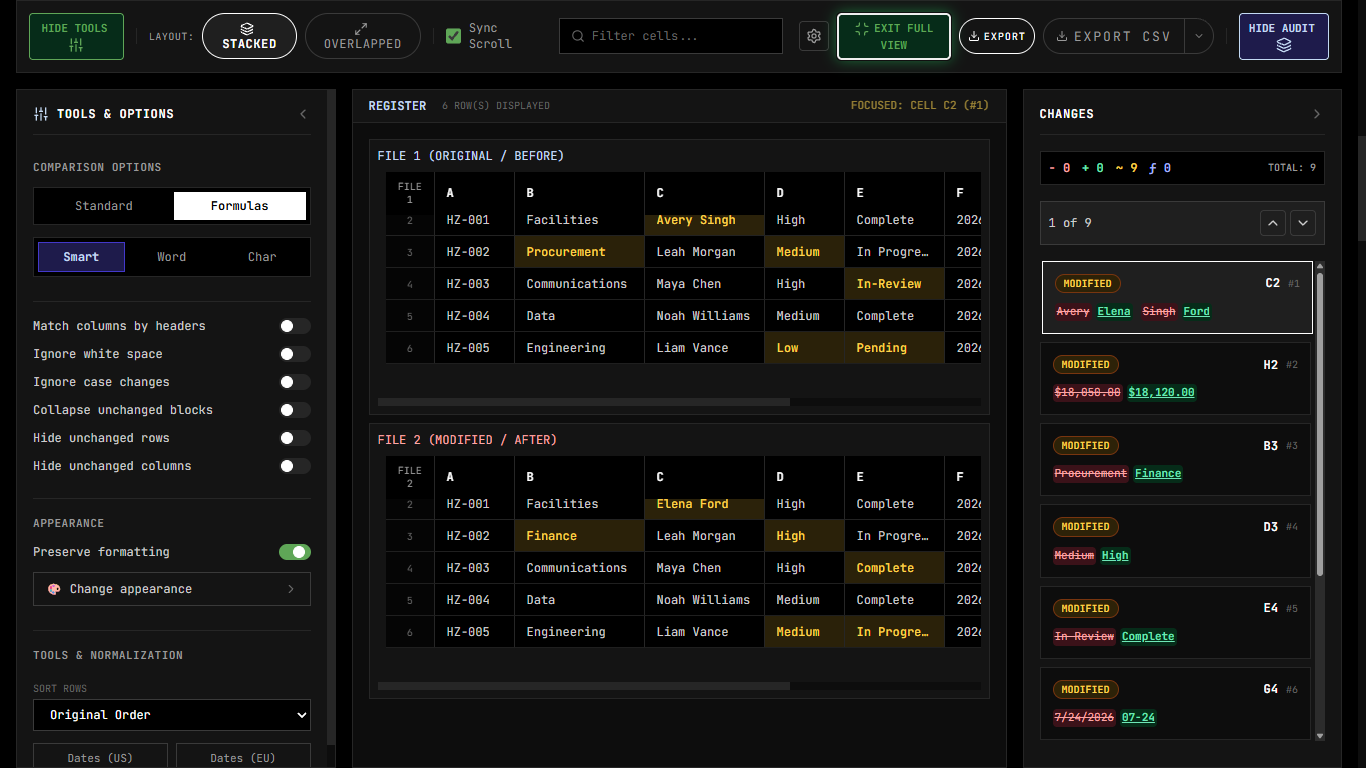
ExcelCompareColumns is a browser-based spreadsheet comparison tool that diffs Excel files cell-by-cell with formula awareness, fuzzy row alignment, and synchronized scrolling. It offers four modes—visual file diff, column set comparison, key-value reconciliation, and batch processing—all processed locally for complete privacy. Users can export audit-ready CSV reports without signing up or installing software.
Features
- Visual file diff: Compares two Excel files cell by cell, with side-by-side, overlay and unified views. Changes are color-coded as modified, added or deleted.
- Formula awareness: Compares the underlying formulas as well as displayed values, so a change like =SUM(A1:A10) to =SUM(A1:A9) is flagged.
- Column set comparison: Compares two columns and shows the matches, the left-only values and the right-only values. Each result can be exported as CSV.
- ID-based reconciliation: Matches records by a key column (SKU, employee ID, account code) regardless of row order. You can filter results by match, mismatch, left only or right only.
- Smart row matching: Fuzzy matching aligns reordered or inserted rows, which avoids false positives.
- Batch processing: Queues multiple file pairs and produces one consolidated summary report.
- Audit tools: Includes synchronized scrolling, cell annotations, and exports to PDF, HTML, CSV and Excel.
- Privacy: Everything runs in the browser, so files are never uploaded. There is no sign-up or installation, and the tool can work offline once the page has loaded.
- Languages: Available in 9 languages.
Use Cases
- Finance: Reconcile ledgers, catch variances during monthly close, and review changes between workbook versions.
- Operations and supply chain: Check purchase orders against received goods, and find SKUs added to or removed from price sheets.
- HR: Compare employee ID lists across systems to find headcount discrepancies.
- Marketing and sales: Check a new subscriber or lead list against a master CRM export.
- IT and audit: Validate change logs and timestamps by comparing date columns, and produce annotated audit reports.
- Anyone handling confidential data: Compare payroll, supplier pricing or other sensitive files without sending them to a third party.

Comments

Premium Products












































Find your next favorite product or submit your own. Made by @FalakDigital.
Copyright ©2026. All Rights Reserved