EasySwitch
One keyboard, one mouse, all your computers.
EasySwitch turns your Mac, Windows, and Linux computers into one seamless workspace.
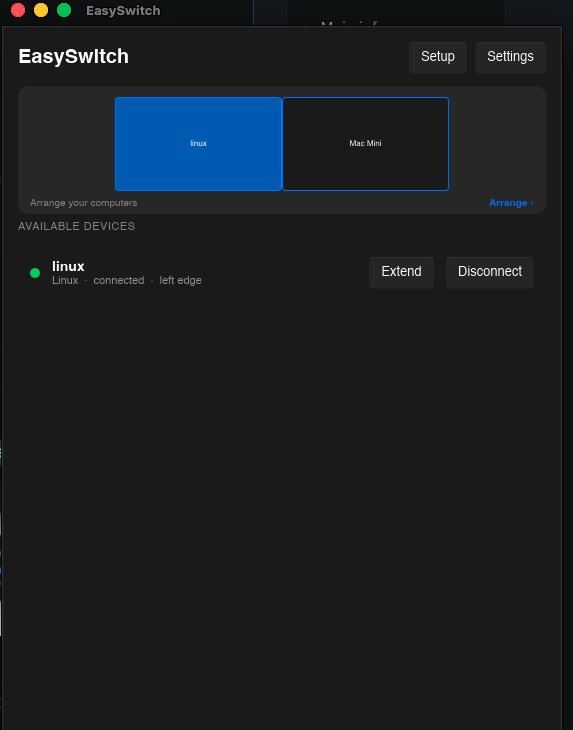
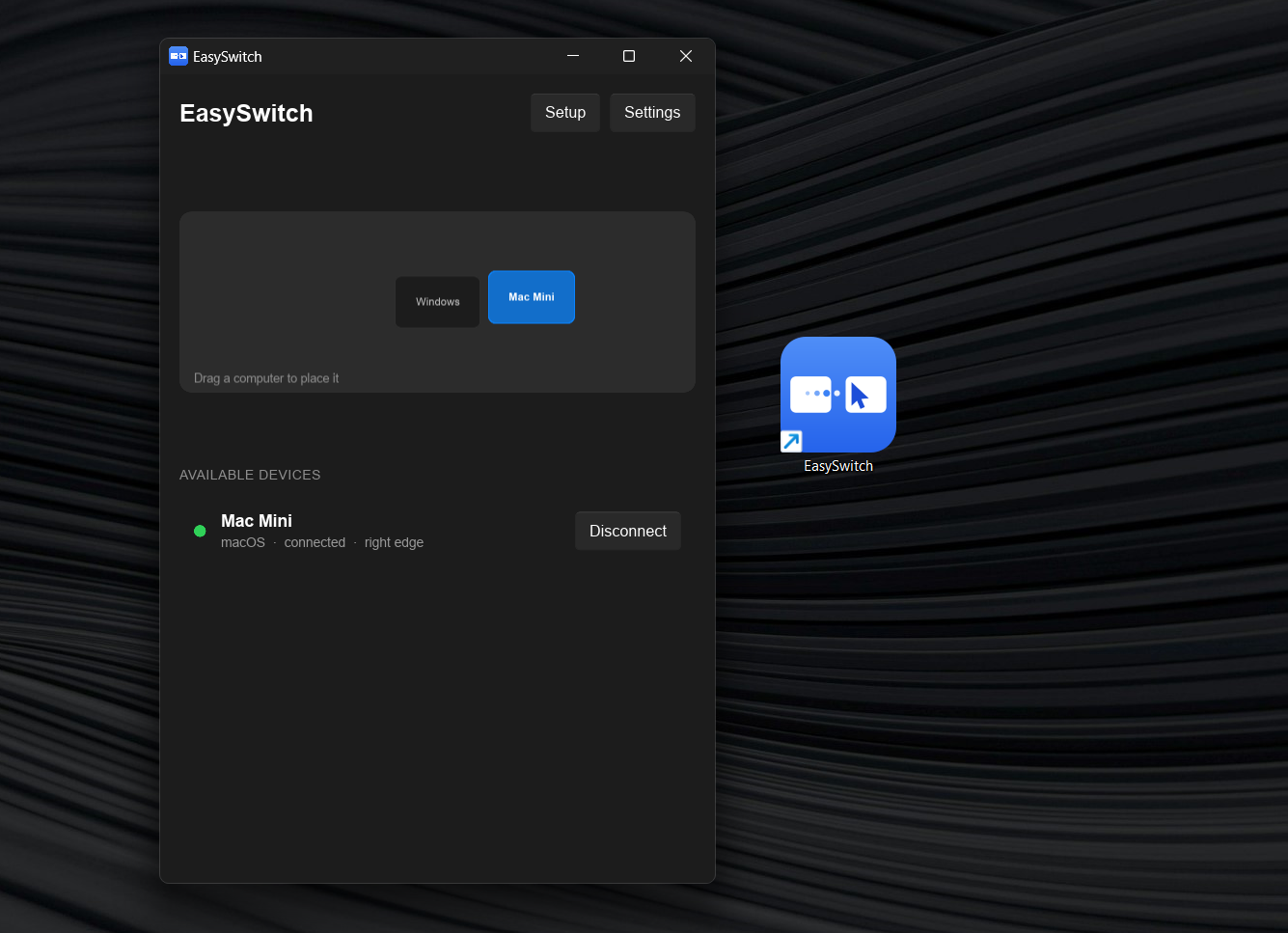
Move your cursor across screen edges just like using multiple monitors, while your keyboard, clipboard, and files follow you between machines. You can also use keyboard shortcuts to switch instantly.
Now with Virtual Display, EasySwitch can also turn another computer into an extended display — giving you more screen space without buying another monitor.
Everything works over your local network with end-to-end encryption. No cables, no hardware KVM, no screen streaming, and no subscription required for the core experience.
Perfect for developers, creators, power users, and anyone who works across multiple computers.
Features
- Seamless mouse & keyboard sharing — Move between computers by simply crossing the edge of the screen.
- Cross-platform — Works across macOS, Windows, and Linux.
- Virtual Display — Use another computer as an extended display for additional screen space.
- Shared clipboard — Copy text, images, and files on one computer and paste them on another.
- Drag & drop file transfer — Drag files across computers without cables or cloud storage.
- Keyboard shortcuts — Jump between connected computers instantly.
- 3+ computer support — Build a chain of multiple machines and move between them naturally.
- Automatic discovery — Devices on the same network can find each other without manually entering IP addresses.
- End-to-end encryption — Data moving between your devices is encrypted.
- No screen streaming — EasySwitch transfers input, clipboard data, and files instead of streaming your entire screen.
- Works offline — Your local network is enough; an internet connection isn't required for normal use.
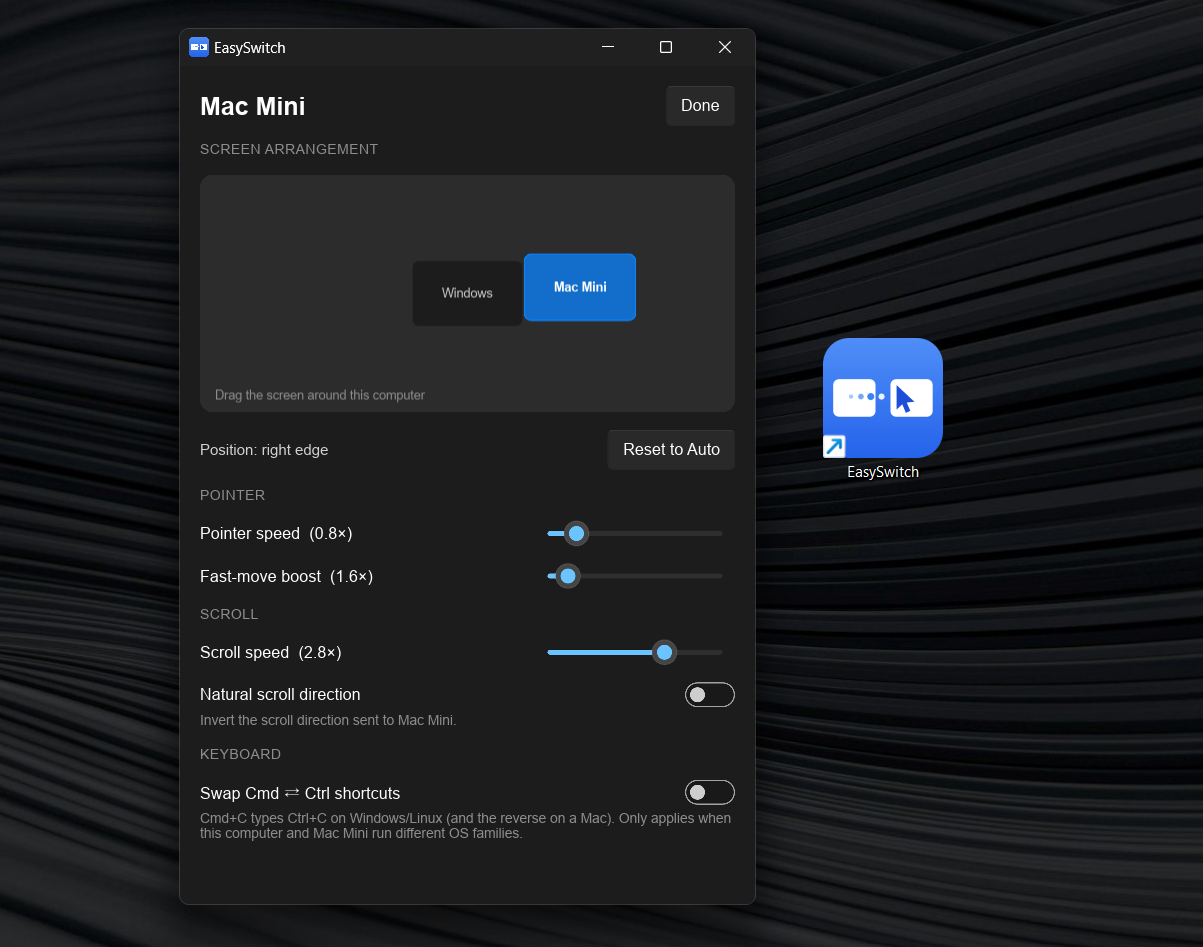
- Cross-platform shortcuts — Automatically handles Cmd/Ctrl differences between macOS, Windows, and Linux.
Use Cases
Multi-computer developers
Use your Mac for development, Windows for testing, and Linux for servers or development environments — while controlling everything from one keyboard and mouse.
Developers with multiple machines
Keep several computers active on the same desk without filling your workspace with keyboards, mice, and KVM hardware.
Extended-screen setups
Turn another computer into a virtual display when you need extra screen space but don't want to buy another monitor.
Designers & creators
Keep your main workstation and secondary machine side by side and move files, clipboard content, and input between them instantly.
Mac + Windows workflows
Work across macOS and Windows without constantly reaching for another keyboard or mouse.
Laptop + desktop setups
Use your laptop alongside your desktop as if both were part of the same workstation.
Remote or hybrid workers
Keep multiple work machines organized on one desk and switch between them without constantly reconnecting peripherals.
Power users
Build a multi-machine workspace where several computers feel like one continuous desktop.

Comments


Been juggling a Mac and a Windows PC on the same desk for years and always hated the copy-paste-via-USB-drive dance, so I gave EasySwitch a shot. The keyboard/mouse handoff between screens is genuinely seamless and the shared clipboard alone saved me more time than I expected in the first day. Tried the Pro virtual display extension too and honestly didn't expect 60fps to feel that smooth over LAN, worth the one-time $49 instead of yet another subscription.



The seamless cursor, keyboard, clipboard, and file handoff across Mac, Windows, and Linux is a compelling workflow improvement. The no-subscription core experience and encrypted local-network approach should resonate with power users; a short comparison showing setup time versus a traditional KVM would make the value even clearer.

What happens when one machine goes to sleep, locks, or drops off the WLAN while the cursor is on it — does input fall back to the local machine automatically, or can you end up "stranded" with a keyboard that controls nothing? A hard shortcut that always yanks control back to the physical machine would make me a lot more comfortable putting this in a daily workflow.
What happens when one machine goes to sleep, locks, or drops off the WLAN while the cursor is on it — does input fall back to the local machine automatically, or can you end up "stranded" with a keyboard that controls nothing? A hard shortcut that always yanks control back to the physical machine would make me a lot more comfortable putting this in a daily workflow.

Empowering worldwide comic lovers with instant, unrestricted access to thousands of captivating webtoon titles and classic Japanese manga archives completely hassle-free. https://blacktoon.pages.dev/



Question from the game dev side: how does it behave when an app captures the mouse? Browser games and 3D viewports use pointer lock and read raw relative movement instead of the cursor position, so the screen edge never gets "hit". Does EasySwitch pass that relative input through, or does the hotkey become the only way out of a locked window? Would be really useful for testing a WebGL build on a Mac and a Windows PC at the same time.





I built EasySwitch because I got tired of treating my own computers like separate worlds. As a developer, I often work across multiple machines — Mac, Windows, and Linux. Switching keyboards, mice, files, and clipboard between them felt unnecessarily painful. Existing solutions either required extra hardware, were focused on remote access, or didn’t give me the seamless experience I wanted. So I started building EasySwitch. The idea is simple: make multiple computers feel like one workspace. Move your cursor across screens, share your keyboard and mouse, copy/paste between devices, transfer files, and now even use another computer as a virtual display. It started as a problem I wanted to solve for myself. Now I’m opening it up to everyone. If you work with multiple computers, I’d genuinely love to hear how you currently handle it — and what still feels annoying. Try EasySwitch and tell me what you think.

EasySwitch looks genuinely useful for anyone juggling several computers throughout the day. I regularly move between a laptop and desktop, and copying files or switching keyboards can interrupt my concentration more than expected. The shared clipboard and cursor movement would make that setup feel much closer to using one large workstation. I’ve dealt with Pavilion customer service https://www.pissedconsumer.com/company/pavilion/customer-service.html while sorting out a computer issue before, which reminded me how much I prefer software solutions that avoid adding extra hardware. Virtual Display is a clever bonus too, especially when traveling or working somewhere without room for a second monitor. The local-network approach also sounds convenient.



For a mixed work/personal setup, can clipboard sharing and file transfer be disabled per device while keeping keyboard and mouse switching? Also, does a newly discovered computer require explicit pairing approval? Separate controls for these features would make the local-network workflow easier to evaluate.



This solves a real problem for anyone splitting work across a Mac and a Windows box daily. The shared clipboard and drag-and-drop file transfer alone would save a lot of AirDrop-to-nowhere frustration. Curious how the cursor handles mixed-DPI setups when crossing from a high-res laptop screen to a lower-res external monitor - does pointer speed adjust automatically?

This is a brilliantly conceived software KVM that finally bridges the gap between input-sharing and display-extension tools. Its core positioning — a LAN-based, cloud-independent, privacy-focused workspace unifier — speaks directly to the frustrations of developers, creators, and power users. I use two laptop and now i use the type-c exend to switch between them
Software KVMs really live or die on two things: cross-OS edge cases and input latency. Does EasySwitch handle a mixed Mac/Windows/Linux setup with modifier remapping (so Cmd on the Mac becomes Ctrl on Windows), and when I drag a file across machines does it actually transfer the file or only the clipboard text? Also curious whether it's LAN-only or can bridge two machines on different networks, and whether that link is end-to-end encrypted.


cool! Now with Virtual Display, EasySwitch can also turn another computer into an extended display — giving you more screen space without buying another monitor. Everything works over your local network with end-to-end encryption. No cables, no hardware KVM, no screen streaming, and no subscription required for the core experience.

The local-network + E2E encryption stance is the right call — the usual failure mode for this category is traffic silently relaying through someone's server. Two things decide whether I'd drop my hardware KVM: (1) mixed-DPI edge transitions, Retina to 1080p cursor scaling jumps are what break the illusion for most people, and (2) discovery on locked-down VLANs where mDNS/UDP broadcast gets blocked — a manual IP fallback saves you there. Curious how Virtual Display latency holds up over Wi-Fi versus wired.
Premium Products










































Sponsors
Buy



Makers
Makers
Comments
Been juggling a Mac and a Windows PC on the same desk for years and always hated the copy-paste-via-USB-drive dance, so I gave EasySwitch a shot. The keyboard/mouse handoff between screens is genuinely seamless and the shared clipboard alone saved me more time than I expected in the first day. Tried the Pro virtual display extension too and honestly didn't expect 60fps to feel that smooth over LAN, worth the one-time $49 instead of yet another subscription.
The seamless cursor, keyboard, clipboard, and file handoff across Mac, Windows, and Linux is a compelling workflow improvement. The no-subscription core experience and encrypted local-network approach should resonate with power users; a short comparison showing setup time versus a traditional KVM would make the value even clearer.
What happens when one machine goes to sleep, locks, or drops off the WLAN while the cursor is on it — does input fall back to the local machine automatically, or can you end up "stranded" with a keyboard that controls nothing? A hard shortcut that always yanks control back to the physical machine would make me a lot more comfortable putting this in a daily workflow.
What happens when one machine goes to sleep, locks, or drops off the WLAN while the cursor is on it — does input fall back to the local machine automatically, or can you end up "stranded" with a keyboard that controls nothing? A hard shortcut that always yanks control back to the physical machine would make me a lot more comfortable putting this in a daily workflow.
Empowering worldwide comic lovers with instant, unrestricted access to thousands of captivating webtoon titles and classic Japanese manga archives completely hassle-free. https://blacktoon.pages.dev/
Question from the game dev side: how does it behave when an app captures the mouse? Browser games and 3D viewports use pointer lock and read raw relative movement instead of the cursor position, so the screen edge never gets "hit". Does EasySwitch pass that relative input through, or does the hotkey become the only way out of a locked window? Would be really useful for testing a WebGL build on a Mac and a Windows PC at the same time.
I built EasySwitch because I got tired of treating my own computers like separate worlds. As a developer, I often work across multiple machines — Mac, Windows, and Linux. Switching keyboards, mice, files, and clipboard between them felt unnecessarily painful. Existing solutions either required extra hardware, were focused on remote access, or didn’t give me the seamless experience I wanted. So I started building EasySwitch. The idea is simple: make multiple computers feel like one workspace. Move your cursor across screens, share your keyboard and mouse, copy/paste between devices, transfer files, and now even use another computer as a virtual display. It started as a problem I wanted to solve for myself. Now I’m opening it up to everyone. If you work with multiple computers, I’d genuinely love to hear how you currently handle it — and what still feels annoying. Try EasySwitch and tell me what you think.
EasySwitch looks genuinely useful for anyone juggling several computers throughout the day. I regularly move between a laptop and desktop, and copying files or switching keyboards can interrupt my concentration more than expected. The shared clipboard and cursor movement would make that setup feel much closer to using one large workstation. I’ve dealt with Pavilion customer service https://www.pissedconsumer.com/company/pavilion/customer-service.html while sorting out a computer issue before, which reminded me how much I prefer software solutions that avoid adding extra hardware. Virtual Display is a clever bonus too, especially when traveling or working somewhere without room for a second monitor. The local-network approach also sounds convenient.
For a mixed work/personal setup, can clipboard sharing and file transfer be disabled per device while keeping keyboard and mouse switching? Also, does a newly discovered computer require explicit pairing approval? Separate controls for these features would make the local-network workflow easier to evaluate.
This solves a real problem for anyone splitting work across a Mac and a Windows box daily. The shared clipboard and drag-and-drop file transfer alone would save a lot of AirDrop-to-nowhere frustration. Curious how the cursor handles mixed-DPI setups when crossing from a high-res laptop screen to a lower-res external monitor - does pointer speed adjust automatically?
This is a brilliantly conceived software KVM that finally bridges the gap between input-sharing and display-extension tools. Its core positioning — a LAN-based, cloud-independent, privacy-focused workspace unifier — speaks directly to the frustrations of developers, creators, and power users. I use two laptop and now i use the type-c exend to switch between them
Software KVMs really live or die on two things: cross-OS edge cases and input latency. Does EasySwitch handle a mixed Mac/Windows/Linux setup with modifier remapping (so Cmd on the Mac becomes Ctrl on Windows), and when I drag a file across machines does it actually transfer the file or only the clipboard text? Also curious whether it's LAN-only or can bridge two machines on different networks, and whether that link is end-to-end encrypted.
cool! Now with Virtual Display, EasySwitch can also turn another computer into an extended display — giving you more screen space without buying another monitor. Everything works over your local network with end-to-end encryption. No cables, no hardware KVM, no screen streaming, and no subscription required for the core experience.
The local-network + E2E encryption stance is the right call — the usual failure mode for this category is traffic silently relaying through someone's server. Two things decide whether I'd drop my hardware KVM: (1) mixed-DPI edge transitions, Retina to 1080p cursor scaling jumps are what break the illusion for most people, and (2) discovery on locked-down VLANs where mDNS/UDP broadcast gets blocked — a manual IP fallback saves you there. Curious how Virtual Display latency holds up over Wi-Fi versus wired.
Premium Products
New to Fazier?

Find your next favorite product or submit your own. Made by @FalakDigital.
Copyright ©2026. All Rights Reserved