
Dragble
Drag & drop email template builder, your SaaS ships in days
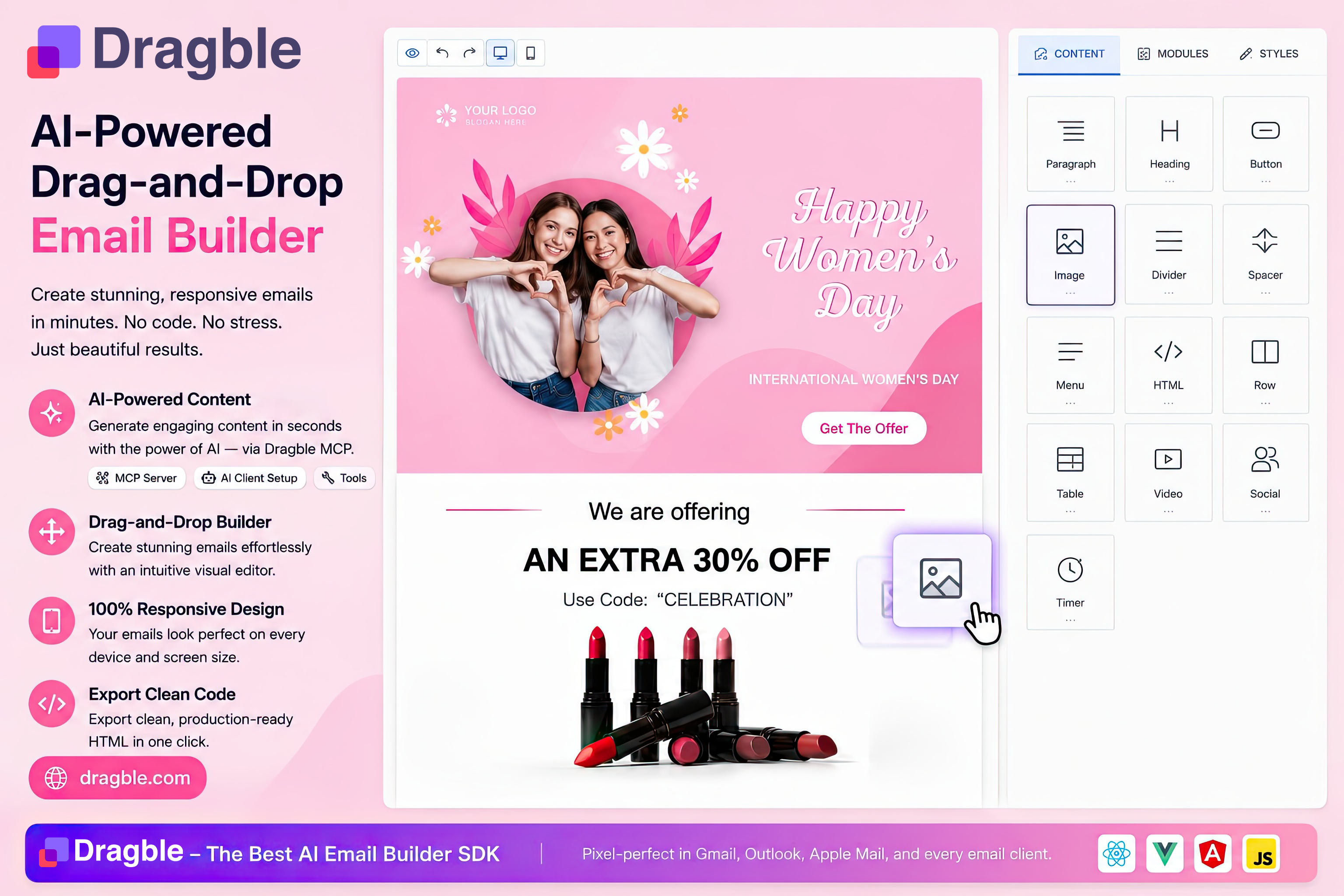
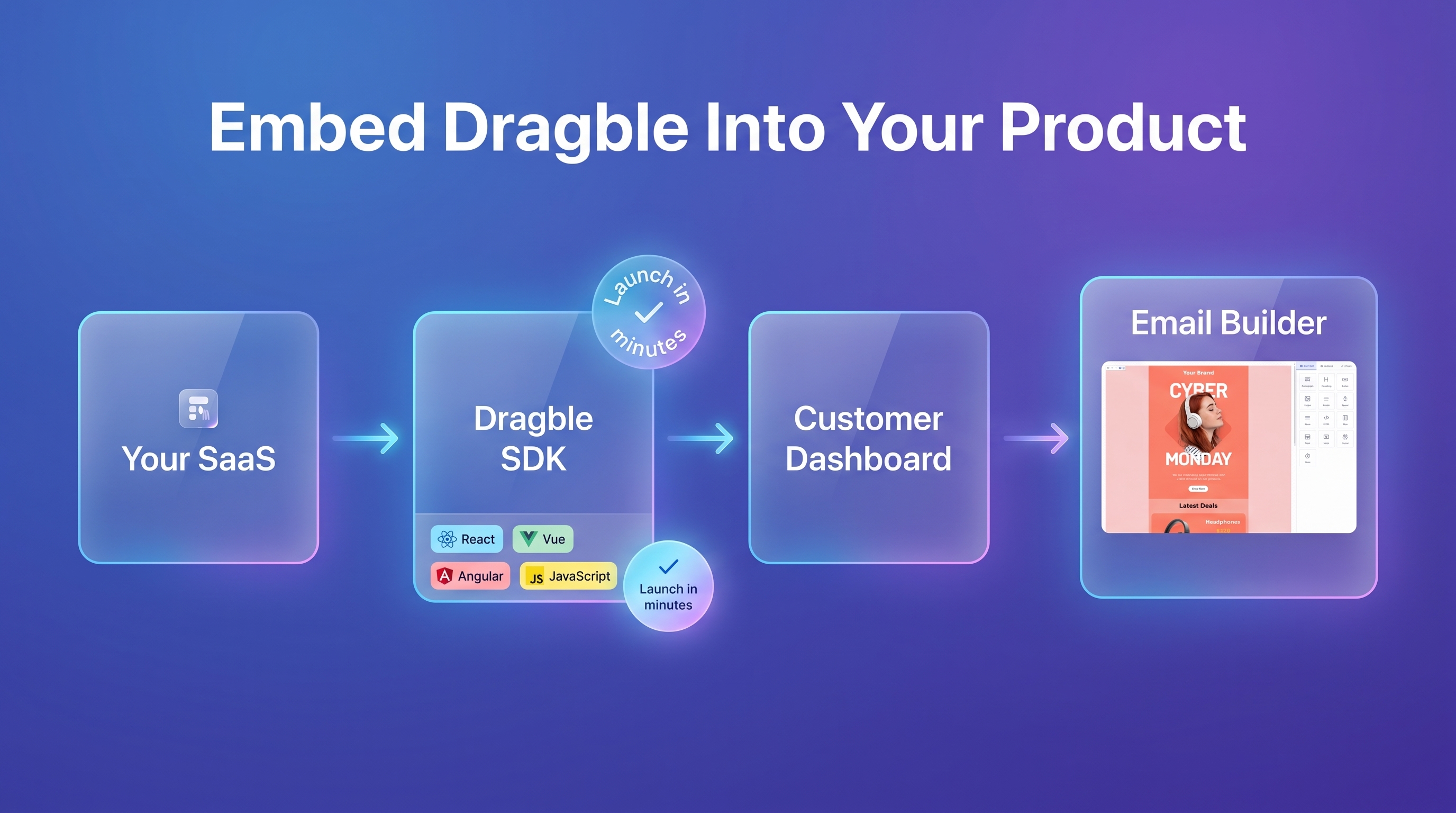
Dragble is an embeddable drag-and-drop email template builder with HTML export and a white-label SDK for SaaS teams that want AI-ready responsive email editing. Connect AI agents through an MCP Server to create, update, and refine email templates directly inside the live visual editor.
Features
Built for Modern SaaS
🤖 AI Agents & MCP
Let AI create, edit, and optimize email designs directly inside the editor.
🎨 White-Label Embed
Fully customize the editor to match your brand and product experience.
⚡ Ship in Days, Not Months
Integrate a production-ready email builder without building one from scratch.
Key Features
✓ Drag-and-drop HTML email editor
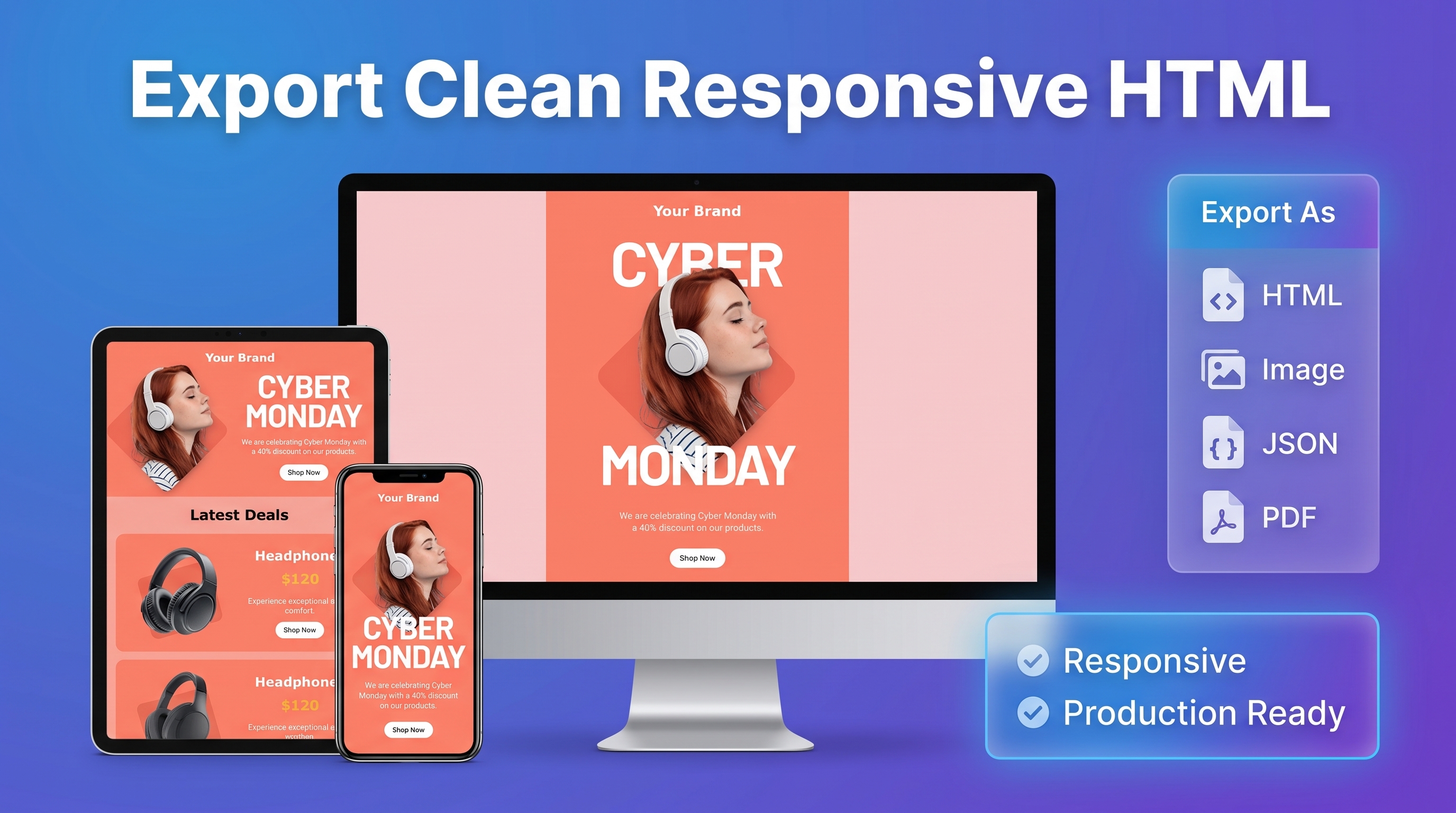
✓ Responsive templates and live preview
✓ Merge tags and reusable content modules
✓ Clean HTML and JSON export
✓ AI-powered editing with MCP
✓ Fully embeddable and white-label
Use Cases
✓ Drag-and-drop HTML email editor
✓ Responsive templates and live preview
✓ Merge tags and reusable content modules
✓ Clean HTML and JSON export
✓ AI-powered editing with MCP
✓ Fully embeddable and white-label

Comments



Drag-and-drop interfaces are deceptively hard to get right - most implementations feel clunky or heavy. What stands out about Dragble is that it's clearly built by someone who understands how people actually interact with interfaces. The responsiveness and flow are polished in a way that makes tedious tasks feel less painful. Small UX wins like that separate products that people use once from products people keep coming back to.
What decides whether an embeddable email builder is worth integrating is what the exported HTML survives. Outlook on Windows still renders with the Word engine: no flexbox, no grid, unreliable max-width, VML needed for background images and bulletproof buttons. Does the export target that, and does the live preview reflect it, or is it a browser preview? More specific to the MCP angle: when an agent edits a template through the MCP server, is the output validated against those constraints before it is saved? An agent will happily emit a flex row that looks perfect in the visual editor and collapses in Outlook, and the person who finds out is your customer's customer. White-label plus HTML export is the right shape for this. The moat is the boring compatibility work, not the drag and drop.
Drag-and-drop interfaces are deceptively hard to get right - most implementations feel clunky or heavy. What stands out about Dragble is that it's clearly built by someone who understands how people actually interact with interfaces. The responsiveness and flow are polished in a way that makes tedious tasks feel less painful. Small UX wins like that separate products that people use once from products people keep coming back to.


Embeddable + white-label with clean HTML export is exactly the combo most email builders miss; usually you get one or the other. The MCP server for letting an agent edit templates inside the visual editor is a nice touch. Two questions: how do you handle Outlook-specific quirks in the exported HTML (VML buttons, table fallbacks), and does the JSON export round-trip back into the editor without loss?
The MCP-agent-in-editor angle is the interesting bet here — most "AI + email builder" tools bolt a chat window onto the side and hope the generated HTML survives. Letting the agent edit inside the live visual editor means constraints (merge tags, block structure, responsive rules) get enforced at the point of editing instead of after the fact. One thing I'd want to know as a potential embedder: when the AI redesigns a block, does it stay inside the same responsive/box-model constraints your manual drag-and-drop uses, or can it produce markup a human editing by hand never would? That's usually where "AI edits templates" tools end up needing a review step before publish.

The Outlook/VML point above is the real answer to "is this production-ready" for any embeddable editor, and it applies one level up too: once an AI agent can edit structure directly instead of just generating markup, the interesting question is whether invalid output gets caught at the point of the edit or only on save. Curious which way you went for the MCP path here.

I'm excited to introduce Dragble. Over the last few years, I've tried nearly every email builder on the market. While they make designing emails easier, I kept running into the same problem. Creating great emails still takes too much time. You jump between AI tools, design software, and email editors. AI can generate content or HTML, but it doesn't understand the actual design you're working on. Every update turns into a cycle of copy-pasting, rebuilding layouts, and making the same manual edits over and over again. I kept asking myself: Why can't AI work directly inside the email editor instead of outside it? That question became the foundation of Dragble. Dragble is an AI-powered email template builder where AI isn't just an assistant—it becomes part of the design workflow. Using Model Context Protocol (MCP), AI agents connect directly to the live visual editor. Instead of generating disconnected HTML, they understand your email's structure and can create, edit, and refine templates in real time. You can create a complete newsletter from a prompt? Need to redesign a hero section? Just ask AI and it will redesign it as you want. Want AI to rewrite copy, replace images, update layouts, or improve spacing? It happens directly inside the editor without switching tools or rebuilding your design. But we didn't stop there. We also wanted developers and SaaS companies to avoid spending months building their own email editor. That's why Dragble is fully embeddable with a white-label SDK. You can integrate it into your product in minutes, customize the experience, and offer your users a professional email builder under your own brand. What makes Dragble different? ✨ AI creates and edits email templates directly inside the visual editor ⚡ Real-time AI collaboration powered by MCP 🎨 Drag-and-drop email design with no coding required 📱 Responsive, production-ready HTML export 🧩 White-label SDK for embedding into SaaS products ♻️ Reusable templates, content blocks, and brand assets Who is Dragble for? 📧 Email marketers creating newsletters and campaigns 🚀 SaaS companies embedding email creation into their products 💻 Developers who need clean, responsive HTML 🎯 Agencies managing multiple clients and brands 🤖 Teams building AI-powered workflows This is just the beginning of what we want to build. Our vision is to make AI a true design partner—not another tool you have to switch to. I'd love to hear your thoughts, ideas, and feedback. I'll be here throughout the day answering questions and discussing the future of Dragble.
Premium Products






















































Sponsors
Buy

Makers
Makers
Comments
Drag-and-drop interfaces are deceptively hard to get right - most implementations feel clunky or heavy. What stands out about Dragble is that it's clearly built by someone who understands how people actually interact with interfaces. The responsiveness and flow are polished in a way that makes tedious tasks feel less painful. Small UX wins like that separate products that people use once from products people keep coming back to.
What decides whether an embeddable email builder is worth integrating is what the exported HTML survives. Outlook on Windows still renders with the Word engine: no flexbox, no grid, unreliable max-width, VML needed for background images and bulletproof buttons. Does the export target that, and does the live preview reflect it, or is it a browser preview? More specific to the MCP angle: when an agent edits a template through the MCP server, is the output validated against those constraints before it is saved? An agent will happily emit a flex row that looks perfect in the visual editor and collapses in Outlook, and the person who finds out is your customer's customer. White-label plus HTML export is the right shape for this. The moat is the boring compatibility work, not the drag and drop.
Drag-and-drop interfaces are deceptively hard to get right - most implementations feel clunky or heavy. What stands out about Dragble is that it's clearly built by someone who understands how people actually interact with interfaces. The responsiveness and flow are polished in a way that makes tedious tasks feel less painful. Small UX wins like that separate products that people use once from products people keep coming back to.
Embeddable + white-label with clean HTML export is exactly the combo most email builders miss; usually you get one or the other. The MCP server for letting an agent edit templates inside the visual editor is a nice touch. Two questions: how do you handle Outlook-specific quirks in the exported HTML (VML buttons, table fallbacks), and does the JSON export round-trip back into the editor without loss?
The MCP-agent-in-editor angle is the interesting bet here — most "AI + email builder" tools bolt a chat window onto the side and hope the generated HTML survives. Letting the agent edit inside the live visual editor means constraints (merge tags, block structure, responsive rules) get enforced at the point of editing instead of after the fact. One thing I'd want to know as a potential embedder: when the AI redesigns a block, does it stay inside the same responsive/box-model constraints your manual drag-and-drop uses, or can it produce markup a human editing by hand never would? That's usually where "AI edits templates" tools end up needing a review step before publish.
The Outlook/VML point above is the real answer to "is this production-ready" for any embeddable editor, and it applies one level up too: once an AI agent can edit structure directly instead of just generating markup, the interesting question is whether invalid output gets caught at the point of the edit or only on save. Curious which way you went for the MCP path here.
I'm excited to introduce Dragble. Over the last few years, I've tried nearly every email builder on the market. While they make designing emails easier, I kept running into the same problem. Creating great emails still takes too much time. You jump between AI tools, design software, and email editors. AI can generate content or HTML, but it doesn't understand the actual design you're working on. Every update turns into a cycle of copy-pasting, rebuilding layouts, and making the same manual edits over and over again. I kept asking myself: Why can't AI work directly inside the email editor instead of outside it? That question became the foundation of Dragble. Dragble is an AI-powered email template builder where AI isn't just an assistant—it becomes part of the design workflow. Using Model Context Protocol (MCP), AI agents connect directly to the live visual editor. Instead of generating disconnected HTML, they understand your email's structure and can create, edit, and refine templates in real time. You can create a complete newsletter from a prompt? Need to redesign a hero section? Just ask AI and it will redesign it as you want. Want AI to rewrite copy, replace images, update layouts, or improve spacing? It happens directly inside the editor without switching tools or rebuilding your design. But we didn't stop there. We also wanted developers and SaaS companies to avoid spending months building their own email editor. That's why Dragble is fully embeddable with a white-label SDK. You can integrate it into your product in minutes, customize the experience, and offer your users a professional email builder under your own brand. What makes Dragble different? ✨ AI creates and edits email templates directly inside the visual editor ⚡ Real-time AI collaboration powered by MCP 🎨 Drag-and-drop email design with no coding required 📱 Responsive, production-ready HTML export 🧩 White-label SDK for embedding into SaaS products ♻️ Reusable templates, content blocks, and brand assets Who is Dragble for? 📧 Email marketers creating newsletters and campaigns 🚀 SaaS companies embedding email creation into their products 💻 Developers who need clean, responsive HTML 🎯 Agencies managing multiple clients and brands 🤖 Teams building AI-powered workflows This is just the beginning of what we want to build. Our vision is to make AI a true design partner—not another tool you have to switch to. I'd love to hear your thoughts, ideas, and feedback. I'll be here throughout the day answering questions and discussing the future of Dragble.
Premium Products
New to Fazier?

Find your next favorite product or submit your own. Made by @FalakDigital.
Copyright ©2026. All Rights Reserved