DocuVerified
Create, issue and verify trusted company documents
DocuVerified is a secure document infrastructure platform for businesses to create, manage, approve, sign, issue and verify official company documents. Build reusable templates, populate documents with employee and company data, add digital signatures and seals, generate QR-based verification, protect sensitive fields and track document lifecycle states from draft to revoked.
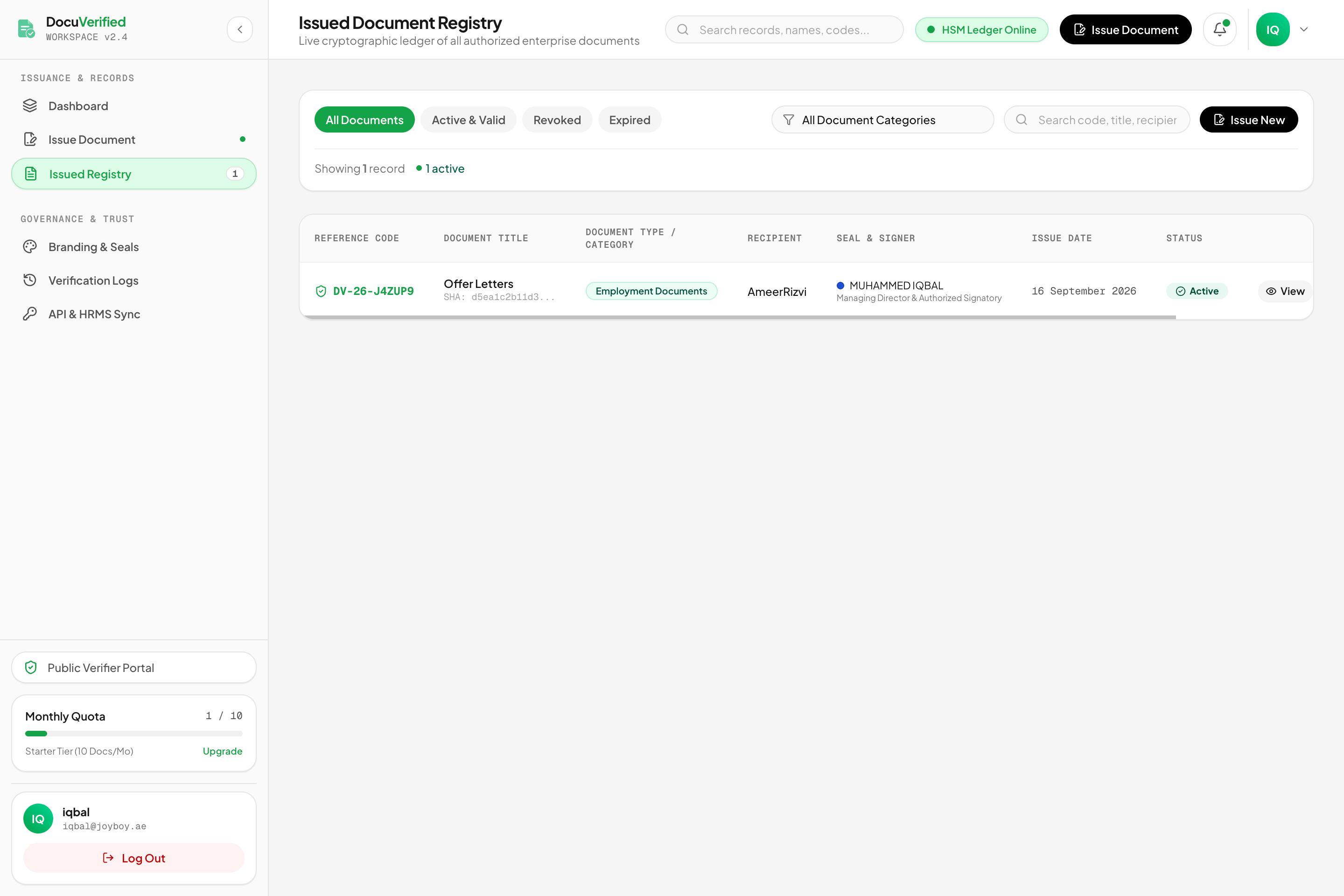
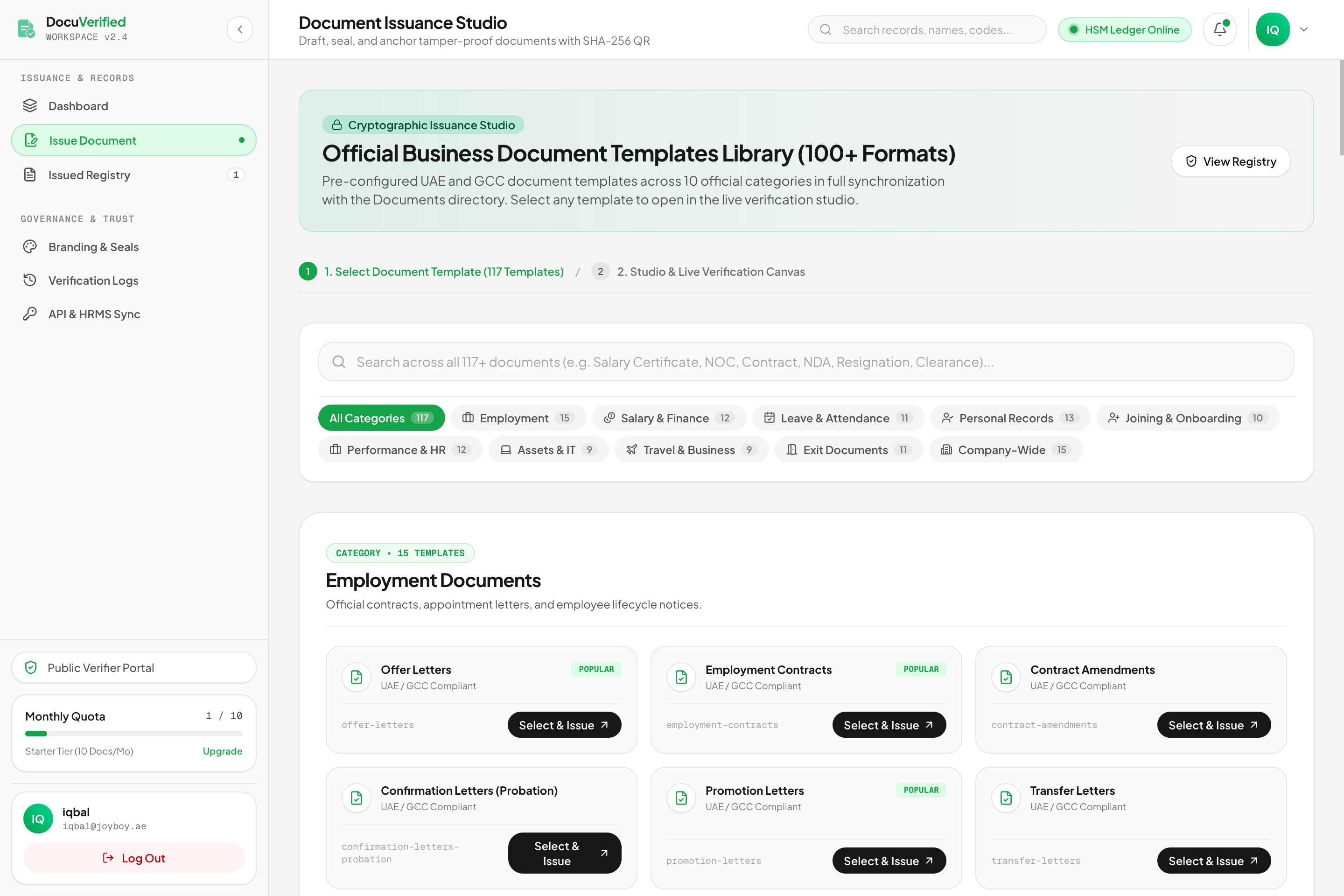
Features
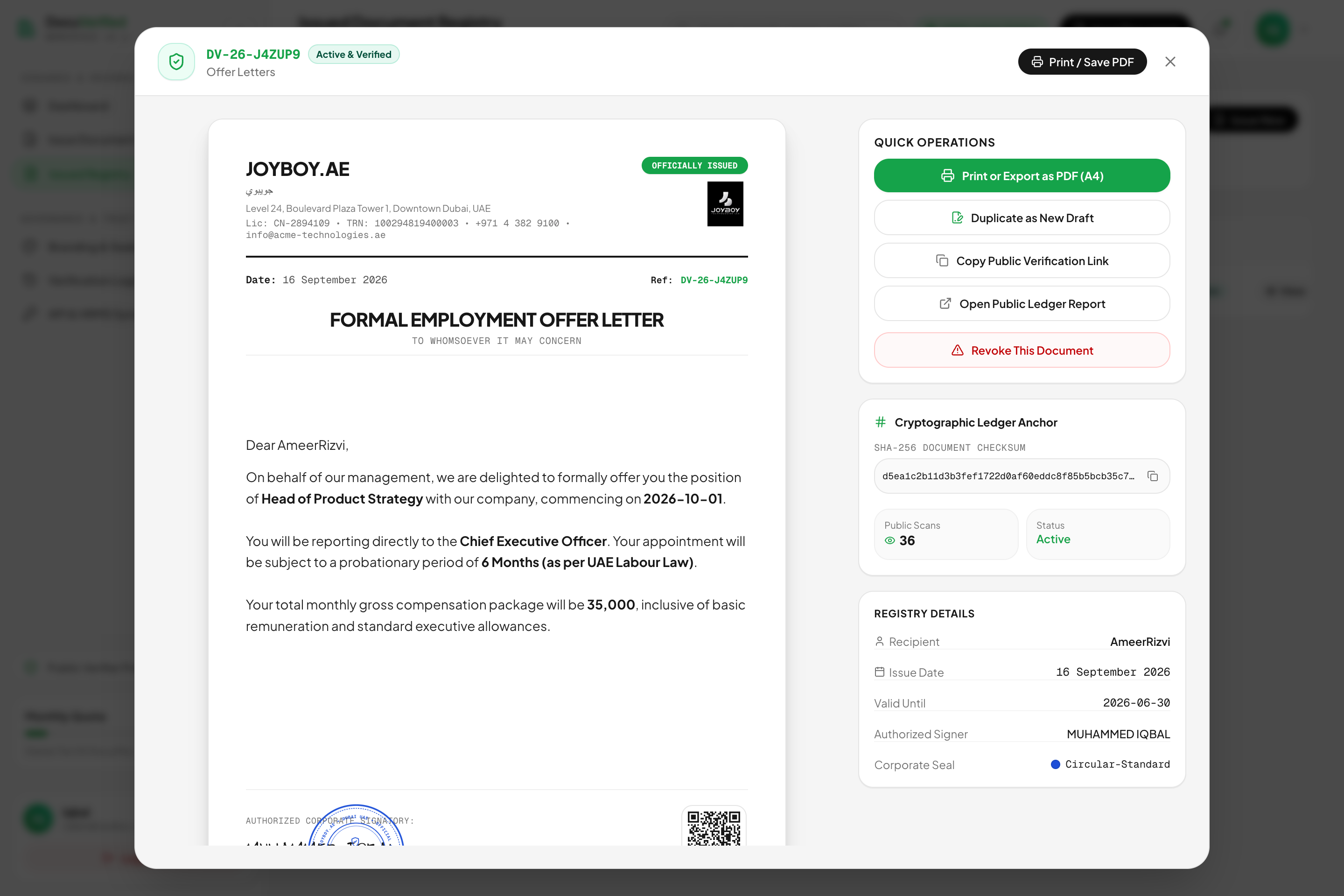
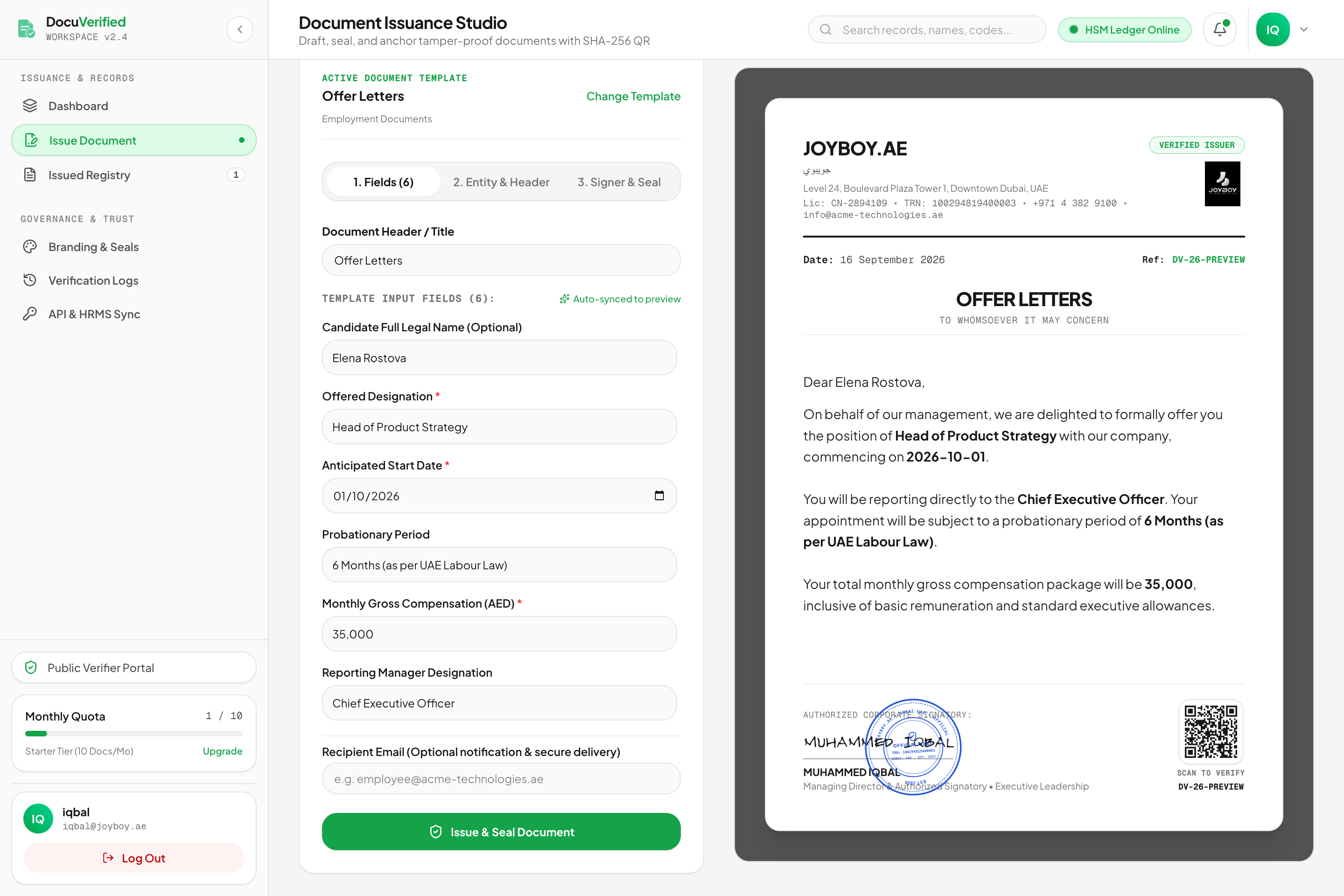
- Reusable document templates
- Dynamic employee and company fields
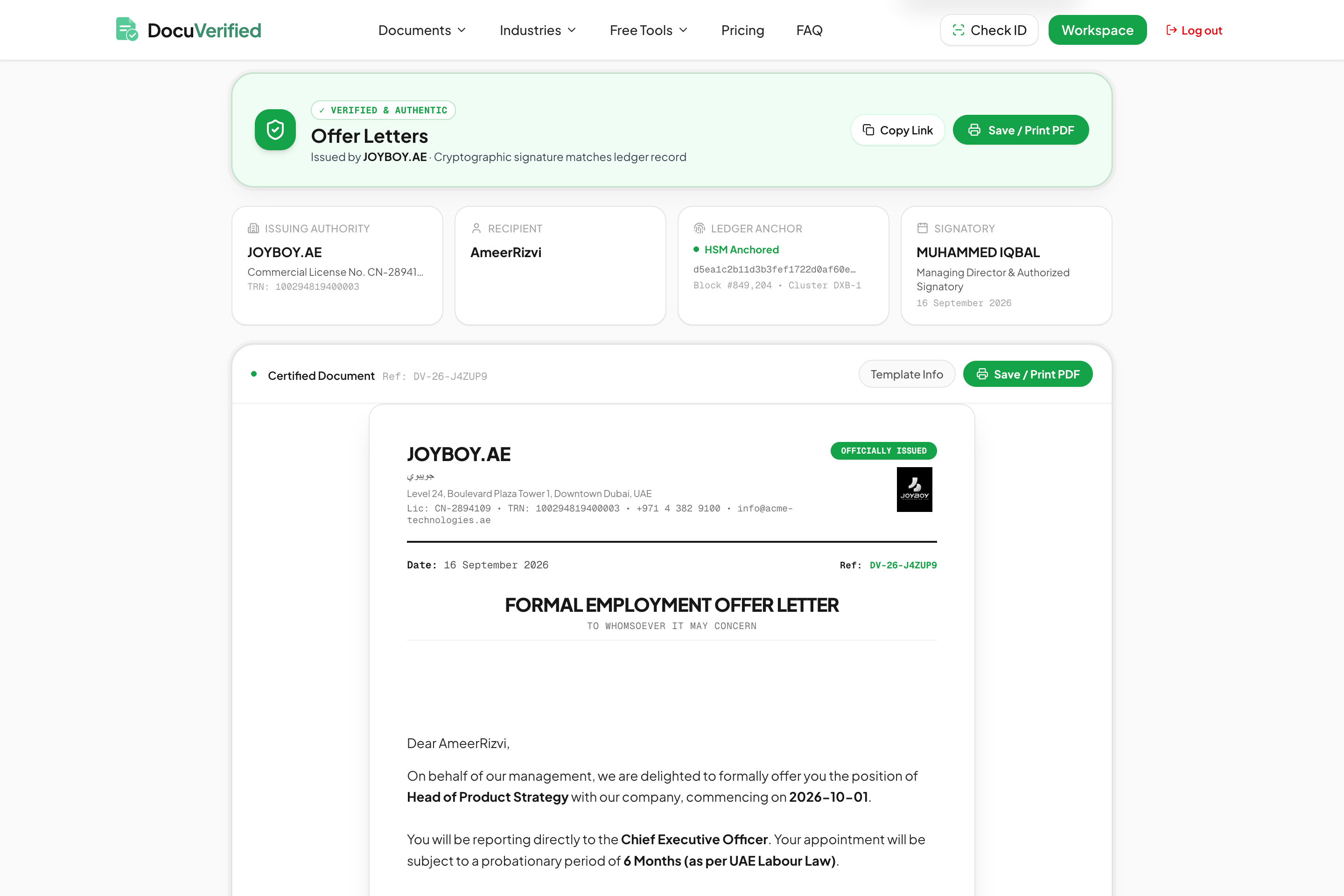
- QR-based public verification
- Digital signatures and seals
- SHA-256 document integrity checks
- Approval and issuance workflows
- Document expiry and revocation
- Field-level privacy and data masking
- HR and payroll integrations
- Secure document lifecycle tracking
Use Cases
- Salary certificates
- Employment verification letters
- Experience certificates
- Offer and appointment letters
- No Objection Certificates (NOCs)
- HR confirmation letters
- Employee reference letters
- Income and compensation letters
- Company-issued certificates
- Compliance and policy documents
- Vendor and partner verification documents
- Secure document sharing and verification
- Document expiry and revocation management
- Third-party employment verification
- Tamper-evident official document issuance

Comments


We started DocuVerified after seeing how fragmented official company document workflows still are. Creating a simple employment letter or salary certificate can involve templates, spreadsheets, HR systems, signatures, PDFs and manual verification. We wanted to bring that entire process into one trusted platform. DocuVerified lets companies design reusable templates, populate them with structured data, issue documents securely and let recipients or third parties instantly verify authenticity. We’re especially focused on making verification, privacy, document integrity and lifecycle management first-class parts of the experience. We’re still improving the product and would love feedback from HR teams, founders and anyone who regularly issues or verifies company documents.


The QR-based public verification combined with SHA-256 integrity checks is a strong fit for salary certificates and employment letters. When a third party scans the QR, what do they see, and can field-level masking hide the salary while still confirming employment? I'd also like to see how revocation shows up for someone holding an old PDF.
For third-party employment verification through the public QR page, what does the verifier see once a document has been revoked or has expired? I am also curious whether the SHA-256 check runs against the original PDF or a re-rendered copy, since that decides whether a printed copy can still be verified.
The combination of QR-based public verification with SHA-256 integrity checks is exactly the right stack for this use case — salary certificates and experience letters are some of the most forged documents in hiring, so a verifier being able to confirm tamper-evidence without an account is the killer feature. Two things I'd love to see: (1) field-level privacy on the public QR page so a salary figure can be proven without exposing the full letter, and (2) a standard revocation/expiry signal so a verifier instantly sees whether a document is still valid, not just whether it was once issued. Curious how you handle key management for the issuer signatures — is it per-company keys or platform-managed?

The QR-based public verification combined with SHA-256 integrity checks is a strong fit for salary certificates and employment letters that third parties need to trust. How does a verifier see a revoked or expired document when they scan the QR code? A clear status page there would make the revocation feature much more visible.

Muhammed, the HR angle is the strongest one here: experience letters and salary certificates for visa files are exactly where people get stuck waiting on an old employer. Who buys first in practice, HR teams issuing them, or the banks and embassies doing the checking? I googled "issue company documents with qr code verification software" (Google, US settings): the top results include Qrowntech, VerifyDoc, TruEnroll, Qryptal, Certidox and a "top 5 document verification software 2026" list. DocuVerified isn't on page 1 yet, and that top-5 list is the kind of page AI assistants quote. I run AI Knows Us, so search checks like this are my day job.

QR verification plus a SHA-256 check and an explicit revoked state is what makes this useful for employment letters, not just another e-sign flow. On the public QR page, when a letter is revoked or expired, does the status show without revealing the masked employee fields? And is the hash over the issued PDF bytes or over the template data?
QR verification plus a SHA-256 check and an explicit revoked state is what makes this useful for employment letters, not just another e-sign flow. On the public QR page, when a letter is revoked or expired, does the status show without revealing the masked employee fields? And is the hash over the issued PDF bytes or over the template data?
Premium Products



















































Sponsors
Buy

Makers
Makers
Comments
We started DocuVerified after seeing how fragmented official company document workflows still are. Creating a simple employment letter or salary certificate can involve templates, spreadsheets, HR systems, signatures, PDFs and manual verification. We wanted to bring that entire process into one trusted platform. DocuVerified lets companies design reusable templates, populate them with structured data, issue documents securely and let recipients or third parties instantly verify authenticity. We’re especially focused on making verification, privacy, document integrity and lifecycle management first-class parts of the experience. We’re still improving the product and would love feedback from HR teams, founders and anyone who regularly issues or verifies company documents.
The QR-based public verification combined with SHA-256 integrity checks is a strong fit for salary certificates and employment letters. When a third party scans the QR, what do they see, and can field-level masking hide the salary while still confirming employment? I'd also like to see how revocation shows up for someone holding an old PDF.
For third-party employment verification through the public QR page, what does the verifier see once a document has been revoked or has expired? I am also curious whether the SHA-256 check runs against the original PDF or a re-rendered copy, since that decides whether a printed copy can still be verified.
The combination of QR-based public verification with SHA-256 integrity checks is exactly the right stack for this use case — salary certificates and experience letters are some of the most forged documents in hiring, so a verifier being able to confirm tamper-evidence without an account is the killer feature. Two things I'd love to see: (1) field-level privacy on the public QR page so a salary figure can be proven without exposing the full letter, and (2) a standard revocation/expiry signal so a verifier instantly sees whether a document is still valid, not just whether it was once issued. Curious how you handle key management for the issuer signatures — is it per-company keys or platform-managed?
The QR-based public verification combined with SHA-256 integrity checks is a strong fit for salary certificates and employment letters that third parties need to trust. How does a verifier see a revoked or expired document when they scan the QR code? A clear status page there would make the revocation feature much more visible.
Muhammed, the HR angle is the strongest one here: experience letters and salary certificates for visa files are exactly where people get stuck waiting on an old employer. Who buys first in practice, HR teams issuing them, or the banks and embassies doing the checking? I googled "issue company documents with qr code verification software" (Google, US settings): the top results include Qrowntech, VerifyDoc, TruEnroll, Qryptal, Certidox and a "top 5 document verification software 2026" list. DocuVerified isn't on page 1 yet, and that top-5 list is the kind of page AI assistants quote. I run AI Knows Us, so search checks like this are my day job.
QR verification plus a SHA-256 check and an explicit revoked state is what makes this useful for employment letters, not just another e-sign flow. On the public QR page, when a letter is revoked or expired, does the status show without revealing the masked employee fields? And is the hash over the issued PDF bytes or over the template data?
QR verification plus a SHA-256 check and an explicit revoked state is what makes this useful for employment letters, not just another e-sign flow. On the public QR page, when a letter is revoked or expired, does the status show without revealing the masked employee fields? And is the hash over the issued PDF bytes or over the template data?
Premium Products
New to Fazier?

Find your next favorite product or submit your own. Made by @FalakDigital.
Copyright ©2026. All Rights Reserved