ControllerTest
Free online controller tester for buttons, sticks & drift
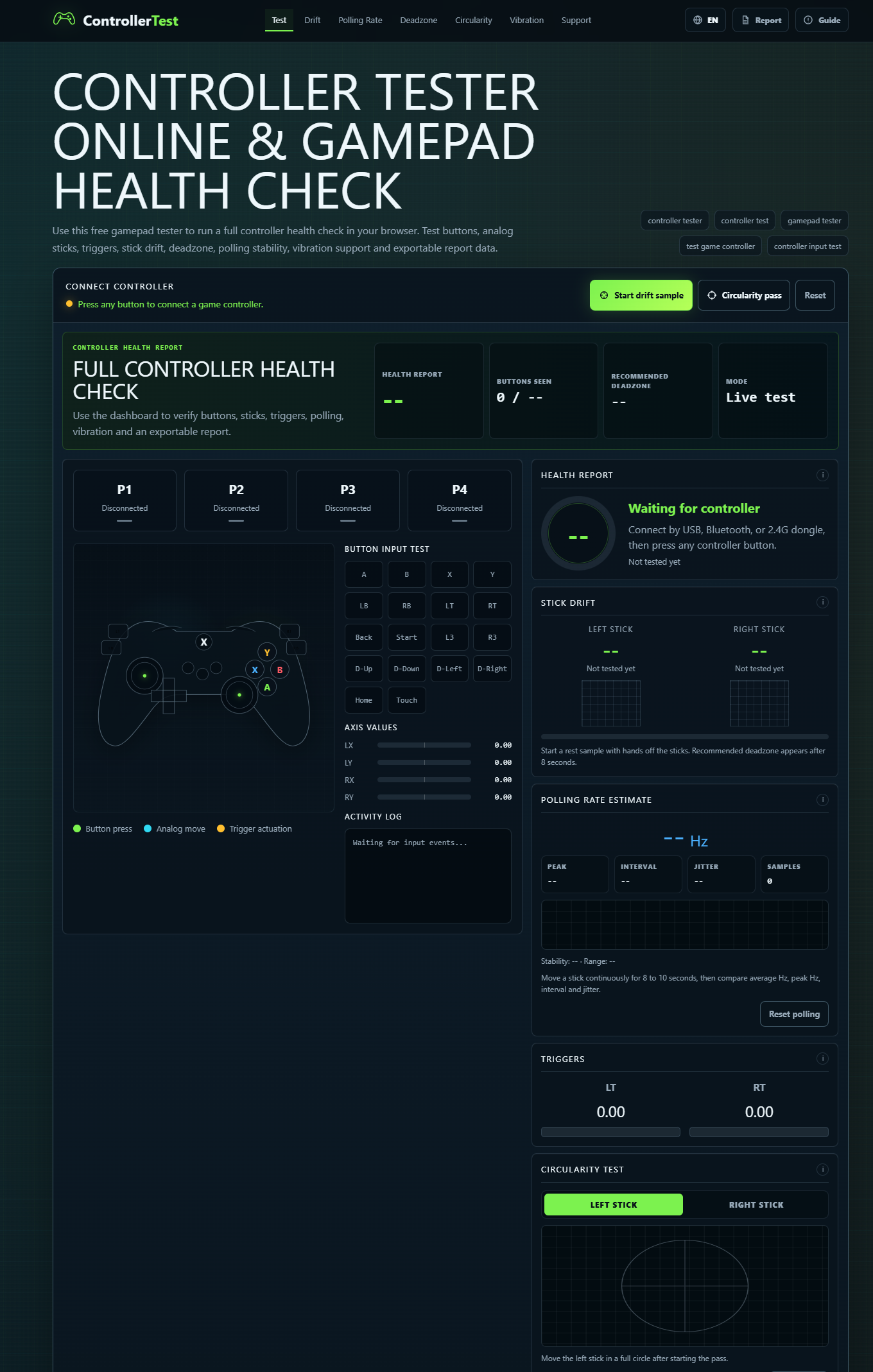
ControllerTest is a free online gamepad tester that helps you check your controller’s condition directly in your browser. Test buttons, sticks, triggers, drift, deadzones, and vibration support, then export a controller health report.
Use it to troubleshoot issues, inspect a used controller before buying, or compare results before and after repairs. Supports Xbox, PlayStation, Switch, and other browser-compatible controllers. Controller input data stays in your browser, with no installation required.
Features
- Live input testing: Check buttons, analog sticks, and triggers.
- Drift and deadzone checks: Identify unwanted stick movement and input thresholds.
- Polling rate estimates: Compare browser-observed input timing and stability.
- Vibration testing: Check vibration on supported controllers.
- Health reports: Export results as JSON or CSV.
- Broad compatibility: Supports Xbox, PlayStation, Switch, and other browser-compatible gamepads.
- Free and browser-based: No installation required; controller input data is processed locally.
Use Cases
- Check before buying: Test a used controller for button issues, stick drift, and trigger response.
- Troubleshoot problems: Identify controller input issues affecting gameplay.
- Verify repairs: Compare test results before and after a repair.
- Check a new controller: Confirm buttons, sticks, triggers, and supported vibration work as expected.
- Document controller condition: Export reports for repair records or resale listings.
- Compare setups: Check how browser-observed input timing changes across connection methods and settings.

Comments


Hi everyone! 👋 I’m the maker of ControllerTest, a free tool for checking game controllers directly in your browser. The goal is to help you answer practical questions: Is my stick drifting? Do all the buttons work? Is this used controller worth buying? Did a repair fix the problem? You can test buttons, sticks, triggers, deadzones, and supported vibration, then export a health report to keep or compare later. Controller input data is processed locally in your browser. I’d love to hear which controller you tested, whether anything was confusing, and what would make the tool more useful for you. Thanks for trying it!

The live diagram that lights each button and prints stick coordinates is what I would use before buying a used pad, especially the drift line that says whether the sticks are centered. Exporting that as a health report in JSON or CSV is the part I would keep, so a before-and-after repair is not just a memory of the screen.
A browser tester is most useful if it separates real stick drift from a calibration offset. Does the page show a numeric deadzone and raw axis values at rest, and have you checked the same pad over Bluetooth in Chrome versus Firefox? Gamepad API mappings differ there, so a stick that looks centered in one browser can read as drifting in the other.
The polling-rate estimate is a nice touch. For before/after repair checks it would help if each exported report also recorded the connection type (USB, Bluetooth, or a dongle) and the browser, because those change the timing more than the pad itself. Do you warn people when the tab is in the background? Chrome slows timers there, so the numbers can look worse than they are.
Online Quran Classes for Kids offer easy and engaging lessons in Quran reading, Noorani Qaida, and Tajweed. Experienced teachers help children improve recitation and build strong Islamic knowledge from home.https://thequrannest.com/online-quran-classes-for-kids/
Premium Products
















































Sponsors
Buy

Makers
Makers
Comments
Hi everyone! 👋 I’m the maker of ControllerTest, a free tool for checking game controllers directly in your browser. The goal is to help you answer practical questions: Is my stick drifting? Do all the buttons work? Is this used controller worth buying? Did a repair fix the problem? You can test buttons, sticks, triggers, deadzones, and supported vibration, then export a health report to keep or compare later. Controller input data is processed locally in your browser. I’d love to hear which controller you tested, whether anything was confusing, and what would make the tool more useful for you. Thanks for trying it!
The live diagram that lights each button and prints stick coordinates is what I would use before buying a used pad, especially the drift line that says whether the sticks are centered. Exporting that as a health report in JSON or CSV is the part I would keep, so a before-and-after repair is not just a memory of the screen.
A browser tester is most useful if it separates real stick drift from a calibration offset. Does the page show a numeric deadzone and raw axis values at rest, and have you checked the same pad over Bluetooth in Chrome versus Firefox? Gamepad API mappings differ there, so a stick that looks centered in one browser can read as drifting in the other.
The polling-rate estimate is a nice touch. For before/after repair checks it would help if each exported report also recorded the connection type (USB, Bluetooth, or a dongle) and the browser, because those change the timing more than the pad itself. Do you warn people when the tab is in the background? Chrome slows timers there, so the numbers can look worse than they are.
Online Quran Classes for Kids offer easy and engaging lessons in Quran reading, Noorani Qaida, and Tajweed. Experienced teachers help children improve recitation and build strong Islamic knowledge from home.https://thequrannest.com/online-quran-classes-for-kids/
Premium Products
New to Fazier?

Find your next favorite product or submit your own. Made by @FalakDigital.
Copyright ©2026. All Rights Reserved