Code Meter - Claude Usage Monitor macOS
Better monitoring for Claude Code and Minimax rate limits
Checking /usage for claude or going on the Minimax api page to check for usage, felt wrong, so I built the thing I wanted: a tiny menu bar app that shows your usage percentage at all times.
A few things I’m proud of:
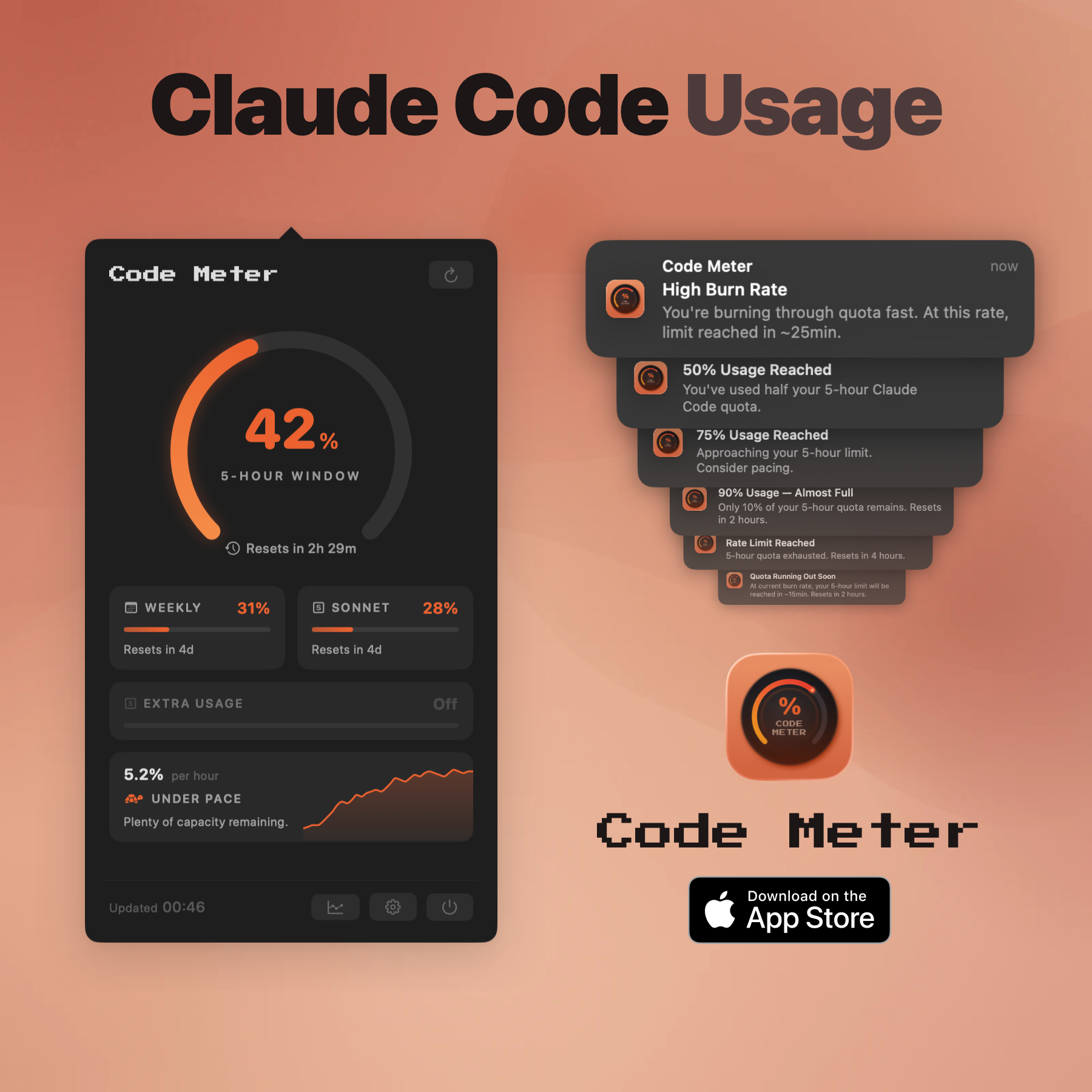
• Burn rate analysis. It doesn’t just show your current percentage. It tells you whether you’re on pace to hit the limit, and roughly when.
• Desktop widgets. I keep a small widget on my desktop so I can see my usage without even clicking the menu bar icon.
• Adaptive polling. When your usage is stable, it polls less often. When things are moving, it speeds up. Keeps the data fresh without hammering the API.
• Minimax support. If you use Minimax’s Token Plan for coding, Code Meter tracks that too. Just paste your API key.
It’s a native macOS app. SwiftUI, Liquid Glass, no Electron. Runs in the menu bar with no dock icon. Feels like it belongs on your Mac because it does.
Features
• Real-time usage gauge in the menu bar with color-coded status
• Per-model breakdowns for Opus and Sonnet
• Burn rate analysis - see if you’re pacing well or burning too fast • Projected exhaustion warnings (“you’ll hit the limit in ~15 minutes”)
• Smart notifications at 50%, 75%, 90%, and 100% usage
• Desktop widgets (small & medium) for at-a-glance monitoring • Usage history charts (Now, 6H, 1D, 1W)
• Minimax AI Token Plan support (via API key)
Use Cases
Perfect companion when building with Claude Code or Minimax

Comments


Burn-rate projection is the useful part here. A raw percentage doesn't tell you whether you'll hit the limit before the window resets, and this does. Adaptive polling is a thoughtful touch for a menu bar app too. Does it keep usage history across resets, so you can see which days or sessions burn the most?
Premium Products





































Sponsors
Buy
Makers

Makers
Comments
Burn-rate projection is the useful part here. A raw percentage doesn't tell you whether you'll hit the limit before the window resets, and this does. Adaptive polling is a thoughtful touch for a menu bar app too. Does it keep usage history across resets, so you can see which days or sessions burn the most?
Premium Products
New to Fazier?

Find your next favorite product or submit your own. Made by @FalakDigital.
Copyright ©2026. All Rights Reserved