
Bytesweep
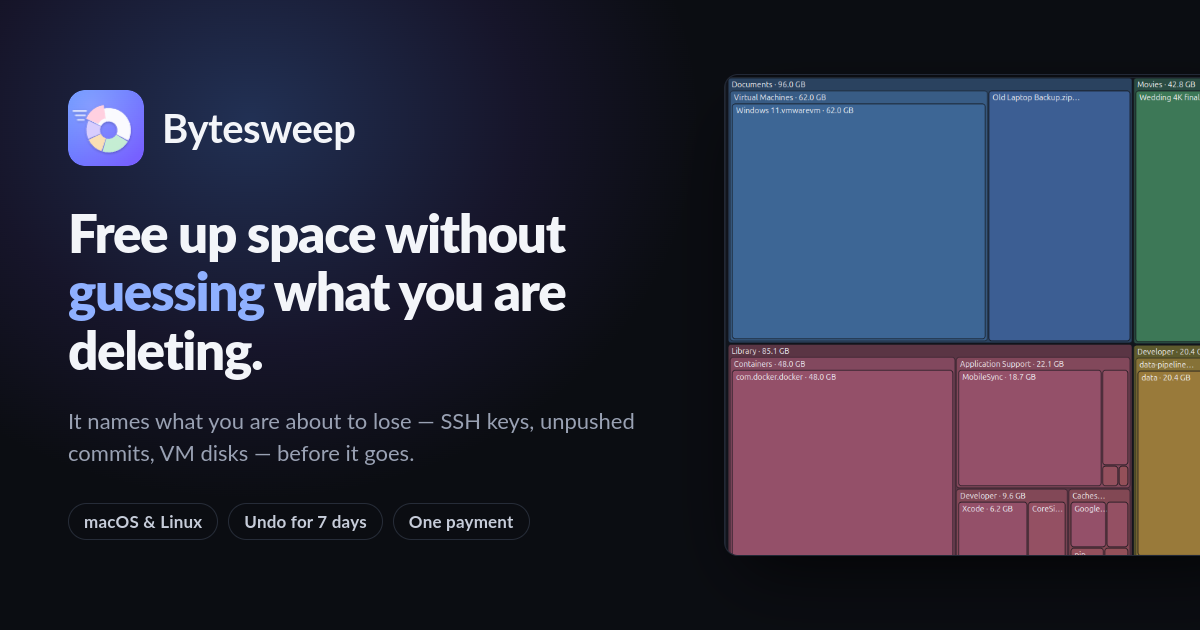
A graphical du that knows what not to delete

Comments


Interesting that undo is one click. For actions like removing old kernels or snap revisions, what does undo actually do: reinstall the package, or is it only available for things that can be safely restored, like caches and journal logs? That's the part I'd want to know before trusting a cleaner with system-level items.


The one-click undo plus distro-aware cleanup is exactly the right pair — deleting system files is scary precisely because you can't tell what matters. The eight different views of disk usage sound useful for finding the big wins first rather than blindly emptying caches. Question: does it preview what will be freed before you commit, or does it apply immediately with undo as the only safety net?




Really like the idea of making Linux disk cleanup more visual and less intimidating. Having distro-aware cleanup commands is especially useful when dealing with Docker and system files. Curious if you’re planning to support scheduled cleanups or disk usage alerts in the future. Congrats on the launch!



Distro-aware cleanup with one-click undo solves the exact fear I have with most disk cleaners. Clearing old kernels and snap revisions with the right command per distribution is a thoughtful touch — no more looking up package manager flags. Does the eight-view breakdown let you drill into a single Docker image to see what is actually taking space?




Pairing the disk view with the exact cleanup command per distro is a nice touch, because a lot of disk tools just say "delete this" without explaining the risk. Does the "one click to undo" cover Docker images and old kernels too, or only package caches and logs? That seems like the case where an undo would matter most.


The detail that stands out to me is that Bytesweep names what you're about to lose — SSH keys, unpushed commits, VM disks — before anything gets deleted. Most disk tools only show sizes, and that's exactly how people end up wiping something important while chasing free space. The eight views plus distro-specific cleanup commands make it feel a lot safer than a generic cleaner. One question: can it run on a headless Linux server or over SSH, or is it desktop-only for now? A scheduled scan that warns you when caches or Docker junk start growing again would be a great addition for dev machines.
The eight-view breakdown is a smart way to spot the biggest space hogs before touching anything, and the 7-day undo window is reassuring for risky items like Docker leftovers. It would help to show a short dry-run summary of exactly which commands will run for each Linux distribution before confirming.
The part I'd trust is showing the exact command for the distro before it runs. A cleaner that hides whether it is about to call apt autoremove, snap set retain, or docker builder prune is hard to review. The eight disk views only help if each one maps to one of those commands and a size, so you can skip a journal vacuum when the real win is old snap revisions. Undo is fine for caches; kernel and snap removal should be a separate confirm, since those are not sitting in a trash folder.
Premium Products








































Sponsors
Buy

Awards
View all
Awards
View allMakers

Makers
Comments
Interesting that undo is one click. For actions like removing old kernels or snap revisions, what does undo actually do: reinstall the package, or is it only available for things that can be safely restored, like caches and journal logs? That's the part I'd want to know before trusting a cleaner with system-level items.
The one-click undo plus distro-aware cleanup is exactly the right pair — deleting system files is scary precisely because you can't tell what matters. The eight different views of disk usage sound useful for finding the big wins first rather than blindly emptying caches. Question: does it preview what will be freed before you commit, or does it apply immediately with undo as the only safety net?
Really like the idea of making Linux disk cleanup more visual and less intimidating. Having distro-aware cleanup commands is especially useful when dealing with Docker and system files. Curious if you’re planning to support scheduled cleanups or disk usage alerts in the future. Congrats on the launch!
Distro-aware cleanup with one-click undo solves the exact fear I have with most disk cleaners. Clearing old kernels and snap revisions with the right command per distribution is a thoughtful touch — no more looking up package manager flags. Does the eight-view breakdown let you drill into a single Docker image to see what is actually taking space?
Pairing the disk view with the exact cleanup command per distro is a nice touch, because a lot of disk tools just say "delete this" without explaining the risk. Does the "one click to undo" cover Docker images and old kernels too, or only package caches and logs? That seems like the case where an undo would matter most.
The detail that stands out to me is that Bytesweep names what you're about to lose — SSH keys, unpushed commits, VM disks — before anything gets deleted. Most disk tools only show sizes, and that's exactly how people end up wiping something important while chasing free space. The eight views plus distro-specific cleanup commands make it feel a lot safer than a generic cleaner. One question: can it run on a headless Linux server or over SSH, or is it desktop-only for now? A scheduled scan that warns you when caches or Docker junk start growing again would be a great addition for dev machines.
The eight-view breakdown is a smart way to spot the biggest space hogs before touching anything, and the 7-day undo window is reassuring for risky items like Docker leftovers. It would help to show a short dry-run summary of exactly which commands will run for each Linux distribution before confirming.
The part I'd trust is showing the exact command for the distro before it runs. A cleaner that hides whether it is about to call apt autoremove, snap set retain, or docker builder prune is hard to review. The eight disk views only help if each one maps to one of those commands and a size, so you can skip a journal vacuum when the real win is old snap revisions. Undo is fine for caches; kernel and snap removal should be a separate confirm, since those are not sitting in a trash folder.
Premium Products
New to Fazier?

Find your next favorite product or submit your own. Made by @FalakDigital.
Copyright ©2026. All Rights Reserved