
BeautifulScreenshots
Turn plain screenshots into polished, scroll-stopping visual
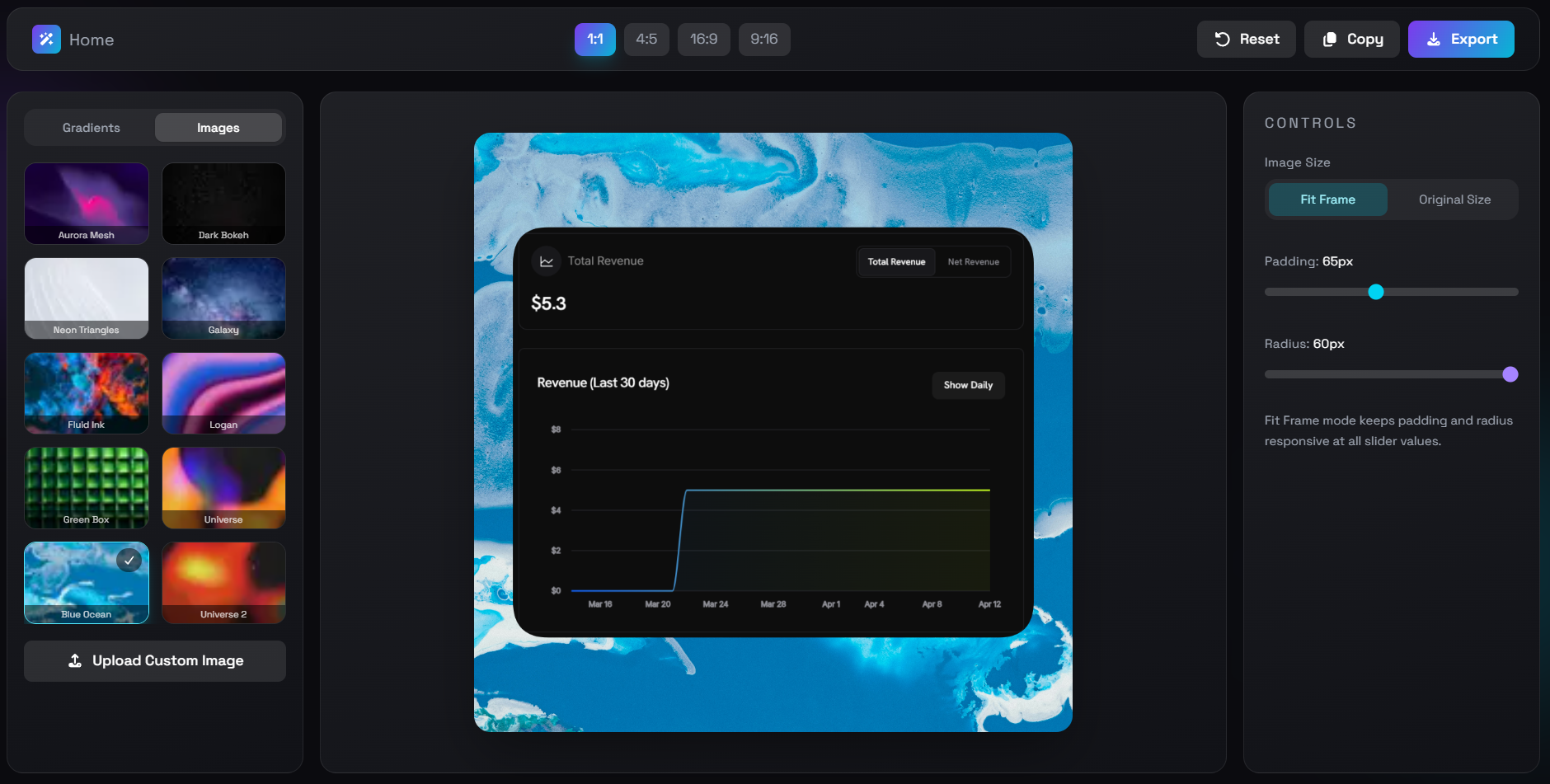
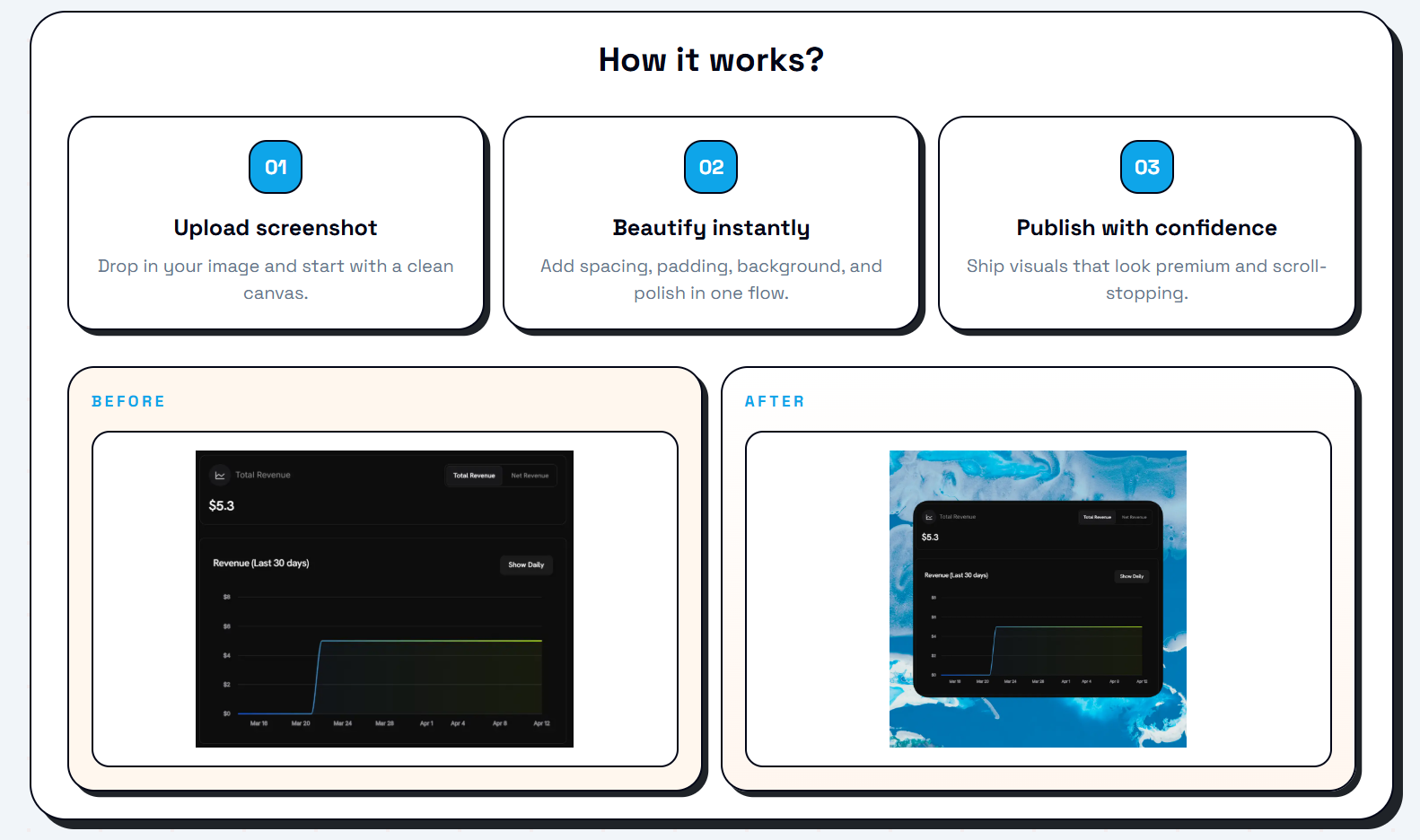
Turn plain screenshots into polished, scroll-stopping visuals that get more clicks. BeautifulScreenshots is a focused screenshot beautifier that allows you to upload your image, beautify it instantly with spacing, padding, and background, and publish with confidence. It features a clean UI/UX, no watermarks, and a one-time payment model, ensuring you can create premium visuals without the clutter of bloated tools.
Features
- Only the features you actually need:
- Clean UIUX
- No watermark
Use Cases
- To post on X/Twitter, LinkedIn, Threads use better eye-catching screenshots
- Better Screenshots will give more attention, clicks, and engagement rate.

Comments









BeautifulScreenshots is a sharp, no-nonsense utility that does one thing well: makes your screenshots look like they belong in a feed worth following. If your current workflow involves wrestling with Canva every time you want to share a UI or a stat, this is an easy upgrade. Sometimes the best product is just the obvious thing, built cleanly and left alone.


The one-time payment model is a smart move — every other screenshot tool wants a subscription for something you use 30 seconds at a time. The "Fit Frame" option that keeps padding responsive is a nice detail too. Would be great to see a browser extension that lets you beautify directly from a screenshot shortcut without opening the app.
The one-time payment model is a smart move — every other screenshot tool wants a subscription for something you use 30 seconds at a time. The "Fit Frame" option that keeps padding responsive is a nice detail too. Would be great to see a browser extension that lets you beautify directly from a screenshot shortcut without opening the app.
The one-time payment model is a smart move — every other screenshot tool wants a subscription for something you use 30 seconds at a time. The "Fit Frame" option that keeps padding responsive is a nice detail too. Would be great to see a browser extension that lets you beautify directly from a screenshot shortcut without opening the app.
The one-time payment model is a smart move — every other screenshot tool wants a subscription for something you use 30 seconds at a time. The "Fit Frame" option that keeps padding responsive is a nice detail too. Would be great to see a browser extension that lets you beautify directly from a screenshot shortcut without opening the app.
The one-time payment model is a smart move — every other screenshot tool wants a subscription for something you use 30 seconds at a time. The "Fit Frame" option that keeps padding responsive is a nice detail too. Would be great to see a browser extension that lets you beautify directly from a screenshot shortcut without opening the app.
The one-time payment model is a smart move — every other screenshot tool wants a subscription for something you use 30 seconds at a time. The "Fit Frame" option that keeps padding responsive is a nice detail too. Would be great to see a browser extension that lets you beautify directly from a screenshot shortcut without opening the app.

I tried using a colorful gradient background for screenshots in my posts. And here's why everyone should use it (hint: it increases the reach of posts). Firstly, I saw big creators use gradient background in their post's screenshots. I didn't understand why they were doing this. Later I read somewhere that gradient colours are easy to capture attention and that's why creators were using it. So, I also started doing the same. And it Also increased engagement rates, likes and impressions on my posts. And I recommend you all do the same. Initially, I was using Canva to create gradient background screenshots. But it was very time consuming to do it every time from Canva. So, I started searching for tools for this specific use only. But all the tools I found have too many features, bad UIUX, and a watermark. So, I built my own as per my needs. A minimalist screenshot beautifying tool which only has padding and radius adjustment options with some beautiful gradient background and images. You can add your custom background image too.

I actually like that this stays simple instead of trying to become another full design suite. Sometimes you just want a quick way to make screenshots look cleaner for X or LinkedIn posts without opening heavy tools like Canva or Figma. The one-time payment model is also refreshing compared to everything becoming subscription-based lately.


Screenshot beautification tools live or die by how well they handle edge cases — light/dark mode screenshots mixed in the same batch, screenshots with very different aspect ratios, etc. How does it handle those? Also, does the export preserve retina/2x resolution or does it downsample? That's usually the dealbreaker for dev docs.




The narrow scope is a strength here. For founders posting on X, LinkedIn, or launch directories, a fast no-watermark screenshot beautifier with padding and backgrounds saves time without forcing them into a full design suite. Logo and brand-kit presets would make it even more useful for repeated product updates.



It is truly impressive how quickly it transforms plain, dull screenshots into polished, aesthetic images ready for social media or portfolios. This is the perfect tool for developers, designers, and makers who frequently share their building process on Twitter or LinkedIn—it saves time while making the results stand out.

Premium Products






































Makers
Makers
Comments
BeautifulScreenshots is a sharp, no-nonsense utility that does one thing well: makes your screenshots look like they belong in a feed worth following. If your current workflow involves wrestling with Canva every time you want to share a UI or a stat, this is an easy upgrade. Sometimes the best product is just the obvious thing, built cleanly and left alone.
The one-time payment model is a smart move — every other screenshot tool wants a subscription for something you use 30 seconds at a time. The "Fit Frame" option that keeps padding responsive is a nice detail too. Would be great to see a browser extension that lets you beautify directly from a screenshot shortcut without opening the app.
The one-time payment model is a smart move — every other screenshot tool wants a subscription for something you use 30 seconds at a time. The "Fit Frame" option that keeps padding responsive is a nice detail too. Would be great to see a browser extension that lets you beautify directly from a screenshot shortcut without opening the app.
The one-time payment model is a smart move — every other screenshot tool wants a subscription for something you use 30 seconds at a time. The "Fit Frame" option that keeps padding responsive is a nice detail too. Would be great to see a browser extension that lets you beautify directly from a screenshot shortcut without opening the app.
The one-time payment model is a smart move — every other screenshot tool wants a subscription for something you use 30 seconds at a time. The "Fit Frame" option that keeps padding responsive is a nice detail too. Would be great to see a browser extension that lets you beautify directly from a screenshot shortcut without opening the app.
The one-time payment model is a smart move — every other screenshot tool wants a subscription for something you use 30 seconds at a time. The "Fit Frame" option that keeps padding responsive is a nice detail too. Would be great to see a browser extension that lets you beautify directly from a screenshot shortcut without opening the app.
The one-time payment model is a smart move — every other screenshot tool wants a subscription for something you use 30 seconds at a time. The "Fit Frame" option that keeps padding responsive is a nice detail too. Would be great to see a browser extension that lets you beautify directly from a screenshot shortcut without opening the app.
I tried using a colorful gradient background for screenshots in my posts. And here's why everyone should use it (hint: it increases the reach of posts). Firstly, I saw big creators use gradient background in their post's screenshots. I didn't understand why they were doing this. Later I read somewhere that gradient colours are easy to capture attention and that's why creators were using it. So, I also started doing the same. And it Also increased engagement rates, likes and impressions on my posts. And I recommend you all do the same. Initially, I was using Canva to create gradient background screenshots. But it was very time consuming to do it every time from Canva. So, I started searching for tools for this specific use only. But all the tools I found have too many features, bad UIUX, and a watermark. So, I built my own as per my needs. A minimalist screenshot beautifying tool which only has padding and radius adjustment options with some beautiful gradient background and images. You can add your custom background image too.
I actually like that this stays simple instead of trying to become another full design suite. Sometimes you just want a quick way to make screenshots look cleaner for X or LinkedIn posts without opening heavy tools like Canva or Figma. The one-time payment model is also refreshing compared to everything becoming subscription-based lately.
Screenshot beautification tools live or die by how well they handle edge cases — light/dark mode screenshots mixed in the same batch, screenshots with very different aspect ratios, etc. How does it handle those? Also, does the export preserve retina/2x resolution or does it downsample? That's usually the dealbreaker for dev docs.
The narrow scope is a strength here. For founders posting on X, LinkedIn, or launch directories, a fast no-watermark screenshot beautifier with padding and backgrounds saves time without forcing them into a full design suite. Logo and brand-kit presets would make it even more useful for repeated product updates.
It is truly impressive how quickly it transforms plain, dull screenshots into polished, aesthetic images ready for social media or portfolios. This is the perfect tool for developers, designers, and makers who frequently share their building process on Twitter or LinkedIn—it saves time while making the results stand out.
Premium Products
New to Fazier?

Find your next favorite product or submit your own. Made by @FalakDigital.
Copyright ©2026. All Rights Reserved