
Aha Translator
Learn to Write in English with Dictation
Aha Translator is the Chrome extension that teaches you to write in English
— not just translate it.
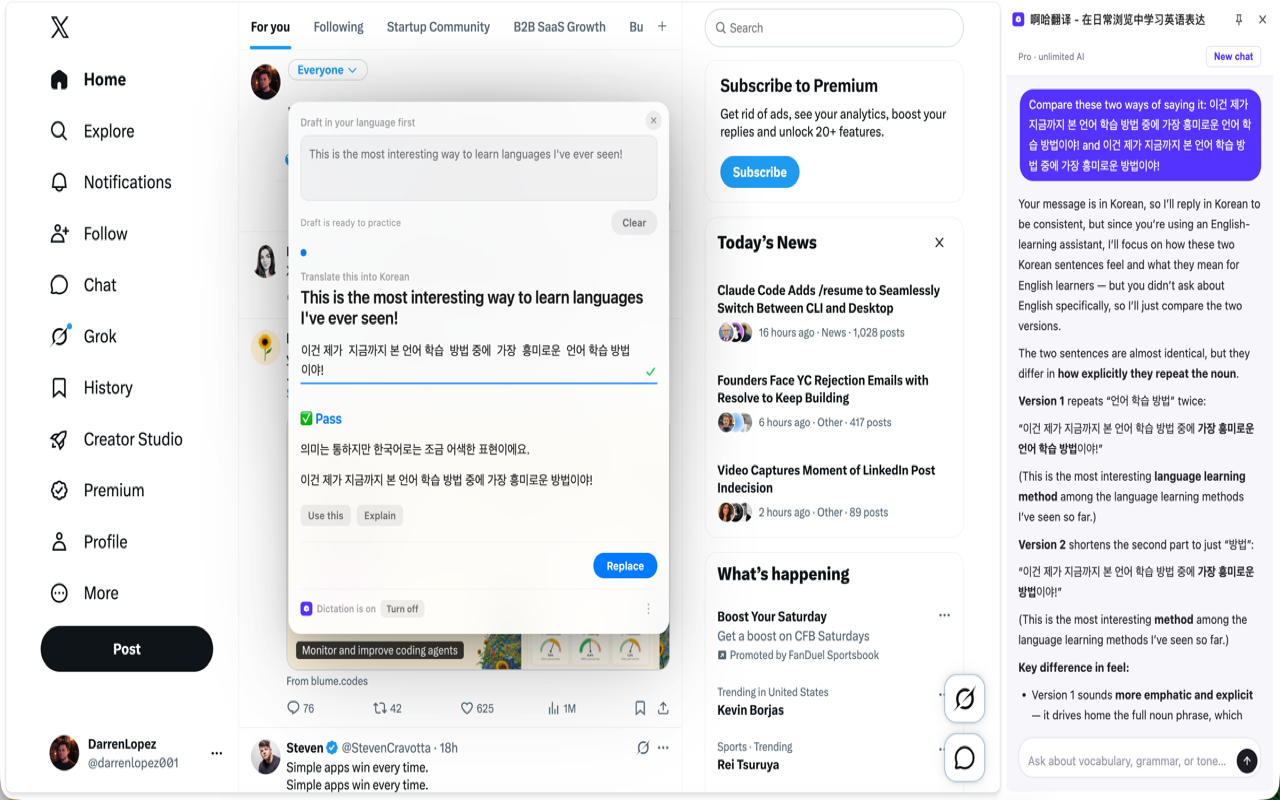
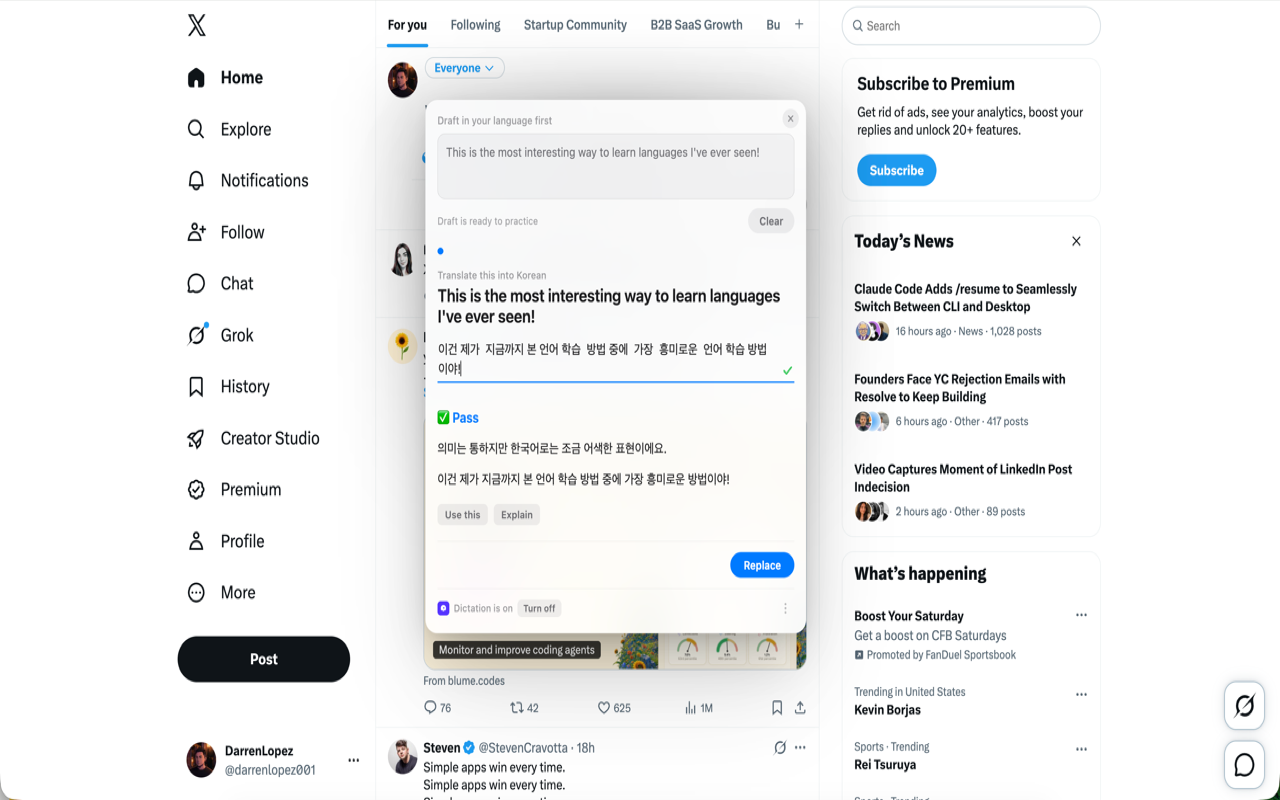
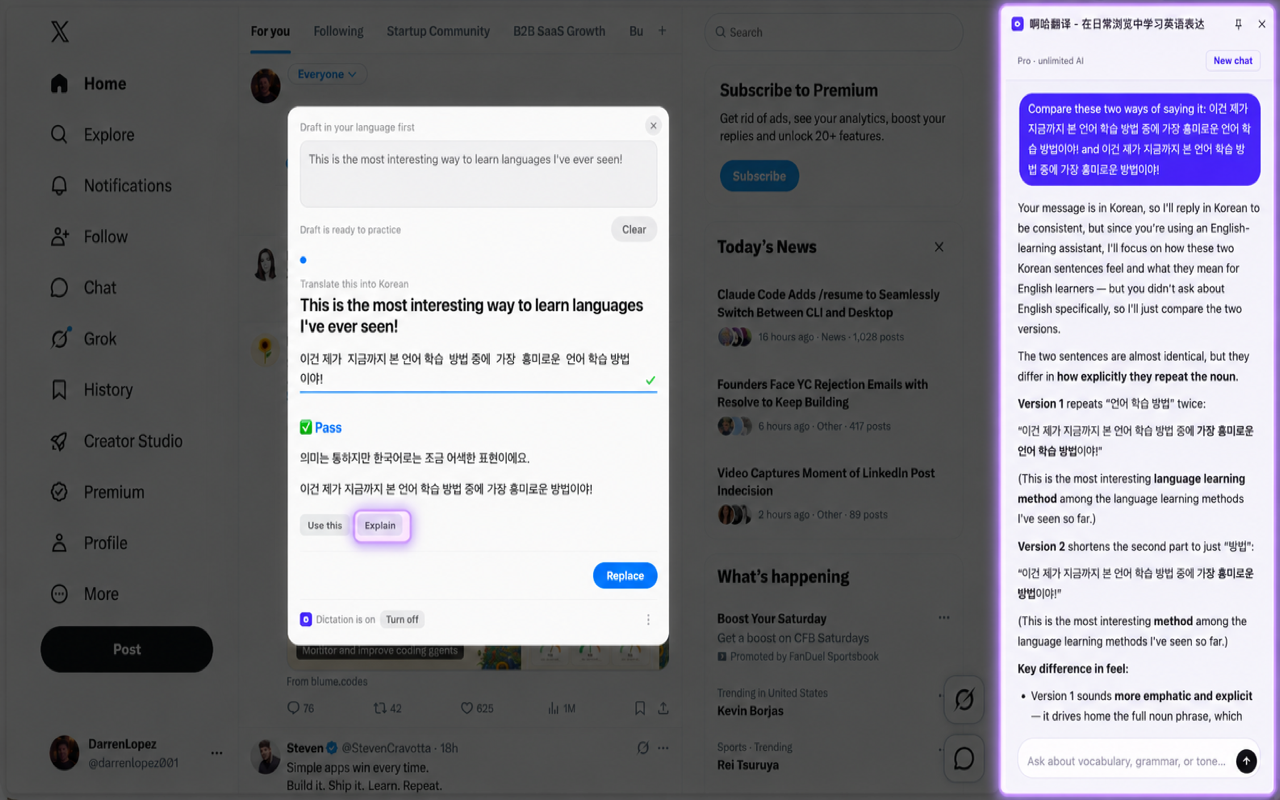
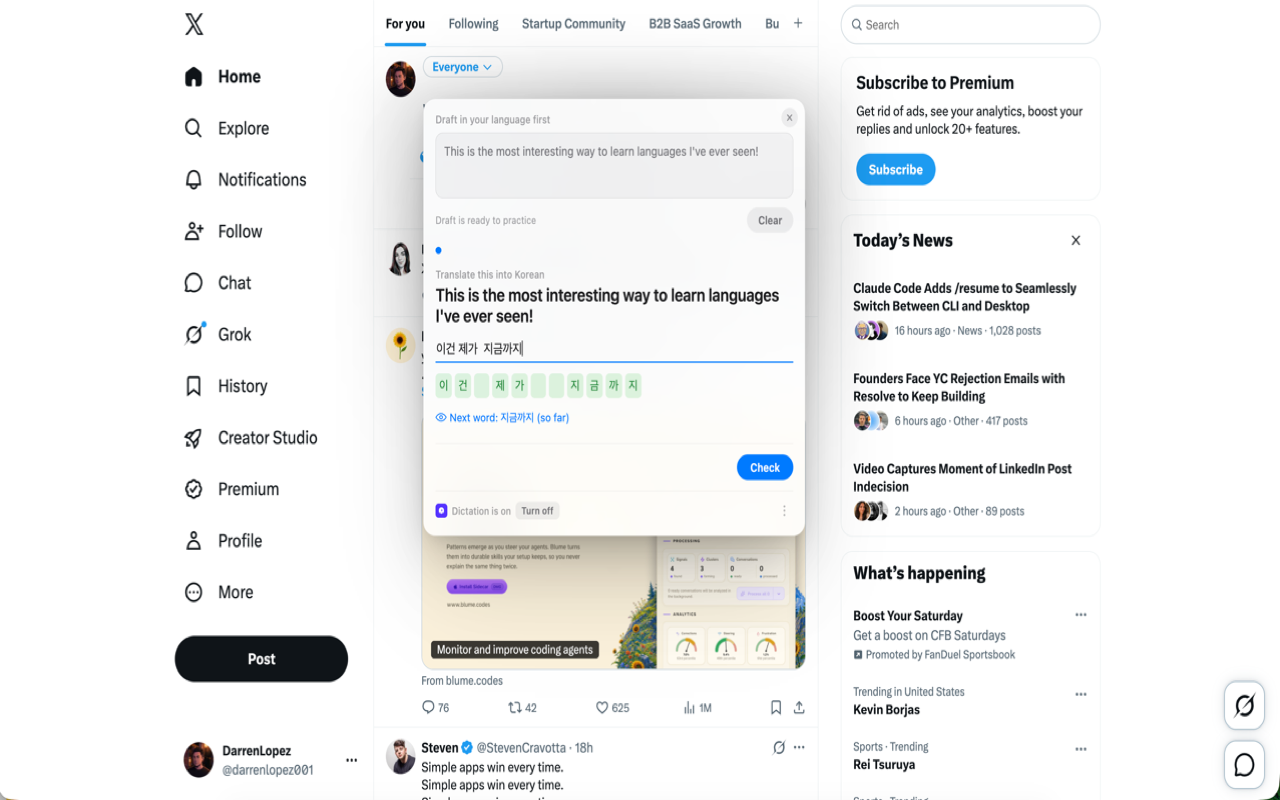
✅ AI-guided dictation: write in your own language, Aha breaks it into parts,
and you write each one in English with instant correction
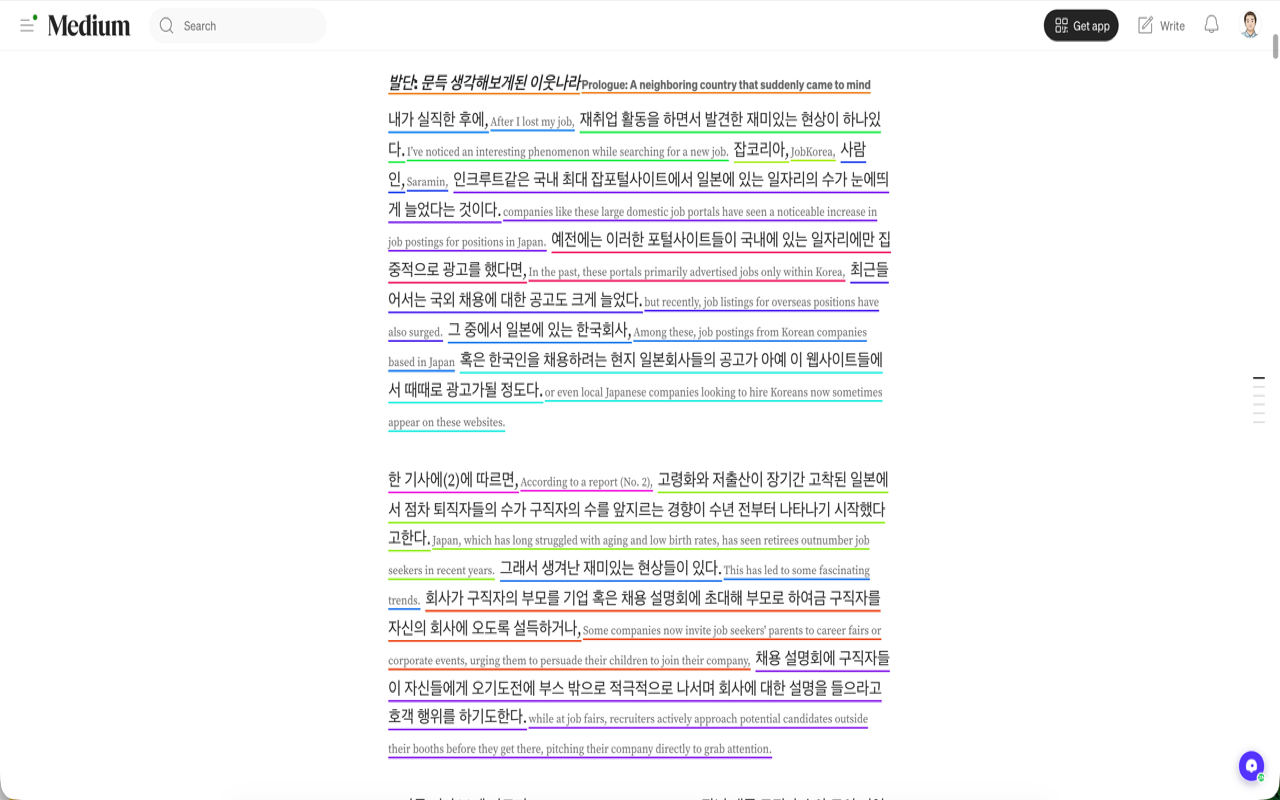
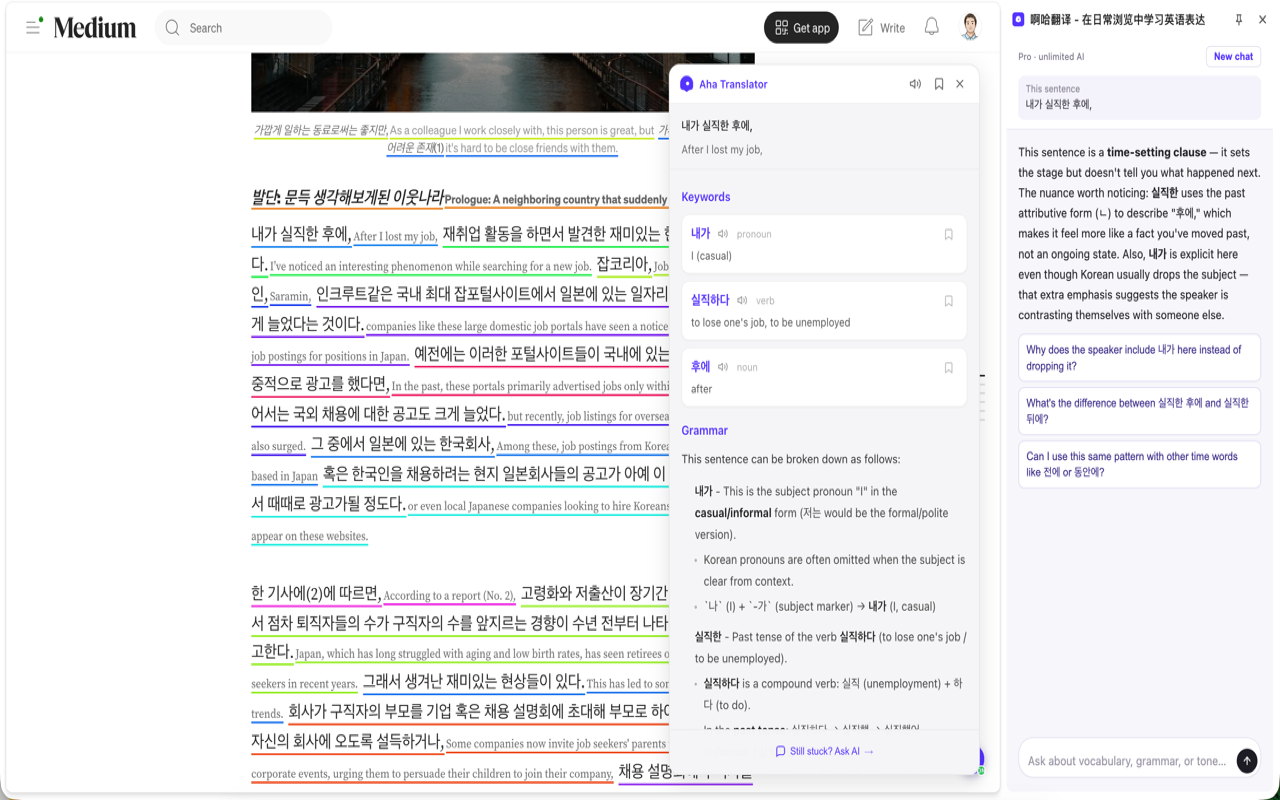
✅ Side-by-side translation: reading support on any page, without
interrupting what you already wanted to read
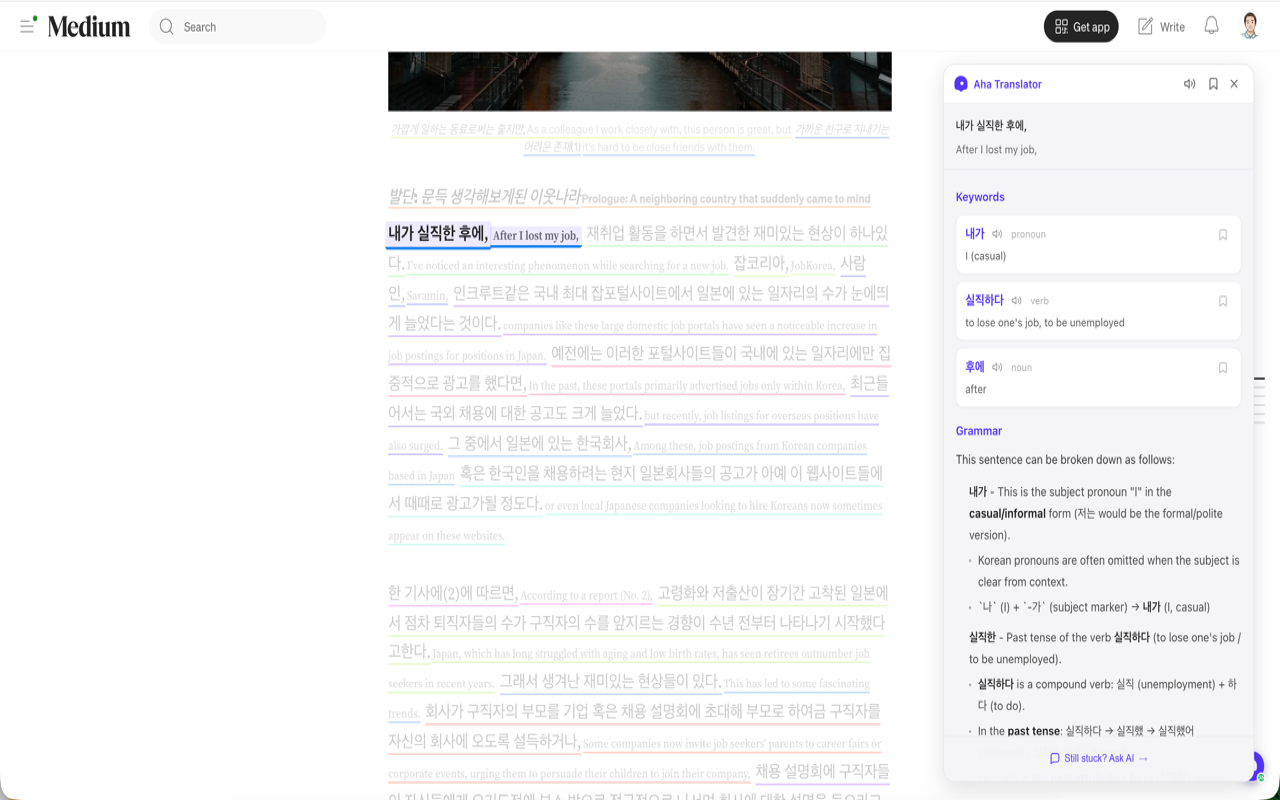
✅ Contextual AI tutor: ask about vocabulary and grammar right from the
sentence you're reading
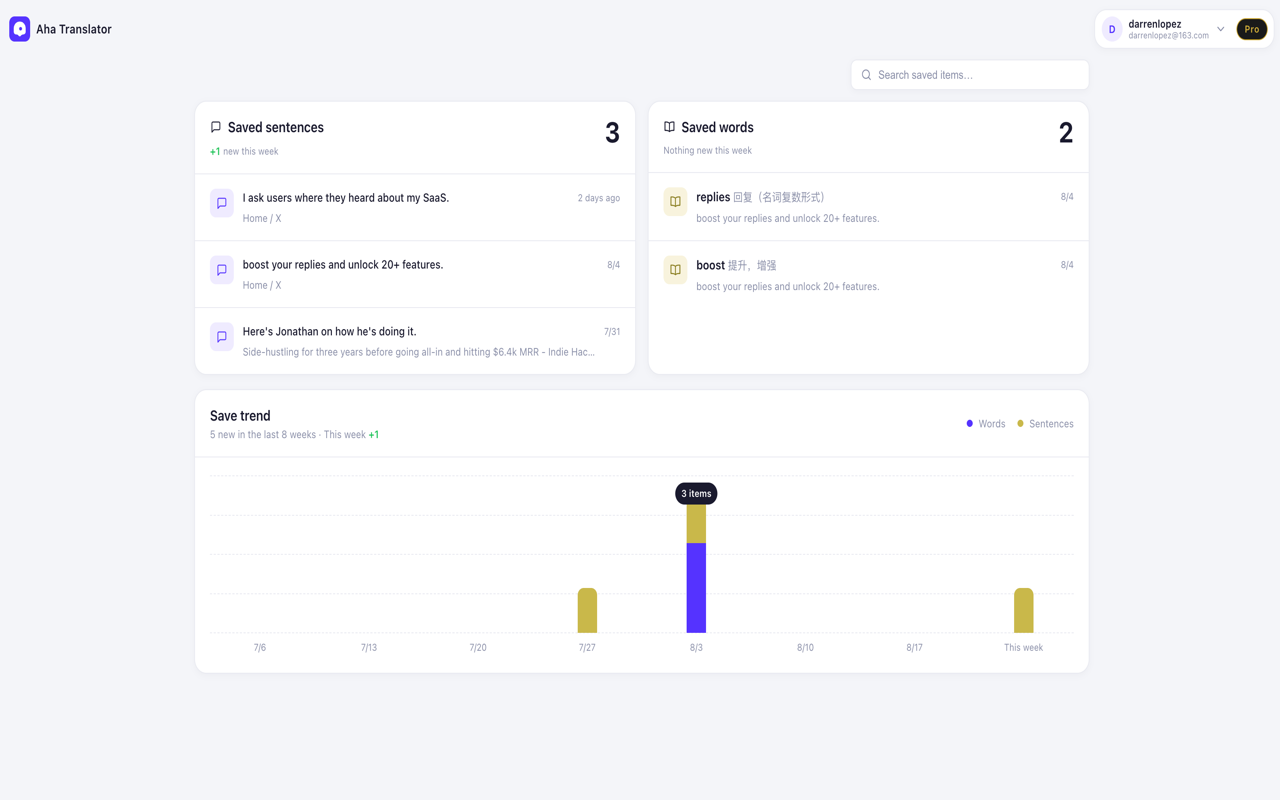
✅ Vocabulary notebook: save words and phrases with context, review with the
progress panel
✅ Free to start — no setup, no API key
When you need to reply to an email, message, comment, or post in English,
start by writing in your own language what you actually want to say. Aha
breaks the content into smaller parts and asks you to write each one in
English, with instant feedback and tips along the way.
Instead of translating the same thoughts over and over, you practice English
inside the messages you already needed to send.
The message still gets written — but this time, you also learn how to write
it.
How the method works
Aha Translator uses active recall writing: instead of handing you a ready-
made translation, it makes you produce it yourself, from memory.
The source text stays visible as a reference, and you write the English
word by word, in contrast with the original, with immediate correction on
every attempt. It's this constant contrast between what you already know how
to say and what you're still learning to say that actually locks the
vocabulary in — because active recall is proven to be far more effective for
memory than passively reading a ready-made translation.
And writing is only half of Aha.
While browsing the web, side-by-side bilingual translation helps you keep
reading without losing sight of the original English. If you want to
understand a sentence better, Aha can explain the vocabulary and grammar, or
let you ask the AI assistant directly, already loaded with the context of
that sentence.
That way, the articles, docs, Reddit posts, newsletters, and pages you
already wanted to read can become English study material based on your own
interests.
No need to find another textbook.
No artificial exercises disconnected from your life.
Read what you already wanted to read.
Write what you already needed to write.
And learn English along the way.
FAQ
What is "active recall writing"?
It's a learning method where you produce the answer from memory, instead of
just reading or copying a ready-made translation. Studies show active recall
locks in content far more durably than passive reading — it's the principle
behind Aha Translator's dictation method.
Do I need to already know English to use Aha Translator?
No. You write what you want to say in your own language, and Aha guides you
to write the English version, even if you don't know the sentence by heart.
Is Aha Translator free?
Yes. The free version includes dictation in any text box, side-by-side
translation, vocabulary and grammar analysis, and the notebook. Pro unlocks
the AI tutor and unlimited use.
What's the difference between Aha Translator and a regular translator?
A translator hands you the finished answer. Aha Translator makes you produce
that answer yourself, with word-by-word correction — so you learn while you
write, instead of just copying and pasting.
What sites does it work on?
Any text box — Gmail, LinkedIn, Slack, WhatsApp Web, and more — plus page
translation on any site you visit.

Comments


Hi Hunt 👋 I started this eight months ago as just another translation extension. Hover a paragraph, get the meaning. I spent months on it — five layers of caching, sentence-by-sentence alignment, all of it. Then I looked at what everyone in this space actually builds. Relingo highlights words for you. Trancy gives you subtitles. Grammarly fixes your sentences. DeepL writes them for you. Every single one helps you understand English. Not one helps you produce it. And I realized my own tool had the same problem. People were reading beautifully and still opening Google Translate the moment they had to reply to an email. So I rebuilt it around the opposite idea: you write the draft in your own language, and Aha makes you type it back out in English yourself — one chunk at a time, from memory, right inside the box you were going to send from. It tells you when you're close, and when you're wrong. Copy-paste gets the email sent. Writing it yourself is the only part that sticks. Free to try. I'd love to hear where it breaks for you.

Writing my own message first and then rebuilding it in English piece by piece is a clever way to make practice happen inside real work, not in a separate lesson. How do you split the original text into parts: by clause, or by fixed length? For languages where word order is very different from English, like Japanese or German, the split point probably decides whether each part can be written naturally on its own. Also curious whether there's a quick mode for days when I just need the reply sent and want to do the exercise later.
Clever approach to language learning! Using dictation and active recall instead of passive translation is backed by solid research. The side-by-side bilingual browsing feature is brilliant — turning everyday reading into practice without extra effort. This could be a game-changer for non-native speakers who want to improve naturally.

Writing it in your own language first and rebuilding it piece by piece in English is a smart way around the translate-and-paste habit. For Hebrew speakers this would be great for emails to professors. Does it handle right-to-left input on the source side, and does the vocabulary notebook keep the original sentence so you can review words in context?
Premium Products










































Sponsors
Buy

Awards
View all
Awards
View allComments
Hi Hunt 👋 I started this eight months ago as just another translation extension. Hover a paragraph, get the meaning. I spent months on it — five layers of caching, sentence-by-sentence alignment, all of it. Then I looked at what everyone in this space actually builds. Relingo highlights words for you. Trancy gives you subtitles. Grammarly fixes your sentences. DeepL writes them for you. Every single one helps you understand English. Not one helps you produce it. And I realized my own tool had the same problem. People were reading beautifully and still opening Google Translate the moment they had to reply to an email. So I rebuilt it around the opposite idea: you write the draft in your own language, and Aha makes you type it back out in English yourself — one chunk at a time, from memory, right inside the box you were going to send from. It tells you when you're close, and when you're wrong. Copy-paste gets the email sent. Writing it yourself is the only part that sticks. Free to try. I'd love to hear where it breaks for you.
Writing my own message first and then rebuilding it in English piece by piece is a clever way to make practice happen inside real work, not in a separate lesson. How do you split the original text into parts: by clause, or by fixed length? For languages where word order is very different from English, like Japanese or German, the split point probably decides whether each part can be written naturally on its own. Also curious whether there's a quick mode for days when I just need the reply sent and want to do the exercise later.
Clever approach to language learning! Using dictation and active recall instead of passive translation is backed by solid research. The side-by-side bilingual browsing feature is brilliant — turning everyday reading into practice without extra effort. This could be a game-changer for non-native speakers who want to improve naturally.
Writing it in your own language first and rebuilding it piece by piece in English is a smart way around the translate-and-paste habit. For Hebrew speakers this would be great for emails to professors. Does it handle right-to-left input on the source side, and does the vocabulary notebook keep the original sentence so you can review words in context?
Premium Products
New to Fazier?

Find your next favorite product or submit your own. Made by @FalakDigital.
Copyright ©2026. All Rights Reserved