
12pixa
Turn any image into a clean SVG, right in your browser
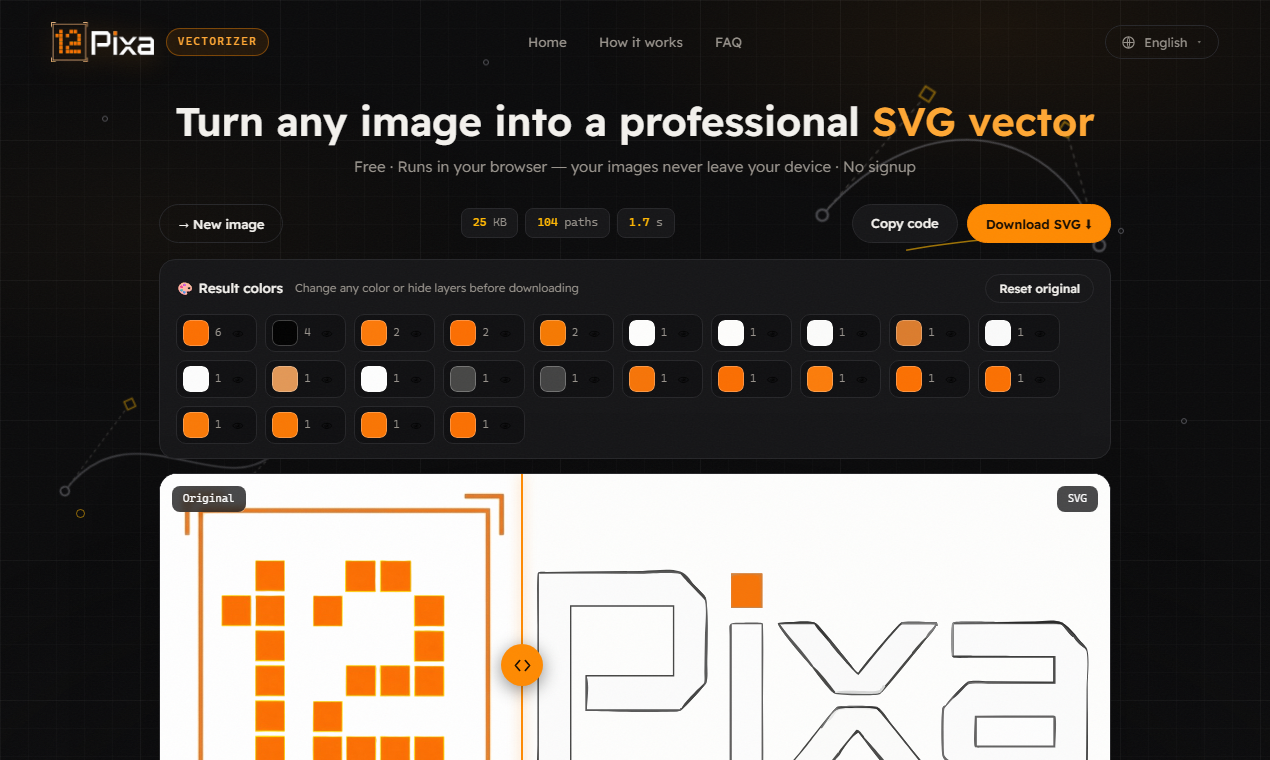
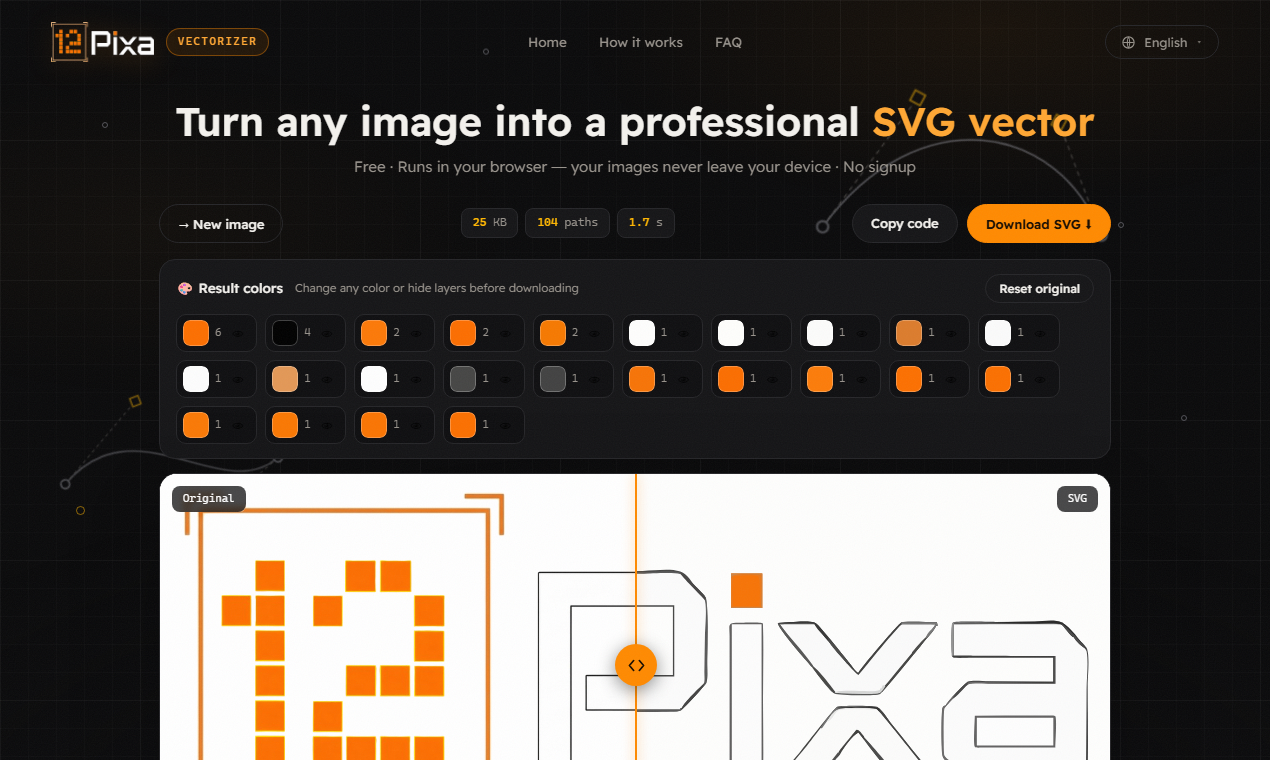
12pixa turns any image into a clean SVG — entirely inside your browser. The tracing engine (VTracer, compiled to WebAssembly) runs locally, so your file never leaves your machine: no upload, no server, no rate limit, and it keeps working offline once the page has loaded.
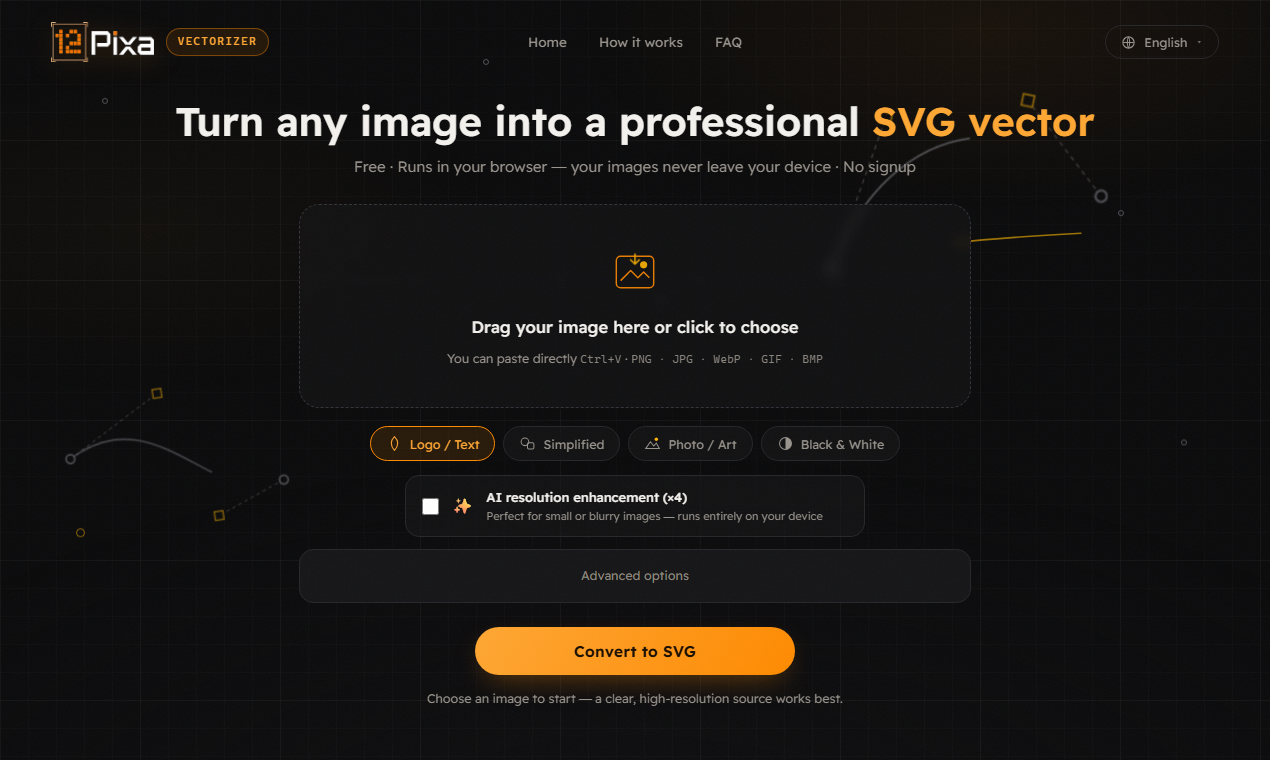
Presets for logos, lettering, artwork, photos and B&W stamps, plus a built-in colour and layer editor that lets you recolour any layer or drop the background before export. Output is standard SVG that opens in Illustrator, Inkscape and Figma.
Free, no account, no watermark, no limits — available in English, Arabic, Spanish, French, German and Turkish.

Comments


Hey Fazier 👋 I originally shipped a site with 65 small image tools. Almost nobody used 64 of them — so I deleted them and kept the one people kept coming back to: the image-to-SVG vectorizer. The hardest bug was in the colour editor. Grouping traced paths by exact hex looks fine on a synthetic test logo, but a real photographed emblem produced 3,122 distinct colours across 3,428 paths — so the top 24 swatches covered 2% of the image and clicking one did nothing visible. Switching to perceptual clustering with a weighted-RGB distance collapsed it to 18 layers covering 100% of paths. Everything runs client-side (VTracer compiled to WebAssembly), so your file never touches a server. That was the whole reason I built it — I wasn't willing to upload a client's unreleased logo to a random service. Free, no account, no watermark, no limits. I'd rather hear what it gets wrong than what it gets right — thin script fonts and scanned drawings are where most tracers fall apart.


This is elegantly simple - converting any image to clean SVG directly in the browser is exactly what many designers need. The offline-first approach is smart, especially for handling proprietary or sensitive designs. The perceptual color clustering solution you described is a great example of shipping focused solutions rather than bloated feature sets.


The perceptual-clustering fix is the interesting part — collapsing 3,122 exact-hex colours down to 18 weighted-RGB layers is exactly why per-hex grouping falls apart on real photos. Since you flagged thin script fonts and scanned drawings as the weak spots: for scans, does a light denoise/threshold pass before tracing help, or does it just eat the hairlines you're trying to keep? And on script fonts, is the loss more about curve-fitting tolerance than colour clustering? Client-side via VTracer is the right call here — nobody should be uploading an unreleased logo to a random tracer.

Really respect the "65 tools down to 1" story — that's the discipline most multi-tool sites are missing (I run a calculator site myself, so I get the temptation to keep adding features nobody uses). Also glad it's WASM-based so client files never leave the browser — that's a real concern for design work. Bookmarking this.


hey try indihunt also it is provideing free ads of upto 1000 dollars https://indihunt.in/


Reducing 65 tools to the one people actually used is a strong product decision. Local WASM and offline support also make this practical for unreleased brand assets. One useful addition could be showing path count and SVG file size before export, since a visually clean trace can still slow down Figma. Do you already simplify paths, or offer a fidelity-versus-complexity control?

The VTracer-in-WASM setup is the right call for unreleased logos. After perceptual clustering, can I merge two layers before export, or only recolour them? 18 layers beats 3,122 hexes, but Figma still gets noisy if I only needed the mark plus one background. Thin script fonts are where tracers usually lose hairlines — is curve-fitting tolerance exposed, or only baked into the logo/lettering presets?

The VTracer-in-WASM setup is the right call for unreleased logos. After perceptual clustering, can I merge two layers before export, or only recolour them? 18 layers beats 3,122 hexes, but Figma still gets noisy if I only needed the mark plus one background. Thin script fonts are where tracers usually lose hairlines — is curve-fitting tolerance exposed, or only baked into the logo/lettering presets?

12pixa Your product has strong potential, but I found a few key improvements that could make it even better. I'd love to share my feedback and suggestions—please contact me at [email protected].

Localizing a free tool into six languages including Arabic is the detail that stands out — almost nobody takes RTL seriously in editor UIs. Was mirroring the layer/colour editor much extra work on top of the translations, and do the non-English versions pull meaningful usage? The 65-tools-down-to-1 story is the best kind of focus.

So I spent the past year building the version I actually wanted. No signup, no email collection, no registration, no ads on any plan including the free one. You make a poll, share a link, and nobody has to create anything. Not you, not the people answering. Everyone tells me I need to collect emails for this to work and they're probably right. But I get enough email already and I didn't want to be another thing in someone's inbox.

12pixa running VTracer as WebAssembly locally is the part that sells it for me, since an unreleased client logo never leaves the machine. The layer editor that lets you recolour or drop the background before export saves the usual round trip into Illustrator. Curious how the B&W stamp preset handles scanned line drawings, since that's where most tracers get noisy. Nice that it keeps working offline once the page has loaded.

Since you're already on perceptual clustering with weighted-RGB, OKLab is worth trying in the same code path — weighted-RGB is a reasonable approximation but it falls apart in blues and purples, where it merges colours a human reads as clearly distinct. Same ΔE threshold idea, just perceptually uniform. On scanned drawings, the thing that usually kills tracing isn't the tracer — it's JPEG ringing plus paper texture feeding noise into the speckle filter. A light median pre-pass on the luminance channel before you trace tends to buy more than any tracer parameter does.


The colour-grouping story in your comment resonates — I build a browser-based screenshot editor and hit the same wall with traced logos: exact-hex grouping falls apart the moment the source is a photo rather than a flat design. Did you end up clustering perceptually (Lab/ΔE) or capping the palette at trace time? Also curious how you keep path counts sane for web export — 3,000+ paths from one emblem gets heavy fast when the SVG ends up inlined as a data URI. Killing 64 tools to keep the one people actually used is the hardest and most correct call in the whole story.


Deleting 64 tools to keep the one people returned to is the hard part, and there is a second payoff you may not have priced in: it changes what directories will accept you. I have been submitting a product to directories this week and read the rejection rules properly for once. AlternativeTo lists what it will not approve, and "collections of online tools" is on it, right next to "basic AI tools" and "simple converters". A site with 65 image utilities reads as exactly that category and gets declined without anyone opening it. One tool that does a specific job with a real engine behind it does not. So the cut did not just clarify the product — it moved you out of a bucket that several directories reject on sight. Worth saying out loud in your listings, because it is invisible from the outside. On what it gets wrong: you asked, so the case I would test is screenshots of dark UIs. Anti-aliased light text on a dark background is where I would expect perceptual clustering to fight itself — the halo pixels around each glyph sit perceptually between the text and the background, so they either merge into the background and thin the letterforms, or become their own layer and give every glyph an outline. Thin script fonts have the same problem for a different reason. If it holds up there, it will hold up on most logos.

12pixa looks genuinely useful. Running VTracer locally through WebAssembly is a strong differentiator—especially for designers working with confidential client assets who don’t want to upload files to a third-party server. The presets and built-in layer editor also make it more practical than a basic image tracer. Free, private, offline-capable, and compatible with Illustrator, Inkscape, and Figma is a compelling combination. I’d be curious to see how the results compare with Illustrator’s Image Trace on detailed logos and photographs. Congrats on the launch!

Really resonates — I built a browser-based image tool myself (compress/resize/convert, no uploads) so I know exactly why "the file never leaves the machine" matters, especially once WASM makes it viable to keep everything client-side. The perceptual-clustering story for logo colors is a great example of the kind of edge case that only shows up once real users hit it. Curious whether WASM startup time (loading VTracer) is noticeable on first load, or negligible in practice?

I tried the landing page, and the four presets—Logo/Text, Simplified, Photo/Art, and Black & White—make the choice clearer than a large advanced-settings panel. One thing that would help before uploading is a small before-and-after example for each preset, especially because Photo/Art intentionally creates a poster-like result rather than an identical photo. Would you consider showing those sample pairs beside the preset buttons?


Premium Products




















































Sponsors
Buy



Makers
Makers
Comments
Hey Fazier 👋 I originally shipped a site with 65 small image tools. Almost nobody used 64 of them — so I deleted them and kept the one people kept coming back to: the image-to-SVG vectorizer. The hardest bug was in the colour editor. Grouping traced paths by exact hex looks fine on a synthetic test logo, but a real photographed emblem produced 3,122 distinct colours across 3,428 paths — so the top 24 swatches covered 2% of the image and clicking one did nothing visible. Switching to perceptual clustering with a weighted-RGB distance collapsed it to 18 layers covering 100% of paths. Everything runs client-side (VTracer compiled to WebAssembly), so your file never touches a server. That was the whole reason I built it — I wasn't willing to upload a client's unreleased logo to a random service. Free, no account, no watermark, no limits. I'd rather hear what it gets wrong than what it gets right — thin script fonts and scanned drawings are where most tracers fall apart.
This is elegantly simple - converting any image to clean SVG directly in the browser is exactly what many designers need. The offline-first approach is smart, especially for handling proprietary or sensitive designs. The perceptual color clustering solution you described is a great example of shipping focused solutions rather than bloated feature sets.
The perceptual-clustering fix is the interesting part — collapsing 3,122 exact-hex colours down to 18 weighted-RGB layers is exactly why per-hex grouping falls apart on real photos. Since you flagged thin script fonts and scanned drawings as the weak spots: for scans, does a light denoise/threshold pass before tracing help, or does it just eat the hairlines you're trying to keep? And on script fonts, is the loss more about curve-fitting tolerance than colour clustering? Client-side via VTracer is the right call here — nobody should be uploading an unreleased logo to a random tracer.
Really respect the "65 tools down to 1" story — that's the discipline most multi-tool sites are missing (I run a calculator site myself, so I get the temptation to keep adding features nobody uses). Also glad it's WASM-based so client files never leave the browser — that's a real concern for design work. Bookmarking this.
hey try indihunt also it is provideing free ads of upto 1000 dollars https://indihunt.in/
Reducing 65 tools to the one people actually used is a strong product decision. Local WASM and offline support also make this practical for unreleased brand assets. One useful addition could be showing path count and SVG file size before export, since a visually clean trace can still slow down Figma. Do you already simplify paths, or offer a fidelity-versus-complexity control?
The VTracer-in-WASM setup is the right call for unreleased logos. After perceptual clustering, can I merge two layers before export, or only recolour them? 18 layers beats 3,122 hexes, but Figma still gets noisy if I only needed the mark plus one background. Thin script fonts are where tracers usually lose hairlines — is curve-fitting tolerance exposed, or only baked into the logo/lettering presets?
The VTracer-in-WASM setup is the right call for unreleased logos. After perceptual clustering, can I merge two layers before export, or only recolour them? 18 layers beats 3,122 hexes, but Figma still gets noisy if I only needed the mark plus one background. Thin script fonts are where tracers usually lose hairlines — is curve-fitting tolerance exposed, or only baked into the logo/lettering presets?
12pixa Your product has strong potential, but I found a few key improvements that could make it even better. I'd love to share my feedback and suggestions—please contact me at [email protected].
Localizing a free tool into six languages including Arabic is the detail that stands out — almost nobody takes RTL seriously in editor UIs. Was mirroring the layer/colour editor much extra work on top of the translations, and do the non-English versions pull meaningful usage? The 65-tools-down-to-1 story is the best kind of focus.
So I spent the past year building the version I actually wanted. No signup, no email collection, no registration, no ads on any plan including the free one. You make a poll, share a link, and nobody has to create anything. Not you, not the people answering. Everyone tells me I need to collect emails for this to work and they're probably right. But I get enough email already and I didn't want to be another thing in someone's inbox.
12pixa running VTracer as WebAssembly locally is the part that sells it for me, since an unreleased client logo never leaves the machine. The layer editor that lets you recolour or drop the background before export saves the usual round trip into Illustrator. Curious how the B&W stamp preset handles scanned line drawings, since that's where most tracers get noisy. Nice that it keeps working offline once the page has loaded.
Since you're already on perceptual clustering with weighted-RGB, OKLab is worth trying in the same code path — weighted-RGB is a reasonable approximation but it falls apart in blues and purples, where it merges colours a human reads as clearly distinct. Same ΔE threshold idea, just perceptually uniform. On scanned drawings, the thing that usually kills tracing isn't the tracer — it's JPEG ringing plus paper texture feeding noise into the speckle filter. A light median pre-pass on the luminance channel before you trace tends to buy more than any tracer parameter does.
The colour-grouping story in your comment resonates — I build a browser-based screenshot editor and hit the same wall with traced logos: exact-hex grouping falls apart the moment the source is a photo rather than a flat design. Did you end up clustering perceptually (Lab/ΔE) or capping the palette at trace time? Also curious how you keep path counts sane for web export — 3,000+ paths from one emblem gets heavy fast when the SVG ends up inlined as a data URI. Killing 64 tools to keep the one people actually used is the hardest and most correct call in the whole story.
Deleting 64 tools to keep the one people returned to is the hard part, and there is a second payoff you may not have priced in: it changes what directories will accept you. I have been submitting a product to directories this week and read the rejection rules properly for once. AlternativeTo lists what it will not approve, and "collections of online tools" is on it, right next to "basic AI tools" and "simple converters". A site with 65 image utilities reads as exactly that category and gets declined without anyone opening it. One tool that does a specific job with a real engine behind it does not. So the cut did not just clarify the product — it moved you out of a bucket that several directories reject on sight. Worth saying out loud in your listings, because it is invisible from the outside. On what it gets wrong: you asked, so the case I would test is screenshots of dark UIs. Anti-aliased light text on a dark background is where I would expect perceptual clustering to fight itself — the halo pixels around each glyph sit perceptually between the text and the background, so they either merge into the background and thin the letterforms, or become their own layer and give every glyph an outline. Thin script fonts have the same problem for a different reason. If it holds up there, it will hold up on most logos.
12pixa looks genuinely useful. Running VTracer locally through WebAssembly is a strong differentiator—especially for designers working with confidential client assets who don’t want to upload files to a third-party server. The presets and built-in layer editor also make it more practical than a basic image tracer. Free, private, offline-capable, and compatible with Illustrator, Inkscape, and Figma is a compelling combination. I’d be curious to see how the results compare with Illustrator’s Image Trace on detailed logos and photographs. Congrats on the launch!
Really resonates — I built a browser-based image tool myself (compress/resize/convert, no uploads) so I know exactly why "the file never leaves the machine" matters, especially once WASM makes it viable to keep everything client-side. The perceptual-clustering story for logo colors is a great example of the kind of edge case that only shows up once real users hit it. Curious whether WASM startup time (loading VTracer) is noticeable on first load, or negligible in practice?
I tried the landing page, and the four presets—Logo/Text, Simplified, Photo/Art, and Black & White—make the choice clearer than a large advanced-settings panel. One thing that would help before uploading is a small before-and-after example for each preset, especially because Photo/Art intentionally creates a poster-like result rather than an identical photo. Would you consider showing those sample pairs beside the preset buttons?
Premium Products
New to Fazier?

Find your next favorite product or submit your own. Made by @FalakDigital.
Copyright ©2026. All Rights Reserved