
XreplyAI
AI social media tool that posts and replies in your voice
## Overview
XreplyAI is built for solo founders, indie hackers, consultants, and B2B creators who know that consistent social presence drives inbound leads — but don't have hours a day to spend on
it.
Most social media tools help you schedule posts. XreplyAI goes further: it learns how you write, then generates posts and replies that sound like you — not a generic AI template. Your
audience never knows AI was involved.
It covers X, LinkedIn, Instagram, Threads, YouTube, and TikTok from one dashboard.
## Getting Started
1. Sign up at xreplyai.com
2. Connect your social accounts (X, LinkedIn, Instagram, Threads, YouTube, TikTok)
3. Upload your Twitter archive to build your voice profile
4. Set up your Content Planner with your topics and posting schedule
5. Install the Chrome extension for AI reply generation on X
6. Review and approve your first batch of generated posts
Setup takes under 15 minutes.
## Pricing & Plans
| Plan | Price | AI | Replies | Scheduling |
|------|-------|----|---------|------------|
| BYOK | $19/mo ($15.83/mo annual) | Your key | Unlimited | Unlimited horizon |
| Pro | $49.99/mo ($41.66/mo annual) | Platform-provided | 100/day | 7-day horizon |
7-day free trial on both plans. 17% discount on annual billing.
Features
**Voice Profile**
Upload your Twitter/X archive and XreplyAI analyzes 50–1,000+ of your own posts to build a personal voice model. It scores your writing across six dimensions — formality, expression,
density, humor, assertiveness, and abstraction — and applies that profile to everything it generates. You can also upload LinkedIn, Instagram, or Threads exports as alternative voice
sources.
**Content Planner**
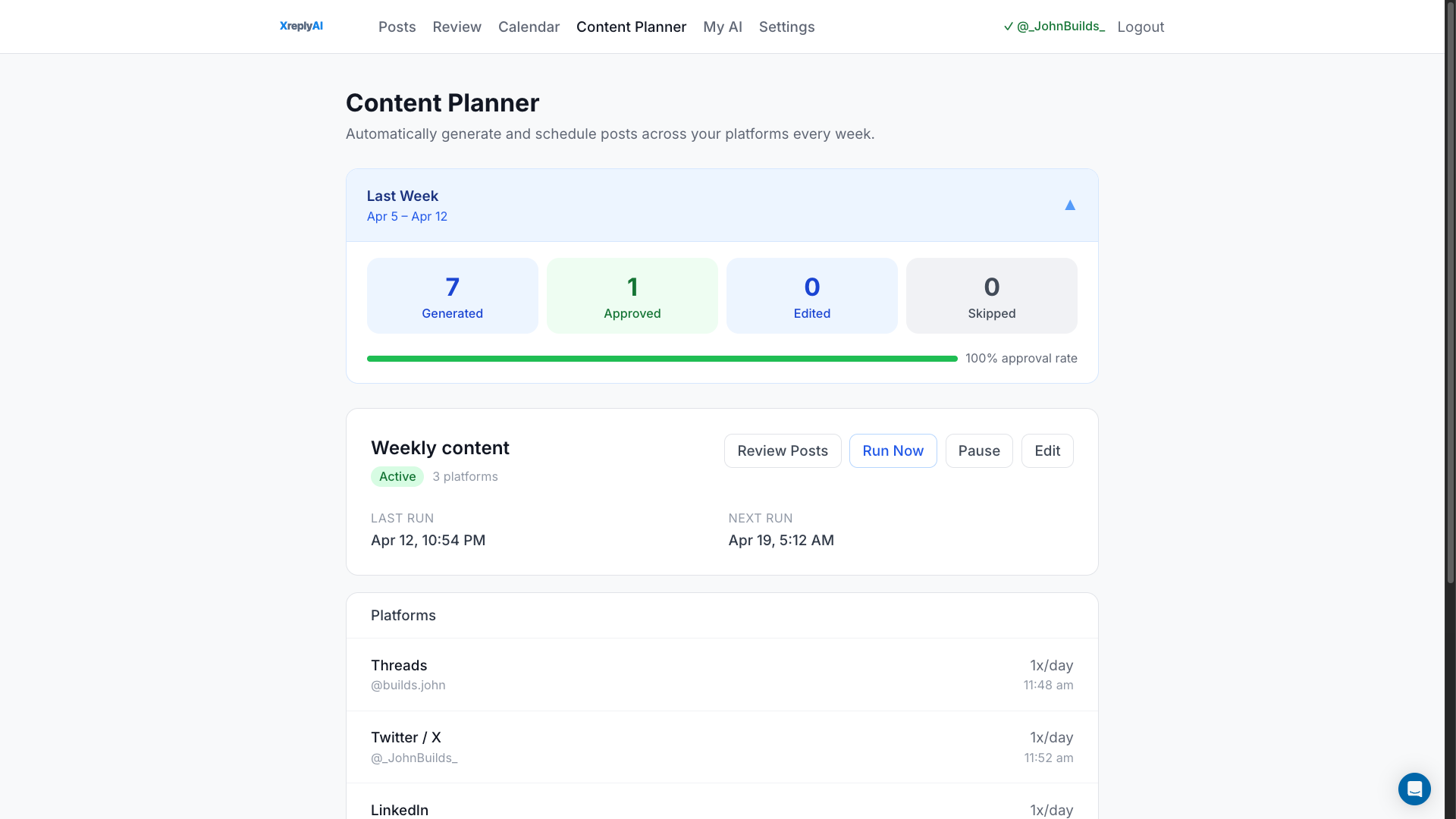
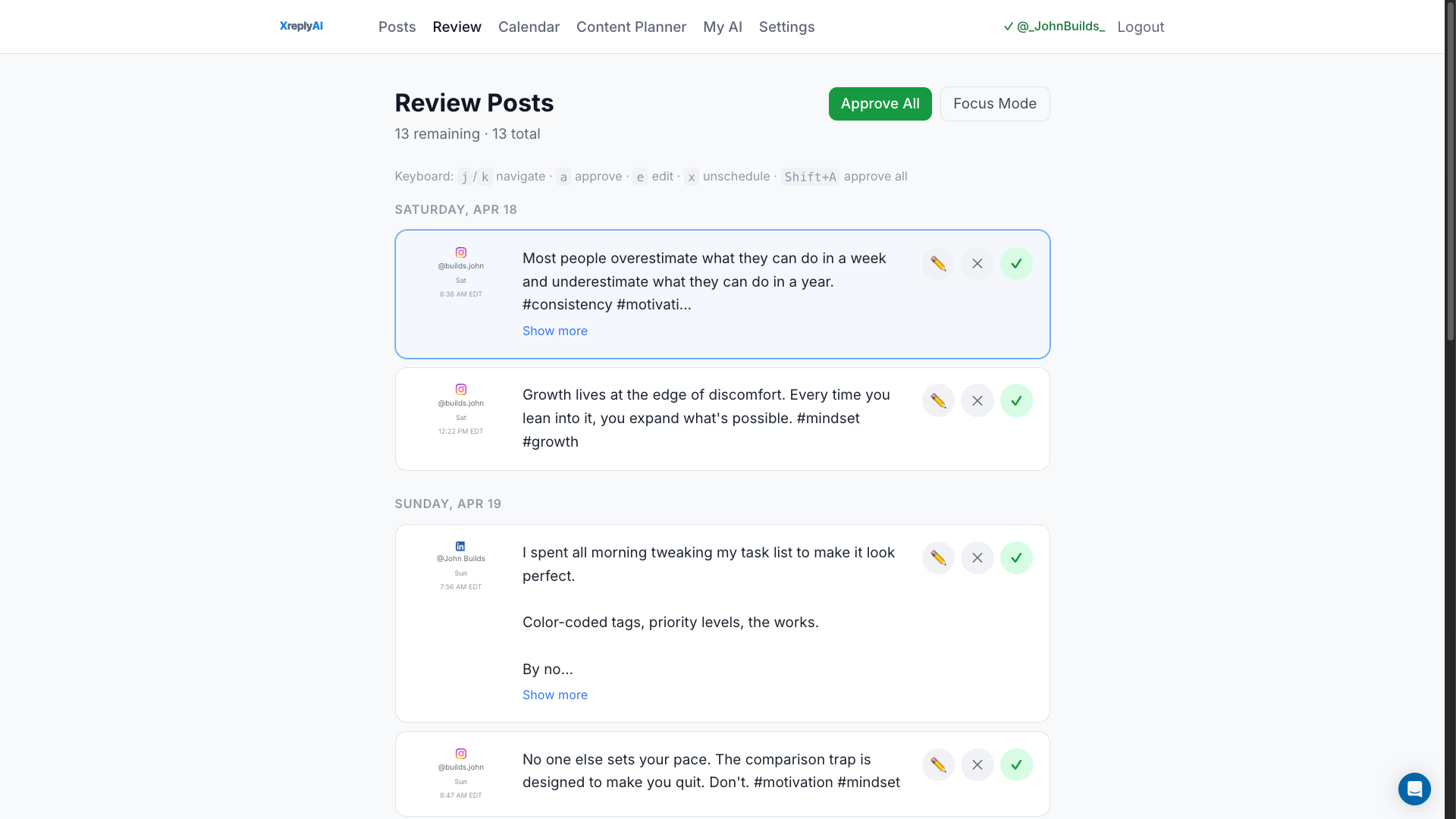
Set your topics, posting times, and content angles once. XreplyAI auto-generates posts on a rolling weekly schedule across all your connected platforms. Each week a fresh batch is created
and queued for your review — you approve, edit, or skip. No blank page, no scrambling for ideas.
**Multi-Platform Composer**
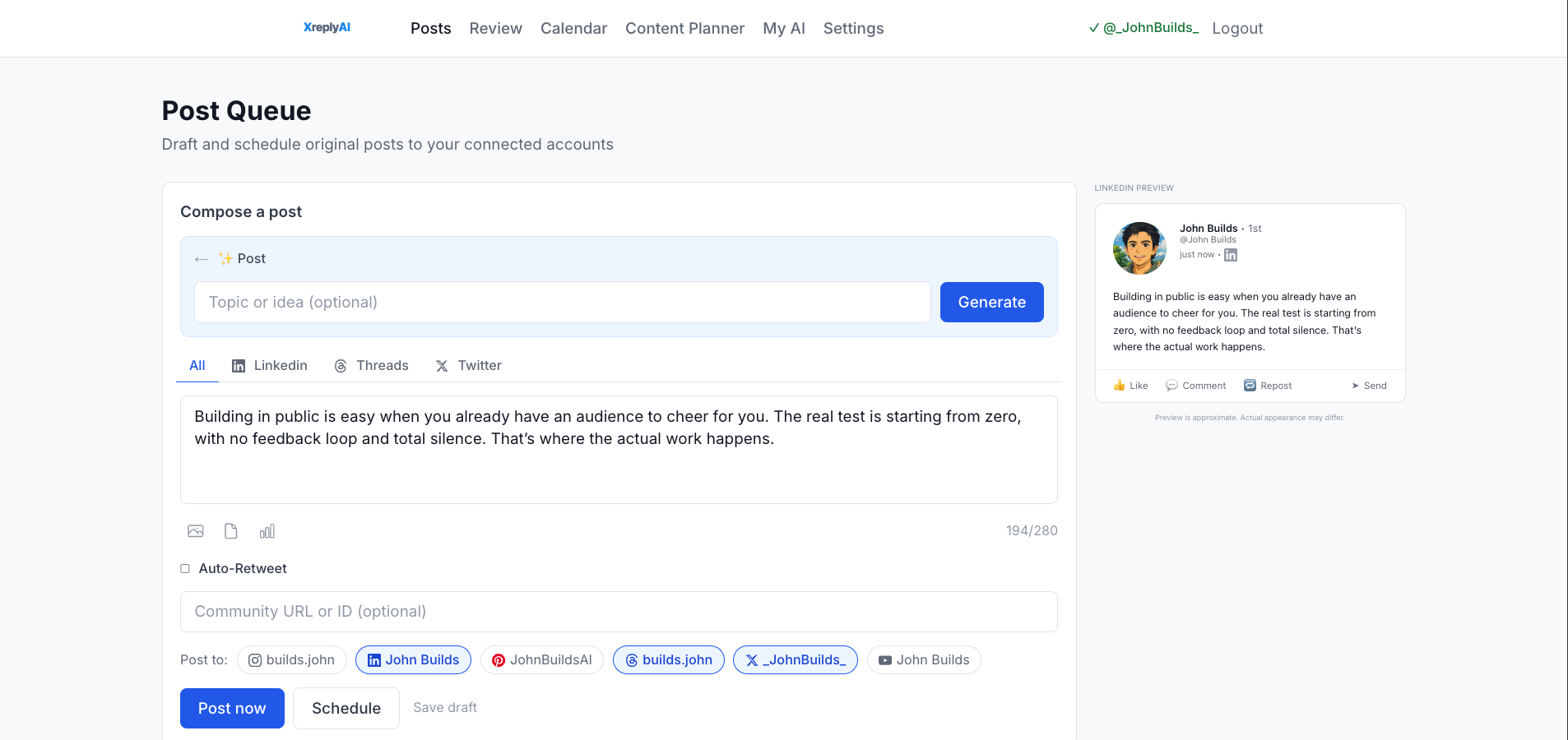
Write once, adapt per platform, publish to 6 platforms from one place. Each platform gets its own content body with platform-native defaults (character limits, hashtag rules, CTA style).
Expired-token platforms are skipped with a summary rather than blocking the whole post.
**AI Reply Generation**
A Chrome extension injects a reply button directly into X.com — on the home feed, profiles, notifications, and TweetDeck. Click it, get a reply in your voice. Thread-aware, with tone and structure controls (one-liner, paragraph, question, list, story arc) and up to 5 regenerations per session.
**Batch Post Generation**
Generate 1–9 posts at once from a topic and angle. Three categories: Personalized (your voice), Trending (timely takes), Viral (high-engagement formats).
**Engagement Queue**
Capture tweets from X.com to reply to later. Draft replies in bulk. Statuses track from captured through to posted.
**BYOK Model**
Connect your own Gemini or OpenAI API key and pay your AI provider directly.
**MCP Server**
Create, schedule, and publish posts via Claude Code, Cursor, or any MCP-compatible AI client — without opening the dashboard.
Use Cases
- **Founders building in public** — stay visible in your niche without posting manually every day
- **Consultants and freelancers** — run a consistent reply strategy for inbound leads without burning out
- **B2B creators** — keep a presence across multiple platforms from one place, in one voice
- **Indie hackers** — ship and market simultaneously without splitting your focus
Sponsors
Buy
Comments



This is way more useful than a basic scheduling tool. The fact that XreplyAI actually learns your writing style instead of generating robotic AI posts is a huge plus. Love the multi-platform support and the AI reply feature directly inside X — feels like a real productivity boost for founders and creators trying to stay consistent online without spending all day on social media.





After trying a lot of AI tools, I’ve realized the best ones aren’t always the most flashy — they’re the ones that consistently save you time. Some AI apps look amazing in demos, but don’t really help in real-world use. Meanwhile, simple tools that solve one problem well are the ones I keep coming back to. At this point, what I want most from AI software isn’t to be impressed — it’s reliability.

What makes XreplyAI interesting is the focus on preserving the creator’s actual writing style instead of generating generic “AI-sounding” content. The Twitter archive training approach is smart because tone consistency is one of the hardest parts of scaling social content. I also like the BYOK model since a lot of indie hackers already have OpenAI or Gemini access and prefer controlling their own API usage. The Chrome extension for contextual replies directly inside X feels especially practical for people trying to stay active without spending hours manually engaging every day.


The voice profile built from your Twitter archive is the right approach — most AI social tools sound generic because they have no context about how you actually write. The BYOK plan at $19 is smart for people already paying for API access. Would be useful to see a "before/after" example of a generated reply vs. what the user would have written themselves.
Premium Products




















Sponsors
Buy

Awards
View all
Awards
View allMakers

Makers
Comments
This is way more useful than a basic scheduling tool. The fact that XreplyAI actually learns your writing style instead of generating robotic AI posts is a huge plus. Love the multi-platform support and the AI reply feature directly inside X — feels like a real productivity boost for founders and creators trying to stay consistent online without spending all day on social media.
After trying a lot of AI tools, I’ve realized the best ones aren’t always the most flashy — they’re the ones that consistently save you time. Some AI apps look amazing in demos, but don’t really help in real-world use. Meanwhile, simple tools that solve one problem well are the ones I keep coming back to. At this point, what I want most from AI software isn’t to be impressed — it’s reliability.
What makes XreplyAI interesting is the focus on preserving the creator’s actual writing style instead of generating generic “AI-sounding” content. The Twitter archive training approach is smart because tone consistency is one of the hardest parts of scaling social content. I also like the BYOK model since a lot of indie hackers already have OpenAI or Gemini access and prefer controlling their own API usage. The Chrome extension for contextual replies directly inside X feels especially practical for people trying to stay active without spending hours manually engaging every day.
The voice profile built from your Twitter archive is the right approach — most AI social tools sound generic because they have no context about how you actually write. The BYOK plan at $19 is smart for people already paying for API access. Would be useful to see a "before/after" example of a generated reply vs. what the user would have written themselves.
Premium Products
New to Fazier?

Find your next favorite product or submit your own. Made by @FalakDigital.
Copyright ©2025. All Rights Reserved