
Techmind Click
Free Online Text Formatter & Case Converter
Free Text Conversion, Slug Generator & Formatting Tools for Developers, SEO & Content Cleanup
Use powerful online tools to convert text case, generate SEO-friendly URL slugs, remove extra spaces, clean line breaks, format content, and optimize text structure for websites, coding projects, documents, and AI-readable content.
Our platform provides simple and fast text formatting utilities designed for developers, SEO professionals, students, bloggers, marketers, and everyday users. Easily transform uppercase text to lowercase, generate clean URL slugs, convert snake_case, remove duplicate spaces, clean unwanted line breaks, and format text instantly without installing any software.
These tools help improve readability, text consistency, website formatting, SEO optimization, coding workflows, and structured content organization. Whether you are preparing website content, cleaning copied text, formatting database values, or generating search-friendly URLs, our utilities make the process faster and easier.
Explore free online text conversion tools including case converters, whitespace removers, slug generators, snake case converters, camel case tools, line break removers, text cleanup utilities, and other formatting solutions built for modern web usage.
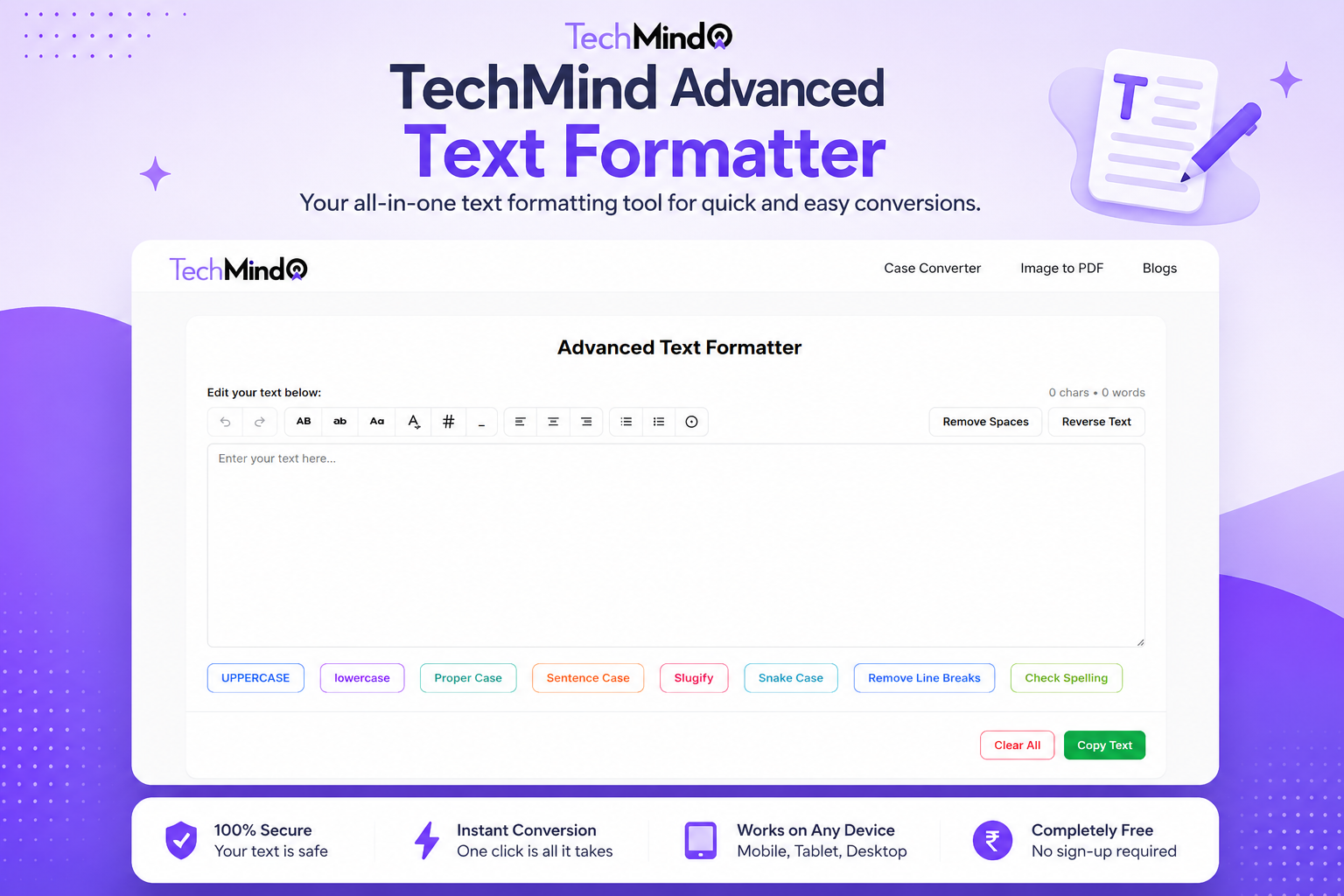
Features
It sounds like you are mapping out a comprehensive suite of text-processing and utility tools—perfect for a robust web application or an all-in-one developer toolbox.
To help you build, structure, or implement these, here is a functional breakdown of how each tool behaves, along with its core logic:
1. Case Converters
- Uppercase: Converts every character in the string to capital letters.
- Example: hello world $\rightarrow$ HELLO WORLD
- Lowercase: Converts every character to small letters.
- Example: HELLO WORLD $\rightarrow$ hello world
- Title Case: Capitalizes the first letter of every major word (often omitting short articles/prepositions like "and", "the", "of" unless they start the sentence).
- Example: the lord of the rings $\rightarrow$ The Lord of the Rings
- Sentence Case: Capitalizes only the very first letter of a sentence and proper nouns.
- Example: this is a test. another test. $\rightarrow$ This is a test. Another test.
2. URL & Developer Cleaners
- Slug Generator: Converts a string into a URL-friendly format by lowering the case, removing special characters, and replacing spaces with hyphens.
- Example: What is Tailwind v4? $\rightarrow$ what-is-tailwind-v4
- Snake Case Converter: Replaces spaces and punctuation with underscores and converts all text to lowercase. Frequently used for database column names or variable formatting.
- Example: Home District $\rightarrow$ home_district
- Slug Remover: Reverses a URL slug back into a clean, readable text string by replacing hyphens or underscores with spaces and capitalizing as needed.
- Example: my-new-post $\rightarrow$ My New Post
3. Formatting & Text Cleaners
- Line Break Remover: Strips out unwanted newline characters ($\backslash$n or $\backslash$r) to compress paragraphs into a single continuous block of text. Often includes an option to replace line breaks with a single space.
- Text Formatting: A collection of quick actions to strip double spaces, trim leading/trailing whitespace, remove tabs, or fix erratic punctuation layout.
4. Analytical Tools
- Character Counter: Counts the total number of characters in a string. It typically offers a toggle to count "with spaces" or "without spaces."
- Word Counter: Splices the text based on whitespace blocks to provide an accurate tally of the total words, often tracking sentence and paragraph counts alongside it.
5. Advanced Utilities
- Spelling Checker: Integrates an engine (like Hunspell) or a browser-native API to scan text, highlight grammatical or typographical errors, and suggest context-aware fixes.
- Image to PDF Converter: A client-side or server-side tool that takes uploaded images (PNG, JPEG, WebP) and compiles them sequentially into a downloadable PDF document.
Are you building these utilities into a specific web application project, or looking for the implementation code (like JavaScript/PHP functions) for some of these specific tools?
Use Cases
Here is a comprehensive breakdown of Use Cases for your utility toolbox application. These use cases define how different users (content writers, developers, and everyday users) interact with the tools to solve specific problems.
1. Content Creation & Copywriting Use Cases
Use Case: Preparing Social Media Copy
- User: Social Media Manager / Content Writer
- Goal: Clean up a rough draft of a post for platforms like X (Twitter) or LinkedIn.
- Flow:
- The user pastes a rough paragraph into the Word & Character Counter to ensure it fits character limits.
- They use the Line Break Remover to turn a poorly formatted, fragmented list into a clean, continuous paragraph.
- They apply Title Case Converter to the main headline to make it stand out.
- They run the Spelling Checker to fix any typos before publishing.
Use Case: Standardizing Article Headlines
- User: Blogger / SEO Specialist
- Goal: Ensure all blog headlines follow proper grammatical formatting.
- Flow:
- The user inputs a raw, lowercase headline (e.g., 10 tips for tailwind css v4 frameworks).
- They click Title Case or Sentence Case depending on their site's style guide.
- The system outputs: 10 Tips for Tailwind CSS v4 Frameworks.
2. Web Development & SEO Use Cases
Use Case: Generating SEO-Friendly URL Slugs
- User: Web Developer / SEO Specialist
- Goal: Create a clean URL from a blog post title.
- Flow:
- The user enters the title: How to Setup PHP CodeIgniter Configurations!.
- They select the Slug Generator.
- The system strips special characters, lowercase the text, and replaces spaces with hyphens.
- Output: how-to-setup-php-codeigniter-configurations
Use Case: Database Schema Formatting
- User: Backend Developer / Database Administrator
- Goal: Convert form field names or user-submitted text into standardized database column names.
- Flow:
- The user inputs a human-readable field label like Home District or Office Address.
- They run the Snake Case Converter.
- Output: home_district or office_address
Use Case: Cleaning Breadcrumbs or URL Variables
- User: Web Developer
- Goal: Convert a raw URL slug back into a readable page header.
- Flow:
- The user inputs a URL segment into the Slug Remover (e.g., latest-web-development-trends).
- The system removes the hyphens and applies capitalization.
- Output: Latest Web Development Trends
Sponsors
Buy
Comments


I wanted to share the story behind this utility toolbox. As a developer and content creator, I constantly found myself with 15 different browser tabs open just to do simple, everyday tasks. One minute I'm converting a client's design brief title into an SEO-friendly URL slug, the next I'm fixing erratic database column spacing, or wrestling with broken layout text copied straight out of a narrow PDF column.
Premium Products



















Sponsors
Buy

Makers
Makers
Comments
I wanted to share the story behind this utility toolbox. As a developer and content creator, I constantly found myself with 15 different browser tabs open just to do simple, everyday tasks. One minute I'm converting a client's design brief title into an SEO-friendly URL slug, the next I'm fixing erratic database column spacing, or wrestling with broken layout text copied straight out of a narrow PDF column.
Premium Products
New to Fazier?

Find your next favorite product or submit your own. Made by @FalakDigital.
Copyright ©2025. All Rights Reserved