
TryShelf
Find any file on your computer by describing it in plain wor
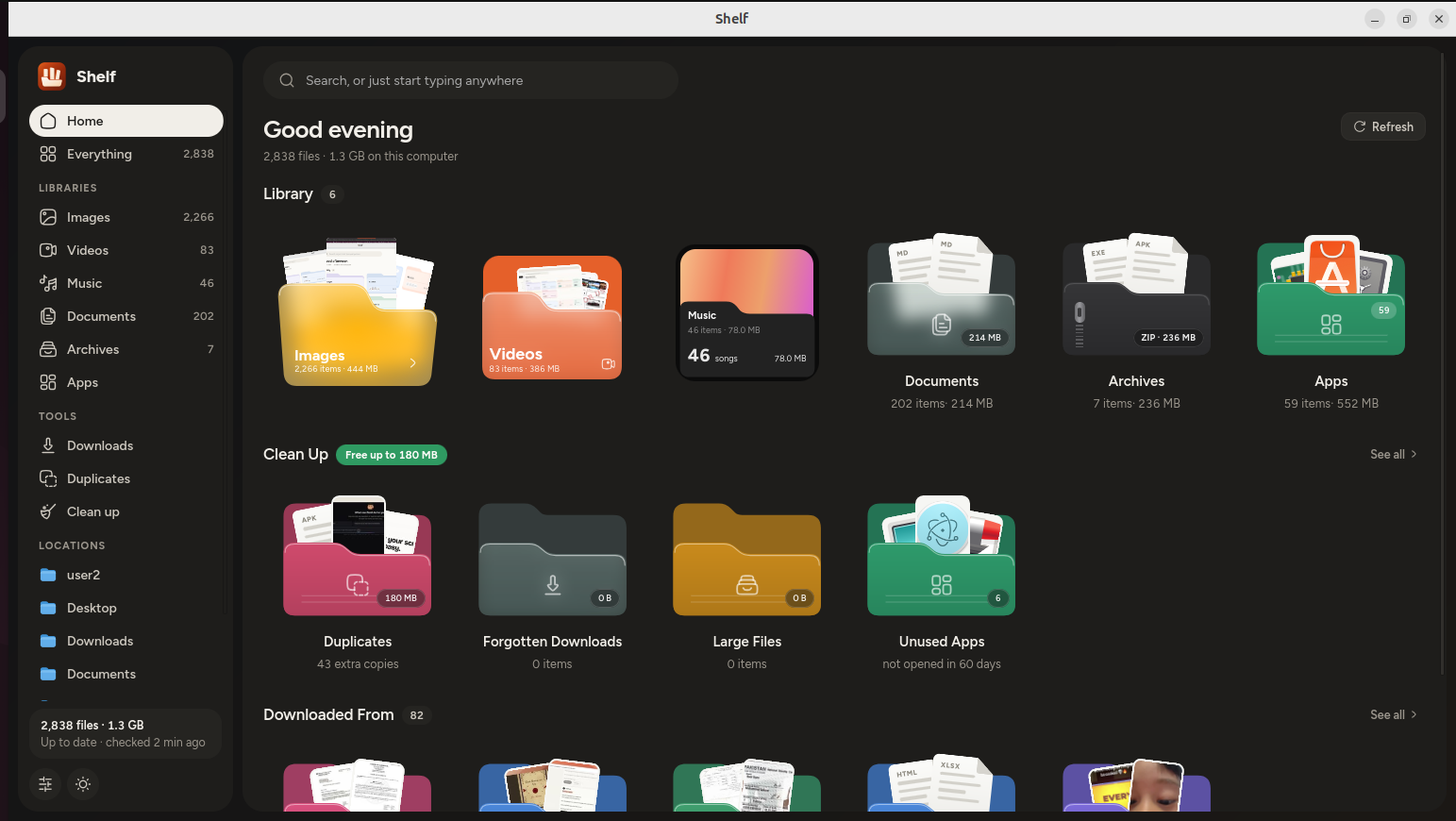
Shelf is a file finder for Windows and Linux. You type what you remember, like "pdfs from last week over 5 mb" or "screenshots from yesterday", and
Shelf finds the file in milliseconds. It sorts your computer into Images, Videos, Music, Documents, Archives and Apps, shows which site each download
came from, finds duplicate files and suggests what to clean up to free space. It comes with light and dark mode. Everything runs on your computer and
nothing is uploaded. $4.99 one time, with a 3 day free trial. tryshelf.fit

Comments

This looks genuinely useful — I often remember roughly what a file was about but not its exact name or folder. Searching by description, like “pdfs from last week over 5 mb”, is a much more natural way to find things. The local-only approach is a big plus for privacy, and the duplicate finder plus clean-up suggestions make it more than just a search tool. I would be keen to see how it handles a large photo library.
The download-source attribution is a detail I did not expect in a local file finder, and it is genuinely useful when you are cleaning out an old Downloads folder and cannot remember where a file came from. Two practical questions: does description search work while the first full index is still being built, or only after it finishes? And does the $4.99 one-time license include future updates, or just this version? Knowing both would make the 3-day trial much easier to evaluate.

Searching files by describing them ("pdfs from last week over 5 mb") is a natural way to find things, and showing which site a download came from is a detail I'd actually use. Does it index file contents or only names, dates and sizes? Also curious whether a macOS version is planned. I'm not building anything in this space, just a user who loses downloads often.


The natural-language search is the standout idea here — describing a file as "pdfs from last week over 5 mb" matches how I actually remember things, not how folders are organized. Keeping the index fully local is also a strong privacy choice. One question: does the search cover network drives or external disks, or only local drives? And does the duplicate finder compare across categories (Images, Documents, etc.) or only within each one?

This solves a real pain — I usually remember roughly what a file was about, not its exact name. The natural-language query ('pdfs from last week over 5 mb') plus showing where each download came from is the part I'd use most. One question: does the local index handle external drives as well, or just the main drive?

Great launch! It's always exciting to see new products helping businesses grow online. Looking forward to seeing more updates and improvements. For SEO resources, guest posting, and link-building services, check out https://idmreset.org/.

This solves a real pain — I usually remember roughly what a file was about, not its exact name or folder. Describing it in plain words feels much more natural than guessing filenames, and keeping everything local is a big plus for privacy. The duplicate finder and clean-up suggestions make it more than just a search tool. I would be keen to see how it handles a large photo library.

The natural-language search examples are a really practical use case. People often remember when they downloaded something rather than its exact filename. I also like the local-first approach and the duplicate file detection feature, which adds value beyond standard file search. One question: How does Shelf handle external drives and newly added files? Does it automatically refresh its index without noticeably affecting system performance?
The natural-language examples like “pdfs from last week over 5 MB” match how people actually remember files, and showing where a download came from is a surprisingly useful touch. Does Shelf refresh its index automatically for external drives and newly added files, and can it do that without slowing the machine?

Categorising files into Images, Videos, Music, Documents, Archives and Apps alongside the plain-language search like "pdfs from last week over 5 mb" is the combination I have been missing in a desktop finder. Does that query style support stacking conditions (a date range plus a size threshold), or does it fall back to keyword matching? Local-only processing with nothing uploaded and a one-time $4.99 with a 3-day trial is also a fair way to price this.


The natural-language search example that combines file type, date, and size is a practical fit for how people remember downloads, and showing each file’s source site is a thoughtful extra. Could you show whether indexing is complete and which drives are included, especially removable drives, before a search runs?

Searching by description instead of filename is how I actually remember files — "pdfs from last week over 5 MB" is exactly the query I'd type. The local-only angle matters here too: an index of everything on my disk is the last thing I'd want uploaded. The duplicate finder plus cleanup suggestions is the feature that would pay for the $4.99 on its own. Is there a macOS version planned, or is Windows/Linux the focus for now?


Congratulations on the launch! Searching by description instead of filename solves a real everyday problem — I often remember roughly what a file was about, not its exact name. The duplicate finder and download-source details are thoughtful touches, and keeping everything local with nothing uploaded is a strong privacy point. Does the search work across external drives as well? Best of luck!




Showing which site each download came from is the detail that makes this more than a search box. Since everything runs locally, I'm wondering how duplicate detection works on large folders: is it by file hash or by name and size, and does it ever read file contents in a way that slows down older machines?

The download-source label is a smart touch for anyone cleaning out an old Downloads folder. One thing I could not find in the description: can I exclude folders from indexing, like node_modules, .git or a Steam library? On a developer machine those can add hundreds of thousands of files and bury the results I actually want. A global hotkey that opens the search box from anywhere would also make Shelf a real everyday replacement for the built-in Windows search, which is where I see it saving the most time.

Congrats on the launch! Searching by description instead of a filename matches how I actually remember files — "pdfs from last week over 5 mb" is a great example. The local-only approach is a big plus for privacy, and the duplicate finder with download-source attribution is the feature I would use most when cleaning up. One question: is a macOS version planned, or is the focus staying on Windows and Linux for now?


The local-only angle is the real differentiator here — a file finder that never uploads anything is exactly what people want for personal documents, and the $4.99 one-time price makes it an easy decision. Searching by description ("pdfs from last week over 5 mb") matches how I actually remember files, not their exact names. Two questions: does the search read inside file contents, or match on names, dates and sizes? And how long does the first index take on a drive with, say, a few hundred thousand files? Congrats on the launch!

Does the plain-language search only look at file names, dates and sizes, or can it also match words inside documents? Something like "the invoice that mentions Acme" is how I usually remember PDFs. Also curious whether it indexes external drives and network folders, since that is where most of my old files end up.

Searching by description instead of folder is a good fit for the real problem: I remember what a file was, not what I named it. The queries like "pdfs from last week over 5 mb" show it handles date and size filters, not just keywords. Question: does it index file contents, or only names, types, dates and sizes? And how does it cope with very large drives or network folders?


The download-source detail is what caught my eye — knowing which site a file came from is the kind of thing you only appreciate after hunting through a Downloads folder for twenty minutes. I also like that everything runs locally and nothing is uploaded; for a tool that indexes your whole computer, that matters more than raw search speed. I think about this a lot building in the family-memory space — families have years of photos and documents scattered across folders, and nobody remembers filenames, only roughly when something happened or what it was about. The duplicate finder plus the clean-up suggestions feel like the part I would actually use every week. Good luck with the launch!


Plain-language file search solves a real pain - I usually remember what a file was about, not its name, so filename search fails me constantly. Two things I would want to know: does it index file contents or just names and metadata, and is everything truly local with nothing uploaded? The duplicate finder plus cleanup suggestions is a smart addition - that alone would save real disk space. How fast is the first index on a large drive?

Premium Products











































Sponsors
Buy
Awards
View all
Awards
View allMakers

Makers
Comments
This looks genuinely useful — I often remember roughly what a file was about but not its exact name or folder. Searching by description, like “pdfs from last week over 5 mb”, is a much more natural way to find things. The local-only approach is a big plus for privacy, and the duplicate finder plus clean-up suggestions make it more than just a search tool. I would be keen to see how it handles a large photo library.
The download-source attribution is a detail I did not expect in a local file finder, and it is genuinely useful when you are cleaning out an old Downloads folder and cannot remember where a file came from. Two practical questions: does description search work while the first full index is still being built, or only after it finishes? And does the $4.99 one-time license include future updates, or just this version? Knowing both would make the 3-day trial much easier to evaluate.
Searching files by describing them ("pdfs from last week over 5 mb") is a natural way to find things, and showing which site a download came from is a detail I'd actually use. Does it index file contents or only names, dates and sizes? Also curious whether a macOS version is planned. I'm not building anything in this space, just a user who loses downloads often.
The natural-language search is the standout idea here — describing a file as "pdfs from last week over 5 mb" matches how I actually remember things, not how folders are organized. Keeping the index fully local is also a strong privacy choice. One question: does the search cover network drives or external disks, or only local drives? And does the duplicate finder compare across categories (Images, Documents, etc.) or only within each one?
This solves a real pain — I usually remember roughly what a file was about, not its exact name. The natural-language query ('pdfs from last week over 5 mb') plus showing where each download came from is the part I'd use most. One question: does the local index handle external drives as well, or just the main drive?
Great launch! It's always exciting to see new products helping businesses grow online. Looking forward to seeing more updates and improvements. For SEO resources, guest posting, and link-building services, check out https://idmreset.org/.
This solves a real pain — I usually remember roughly what a file was about, not its exact name or folder. Describing it in plain words feels much more natural than guessing filenames, and keeping everything local is a big plus for privacy. The duplicate finder and clean-up suggestions make it more than just a search tool. I would be keen to see how it handles a large photo library.
The natural-language search examples are a really practical use case. People often remember when they downloaded something rather than its exact filename. I also like the local-first approach and the duplicate file detection feature, which adds value beyond standard file search. One question: How does Shelf handle external drives and newly added files? Does it automatically refresh its index without noticeably affecting system performance?
The natural-language examples like “pdfs from last week over 5 MB” match how people actually remember files, and showing where a download came from is a surprisingly useful touch. Does Shelf refresh its index automatically for external drives and newly added files, and can it do that without slowing the machine?
Categorising files into Images, Videos, Music, Documents, Archives and Apps alongside the plain-language search like "pdfs from last week over 5 mb" is the combination I have been missing in a desktop finder. Does that query style support stacking conditions (a date range plus a size threshold), or does it fall back to keyword matching? Local-only processing with nothing uploaded and a one-time $4.99 with a 3-day trial is also a fair way to price this.
The natural-language search example that combines file type, date, and size is a practical fit for how people remember downloads, and showing each file’s source site is a thoughtful extra. Could you show whether indexing is complete and which drives are included, especially removable drives, before a search runs?
Searching by description instead of filename is how I actually remember files — "pdfs from last week over 5 MB" is exactly the query I'd type. The local-only angle matters here too: an index of everything on my disk is the last thing I'd want uploaded. The duplicate finder plus cleanup suggestions is the feature that would pay for the $4.99 on its own. Is there a macOS version planned, or is Windows/Linux the focus for now?
Congratulations on the launch! Searching by description instead of filename solves a real everyday problem — I often remember roughly what a file was about, not its exact name. The duplicate finder and download-source details are thoughtful touches, and keeping everything local with nothing uploaded is a strong privacy point. Does the search work across external drives as well? Best of luck!
Showing which site each download came from is the detail that makes this more than a search box. Since everything runs locally, I'm wondering how duplicate detection works on large folders: is it by file hash or by name and size, and does it ever read file contents in a way that slows down older machines?
The download-source label is a smart touch for anyone cleaning out an old Downloads folder. One thing I could not find in the description: can I exclude folders from indexing, like node_modules, .git or a Steam library? On a developer machine those can add hundreds of thousands of files and bury the results I actually want. A global hotkey that opens the search box from anywhere would also make Shelf a real everyday replacement for the built-in Windows search, which is where I see it saving the most time.
Congrats on the launch! Searching by description instead of a filename matches how I actually remember files — "pdfs from last week over 5 mb" is a great example. The local-only approach is a big plus for privacy, and the duplicate finder with download-source attribution is the feature I would use most when cleaning up. One question: is a macOS version planned, or is the focus staying on Windows and Linux for now?
The local-only angle is the real differentiator here — a file finder that never uploads anything is exactly what people want for personal documents, and the $4.99 one-time price makes it an easy decision. Searching by description ("pdfs from last week over 5 mb") matches how I actually remember files, not their exact names. Two questions: does the search read inside file contents, or match on names, dates and sizes? And how long does the first index take on a drive with, say, a few hundred thousand files? Congrats on the launch!
Does the plain-language search only look at file names, dates and sizes, or can it also match words inside documents? Something like "the invoice that mentions Acme" is how I usually remember PDFs. Also curious whether it indexes external drives and network folders, since that is where most of my old files end up.
Searching by description instead of folder is a good fit for the real problem: I remember what a file was, not what I named it. The queries like "pdfs from last week over 5 mb" show it handles date and size filters, not just keywords. Question: does it index file contents, or only names, types, dates and sizes? And how does it cope with very large drives or network folders?
The download-source detail is what caught my eye — knowing which site a file came from is the kind of thing you only appreciate after hunting through a Downloads folder for twenty minutes. I also like that everything runs locally and nothing is uploaded; for a tool that indexes your whole computer, that matters more than raw search speed. I think about this a lot building in the family-memory space — families have years of photos and documents scattered across folders, and nobody remembers filenames, only roughly when something happened or what it was about. The duplicate finder plus the clean-up suggestions feel like the part I would actually use every week. Good luck with the launch!
Plain-language file search solves a real pain - I usually remember what a file was about, not its name, so filename search fails me constantly. Two things I would want to know: does it index file contents or just names and metadata, and is everything truly local with nothing uploaded? The duplicate finder plus cleanup suggestions is a smart addition - that alone would save real disk space. How fast is the first index on a large drive?
Premium Products
New to Fazier?

Find your next favorite product or submit your own. Made by @FalakDigital.
Copyright ©2026. All Rights Reserved